RDP Session via SSH Tunnel

RDM Version: 2024.2.15.0 64-bit -- running on Windows Server 2019
Trying to configure an RDP session to connect via an SSH Tunnel to a remote Windows Terminal Server.
We followed the blog entry here and got it all working BUT if we do it this way then it needs a separate tunnel for each RDP target. We want to have a single tunnel which will give us access to multiple target machines (simultaneously).
I am guessing that we would use an environment variable or a custom field containing the remote host ip/name and pass that in to the tunnel from the RDP session that uses the tunnel.
Can anyone suggest how this can be done please?
TIA
All Comments (5)
Hello,
Thank you for reaching out to the Devolutions forum.
I am not sure I clearly understand your question. Could you please rephrase it?
Thank you.
Best regards,
Carl Marien
Hello,
Thank you for reaching out to the Devolutions forum.
I am not sure I clearly understand your question. Could you please rephrase it?
Thank you.
Best regards,
I'll try.
The link I posted in the first place shows how to set up an ssh tunnel and then drive an RDP session through that tunnel. So, to get to RDP machine AAA I first have a tunnel to machine A which can see AAA. It can also "see" BBB, CCC and DDD (all Windows hosts).
Here is the RDP session: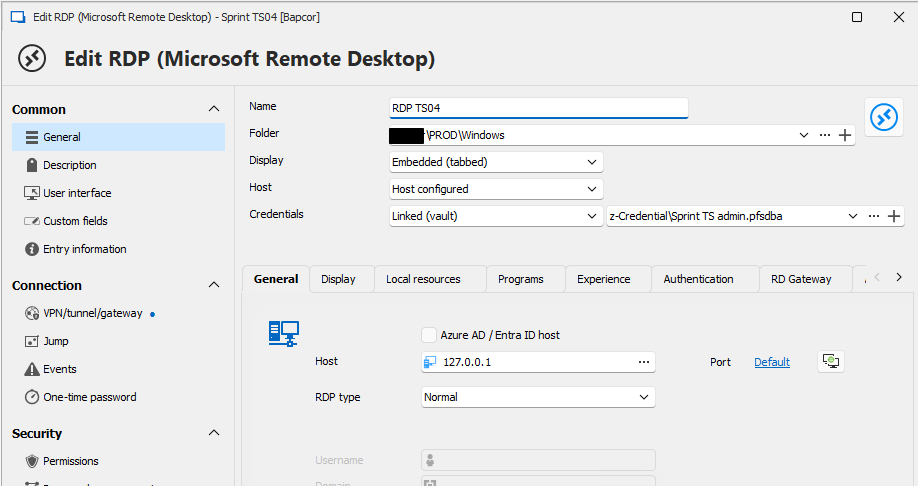
and here is the VPN tunnel definition. 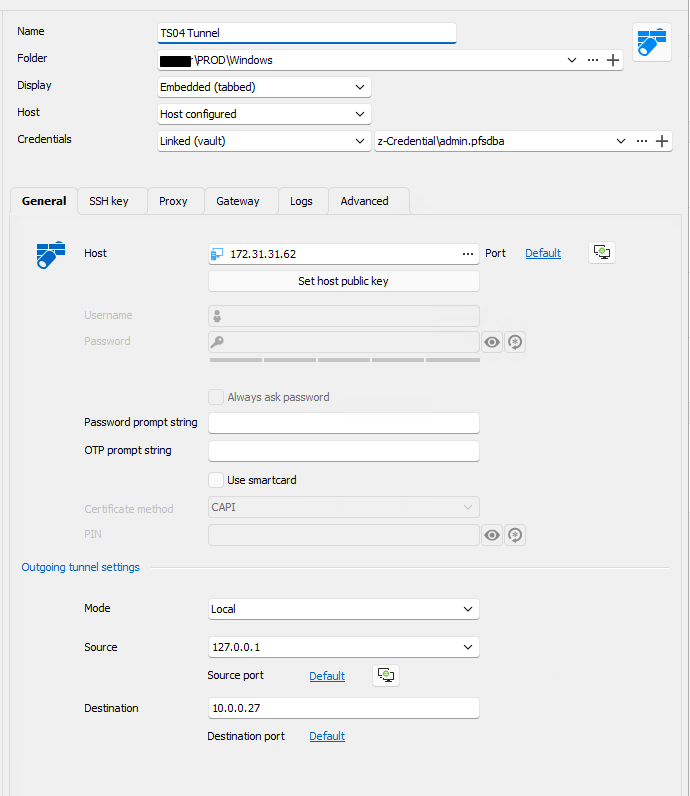
So rather than have a destination defined, we want to be able to pass into the tunnel the IP address of the destination. We imagined we could use a construct like $TARGET$, passed in from the RDP session to the VPN session. Something like this: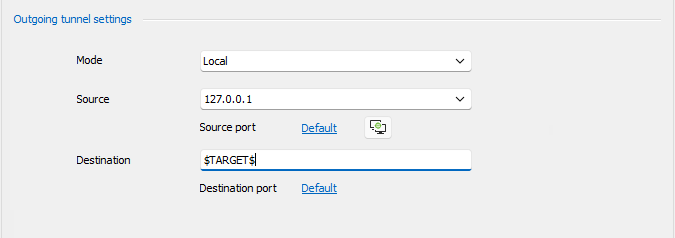
This way we can one single tunnel defined and used for multiple targets.
I hope this clarifies.
Regards
2024-07-17_07-45.png
2024-07-17_07-42.png
2023-08-16_12-44.png
2024-07-17_07-37.png
Hello,
Perfect, thank you for the clarification. In that case, you can create an SSH tunnel entry and link it to the RDP entry.
Please follow these steps:
1. Create a new entry and select SSH Tunnel.
2. Enter the information, then click Save.
3. Go to the properties of the entry you want to link (you can select more than one with Ctrl + Click).
4. Go into the properties of the entry.
5. If you have selected more than one entry, right-click on one -> Batch Edit -> Edit Entry (General Settings).
6. Go to the VPN/Tunnel/Gateway section.
7. Select "Always Connect."
8. Change the type to "SSH Tunnel."
9. In the settings sub-menu, select the session you created from the dropdown menu.
Best regards,
Carl Marien
So we looked through this. It seems to be the standard RDP over SSH Tunnel that we followed in the first place.
Let me try again. We want to use ONE single tunnel to reach MULTIPLE RDP hosts.
We do NOT want to have to create a single tunnel for each target RDP host.
Hope that clarifies (or that I have completely misinterpreted).
Hello,
Sorry for the misunderstanding.
These documentations links will help you configure a connection for multiple sessions:
https://docs.devolutions.net/rdm/kb/rdm-windows/how-to-articles/configure-vpn-multiple-sessions/#configure-the-vpn-settings-on-the-parent-folder-entry
https://docs.devolutions.net/rdm/kb/rdm-windows/how-to-articles/vpn-group/
I know these are for VPN connections, but you should be able to follow the steps with SSH tunnels.
If you have any additional questions, concerns, or require further support, please let me know, and I'll be more than happy to help.
Best regards,
Carl Marien
