Disable that global Read-Only mode in RDM when DVLS version missmatch
Disable that global Read-Only mode in RDM when DVLS version missmatch
0 vote

Hi All
Can you please change the behavior by locking remote desktop manager into a complete read-only status when the major release version of the dvls server has been adjusted? Since RDM still does not have a clean config deployment in which individual parameters can be controlled centrally and we always have to update DVLS together with RDM, it is extremely difficult to be able to carry out a maintenance window with a number of employees of 150+ when not all clients are connected to the network .
I would like it to be the case with Devolutions, as with other software manufacturers, that only the new functionalities in the RDM cannot be used in the event of a version mismatch.
Best Regards,
Andreas
All Comments (7)
Hello,
Thank you for your feedback. I want to start off by saying that we are currently having discussions internally on how to improve this behavior.
To give you a little more context, the reason we decided on this behavior is that sometimes, we need to perform migrations that would make certain existing features incompatible with earlier versions and could cause weird bugs. This doesn't happen every release, but it's happened a few times over the past few major releases and it caused difficult to debug support cases, which is why we had introduced the read only mode when the major version doesn't match.
We're seeing that this is not as suitable of a solution as we first thought, so we are going to see what alternative solutions we can put in place to make things easier, especially for big deployments and for our cloud solution (Devolutions Hub).
Regards,
Hubert Mireault
Hello,
I wanted to let you know that after discussing internally, we are removing the "version mismatch" behavior putting RDM in read-only mode starting with RDM 2024.2.17.0. I hope this will make things easier for your users.
If you want to restrict the versions people can use to connect to the datasource, you can still change the minimal/maximal version.
Regards,
Hubert Mireault
Hello Hubert
Thanks for the good news.
Maybe as a feature request it could be a good way only locking new Features when using newer Version of RDM as DVLS.
Best Regards,
Andreas
Hello,
We will definitely consider your feature request to lock only new features when there is a version mismatch between RDM and DVLS, but most of the time it's not feature-related. Our biggest challenge is with the entries directly when we add a new integration/protocol, or when we do a data migration. A non-updated RDM could potentially corrupt the data.
Regards
David Hervieux
Dear,
Our mac users are still reporting read-only issues after updating RDM client.
Windows is working great but I was wondering if this will change for mac users in the future too?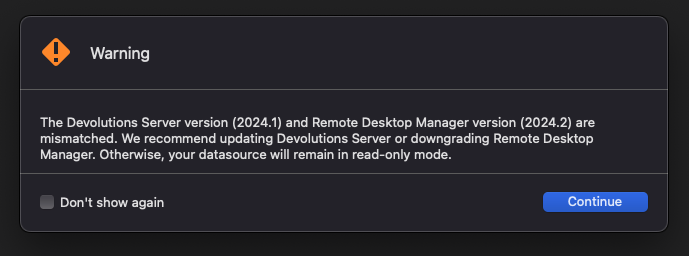
thanks
Stijn
Scherm_afbeelding 2024-09-03 om 10.14.41.png
Hello,
As I can see, the feature is integrated on MAC as well, but it's not released yet.
I will have a chat with the team and get back to you.
Best regards,
Jeff Dagenais
Hello,
We have released RDM MAC 2024.2.10.3 and this version contain a fix regarding your issue. You can download this latest version here
https://devolutions.net/remote-desktop-manager/home/download/
Best regards,
Jeff Dagenais