Start a macro entry by pressing a button on your keyboard
Start a macro entry by pressing a button on your keyboard
0 vote

Hi,
I created a macro that I can use to get remote access on the selected host.
All our PC's (hosts) are synced from our Active Directory to Remote Desktop Manager.
So when I want to get access to one of the selected hosts, I manually lounge that macro by right click on that host, Macro's..., and select the macro.
Now would it be easier to run that macro from that selected host with a simple shortcut on my keyboard.
At this moment this is not possible.
I use the Remote Control Viewer application from SCCM (Software Center Control Manager):
All Comments (4)
Hello,
Did you try our "shortcut macros" feature? You can configure macros on shortcuts in File > Settings > User interface > Keyboard: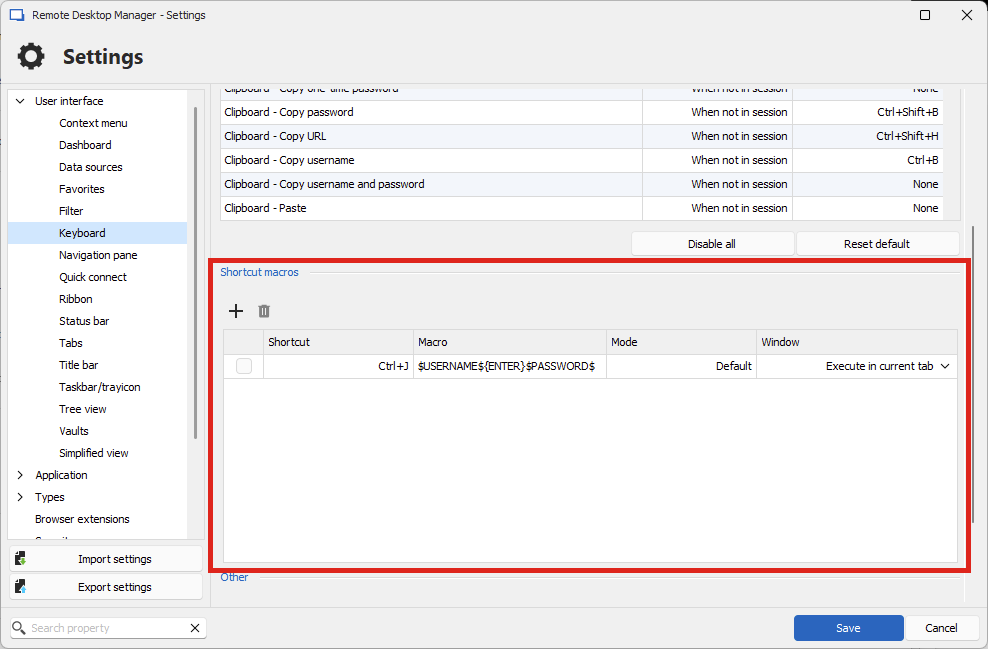
Regards,
Hubert Mireault
65b68f98-9dc6-49a5-adba-47622daab595.png
Hi Hubert,
Yes I already tried that, but that doesn't work for me.
Then I had contact with support and they said this feature isn't existing yet.
See ticket 00064839.
Thx in advance.
Bart
Hello,
Thank you, I understand better what you're trying to do. Indeed, the solution I suggested wouldn't work as the shortcut macro feature only performs typing macros, while in your case this is a command line.
I will open a ticket for this, we will have to figure out the best way to implement this to make it reusable in multiple scenarios.
Regards,
Hubert Mireault
Hi Hubert,
Thanks a lot! If we can automate this it would be much easier for us!
Kind regards,
Bart De Worm
Healthcare IT System Analyst