SSH forward remote port to local

I am trying to accomplish something very simple, yet couldn't get it working in RDM.
Task: To configure port forwarding from @remote_machine to localhost
Example: Let say I have a remote machine named remote_machine with Netdata installed (open-source monitoring tool).
By default, Netdata starts a web server for its dashboard at port 19999.
I can ssh to remote_machine, but cannot see the stats as all ports (except 22) are not exposed to internet.
In Linux, using terminal:ssh -p 22 -i '/home/alex/.ssh/id_rsa' -L 59999:localhost:19999 alex@remote_machine
In Windows, using openssh:ssh -p 22 -i 'C:\Users\alex\.ssh\id_rsa' -L 59999:localhost:19999 alex@remote_machine
Now I can open the page via http://localhost:19999
I tried both SSH port forward and SSH tunnel
SSH port forward:
Tab General
-----------
Source: 127.0.0.1 Port: 59999
Destination: remote_machine Port: 19999
Mode: Local
Tab SSH Settings
----------------
Host: remote_machine Port: 22
Tab SSH key
-----------
SSH Key: File (local)
File: C:\Users\alex\.ssh\id_rsa
Logs:
[7/8/2024 22:10:18] User authenticated successfuly by public key
Listening on 127.0.0.1:59999
[7/8/2024 22:10:18] Sending forward channel open request: 0/- remote_machine:19999
[7/8/2024 22:10:18] Received channel open failure: 0/0 2 Connection refused
Unable to connect remote end of tunnel: aborting connection 127.0.0.1:59999 -> remote_machine:19999
Closed tunnel: 127.0.0.1:59999 -> remote_machine:19999
When I open the browser, obviously I cannot open the page via http://localhost:59999
SSH Tunnel:
Tab General
------------
Host: remote_machine Port: 22
Outgoing tunnel ------------
Mode: Local
Source: 127.0.0.1 Port: 59999
Destination: remote_machine Port: 19999
Tab SSH key
-----------
SSH Key: File (local)
File: C:\Users\alex\.ssh\id_rsa
Logs:
[7/8/2024 21:40:39] User authenticated successfuly by public key
Listening on 127.0.0.1:10007
[7/8/2024 21:40:55] Sending forward channel open request: 0/- remote_machine:19999
[7/8/2024 21:40:55] Received channel open failure: 0/0 2 Connection refused
Unable to connect remote end of tunnel: aborting connection 127.0.0.1:59999 -> remote_machine:19999
Closed tunnel: 127.0.0.1:59999 -> remote_machine:19999
When I open the browser, I cannot open the page via http://localhost:19999
Something else is required? Am I using the right tools? I tried also to leave destination field empty, but it's not allowed. Please, advise.
Thanks.
All Comments (7)
Hello,
Thank you for reaching out to us regarding this,
- Could you please specify the version of RDM you are currently using?
- What type of data source are you using?
That being said to clarify, you able to access the remote host but are having issues when attempting to access the dashboard or are you attempting to access this dashboard locally?
Let me know,
Best regards,
Samuel Dery
RDM 2024.2.13.0 64-bit (Windows)
Data Source (local = sqllite)
I am reaching the remote host over ssh just fine. I am trying to achieve is to forward some ports from the remote host to the local host.
In the example, remote machine with Netdata starts a web server for its dashboard at port 19999. As no ports (except 22) are exposed to internet, I need to forward remote port 19999 to local port (i.e. 19999). If successful, I can open the page via http://localhost:19999
Hello Alex,
Thanks for your patience.
I'm not too familiar with NetData, but from your message, I understand that the WebServer should start on demand; can you confirm?
My best guess is that the authentication (alex@remote_machine) doesn't get through, and therefore the web server doesn't start.
I can confirm that doing the exact same config on my side works with one of my IIS web pages.
Any thoughts?
Best regards,
Alex Belisle
I don't think you understood what is required. May be I did not explain it properly. Webserver does not need to start on demand. It's already running locally. Just not exposed to internet. And it was only used as an example.
Let me try again. First, very simple scenario.
Let say I have a remote machine with the external ip 123.123.123.123.
Only ssh service is listening on all interfaces; all other services are listening on the loopback network interface ( lo ), meaning it can only be accessed from localhost. This is usually the default for security reasons.
# netstat -plnt
Active Internet connections (only servers)
Proto Recv-Q Send-Q Local Address           Foreign Address         State       PID/Program name
tcp        0      0 0.0.0.0:22              0.0.0.0:*               LISTEN      611/sshd: /usr/sbin
tcp        0      0 127.0.0.1:3306          0.0.0.0:*               LISTEN      904/mariadbd
tcp        0      0 127.0.0.1:12345         0.0.0.0:*               LISTEN      4117869/abcd
Let say I am interested to connect to service abcd on port 12345.
Simple solution is to forward remote port 12345 to my local machine to let say port 67890 and the access it on 127.0.0.1:67890.
In Linux, using terminal:
ssh -p 22 -i '/home/alex/.ssh/id_rsa' -L 12345:localhost:67890 alex@123.123.123.123
In Windows, using openssh:
ssh -p 22 -i 'C:\Users\alex\.ssh\id_rsa' -L 12345:localhost:67890 alex@123.123.123.123
Hope now it's clear. Thanks.
Hello Alex,
Thanks for the details.
I emulated a similar environment (a Simple IIS page that does not answer to anything else than localhost and opened through OpenSSH port 22 ONLY)
In RDM, I created an SSH Tunnel entry (on my side, I did not leverage the PKI auth, but it's not your issue at the moment.)
I populated my SSH Tunnel: 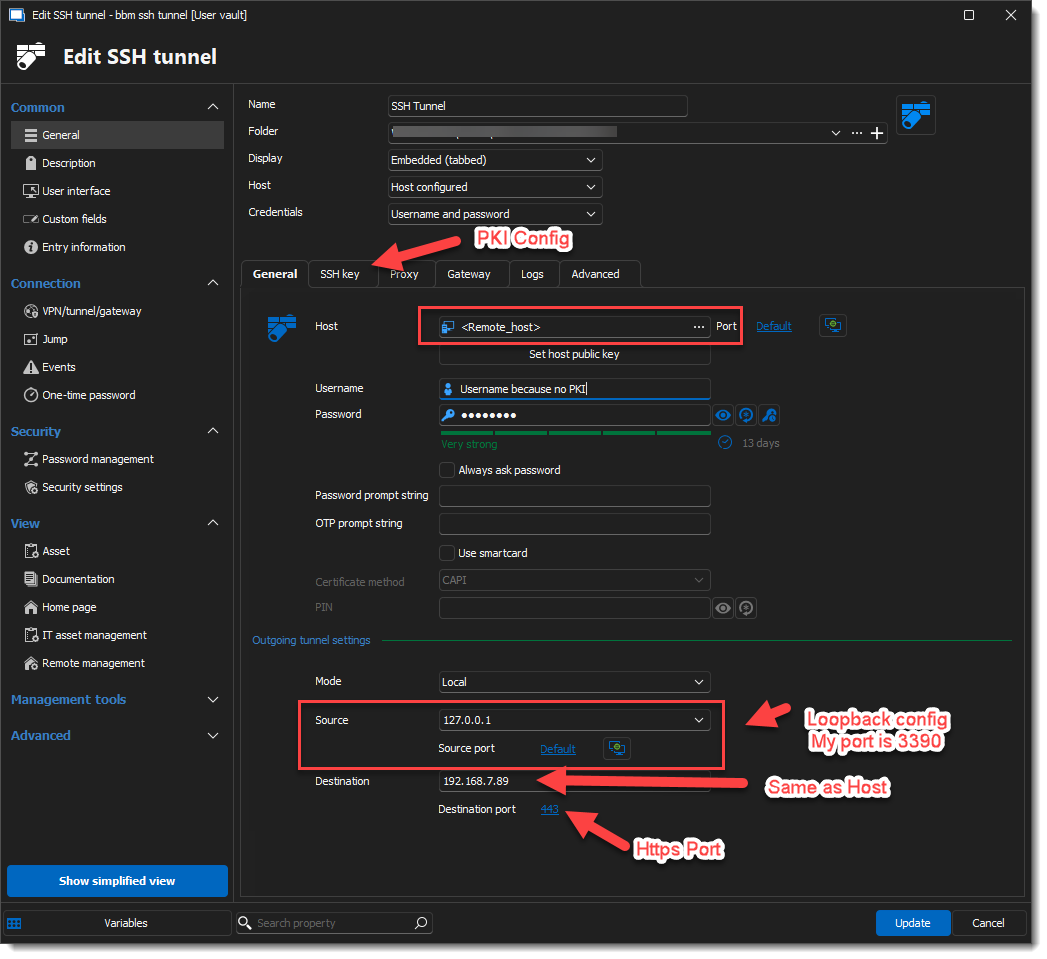
Then I created a Website entry to point toward the local forwarded port (https://127.0.0.1:3390) and configured the SSH Tunnel to open prior to access the web page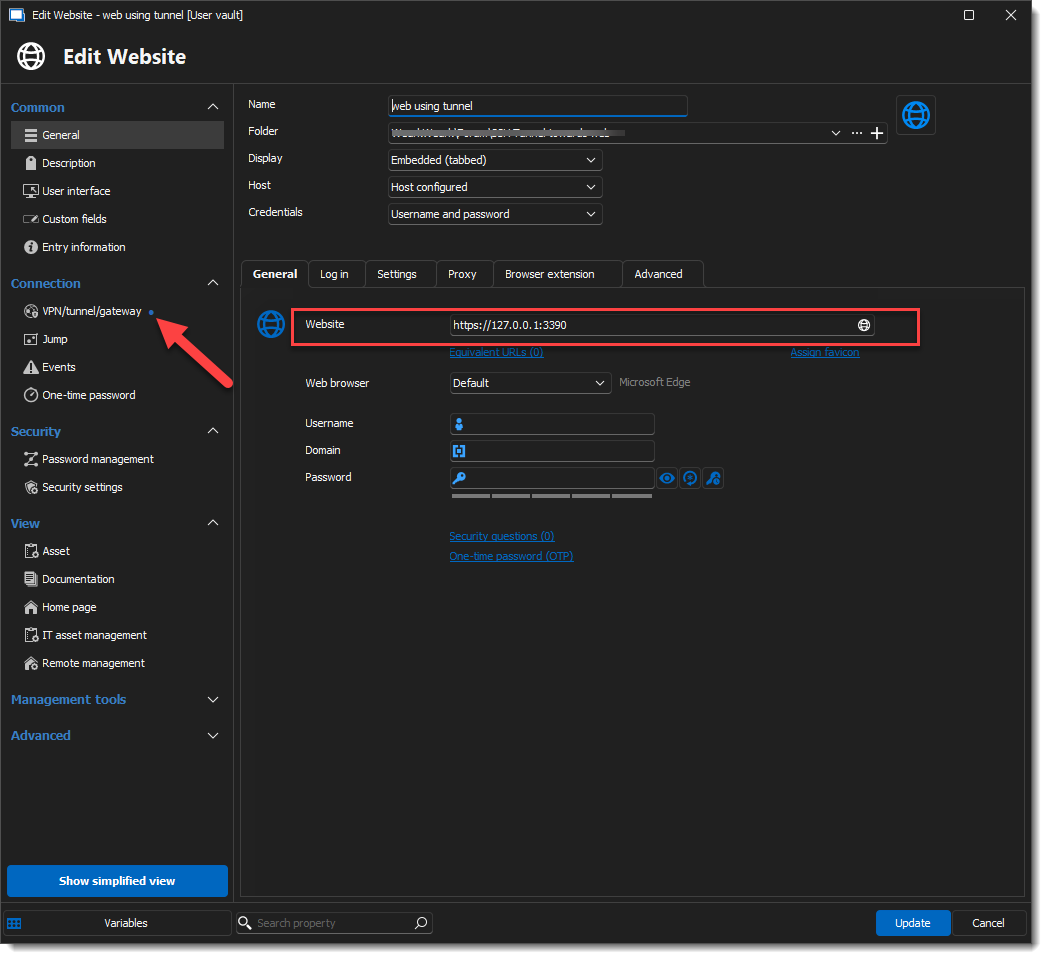
Set the VPN/Tunnel/Gateway config to Alwaus connect, Type: Session, and head to Settings (Session). Then Select the SSH Tunnel in the Session Dropdown.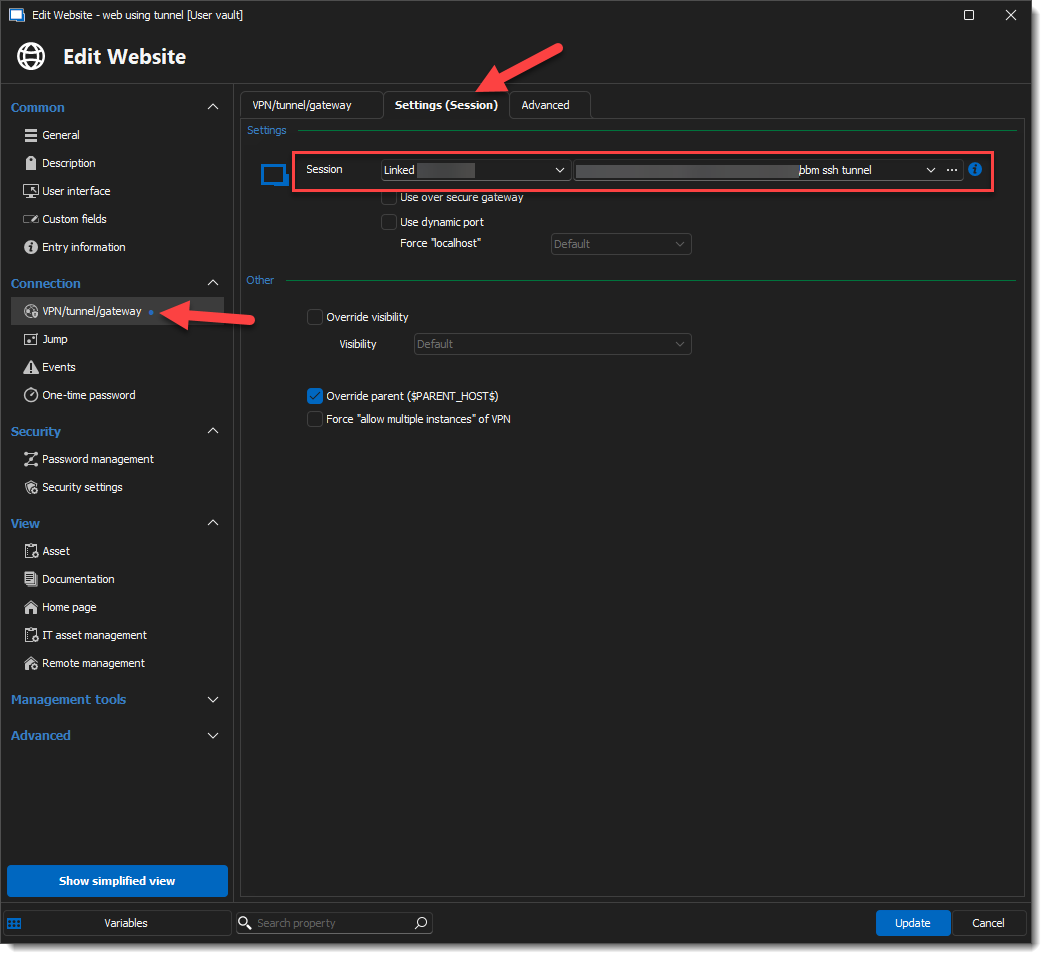
And the result: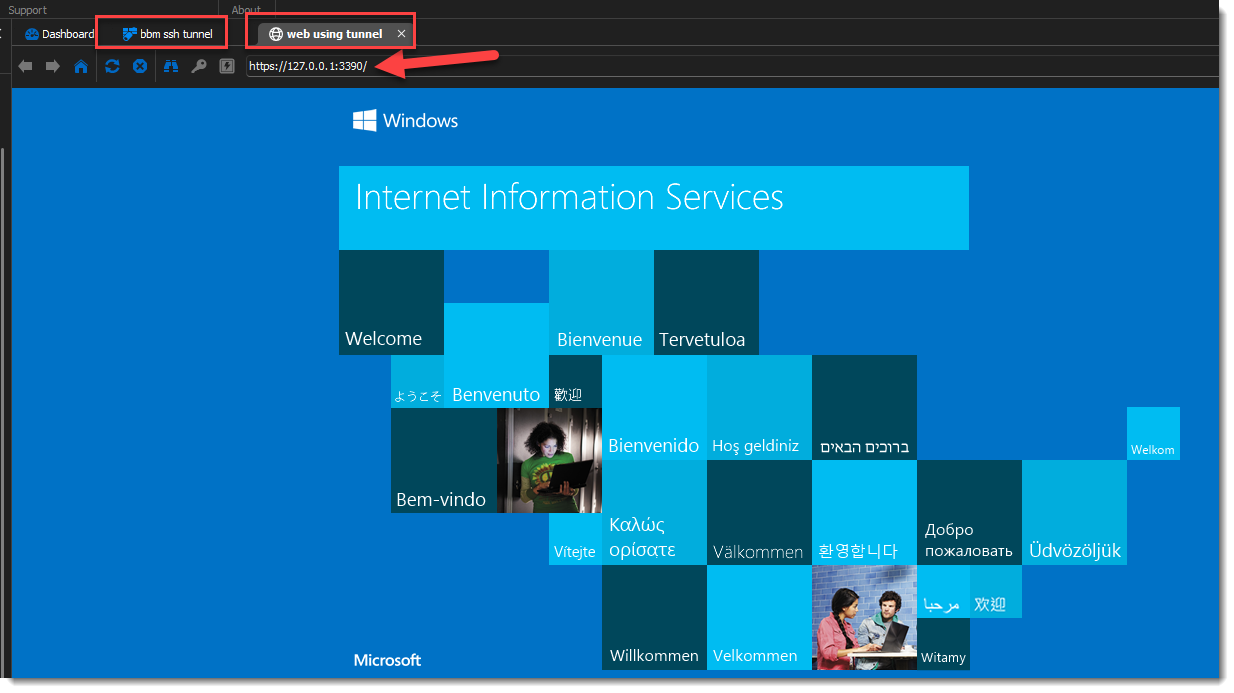
I hope this helps.
Best regards,
Alex Belisle
bcf91ec2-4bbb-4111-9038-9851700c8668.png
173bcd93-26f2-487a-8cb7-32cdbdf79ee1.png
d5c8fbc1-4aaf-4cf4-8a74-17810e08e8c9.png
431baf59-2a8a-4230-a1db-c2ab33172c94.png
Thanks. Your config works and it's exactly what I was looking for.
Only a small change I did is for the "outgoing tunnel settings". I used localhost (127.0.0.1) for both as a source and a destination.
This way if the host is on a DHCP (likely), I do not have to change the config with each new ip.
Cheers.
Excellent!
Thanks for your feedback.
Have a great one,
Cheers!
Alex Belisle