No scroll in a Tmux session

Hi!
I'm having problems with scroll in a tmux session in RDM.
I can't scroll though the output of a process in a tmux session, but it works just fine in the default terminal mac app.
I've recorded a video to show the problem better:
https://youtu.be/i9zbaw52Hrg
This is my ~/.tmux.conf settings fileset -g mouse onset-option -g history-limit 99999
Recommended Answer
Hello,
After investigating the issue, turning off "Force scrolling history when using mouse wheel" in File -> Settings -> Entry types -> Sessions -> Terminal should resolve the problem. Could you please try this and let us know if it works for you?
Best regards,
@David Godin
Thank you so much, David.
For those who might need this for macOS: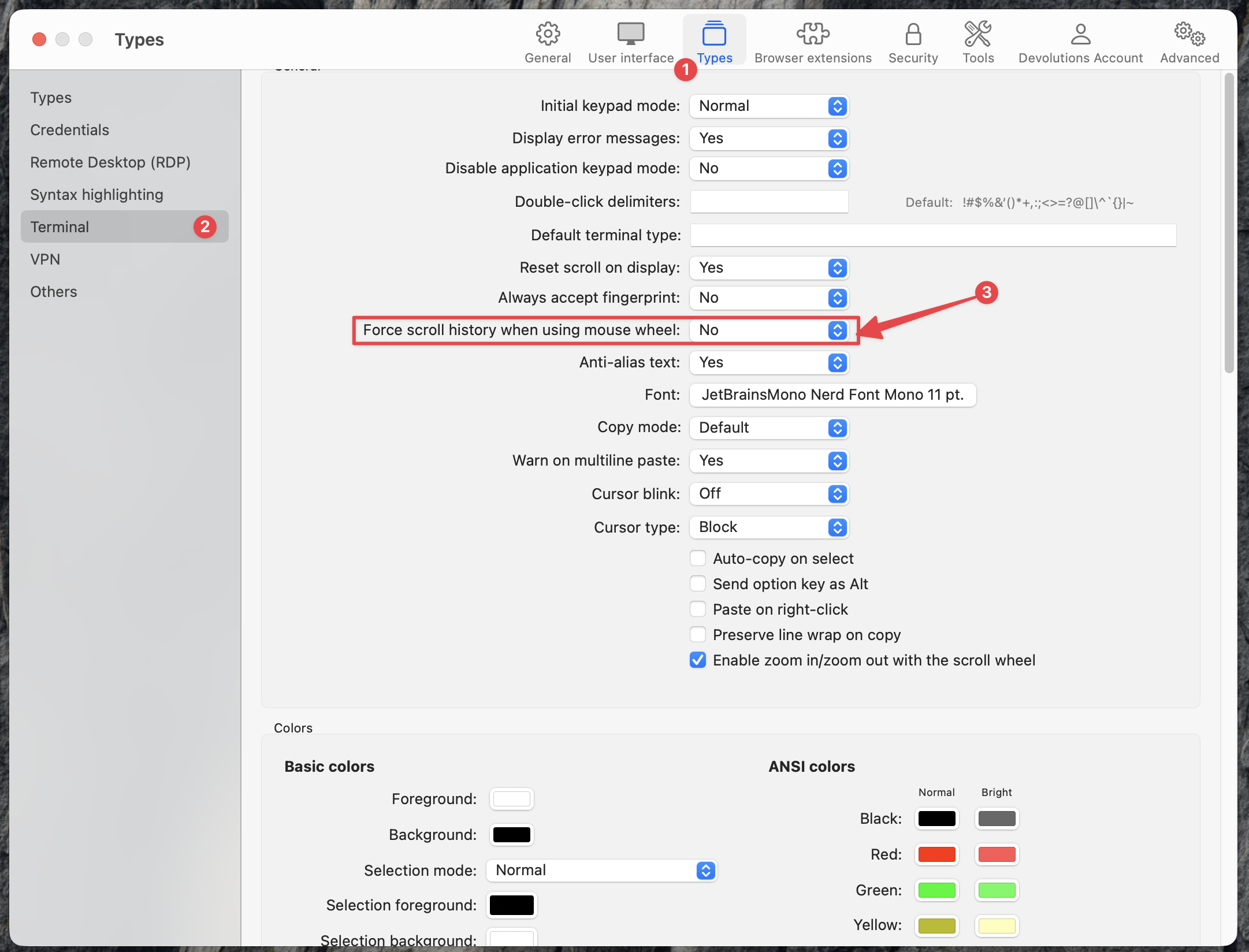
Remote Desktop Manager 2026-01-25 10.47.03.png
All Comments (7)
Hello,
I tried to recreate your issue but was not able to set the history-limit. Could you send us a screenshot of your tmux.conf file? I will copy and paste it to ensure the configuration is the same.
Best regards,
Carl Marien
Hello,
I tried to recreate your issue but was not able to set the history-limit. Could you send us a screenshot of your tmux.conf file? I will copy and paste it to ensure the configuration is the same.
Best regards,
Hi!
thanks a lot for the response. I will lay down steps to reproduce in a more precise way, sorry:
ssh into a linux server. I'm using Ubuntu Server 22.04
create a text file with long content, I've used https://www.lipsum.com/feed/html and created lorem.txt with nano lorem.txt and pasting the content
run tmux to open a tmux session
run cat lorem.txt and try to scroll up, it should show all the contents of the file but instead it doesn't scroll the document, it scroll to the previous terminal while using RDM. Expected behavior is to scroll the contents of the document like in the default mac terminal.
this are the contents of my tmux.conf:
but to be honest the history-limit doesn't matter, even if it's not set the behavior is the same, i believe the default is 5000. The set -g mouse on I believe it's required for scrolling with the mouse.
I recorded another video which I hope better represents the bug:
https://www.youtube.com/watch?v=BkjMlCtXHdM
9d68bbe1-7402-45a1-8770-2a35b9244c52.png
Hello,
Thank you for the step-by-step instructions. I was able to reproduce the issue and have created a bug report. I will keep you informed about any progress on this case.
Best regards,
Carl Marien
Hello,
After investigating the issue, turning off "Force scrolling history when using mouse wheel" in File -> Settings -> Entry types -> Sessions -> Terminal should resolve the problem. Could you please try this and let us know if it works for you?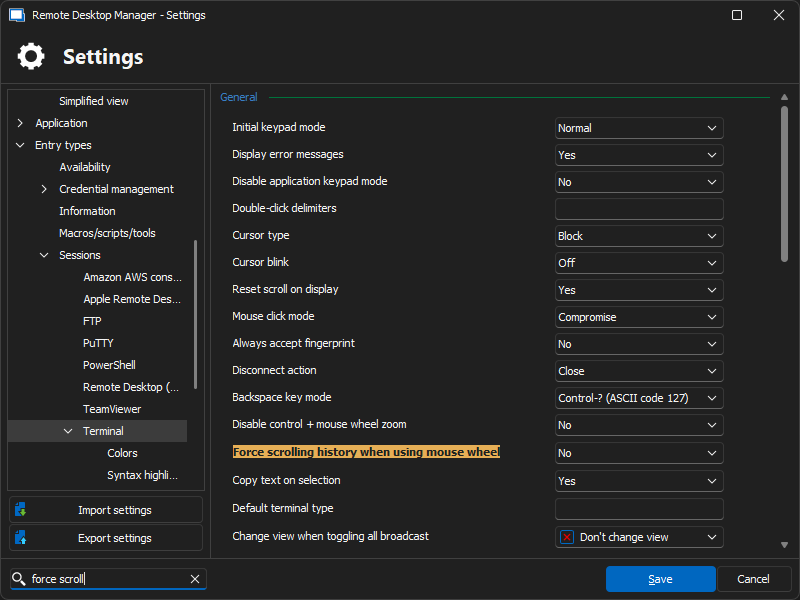
Best regards,
David Godin
8f908abd-df7a-48ed-83aa-3d2293994d89.png
Yes, that fixed the problem. I'm on mac so the location of the setting was a bit different but found it. Thanks for the support
Thank you for confirming that the issue is resolved. I'm glad the solution worked for you!
Best regards,
David Godin
Hello,
After investigating the issue, turning off "Force scrolling history when using mouse wheel" in File -> Settings -> Entry types -> Sessions -> Terminal should resolve the problem. Could you please try this and let us know if it works for you?
Best regards,
@David Godin
Thank you so much, David.
For those who might need this for macOS:
Remote Desktop Manager 2026-01-25 10.47.03.png
