Macro failed in SSH session

MacOS RemoteDesktopMAnager version 2024.2.7.4
When activate a macro after a relogin cloud backup, the macro fails
Expect """but found unknown token.
Solution, quit app and start again.
This is happen after the last update version 2024.2.7.4
Screenshot in Dutch (sorry)
All Comments (2)
Hello,
We will look into the issue, sadly it seem the image is broken, can you try to resend it?
best regards.
Michel Lambert
Sorry, missed the communication (Holidays :))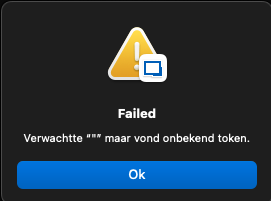
I have noticed that it works on startup, real rafter some time it suddenly stops working.
Then I have to restart the app and it works again.
Steps, start ssh session
Right-click on the session on the left and go to Macro/scripts/tools
Click on the desired script.
If it works then it will be executed, and otherwise you will thus get an error message, see image.
Macro-failure-ssh-session.png