Delinea Secret Server MFA Auto Submit
0 vote

Recently I deployed the version 2024.2.12 of RDM to our clients and one new feature is actually causing us some trouble. It’s for the Delinea Secret Server Multi Factor prompt. It has the “Auto submit” box checked by default and it submits after 4 digits.
Is it possible to:
- Have that box unchecked by default? I looked through the settings and couldn’t find a place to change that.
Or
- Have it wait for 6 digits before auto submitting? Our RSA OTP has 6 digits but the form auto submits after 4 and then we get a wrong code entered error.
Thanks!
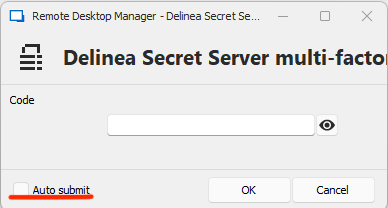
image.png
All Comments (11)
Hello,
Thank you for reaching out to us on that matter.
Unfortunately, I didn't find any option to uncheck the option by default or to change the number of digits from 4 to 6. I am talking with our development team and I will get back to you as soon as I have more information.
Best regards,
Hello,
After validating with our development team, the Auto Submit is configured in the code to submit after 6 digits. Also, the Auto Submit option state is saved directly after it is enabled or disabled so that it stays in the same state each time.
If the issue is persisting on your side, would it be possible to test using a portable version of RDM?
To do so, you will need to do the following:
1- Download the .zip file below:
https://remotedesktopmanager.com/home/thankyou/rdmbin
2- Create a new folder on your Desktop
3- Extract the content of the .zip file into the folder created at #2
4- Go to this folder once the .zip file has been extracted and run remotedesktopmanager.exe
5- Connect to your data source
Best regards,
Thanks for checking on that. It's weird that it auto submits after 4 digits for all of our users. 6 would have been fine.
I might try that portable version test but it could be hard since we don't have admin rights on the machines and I would have to package that and deploy via intune.
I confirm that, at least for now, the checkbox has remained unchecked. So as long as the users figure that out and uncheck it, it's ok. I was hoping there was a way I could turn that off for all during deployment since some failed to noticed that option and called for help asking why they can't enter the MFA code anymore.
Hello,
Since we received a separate Forum thread for the same issue, we will verify the configuration of the entry on our side. After talking to our development team, they confirmed that the MFA is coded to auto submit at 6 digits.
Also, if we uncheck the Auto Submit option, it will save the state so that users don't have to uncheck it each time. Unfortunately, we don't have any admin option to disable it.
Best regards,
Hello,
After some testing from our side, with RDM 2024.2.13.0 we were able to confirm that the auto submit is submitting after the 6th digits.
Would it be possible that you are pasting the code in, and it might contain some spaces?
Also, would you be able to upgrade to RDM 2024.2.13.0 and verify if you are still experiencing the issue?
Best regards,
Sounds good, I will deploy that version next week and will provide feedback here. Thanks.
OK, I am going crazy and provided incorrect info here. RDM does indeed auto submit after 6 characters. But our tokens generate an 8 character code. For some reason I was thinking it was 6 and I knew it auto submitted when we were 2 characters away from finishing typing but it's 8 and 6.
Although I was mistaken on the digits above, the request is still valid. It would be nice for the developers to add an option in the preferences menu to adjust how many characters you want to type in before it auto submits, that way people can adjust it to match their environment.
For now I'll continue to instruct people to uncheck that box.
Hello,
Thank you for the explanation. We've had a similar request here, so I will add your information to this ticket.
Regards,
Hubert Mireault
That's funny, the person that requested that change also works for SAP and is a colleague of mine, not in the same team but we've worked together before.
Thanks for following up.
Hello,
Starting with RDM 2024.2.17.0, the window will have a dropdown to choose the auto submit mode: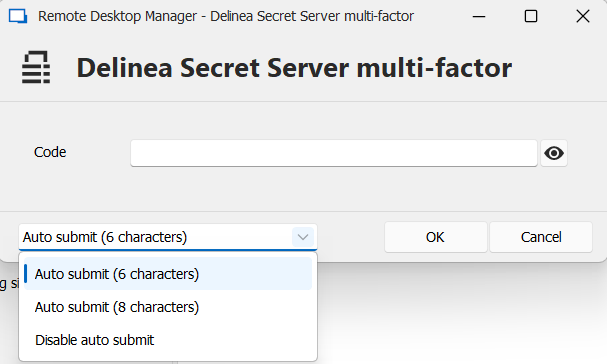
Please note that if you had previously disabled it, it will revert back to "Auto submit (6 characters)" and you will have to disable it again. Further changes of this setting should save and load as expected. Once this release is available, please let us know if you have any additional feedback.
Regards,
Hubert Mireault
6cec61cd-ce5c-4a55-b240-0c1ed6c139f2.png
That's awesome, thanks for listening to us.