Splashtop Session Instructions

Trying to understand how to use the Splashtop session entry option. It requires 3 fields, Account, API Key and then computer. Is account my Splashtop account username? When I go into Splashtop and utilize the set up api keys options I see a number of services, Jira, FreshService, Zendesk, etc., but nothing for RDM. Do I need to use a specific API key? I assume once I fill in the account and api key directly hitting the 3 does on the 3rd field Computer will list all of the existing endpoints in my Splashtop account so that I can associate one with this session entry?
All Comments (64)
Hello Dallen,
it looks likes the API configuration of Splashtop is manage on their side.
Could you tell me if the entry works properly after you have configured the API with them?
Best regards,
Patrick Ouimet
Hello,
Here's a bit more info to get you started :
- The account refers to the email linked to your Splashtop account
- The API token can be generated in the "API" section of your Splashtop account settings. Note that this feature is only available for Splashtop Enterprise licenses
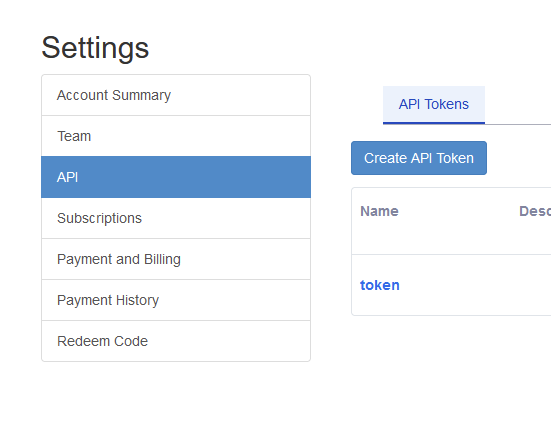
- And as you said, the computer list should load properly once you have those 2 previous fields entered
Please let us know if there's any more help we can provide.
Regards
Jonathan Del Signore
6147bffd-8e90-4ac4-b184-1d8e2613b5af.png
Hi Jonathan
We are using the Enteprise onprem version. So it needs also the URL to where RDM needs to connect. Could you add this please, so we can also use it on the onprem version of Splashtop Enterprise?
Thanks and kind regards.
Patrick
Hi Jonathan
I registered for an Splashtop Enterprise Account Cloud as well, so we can test the Splashtop functionality within RDM.
I generated the API Key and enabled it. But it won't connect with my account email and the API Key to Splashtop. Any ideas?
And is this really secure? A second factor should be added as well, as customer PCs can be accessed trough this integration.
Thanks and best regards.
Patrick
Hi Patrick,
We'll open a ticket to add support for onprem and keep you updated on the progress.
We'll also look into supporting MFA, but it would need to be supported by their API. At first glance, it doesn't seem possible at the moment.
As for your cloud issue, could you please enable Debug Level 1 in Help -> Profiler -> Debug Only and leave the profiler open while you try to connect. This could give us a better understanding of the reason it's failing.
Regards
Jonathan Del Signore
Hi Jonathan
Thanks that sounds good.
I was also in contact with them and they said perhaps you only integrated with their US Datacenter and as we are in the EU, you need to use another server to authenticate the user and Token against it.
I will also enable debugging. Will you see it automatically nor do I need to send you some logs afterwards?
Thanks and kind regards.
Oh that must be it, are you on the latest version (2024.2.14)? We just added a region selector to the entry settings, where you can choose EU.
And the profiler logs would need to be sent, they stay local otherwise.
Regards
Jonathan Del Signore
We just updated yesterday, but I did not check again since then. That was it! Now it is working perfeclty.
Some things that would be nice:
- Show the group of a PC (see screenshot of the Splashtop App "Fundgrube" Group)
- Multiple Imports (select which ones)
- Define where they are imported to (instead of just the root folder)
- A message that the import was succesful
- Show the notes of the entry
- First the PC showed as disconnected, even if I hit refresh on the top right, it did not refresh. I had to close and open again. Please check the refresh button.
- Is there a way to also show the online status of the client in the normal Menu-Bar entires instead of just in the Splashtop Dashboard? (because once imported, we will use the entries under the customers.
- A filter for the Dashboard which can be set permanently in the settings of the entry, to only show machines from a certain group would help (also if number 6 does not work)
- There are also options to: Start a chat / Filetransfer / and Remote Commands which would be nice to have here as a button as well. (see screenshot below)
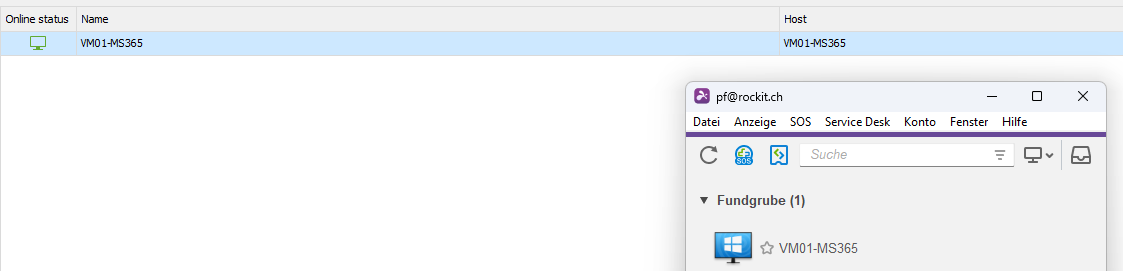
 Commands.
Thanks and best regards
Patrick
splash2.png
splash.png
Hello,
I'll address your requests separately since they won't all be done in the same time frame :
1,3,4,5 : These are fairly simple to add, we'll open a ticket and do them as soon as we get the chance.
2 : I'm not sure I understand. Do you mean selecting multiple computers and import them all at once? If so, this is already possible so I would need more information.
6 : This works fine on my end. Whether a computer comes online or goes offline, the status is reflected properly as soon as I hit refresh. Are you sure this isn't an issue of delay? i.,e if you wait a little while before refreshing, does the change happen?
7 : This would most likely be possible, but I'll need to confirm with the team. I'll come back to you as soon as I have more info.
8 : We'll open a ticket for this one, but it probably won't get done until 2024.3. It would require a sync between our projects and we're in a state of "feature freeze" for 2024.2
9 : We'll open a ticket to add more actions, but I can't guarantee these are all possible and we'll need to investigate further. I found the command for the Remote Commands, but Chat and File Transfer seem to only be supported on the desktop app. (Even in the web portal, they don't look supported)
Regards
Jonathan Del Signore
Hello,
Here are a few additions that will be available in version 2024.2.17 :
- Different sections for each group
- New column to show the computer's notes
- 3 new actions : File transfer, chat and remote command
Regards
Jonathan Del Signore
Hi Jonathan
Just wanted to say: YOU GUYS ROCK!
Thanks a lot, these are great news. Also for the rest of the features. Did you also get a response from Splashtop if they will support it in the onPrem version soon?
Cheers
Patrick
Hi Jonathan
I was just wondering, what's th status of the other points.
And especially for the support of the API in the on-prem versions.
Did it get added?
Thanks and best regards.
Patrick
Hello Patrick,
Thank you for this feedback.
There is no ETA for those improvements at this moment.
Jonathan and I will follow up on this forum when any other improvement is available.
Best regards,
Patrick Ouimet
Any feedback on API support for the enterprise on-prem version?
Thanks a lot.
Patrick
Hi Patrick,
We are planning on adding support for on-prem for 2025.1. Do you require MFA to be supported as well? That's the part we'll need to validate with Splashtop because it's currently not possible via their API.
Regards
Jonathan Del Signore
Hi Jonathan
Yes 2FA is a must today and they even need it for certain options to be available in the console.
So thanks for asking them as well, if I can help in any way, please let me know.
Kind regards
Patrick
Hi Johnathan
What is the time frame for 2025.1 at the moment?
Best regards
Patrick
Hi Patrick,
We expect to release the beta at the start of February, with the official release coming a few weeks after.
Regards
Jonathan Del Signore
Hi Jonathan
Did it make it in 2025.1?
Best regards
Patrick
Hi Patrick,
The 2FA feature request is opened with Splashtop, but I haven't received any news yet.
I'll let you know as soon as I hear back.
Regards
Jonathan Del Signore
Hi Jonathan
What about support of the On-Prem enterprise version? (API) As we are running a local one.
Best regards
Patrick
Yes we did add support for on-prem in 2025.1.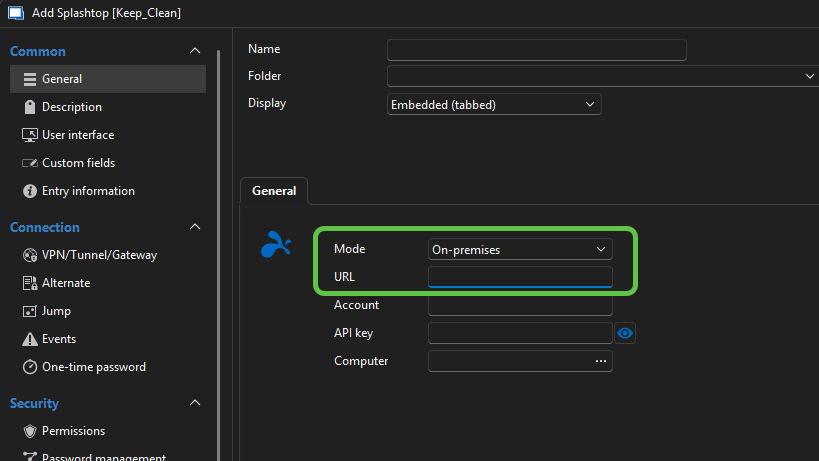
Simply note that we don't have a setup to test this ourselves. It should all work the same, but please let us know if you encounter any hiccups.
Regards
Jonathan Del Signore
c482ec28-1a48-4daa-a205-58079bc3bda5.png
Great news! Will test it and let you know. But will take a little time, I am on vacation for a bit. 😉
Hi Jonathan
We installed the new splashtop server OnPrem and wanted to try the RDM integration, but we can't find the API key in the installation. Any ideay, where to find it? As this seems the authentication token. (no password)
Best regards
Patrick
Hi Jonathan
We had to activate the API for the onPrem version. It's now on, and we enteres the URL like https://splashtop.domain.com and the account ID from the API token and the API Key. But we don't see anything in there. It seems it has no connection. Any logs or something we can see what is wrong?
What kind of access does the API Key need? We set just read access, that should be enough?
Thanks and best regards.
Patrick
Hi Patrick,
I'll check to see if I can find the exact permissions you need on the token, but for now you can go into Help -> Performance profiling. With level 1 in the debug tab, it should print you some kind of error after launching the session: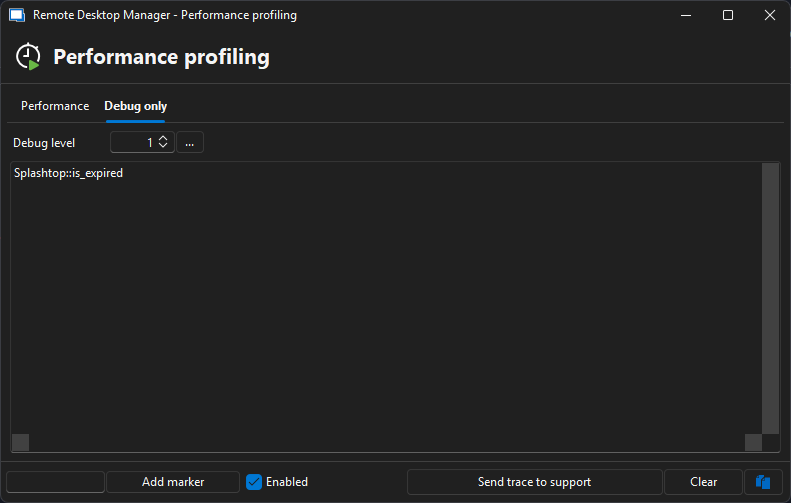
Regards
Jonathan Del Signore
4bf149ec-d17b-4fff-8a24-25deca1fcfb5.png
Hi Jonathan
I get the following:
Double click triggered
Double click node:SPlash Dashboard
Splashtop::No user data
Best regards
Patrick
Your token doesn't seem to have the Basic User Info scope. If I'm not mistaken, you'll need these three scopes for the integration to work: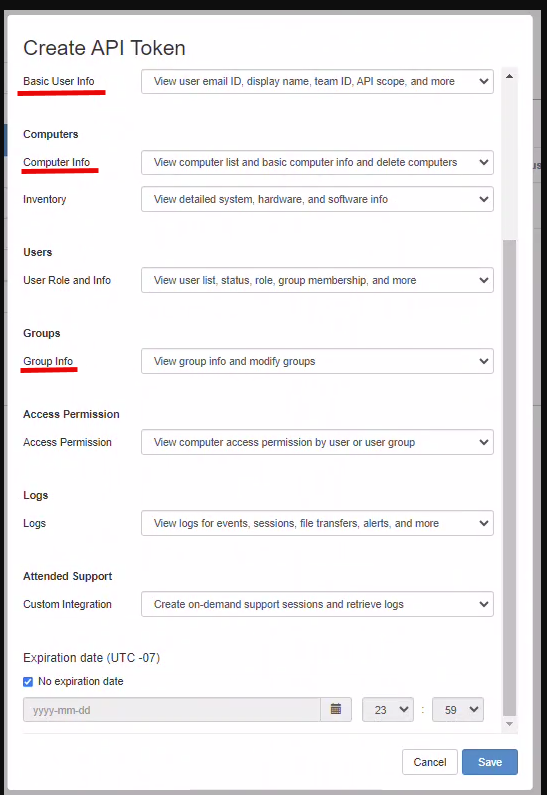
Jonathan Del Signore
41294a65-6a28-40c4-8fc9-0808eede40bd.png
Hi Jonathan
It seems that the OnPrem API looks a bit different than the cloud one, here is what I can select: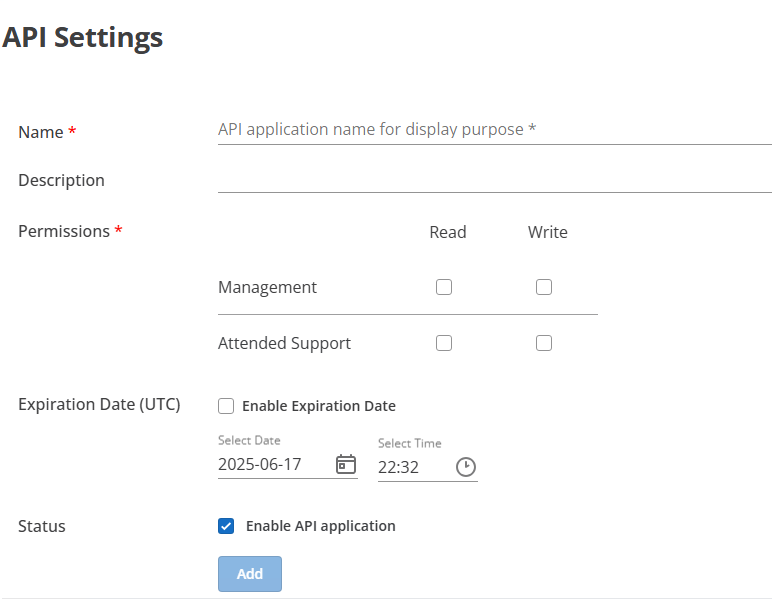
Here is the description of it: How to use Open API – Splashtop On-Prem - Support
- Which says when I enable Management, it should also allow: Management, when this item is enabled, allows you to use user/access permission/computer/group/schedule/security-related API
So I wonder if there is some adaption needed for the onprem one?
Thanks and best regards
Patrick
cc9e8efc-63d2-4a2d-bf54-b904b377d0cc.png
And just to make sure, you also entered the CLient ID (which is a 15 digit number) as account along with the Client Secret as API key in RDM? ( I also tried it with my email as account, but it would not change anything... but perhaps account is something completly different..?)
Or perhaps it needs the Client ID in addtion to the Acouunt Email and the Client Secret: https://splashtop-onprem.readme.io/reference/oauthpost_token-2 Hope this helps.
Hi Patrick,
Just to confirm that we indeed need to login via Client ID / secret, and everything works fine on my end using the setup you provided me.
I'll finish working on the implementation tomorrow, and will update this thread with the exact version containing the changes.
Thanks a lot for your help!
Regards
Jonathan Del Signore
Hello,
The on-prem support will be included in version 2025.2.17.0.
Sorry for the inconvenience, and thanks again for your help!
Regards
Jonathan Del Signore
Perfect! Thanks a lot! I will delete the token now, as you don't need it anymore I think.
Hi Jonathan
Just installed the new version, and it can connect now! Thanks.
But when I hit any of the action buttons (Connect / Filetransfer ...) nothing happens at all. I have the Splashtop Business App open, and when I click it in there it works.
ALso when I import an entry and try to open this new entry in Splashtop, just nothings happens after a double click.
Could you please check that again? I did select the Folder where the Splasthop Business App is installed, if there is anything else I need to selecte somewhere, so RDM knows what to do, please let me know.
Thanks and best regards.
Patrick
Hi Patrick,
Can you please confirm your Splashtop Business app version? Just to make sure the executable name isn't different from the one we're targeting (clientoobe.exe).
Thanks
Jonathan Del Signore
Hi Jonathan
We have version 3.7.2.1 of the Business app, which has an executable named: strwinclt.exe
But I also found the clientoobe.exe in the folder. The File Version ist 3.7.2.1 as well.
Where do I find the path which file it should take again? As it only poped up when it did not find it and now the folder is selected.
Hope this helps.
Best regards.
Patrick
The path can be setup in File -> Settings -> Application -> Paths -> "Configure intallation path". If it's setup correctly, you'll see a "Application is ready" label: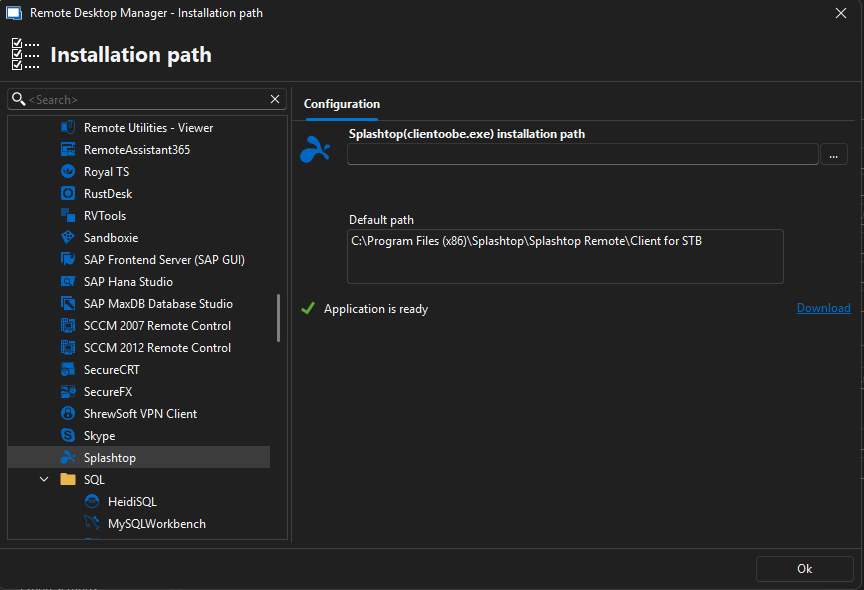
Jonathan Del Signore
d934549a-60da-47ed-aa57-6a9a9c487893.png
Looks good. Only difference is that the path has Client for STB OP in it as OP stands for onprem. But it says Application is ready. But just nothing happens when I say connect, through the dashboard or also with a separate Splasthop entry...
Thank you. Since your installation path is setup correctly, we can confirm that the issue is with the shortcut we use to start sessions. (thanks for sending yours through private message)
It looks like for on-prem, we need to use st-enterprise:// instead of st-business://.
We'll also need to add another field in the session properties to specify the gateway since it's needed in the URL.
I'll let you know once that's done.
Regards
Jonathan Del Signore
Thanks a lot! Just let me know, when I should test something! Best regards.
Hello,
The fix for on-prem actions will be in version 2025.2.20.0, which should release sometime tomorrow.
Regards
Jonathan Del Signore
Hello Jonathan
Great news! Just updated and tested it and now the new session is opened in Splashtop. They only thing is, that it always opens a "single sign on" page for helpspot as well, I understand it the first time, but not for every session I open. Is there a way to change this?
Also it would be nice to have it within RDM instead of the external application. Is there a way to display it there? It's the same behaviour for Splashtop or Splashtop Dashboard entries I open.
We do a lot of remote supporting, so these two things would bother os during work, hope there is a solution, as SPlashtop is very willing to help with it as well.
Thanks and best regards
Patrick
Hi Patrick,
Is the HelpSpot login triggered by the Splashtop Business app? If it is, I'm not sure there's anything we can do to prevent it. All we do is send a request to the app to start a session. When you start a session from the web platform, does it prompt you with the same SSO process? If not, it might be worth mentionning to the Splashtop support team, maybe they can enlighten us.
As for embedding the session into RDM, we already do this by searching for the window title matching the computer name you're connecting to, so it must be different for your version of the business app. Can you please tell me what the session window title looks like? i.e. is it matching the host name exactly, or is there some more details, etc.
Thanks
Jonathan Del Signore
Hi Jonathan
Sorry I had a typo on my text above. I wanted to write Splashtop not Helpspot. "They only thing is, that it always opens a "single sign on" page for splashtop as well, I understand it the first time, but not for every session I open. Is there a way to change this?" It does authenticate via SSO but why does it need to do that all the time.
Regardind the titles I will send you a picture of it. But the Splashtop Windows Name looks exactly like the onw in RDM.
Just for your information: We are using RDM via RDP session, but this should not be an issue, just wanted to let you know. But RDP and so on is opened as a tab in RDM.
One other thing, when we do an Import from the SPlashtop Dashboard, it just imports it in the root folder of RDM, would be nice, to be ablet to choose where it is imported.
Thanks!
Thanks for sending the screenshot.
So yeah for the SSO part, I don't think we can do anything sadly. It's triggered by Splashtop so you'd have to see with them if there's any way to not get prompted everytime.
I can see your window title shows more than just the computer name, so I'll open a ticket to see if there's a better way to detect it. We'll keep you updated on the progress.
And yes we'll add a prompt to select an import folder, that improvement is still logged on our end (along with other import improvements you mentioned earlier). We simply haven't gotten around to it yet, so I'll increase the priority.
Regards
Jonathan Del Signore
The funny thing is, that the SSO messages only occurs, when I start it via RDM, if I open it directly in the Splashtop App, it won't occur.
what else do you see other than the computer name? But yes we can also display some more information up there, so perhaps that's the issue. If I can test anything else, just let me know!
79018aa9-736e-46f8-828f-bd4fe13f43a1.png
When you say you open it in the Splashtop App, do you mean the Business desktop app or the Web portal? We can't replicate exactly what the desktop app does, we need to comunicate to it via the same protocol the Web portal does (st-enterprise://...).
And by "computer name" I mean the exact name you see when you select the computer, not the RDM entry name. If they're the same, then we'll need to investigate further.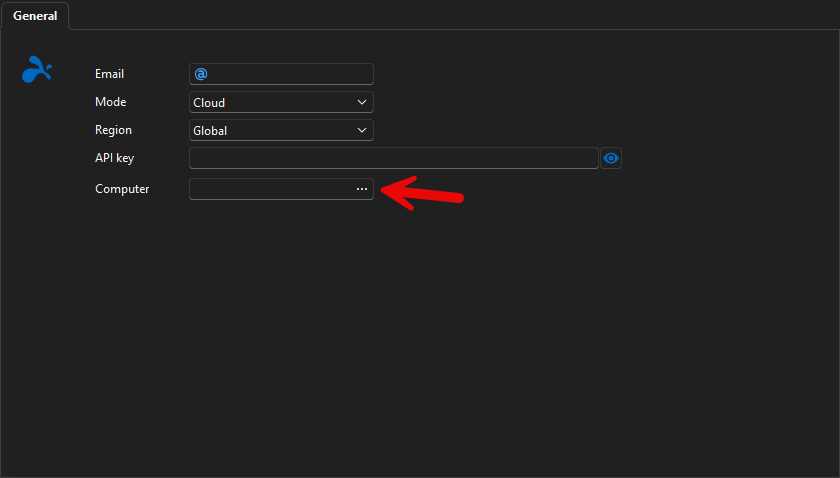
Regards
Jonathan Del Signore
fcb705d4-eee3-400a-9ae0-f05af0edfdc5.png
I mean the Business Desktop App, it's just called "Splashtop OnPrem" in the onprem version.
The name seems to be the same:
So when you test it, Slashtop opens in a tab within RDM (like RDP entries) in your test system?
7619dd77-36b7-4c10-8555-d665461e5e29.png
Ok so you'd need to test by opening the session from the web portal to see if the SSO behavior is the same as RDM. That's the closest thing we can replicate.
And yes it opens in a tab on my end, but you're right the name is correct, so something else fails. Can you test by first enabling the profiler (Help -> Performance profiling -> tab Debug Only - Debug level 1), and launching the session while the profiler is opened? If there's any error while we try to find the process, it will be shown there.
Thanks
Jonathan Del Signore
When I open a session from the Web Portal, it asks me if I want to open it in the browser or in the app. I select the app and after that the app opens. If the app was closed before, it shows me the SSO dialog. If the app was open, it does not. With RDM it shows it only when no other splashtop session is open, so it seems it always closes the app again after opening the session.
I also did the Debuging, but there were no errors:
Thread : 641
----------------------------------------
641 - Connection States: Refresh...
641 - GetOpenedConnections...
641 - Opened - by process : 9 ms
641 - GetOpenedConnections : 10 ms
641 - Connection States: Refresh : 25 ms
But I found something else. When I open the firs Splashtop session from within RDM, it opens in a new window and not as a tab in RDM. But when I leave this open and open a SECOND splashtop session in RDM, this one opens for a quick second as a window, and than is showing as a tab, like we want!
So it seems, that something is special when it starts for the first time and somewhow does not get it like when its open after that. Perhaps because of the SOS browser window, which interrupts the searching for the title in the bar of the new window or something like that.
Hope this helps, and we are a step closer finding the issue.
You might be on to something. After we start the session, we wait for about 5 seconds for the window to show up, and then we stop looking. If your SSO login takes more than that, it would explain why it doesn't find anything. I'll increase that delay for the next version to see if it solves that issue.
And we might indeed close the process when all sessions are closed, so we have to re-open fully when starting a new session. I'll investigate and keep you posted.
Regards
Jonathan Del Signore
Thanks. In which version do you think it will be in and when is it expected?
Hello,
The delay increase will be in version 2025.2.21.0, which we plan to release in the next few days.
Regards
Jonathan Del Signore
Hi Jonathan
Just installed the new version, and it worked! Now the windows is correctly found and put into a tab. Thanks a lot!
So looking forward for the path choser when importing machines.
THanks and best regards.
Patrick
Awesome news!
I'm adding the folder selection today, so it'll be available in 2025.2.22.0.
Regards
Jonathan Del Signore
Thanks a lot!
We connected now everything to our onPrem Installed and have one strange behavior, a lot of machines are displayed in a Group named "standard" instead of it's correct one we setup in Splashtop. Any new machine we add in splashtop is going into this standard group. Any idea why this happens?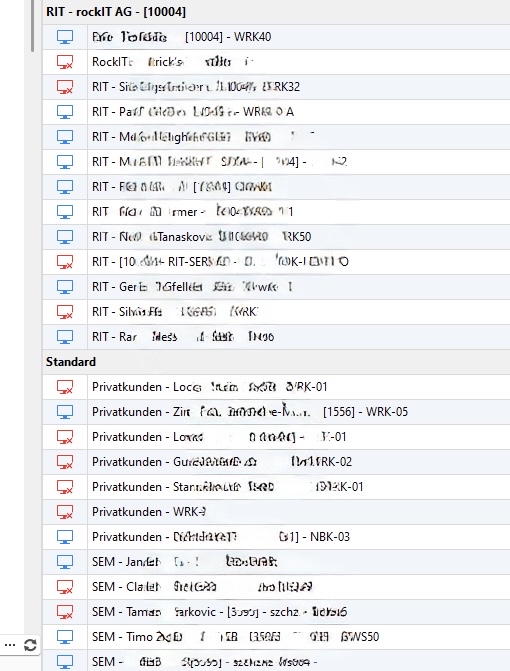
Image.jpg
I assume your RDM is in Swedish? If so, that's the default group we put everything if we can't find the real one. If you open your profiler with Debug level 1, do you see this error: "Splashtop::Computer group ID not found" ?
Regards
Jonathan Del Signore
No we have RDM in English and are located in Switzerland ;-) I get the following errors:
Splashtop::GetGroups error code TooManyRequests
Splashtop::GetGroups error code TooManyRequests
Splashtop::GetGroups error code TooManyRequests
Splashtop::GetGroups error code TooManyRequests
Splashtop::GetGroups error code TooManyRequests
Seems the API doesn't like to many requests?
I also can't open any connection from the dashboard within RDM anymore, in any group.. neither the correct ones, nor the standard group.
Ah thank you, we're indeed fetching the groups way more often than we need to. It will also be fixed for version 2025.2.22.0.
From what I can see the API rate is limited per minute, so if you wait 1 minute I assume you can open sessions again? Just making sure it's the same issue.
Regards
Jonathan Del Signore
I waited now over 30 minutes, and I still can't connect via the dashboard. But it works with in imported entry in RDM. So this seems another issue.
here what is logged in the debug log, after I hit "connnect" withhin the splashtop dashboard.
Loading user info pf@rXXX.ch
user.UserSecurity.IsAdministrator: True
Connection override is null or empty
Migrating data - up to date
Loading user info pf@rXXX.ch
user.UserSecurity.IsAdministrator: True
Connection override is null or empty
Migrating data - up to date
when I open an imported entry, it shows this:
Migrating data - up to date
Double click triggered
Double click node:RIT - WRK40 - Jan Du
I think I have an idea, did you recently enable this in your system settings? It shouldn't matter, but it looks like there's an issue: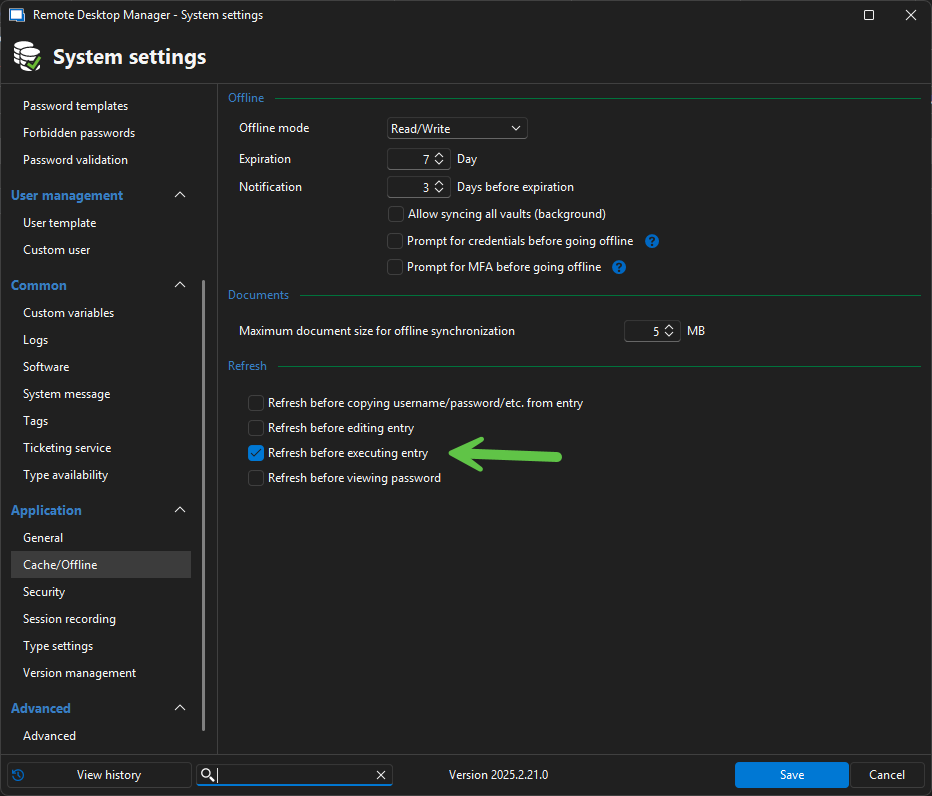
Jonathan Del Signore
6c9e3651-c32a-43a4-85d2-67836d3ad4e4.png
I think we enabled that some time ago, because sometimes the entries werde not updated properly. I now disabled it again, and Splashtop Dashboard is working again, so yes it seems that is the issue... will there be a fix?
Perfect thank you. Yes the fix is pushed internally, so it will also be included in 2025.2.22.0.
Regards
Jonathan Del Signore