Custom Entry Color

Good morning.
Is there a way within RDM to set a custom color for specific entries?
I messed around with the "Color" setting for a single entry, but that is for connection itself, and not the listing.
We have numerous different VPN's that we need to connect to, and it would be nice if I could differentiate which connection on which VPN by entry color.
Thanks!
--- Chuck
Overgaard, AZ (-7 MST / Zulu Year-Round)
RDM Version: 2026.3.2.0 64-Bit - Free
All Comments (22)
Hello,
This is not something supported. It's not really easy with the current architecture, but I will try to think of a way to implement this. I can't promise anything, though.
Regards
David Hervieux
David,
Thank you for the upfront response. I didn't think there was a way to do that from what I could tell, but figured I would give it a shot.
Maybe something to the affect of color always equals default, unless something like <NameColor> field is populated?
Of course that would be a new field, but just throwing something out there.
Thank you again, sir.
--- Chuck
Overgaard, AZ (-7 MST / Zulu Year-Round)
RDM Version: 2026.3.2.0 64-Bit - Free
Hello,
This is much easier than what I thought if it's the text and not the image.
Regards
David Hervieux
Hello,
This is much easier than what I thought if it's the text and not the image.
Regards
Absolutely sir! Just the text!!!
Exactly the same thing as when I set a Jump Host the text turns green.
Just want to have the customer's ability to set the text to certain colors to help other teammates differentiate between the VPN's needed for connectivity.
Yellow = VPN 1
Blue = VPN 2
Green = Jump Host
That kind of stuff, sir.
--- Chuck
Overgaard, AZ (-7 MST / Zulu Year-Round)
RDM Version: 2026.3.2.0 64-Bit - Free
Hello,
I have created a ticket for that.
Regards
David Hervieux
Hello,
I was looking at this and found that this is already supported: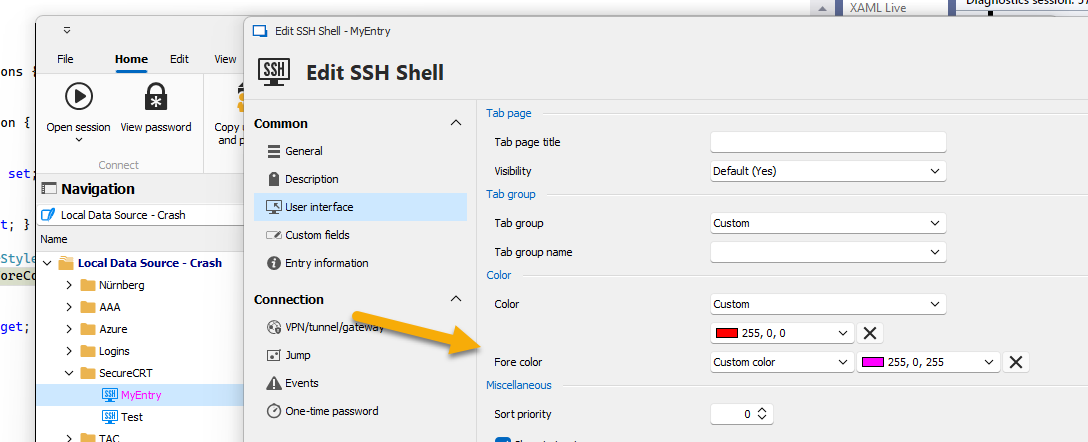
Regards
David Hervieux
d231b391-d520-4184-abc3-549616810142.png
Hello,
I was looking at this and found that this is already supported:
Regards
Well I'll be damned!!! I even played with this before posting.
Problem is, I set "Color" option and saw that when you open the session, it puts a border in that specific color around the open connection: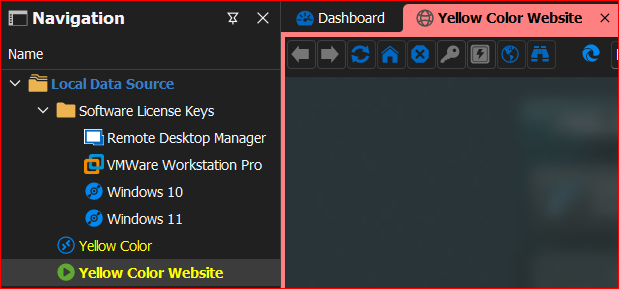
I never played around with the 2nd option there of "Fore color", so my apologies.
Sorry for wasting your time, David.
Please mark this resolved, since that option hasn't quite yet been implemented for the client base here on the forums. :-)
Have a great weekend!
--- Chuck
Overgaard, AZ (-7 MST / Zulu Year-Round)
RDM Version: 2026.3.2.0 64-Bit - Free
83cc6f27-0ef2-4f09-b18e-cbcbfcd15b66.png
Hello,
Don't worry; this was not wasted time. The labels were clearly not obvious, and I will improve them. I remember now that I'm the one who implemented that a few years ago. :)
Regards
David Hervieux
Hello,
Don't worry; this was not wasted time. The labels were clearly not obvious, and I will improve them. I remember now that I'm the one who implemented that a few years ago. :)
Regards
Well thank you, sir! I did, however, run across a couple issues after doing some more digging. Maybe it was designed this way, maybe not - LOL
So the entries themselves work like a champ. There's the stock white, the green for Jump Server, and the one I did: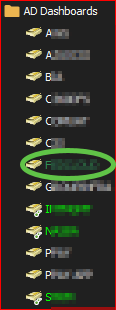
However, it doesn't seem this works with applying colors to folders: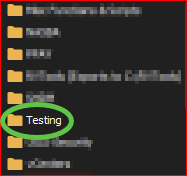

Is it supposed to apply to folders as well?
--- Chuck
Overgaard, AZ (-7 MST / Zulu Year-Round)
RDM Version: 2026.3.2.0 64-Bit - Free
ac548cbf-5a7c-4625-bee4-798afe2fa4c4.png
b5cfdb04-2105-4806-9af6-21c77bc06af3.png
8691b320-5ec7-4c2d-b6ee-a3e6198ad5ae.png
Hello,
I will investigate, but I suspect that the property is not handled by the folders. This is a bug if that's the case.
Regards
David Hervieux
Hello,
I've just verified and the color setting you see is for the tab page when it's inherited. The entry color setting is missing. I will fix this.
Regards
David Hervieux
Good morning, Mr. David sir.
I was just curious on an update for the folder color actually referencing what is wanted.
As you can see in the below screenshot, I did a "Edit> Batch Edit > Edit entries (general settings) > User Interface > Override > Colors > Entry color > Custom color > 255, 128, 128"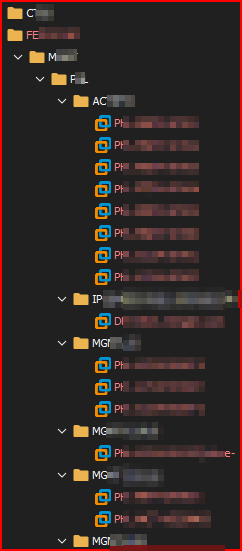
The entries themselves are changed which is fine. However, if the folders are collapsed, it would be nice to have the folder color itself match. This is how my team knows what VPN is needed to make the connection.
Thanks!
--- Chuck
Overgaard, AZ (-7 MST / Zulu Year-Round)
RDM Version: 2026.3.2.0 64-Bit - Free
e614cf7a-5a75-41c6-8b32-20ddae0bc4a3.png
Hello Chuck,
Thank you for your response, and I am sorry for the delay,
Regarding the folders that match the colours of the entries in them, just to ensure, would you like the folder to change colour only when it is collapsed or to always have the colour that matches the entry even when it is not collapsed?
Thank you for letting us know. If you have any other questions, feel free to let us know.
Best regards,
Maxim Robert
Hello Chuck,
Thank you for your response, and I am sorry for the delay,
Regarding the folders that match the colours of the entries in them, just to ensure, would you like the folder to change colour only when it is collapsed or to always have the colour that matches the entry even when it is not collapsed?
Thanks for the question. For our usage, I would say any status. Collapsed, Not Collapsed, etc.
Unless there would be a way to include some sort of "trigger option" when selecting, like a checkbox to say "include child folders" or something to that extent.
Thank you for letting us know. If you have any other questions, feel free to let us know.
Best regards,
--- Chuck
Overgaard, AZ (-7 MST / Zulu Year-Round)
RDM Version: 2026.3.2.0 64-Bit - Free
Hello Chuck,
Thank you for your response!
To ensure I understand correctly, would you always like the folder to show the custom colour?
If you batch edit, select the folder and the entries, and change the colour, does it not apply to all of them?
Thank you for letting us know. If you have any other questions, feel free to let us know.
Best regards,
Maxim Robert
Hello Chuck,
Thank you for your response!
To ensure I understand correctly, would you always like the folder to show the custom colour?
If you batch edit, select the folder and the entries, and change the colour, does it not apply to all of them?
Thank you for letting us know. If you have any other questions, feel free to let us know.
Best regards,
For testing, this is the way the current folder is config'd: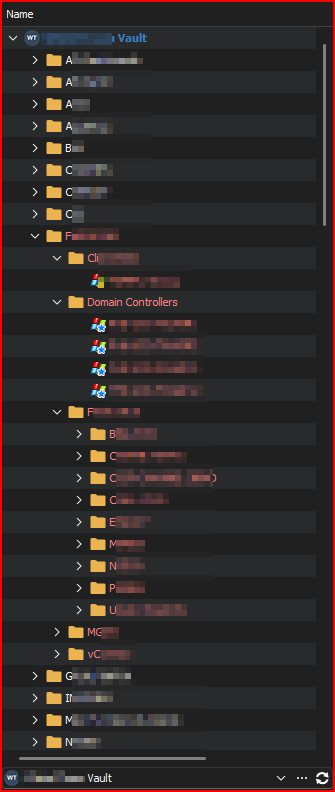
With a batch edit on the "F" parent folder, it now shows this with the new color: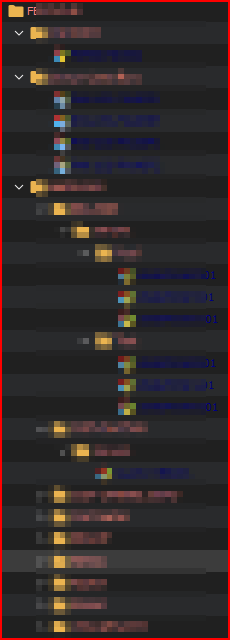
So it changes the color of the entries, yes. Just doesn't change the color of the folders unless done with the Advanced Search.
--- Chuck
Overgaard, AZ (-7 MST / Zulu Year-Round)
RDM Version: 2026.3.2.0 64-Bit - Free
42793d9b-7430-449d-9197-8408a5460686.png
d795fbf3-91bf-4cba-817b-f85cd9c29183.png
Good afternoon.
Is this broken now in 2024.3.27.0?
Or is there a new way to get the FOLDERS to inherit the color of their parent folder at all times?
I have been trying for hours to get my parent folder and subfolders the same color to no avail.
I had to move from Licensed Enterprise to Free Version, and had to update a new Data Source.
Thanks!
--- Chuck
Overgaard, AZ (-7 MST / Zulu Year-Round)
RDM Version: 2026.3.2.0 64-Bit - Free
Hello Chuck,
Thank you for your response!
Unfortunately, I'm unable to reproduce the behaviour. Could you please share screenshots of configuring the options in your folders? This will allow us to make those changes and see if we can reproduce the issue.
Thank you for letting us know. If you have any other questions, feel free to let us know.
Best regards,
Maxim Robert
I had to make the parent and all sub folders set to such: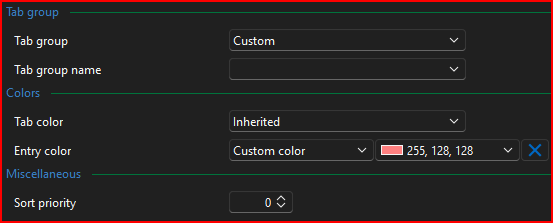
However, I have found ZERO way to "inherit" the Entry color selection.
--- Chuck
Overgaard, AZ (-7 MST / Zulu Year-Round)
RDM Version: 2026.3.2.0 64-Bit - Free
3b1322a8-4fa3-4448-93b6-b25da4ad2f11.png
Hello Chuck,
Thank you for your response!
I've tested different versions of RDM, and I haven't seen any settings for the “entry colour” that could inherit from the parent folder. Have you been able to make it work before version 2024.3.27.0, or could you not configure a folder/input to inherit the input colour from another folder before?
Thank you for letting me know. If you have any other questions, feel free to let us know.
Best regards,
Maxim Robert
Hello Chuck,
Thank you for your response!
I've tested different versions of RDM, and I haven't seen any settings for the “entry colour” that could inherit from the parent folder. Have you been able to make it work before version 2024.3.27.0, or could you not configure a folder/input to inherit the input colour from another folder before?
Thank you for letting me know. If you have any other questions, feel free to let us know.
Best regards,
Good morning, Maxim.
There has never been a way to "Inherit" the folder color.
If this is something that could be implemented, that would be fantastic. That way, if someone is looking for the sub-entries to be identical to the parent entries for their purpose, it would work as planned where it does not today.
--- Chuck
Overgaard, AZ (-7 MST / Zulu Year-Round)
RDM Version: 2026.3.2.0 64-Bit - Free
Hello Chuck,
Thank you for your response!
I've opened a Feature request thread regarding the possibility of adding this feature. Here's the link if you want to follow the thread.
https://forum.devolutions.net/topics/43981/add-an-option-to-inherrit-folders-color-under-user-interface--entry-co
Don't hesitate to share your thoughts on this thread or add more information if needed. If you have any other questions, feel free to let us know.
Best regards,
Maxim Robert