"Copy Password", "Copy Username & Password" options gone on simple datasource/local vault
"Copy Password", "Copy Username & Password" options gone on simple datasource/local vault

Good afternoon,
This is driving me crazy, but since installing the latest 2024 versions (I was running a version from 2023 prior to a few days ago) I no longer see any options related to copying passwords from my personal credentials list. The list still shows up when I connect to a session to select what password to use, but no option to copy or view the credentials in the list from anywhere in the application. I read the release notes, and I just don't see this mentioned anywhere, it's a total dealbreaker to not have this option anywhere.
Any help would be appreciated.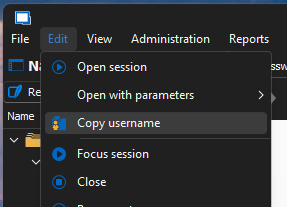
Screenshot 2024-06-25 160734.png
All Comments (5)
Hello Cody,
Thank you for reaching out to us regarding this,
Could you confirm which type of entry you're experiencing this issue with? Is this occurring with a Password List entry?
From quickly testing on my end the option seems to be available with version 2024.2.12.0 is this the version you're currently using?
Let me know,
Best regards,
Samuel Dery
Hello Cody,
Thank you for reaching out to us regarding this,
Could you confirm which type of entry you're experiencing this issue with? Is this occurring with a Password List entry?
From quickly testing on my end the option seems to be available with version 2024.2.12.0 is this the version you're currently using?
Let me know,
Best regards,
Yeah it's 2024.2.12.0 and I'm using a Password List, and strangely I recall being able to view the entered password in the password list when editing one of the entries, but even that doesn't show anymore.
Hello Cody,
Thank you for your reply,
I see; if you go under "Help" -> "Diagnostic" -> "Policy," do you have GPOs shown as enabled in this section? Specifically, the "Remove possibility to see passwords entirely"?
Let me know,
Best regards,
Samuel Dery
Hello Cody,
Thank you for your reply,
I see; if you go under "Help" -> "Diagnostic" -> "Policy," do you have GPOs shown as enabled in this section? Specifically, the "Remove possibility to see passwords entirely"?
Let me know,
Best regards,
None of the policies have a value listed, so I'm assuming no unless there is something else I should be looking for there.
Hello,
Thank you for your reply,
I see, would you be able to test with a portable instance of RDM to see if you encounter the same behavior?
To do so, you will need to do the following:
1- Download the .zip file below:
https://remotedesktopmanager.com/home/thankyou/rdmbin
2- Create a new folder on your Desktop
3- Extract the content of the .zip file into the folder created at #2
4- Go to this folder once the .zip file has been extracted and run remotedesktopmanager.exe
5- Connect to your data source
Let me know,
Best regards,
Samuel Dery