Disabling Dashboard

Hi
My company made me upgrade to version 2024.1.28.0 64-bit.
How can I disable the dashboard? The "close"command is greyed out.
Thanks
All Comments (5)
Hello Marco,
Thank you for reaching out to the Devolutions support team.
Depending on your data source, this could be related to a mismatched version of RDM and your database.
Also, with 2024, the ribbon is hidden by default.
You can use the drop-down on the window tab and click on Dashboard to disable it.
Best regards,
Patrick Ouimet
Honestly not quite sure what you're referring to. Do you mean this?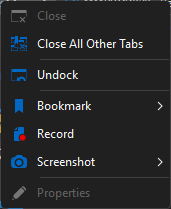
Dropdown.png
Hello,
It's in the Window section located in the ribbon: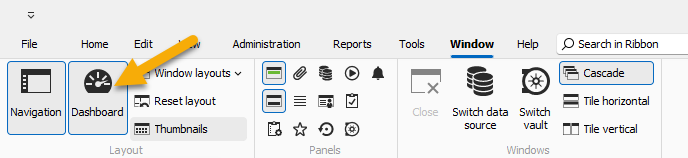
Regards
David Hervieux
a73bde6b-7b13-4309-a907-9b1477a0aa4d.png
Found it, thank you. I had been looking under View but in hindsight, Window makes more sense.
Hello Marco,
We appreciate your patience on this case.
This feature is now available on version 2024.2.13.0.
You can now close the dashboard by clicking on the tab and then using close.
Best regards,
Patrick Ouimet