Problem with Delinea Secret server (cloud/SAML)

Since yesterday I am experiencing issues with the Delina Secret server integration.
During the day ( i assume once a checked out credential has expired) I am not able to open any further connections.
I just receive this error :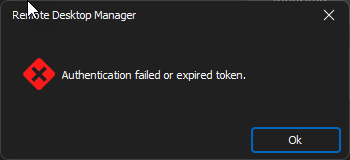
I need to reopen RDM to be able to start new sessions.
Updated to Version 2024.2.8.0 but the issue also came up using that version.
Thanks for your support!
Marco
0f5a9917-e86e-4c7b-9523-308b6c6412db.png
All Comments (14)
Hi Marco,
I'll look into this issue.
Since yesterday
Would that mean it used to work?
Regards
Jonathan Lafontaine
Hi Jonathan,
we are using the integration now for a few months, it was working fine so far.
I started to experience the issue yesterday and it today i had the same issue after updating RDM and rebooting my machine.
Looking at the code, I don't see any changes that would impact the way we handle expired tokens.
I wonder if either Delinea or an admin changed the timeout value.
That being said, I'll work on a fix to handle this case and at least have a way to deal with this that doesn't require restarting RDM.
Jonathan Lafontaine
I can confirm we have this issue also. Started a few days ago. Either exiting and restarting RDM or changing the setting for "Multifactor Mode" from "Ask only when the session expires" to "Ask on every login" in the Secret Server object will work around the issue. Once you successfully re-authenticate to secret server, you can set the multifactor mode back to "ask only when the session expires" and it will work fine again until the session expires... To my knowledge, our admins did not change anything in Delinea, so this may be a code change on Delinea's side.
Are you connecting to an old secretserver or a new delinea.app instance?
Jonathan Lafontaine
Oh, I didn't even know about the delinea.app instance. I'm using https://<myhost>.secretservercloud.com. Should we be doing the delinea.app instance instead?
As far as I know, unless your instance has been upgraded to delinea app, you have to stick to the secretservercloud naming scheme.
Would either of you be able to provide a profiler log once your token has expired?
We do have some code to fetch a new token if we detect the old one has expired and the log might shed some light on why it seems to be skipped.
In RDM, Help menu -> Profiler.
In the profiler, set the level to 1 and leave the window open while using RDM.
Jonathan Lafontaine
I can provide a log when it does this again (which should be tomorrow morning). How do I get it to you, and is there any sensitive data in it?
I don't think there is but to be safe, you can send them to me directly by email at jlafontaine@devolutions.net
Jonathan Lafontaine
I was able to reproduce the issue on my end and a fix has been implemented.
It will be available in RDM 2024.2.12 or newer.
Jonathan Lafontaine
That's awesome! Thanks Jonathan! I was in meetings most of the day, and did not have a time to produce that log, I assume you no longer need it?
Correct. The log would not provide anything interesting at this point.
Jonathan Lafontaine
I installed 2024.2.12.0 last night and ensured that I authenticated to Delina. This morning, I can verify that the fix worked: I did not receive the "token expired" message but instead the expected Delina authentication request. This is now working as it did before.
Thanks so much for the quick fix, Jonathan!
Best regards,
Greg
Hi Greg,
Thank you for the feedback and glad to know it now works as expected!
Regards
Jonathan Lafontaine