RDM - Browse Files using SSH?

Is there a tool in RDM using SSH protocol to browse graphically (like file explorer) the contents of the remote host? If yes can you tell me how or point me to the docs on it?
All Comments (5)
Hello,
In Remote Desktop Manager (RDM), you can use the SSH Port Forwarding feature along with the integrated Explorer (file explorer) to graphically manage files on a remote host. However, please note that RDM itself does not directly provide a graphical file manager specifically for SSH connections. Instead, you'd set up port forwarding within an SSH session and then utilize a tool such as Windows Explorer or other file management tools to browse the files.
Here's a general guide on how to set it up:
1. Create a new SSH session in RDM.
2. Configure SSH Port Forwarding in the session settings (refer to the Port Forwarding section).
3. Connect through the SSH session to start the tunnel.
4. Open your local file explorer and access the forwarded port to reach the remote file system.
Best regards,
Patrick Ouimet
On this,
2. Configure SSH Port Forwarding in the session settings (refer to the Port Forwarding section).
...what is the likely parameters for the port forwarding for file explorer? Is there an example out there for connecting to a Raspberry Pi for the Port Forward? Is it port 445?
Hello theeveryman,
We have a good article on the configuration of the port forwarding using the dynamic port.
https://blog.devolutions.net/2018/10/how-to-setup-dynamic-port-forwarding-in-remote-desktop-manager/
After a quick look, the port for the file explorer should be 445.
Best regards,
Patrick Ouimet
Hello theeveryman,
One of my colleagues also mentioned that this option is available in your SSH session in RDM.
In your SSH parameter, under the Terminal tab, you have SFTP options.
In that option, you can see the file in the tree view.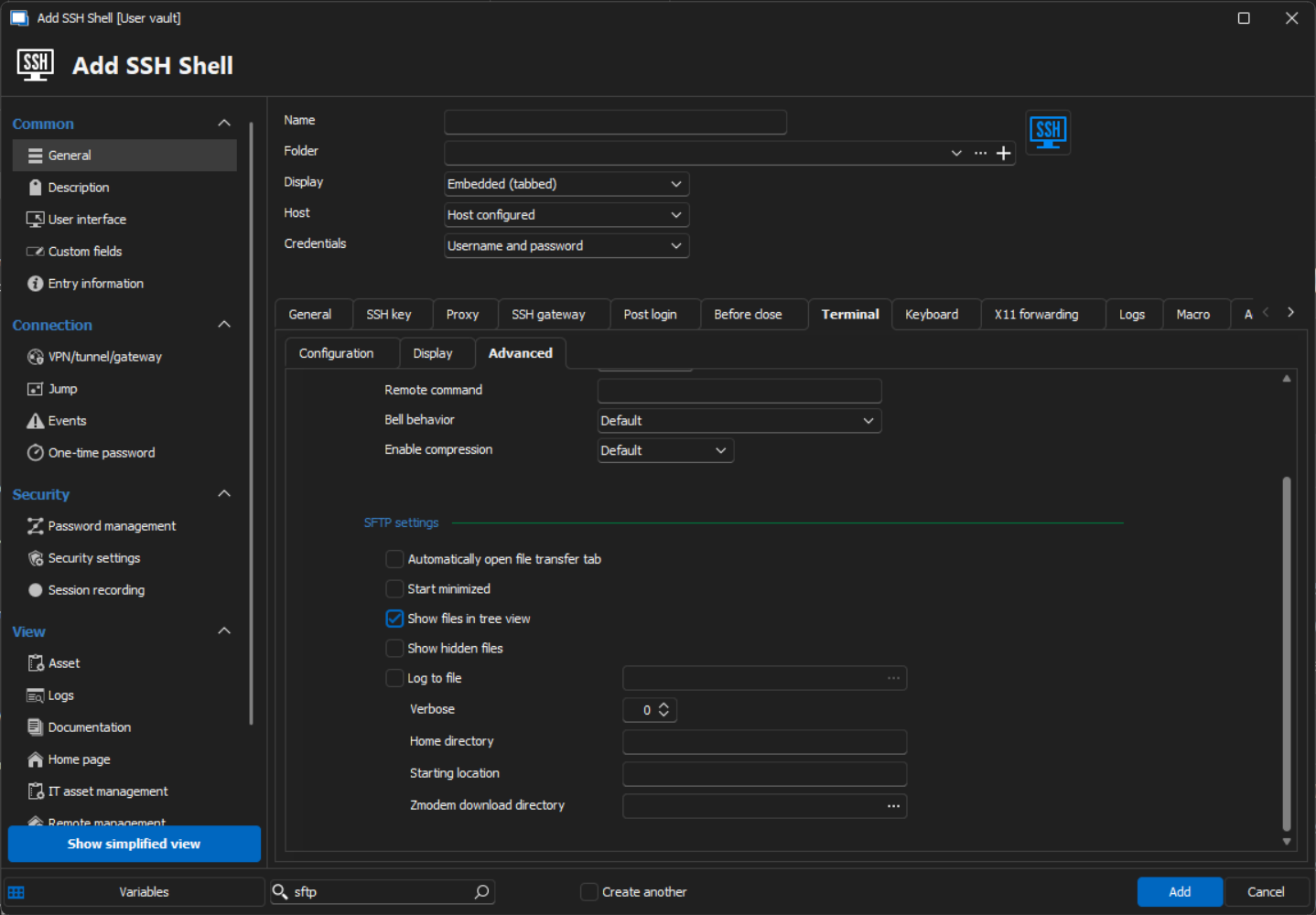
Best regards,
Patrick Ouimet
ssh.png
Yes, that SFTP option is what I was looking for, thank you!