SQL Data source connectivity using custom Windows AD account
SQL Data source connectivity using custom Windows AD account
0 vote

I like the feature of using integrated security to connect to a SQL data source. However, this is limiting to our group. What we would liike to have is a way to use a different domain account to connect to our data source instead of a database login. Is there a current way to do this? We are connecting from a corporate domain into a lab domain that don't have any trust established.
All Comments (4)
Have a look here. Your only option is to use RunAs /netonly
https://docs.devolutions.net/rdm/kb/rdm-windows/how-to-articles/running-rdm-as-another-user/
https://ss64.com/nt/runas.html
Stéfane Lavergne
Thanks for the response . Unfortunately that is not working for me. When I do it from the command prompt, it still opens under the current corp user account. If I do it using option 2, it continues to ask for the credentials. My suspicion is that it's because the networks are untrusted from each other and the lab domain credentials are not recognized as valid credentials. It was a great suggestion though. It would be nice if there was an option to type in the AD credentials using integrated security or with another option to manually enter domain credentials.
I may have been too quick to reply. It might actually be working now. Not sure if I was doing something wrong but it may actually be working. I'll provide an update if I find out otherwise.
Odd, but it should work, that's what the /netonly option is for. Since it will only evaluate your creds across the network not locally.
When I do it from the command prompt, it still opens under the current corp user account.
How did you validate this? The app will still run under the local account but the database connection will be under the runas account. You can validate using the File > My Data Source Information report on the second tab you should see both names.
Option #2 will not work as it does not do /netonly.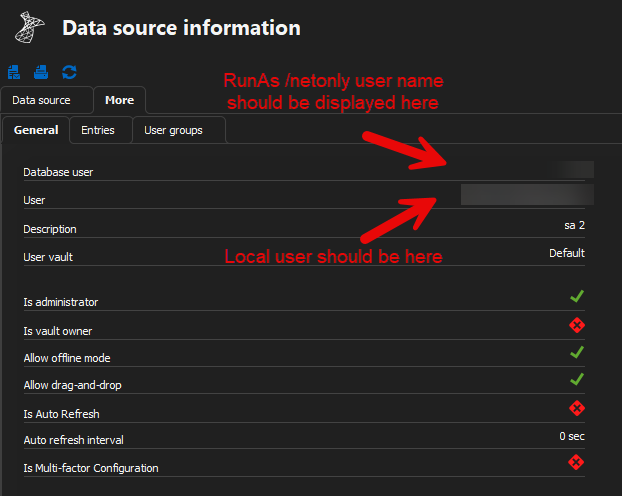
Stéfane Lavergne
eaeedb53-0eb3-4ddc-afdf-d44d0ceb0591.png