Auto update fails - Devolutions Cloud and RDM version mismatch
Auto update fails - Devolutions Cloud and RDM version mismatch

I have two issues with the latest release (2024.2.8.0 (June 17, 2024):
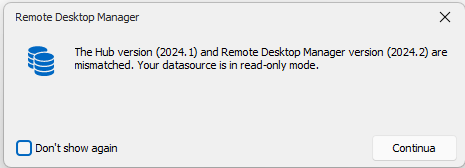
- The Hub version (2024.1) and Remote Desktop Manager version (2024.2) are mismatched. Your datasource is in read-only mode (see attached screenshot).
- After a new version release, every time I forced to manually download and install the setup. Download and install now, or download and install after closing application don't work.
Screenshot 2024-06-17 165453.png
All Comments (18)
Started getting this today too: 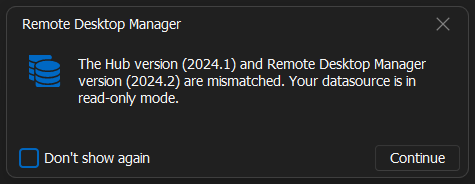
No instructions found to fix the version mismatch.
e9fbe37c-8e56-4a5a-854b-cade33f2abb0.png
I get this too - I see someone else in another message sees the same. I downloaded the previous version but its installer wouldn't install over a newer version - is there a way around this. I'm loathed to recreate my new data source from scratch in the Hub as its lots of copying long pwds etc - as has been noted as a fix - assume this is by hand? Or can I do an export/import?
Hello,
We are currently investigating an issue with the deployment of Hub Personal 2024.2. A quick fix is to do a rollback to 2024.1.32.0
https://devolutions.net/remote-desktop-manager/home/previousversions
We will keep you post on the status of this issue.
Sorry about that.
Best regards,
Jeff Dagenais
Except that when I install the old version it won't allow an install over a newer version.
@graememccarthy Try to uninstall last version and install old version.
@graememccarthy,
Indeed, you would need to uninstall RDM 2024.2 to install RDM 2024.1.
Best regards,
Jeff Dagenais
Thanks. Back to previous version now.
Hello,
HUB Personal 2024.2 has been deployed. You should now be able to authenticate via RDM 2024.2.8.0.
You can download this latest release here
https://devolutions.net/remote-desktop-manager/home/download/
Best regards,
Jeff Dagenais
Excuse me, and what about auto-update issues?
@dibiasi,
I suspect that you are referring to the question below:
After a new version release, every time I forced to manually download and install the setup. Download and install now, or download and install after closing application don't work.
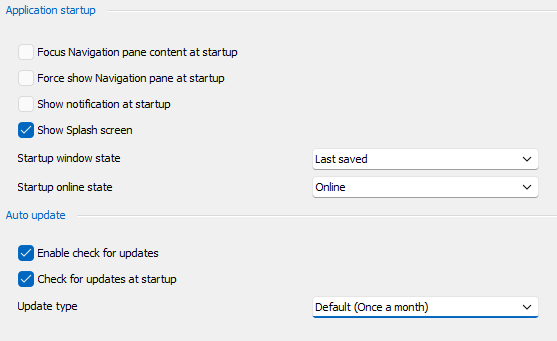
What is the setting that you have in File -> Settings -> Application -> Application Startup? Could you send us a screenshot of that section so that we could perform some test please.
Best regards,
Jeff Dagenais
Screenshot 2024-06-18 201236.png
Hello,
as showed in below screenshot, in addition to what has already been said: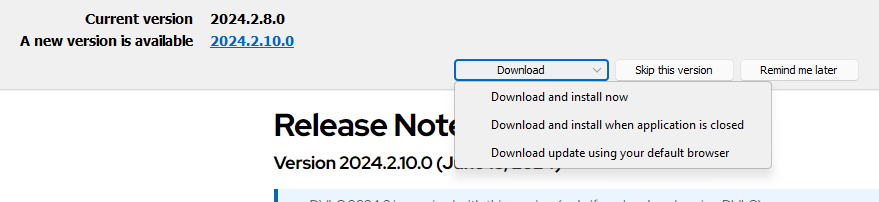
Selecting "Download and install now" or "Download and install when application is closed" doesn't work, nothing happens.
The only working option is "Download update using your default browser".
Screenshot 2024-06-20 085415.png
Hello @dibiasi,
Thank you for your response!
After contacting the development team, I learned that it was a known issue, and a ticket was opened regarding it.
I will let you know with more details as soon as possible. If you have any other questions, feel free to let us know.
Best regards,
Maxim Robert
Hello @dibiasi,
Could you try the following and let us know the results:
- Is there anything in the Event Viewer logs?
- Which antivirus do you have? Is it possible that it is blocking the process?
- Does opening the “C:\Program Files (x86)\Devolutions\Remote Desktop Manager\Devolutions.Updater.exe” file launch the updater?
- Does the file “C:\Users\YourUser\AppData\Local\Temp\RDMUpdate\Devolutions.Updater.exe” exist? Does it launch the updater?
- Copy the Devolutions.Updater.exe from the Program Files path into the Temp\RDMUpdater folder -> Does it paste? Does it start?
Please provide your answers using the same number format to help us better understand the reply.
Best Regards,
Maxim Robert
Hello Maxim,
thanks for your reply:
- Unfortunately I was unable to recognize any related events
- Windows Defender on Windows 11 Home
- Yes
- Folder "RDMUpdate" doesn't exist in "C:\Users\YourUser\AppData\Local\Temp\"
- Yes
So, I think the issue was caused by some deep cleaning perfomed by "Microsoft PC Manager" (in this case Defender wasn't guilty), because after I tried to recreate "C:\Users\YourUser\AppData\Local\Temp\RDMUpdate" folder and copying into it "Devolutions.Updater.exe", now RDM launches the updater properly.
I didn't know that the updater was launched from a Temp folder, so do you confirm that is the default behavior?
Have a nice day!
Hello,
I can confirm that RDM uses the temp folder for the update. This can be configured in File->Settings | Paths.
I will try to improve the robustness and ensure RDM detects when the updater application is not found.
Regards
David Hervieux
Hello,
We will have additional logs for the update process starting from RDM 2024.2.14.0. To access those logs, you will need to do the following :
- Go in Help -> Profiler -> Debug only.
- Change the Debug level to "1".
- Go in Help -> Check for updates (If 2024.2.15.0 is not yet released you will need to hold CTRL before clicking on Check for updates to bypass the version check).
- Do the "Download and install now" option.
- Look at the logs in the Profiler and send them to us.
Best Regards,
Michaël Beaudin
Hello,
We have a potential fix for the "Download and install now" issue that should be available starting from the version 2024.2.15.0 of RDM.
This will not fix the problem when updating from 2024.2.14.0 or lower but will do so when updating from 2024.2.15.0 to 2024.2.16.0.
Best Regards,
Michaël Beaudin