User specific settings dont overwrite display mode

Good morning everyone,
i think i have found a bug regarding to the user specific settings which dont overwrite the display settings.
My colleagues changed the display settings to undocked for every RDP connection. 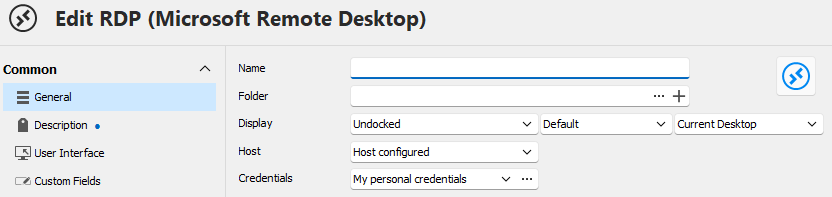
I absolutely hate it so i tried to switch it back to "embedded (tabbed)" just for me via the user specific settings.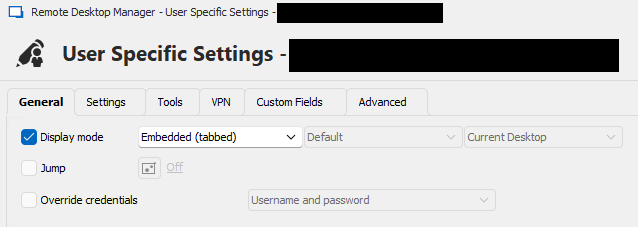
But it does not work. The user specific settings are saved, but the RDP connection is still opend undocked.
When i changed the display mode to "embedded (tabbed)" for everyone and the user specific settings to "undocked" everything works as it should, the display mode is overwritten.
Apparently i'm nearly the only one who want to use the embedded mode, so it's not an option to change the display mode back to embedded and my colleagues have to set the user specific settings to undocked.
My RDP Manager version is: 2024.1.31.0 64-bit and we are using an SQL Lite db.
I hope someone can confirm the bug or tell me what i did wrong.
With best regards from Germany,
Florian
User Specific Settings_v2.png
Edit RDP_1_v2.png
All Comments (2)
Hello Florian,
Thank you for reaching out to us regarding this,
You mentioned that your data source is a SQLite, User Specific Settings are not available with this type of data source, am I correct in assuming you meant SQL Server?
Could you update to the latest version 2024.1.32.0 and let me know if this issue persists for you?
Best regards,
Samuel Dery
Hi Samuel,
Thank you for your quick response.
You are right, we are using a SQL Express Server as datasource.
But I have to admit that i set the user specific settings not right, I forgot to overwrite the screen size.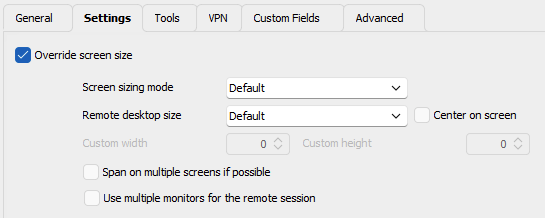
With this option checked everythings works fine.
Best regards,
Florian
grafik.png