Find by name in "My personal credentials" bitwarden connection
Find by name in "My personal credentials" bitwarden connection
0 vote

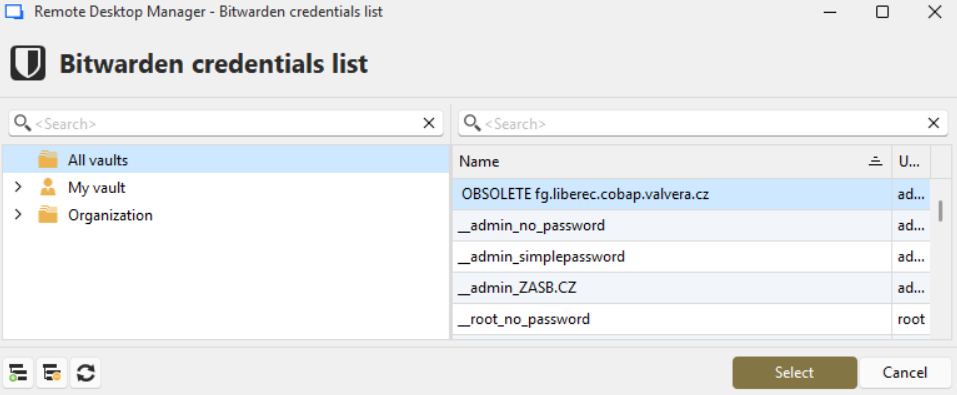
I would like to have "Bitwarden Credentials List" window to have filled second "Search" field (searching within list of bitwarden entries) with hostname of currently opening entry (with focus set on filtered list).
I have configured "My personal credentials" as bitwarden type with "Always prompt with list" option checked.
Then when I create new session entry, I choose "My personal credentials" option and so when I open session, it opens "Bitwarden Credentials List" window and it would be great to have already list filtered.
Even better would be if in case, when Bitwarden Credential List filtered by hostname will find only one bitwarden entry - it will automatically use this one bitwarden entry.
I know, that using bitwarden synchronizer and "Find by name (user vault)" can achive nearly the same, but synchronizing bitwarden entries to local vault is not what we want.
Ondrej
All Comments (19)
Hello Ondrej,
Could you describe your environment by answering these questions:
- What type of datasource do you use? Is it Devolutions Server, Devolutions Hub, SQL Server, something else?
- Are you the only person who will be using Bitwarden in this case?
- You mention configuring "My personal credentials", were you configuring this in the shared vault? Will other people be using the same entry as you? What credentials are your colleagues planning to use?
At the moment I don't see a solution that isn't very niche by nature, or confusing to configure and use. Maybe this information could help us devise a way to achieve this.
Regards,
Hubert Mireault
Hello Hubert,
we are using Devolutions Server as datasource.
Currently, I'm testing RDM with one of my coleagues and in the future I suppose there will be around 5 people sharing datasource.
Each of us has bitwarden in which we have private and shared (company) credential entries.
Usage example:
we all work on firewall named fg1. We use its https and ssh. I have my credentials (valvera.pejsa) in my private bitwarden folder, my colegue has his (valvera.lezak) in his private bitwarden. Then there is another device - fgcust1 where we have shared credentials (user: valvera) in shared bitwarden folder.
And we want to have entry in RDM named FG1 with credentials set to "My personal credentials", so when I open session, RDM will lookup "fg1" in my bitwarden (containing my personal and shared entries), it will find entry named fg1 with credentials valvera.pejsa. When my colleague opens session on the same RDM entry, it will lookup fg1 in his bitwarden and it will find entry with name fg1 with credentials valvera.lezak
I'm not sure what seems confusing to you. Maybe if it will suits to you, I can present it to you on some teams session, or I can make some screenshots to explain my idea.
Best regards,
Ondrej Pejsa
Hello,
Thank you for the additional information, it's very helpful. My comment about confusion was not about your scenario, but about how we could implement this in a good and intuitive way within our application, and I think I have an idea.
- We will add a new text field for "pre-filter search" when the entry is configured in "always prompt with list".
- In your case, this field would be filled with the value $LINKED_OWNER_NAME$. The "linked owner" variables are a set of variables that are used in credential entries to point to certain values of the entry that is using them. For you, if your entry is called FG1 and you are linking to the credential, the $LINKED_OWNER_NAME$ variable in the credential will resolve to FG1.
- When the search result only shows one entry when using the "pre-filter search" configuration, automatically choose this entry instead of prompting. If it would show multiple results, prompt as usual.
Let me know if what I described should solve this issue, and I will open a ticket for this.
Regards,
Hubert Mireault
Hello,
thank you very much for your effort.
It seems to me, that adding "pre-filter search" field in configuration of bitwarden within "My personal credentials" window could be right solution.
I think, that when we use variable $HOST$ or $NAME$, it should do the work. Because "Bitwarden credential list" window search within my bitwarden account, it will find any entry, which I have in my bitwarden account (so personal and shared bitwarden entries) and the same goes for my coleagues "bitwarden credential list" (it looks within his bitwarden account). So I'm not sure what benefits will be to use $LINKED_OWNER_NAME$ (btw. I cannot find it in Variables list in my RDM).
Btw. can we use regular expresions with variables ? (for example to get substring of $NAME$ till first white space - so "host.domain.com" part of "host.domain.com (Some Note)" entry name.
This is window, where I think "pre-filter search" (or maybe more specificaly "pre-filter bitwarden entry search") should be added (maybe under "Always prompt with list"). We do not use other credential managers, but I suppose, that this can be usefull for them too.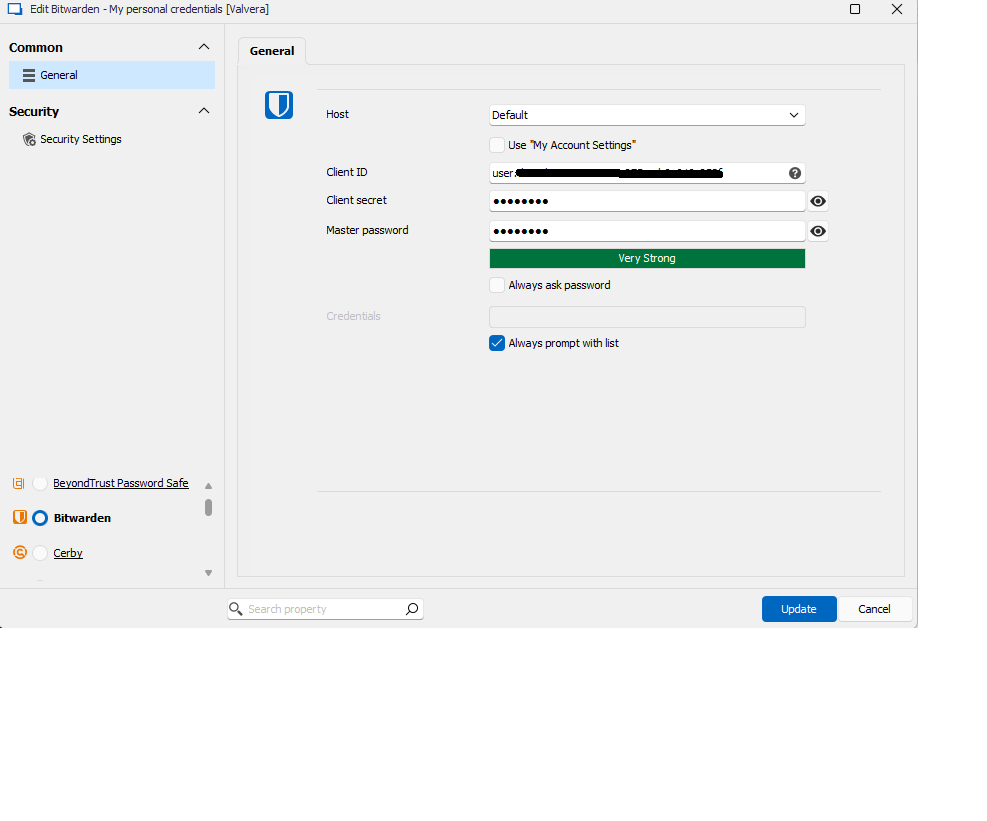
And on this image I wanted to show where "pre-filter search" value should be used. And please, if it is possible, focus cursor in the list of found entries, so simple tap on Enter key will use first (and often only one) entry in the list :). In this example we have entry with $HOST$ = s1.cl.vver.cz and this is what we need to pre-search within bitwarden credentials list (now we're entering it manually in the search list).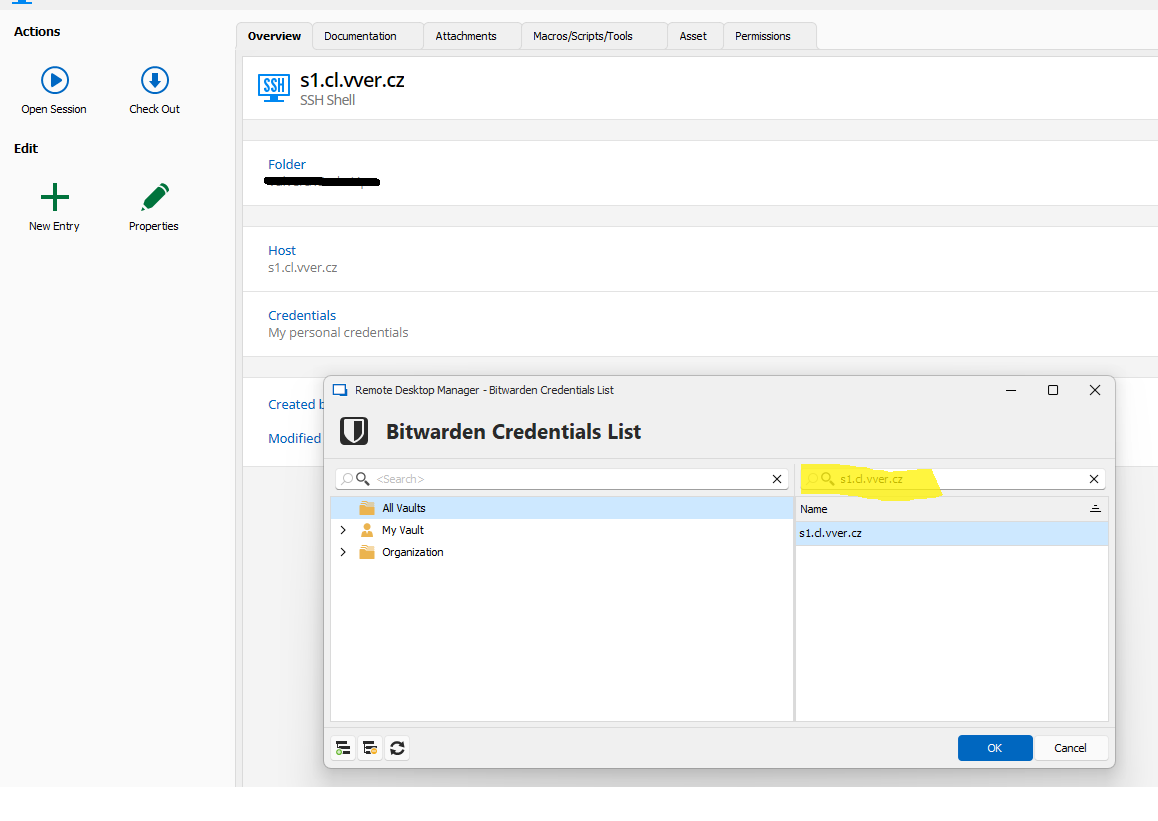
Best regards
Ondrej
devolutions-mypersonalcredential-bitwarden.png
devolutions-bitwarden-search.png
Hello,
I forgot to react to last of your points:
- When the search result only shows one entry when using the "pre-filter search" configuration, automatically choose this entry instead of prompting. If it would show multiple results, prompt as usual.
I confirm, that this (auto select entry if only one is found) will be great solution.
Regards,
Ondrej
Hello,
> I think, that when we use variable $HOST$ or $NAME$, it should do the work. Because "Bitwarden credential list" window search within my bitwarden account, it will find any entry, which I have in my bitwarden account (so personal and shared bitwarden entries) and the same goes for my coleagues "bitwarden credential list" (it looks within his bitwarden account). So I'm not sure what benefits will be to use $LINKED_OWNER_NAME$ (btw. I cannot find it in Variables list in my RDM).
The reason why I suggest the "linked owner" variables is because variables resolve information of the entry itself. Using the $NAME$ variable in your Bitwarden entry will resolve to the name of the Bitwarden entry, and not of the RDP entry using it. This behavior is the same whether the Bitwarden entry is a separate entry in the tree, or used through My Personal Credentials. The "linked owner" variables are a set of variables made specifically for when you link a credential to an entry and will resolve to values of that "owner" entry.
If you edit a credential entry and click on the "variables" button, you should see the "linked owner" variables (which also includes one for the host, if you'd prefer using that one):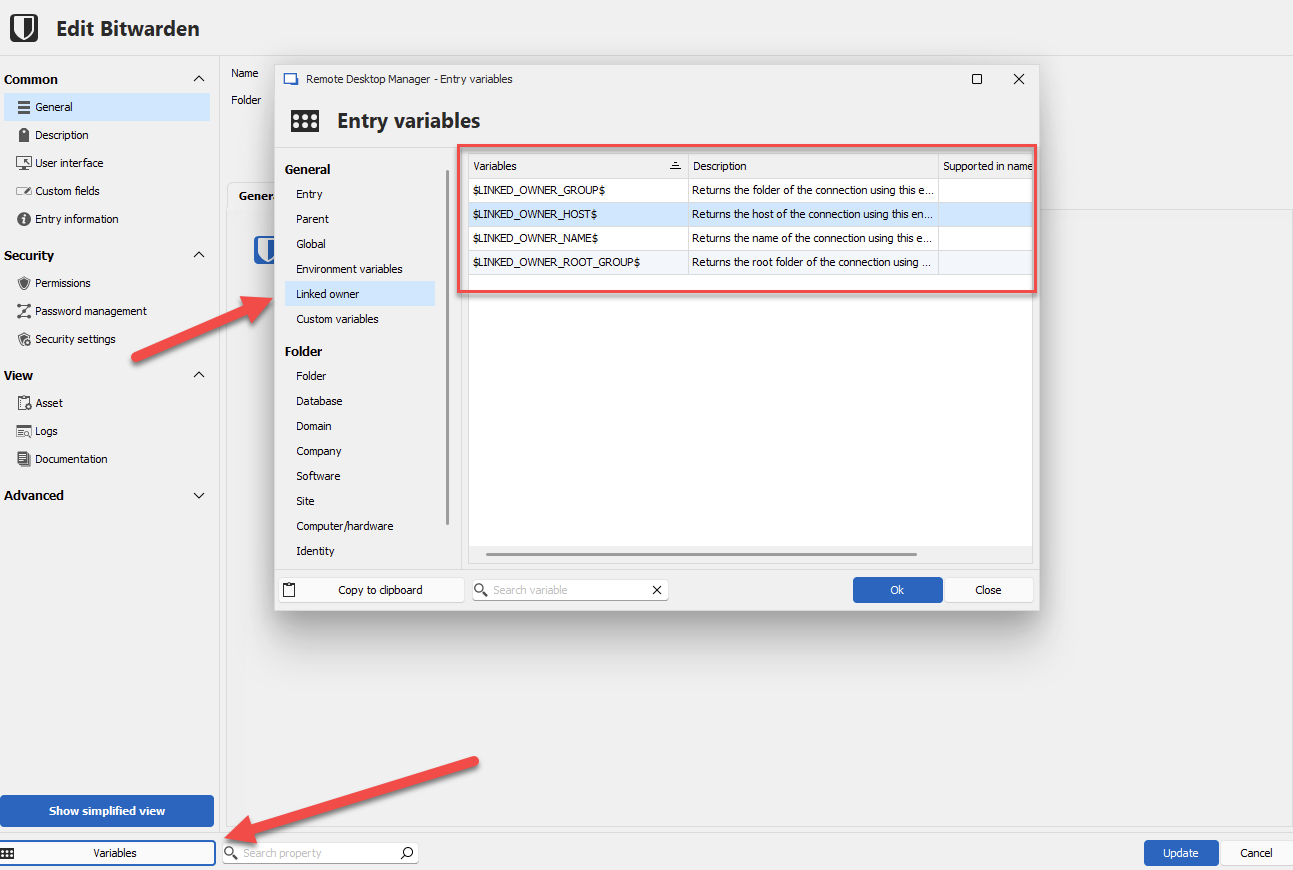
From your description, this confirms that the solution I have in mind should work for you, so I will open a ticket for this with the details.
Regards,
Hubert Mireault
6f087bf9-d7ae-4545-a210-dc076b6d75bb.png
Hello Hubert,
thank you very much. Now I understand why LINKED_OWNER should be used (I was thinking, that variable will be evaluated before opening Bitwarden Credential List window (and that it will be passed as parameter to function displaying this window). But I'm not programmer.
I can also confirm, that I see LINKED variables in credential entries.
So thank you very much for your effort.
Btw. as I mentioned before, allowing usage of regular expressions within variables evaluation will be also usefull :)
Best regards,
Ondrej Pejsa
The issue I see with regular expressions in this particular case would be properly handling variables alongside the regular expressions, as variables in RDM use the "$" character, and the same character is used in regular expressions. It might be difficult for the user to construct a regular expression that works properly because of that. We will keep this in mind as a future improvement, but I hope that the solution I outlined previously will work well enough for you as a first implementation.
Regards,
Hubert Mireault
Solution that you outlined will be great for us and it will work well enough for us now.
Regexp would be nice feature, but it is not necessary.
Regards,
Ondrej
Hello Hubert,
I would like to ask if there is anything new regarding this issue (autofill Search field in Bitwarden Credentials List).
Best regards,
Ondrej Pejsa
Hello,
Nothing new for now, we're currently focusing our efforts on stabilizing our recent release of RDM 2024.3.
Regards,
Hubert Mireault
Hello,
The feature has been implemented and will be available starting with our next major version, 2025.3.0. A new “Advanced” tab has been added to the Bitwarden entry settings, where you'll find the “Pre-filter search” field. It supports variables like $LINKED_OWNER_HOST$, and if the filter returns a single result, it will be selected automatically.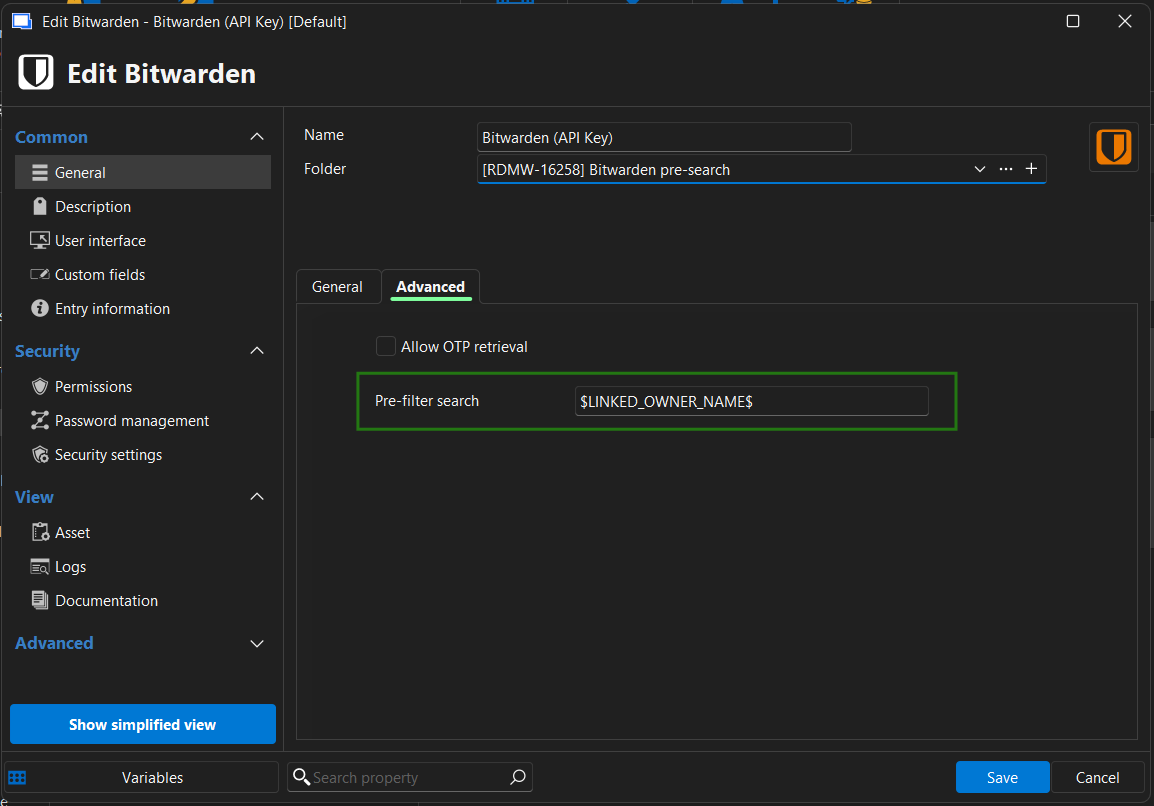
Regards,
Léon Le Brun
177e1f2a-b266-40a3-a745-7723da9246c3.png
Hello,
I want to thank you for this feature. I want to ask you to add at least $LINKED_OWNER_CUSTOM_FIELD1$ variable.
In some cases we have one entry in bitwarden which we are using for multiple entries. For example in my bitwarden I have entry "AD contoso.org" in which I have credentials for my active directory account in contoso.org and in RDM I have multiple entries with diferent names - ie. pdc.contoso.org, bdc.contoso.org, sql.contoso.org . In this case using $LINKED_OWNER_NAME$ will not find right entry in my bitwarden. So I would like to set $CUSTOM_FIELD1$ in pdc.contoso.org (and other similar entries) to "AD contoso.org" and then configure My privileged account / bitwarden / Advanced / Pre-filter search to $LINKED_OWNER_CUSTOM_FIELD1$ to make it lookup for "AD contoso.org" instead of pdc.contoso.org.
And even better would be to allow set Pre-filter search to something $LINKED_OWNER_CUSTOM_FIELD1$ | $LINKED_OWNER_NAME$ - so if CUSTOM_FIELD1 is empty, it will use NAME.
But I understand, that this can be way more complicated to do (and it is not so complicated to set $CUSTOM_FIELD1$ on all entries in RDM).
Best regards,
Ondrej Pejsa
Hello Ondrej,
I have opened a ticket so we can add LINKED_OWNER variables for the custom fields. We will post back here once it's available.
Regards,
Hubert Mireault
Great, thank you very much.
Regards,
Ondrej
Hello Ondrej,
I did some testing and from what I can see, you could use the $CUSTOM_FIELD1$ variable and it would achieve the same thing when using the Bitwarden credential through an RDP entry, for example. Could you try this out and see if it works how you'd expect? For me, setting the $CUSTOM_FIELD1$ variable in the Bitwarden entry and running my RDP, the custom field from the RDP entry will be the one used, which seems to be what you need.
From these tests, this has made me question whether the "LINKED_OWNER" variables might not be required anymore or if I'm missing a specific use case where they are required. It wouldn't be difficult to add new "LINKED_OWNER" variables (I have the code on my local machine, which is why I was testing this), but I can't figure out the actual scenario where it wouldn't work with the regular variables. Perhaps I'm missing something obvious.
Regards,
Hubert Mireault
I am not sure if I understand you right, but it seems that it is not working for me. I have latest RDM version (2025.3.30.0).
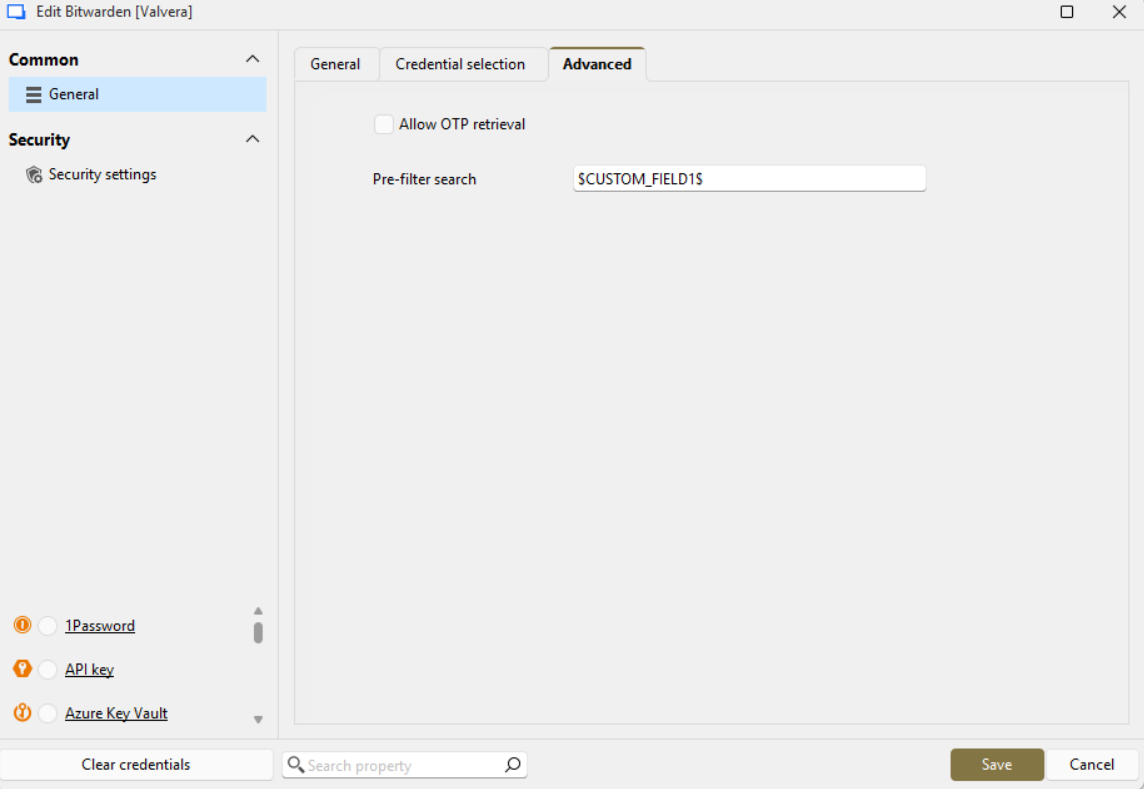
I have configured My privileged account to use bitwarden - there in Advanced page Pre-filter search configured to $CUSTOM_FIELD1$.
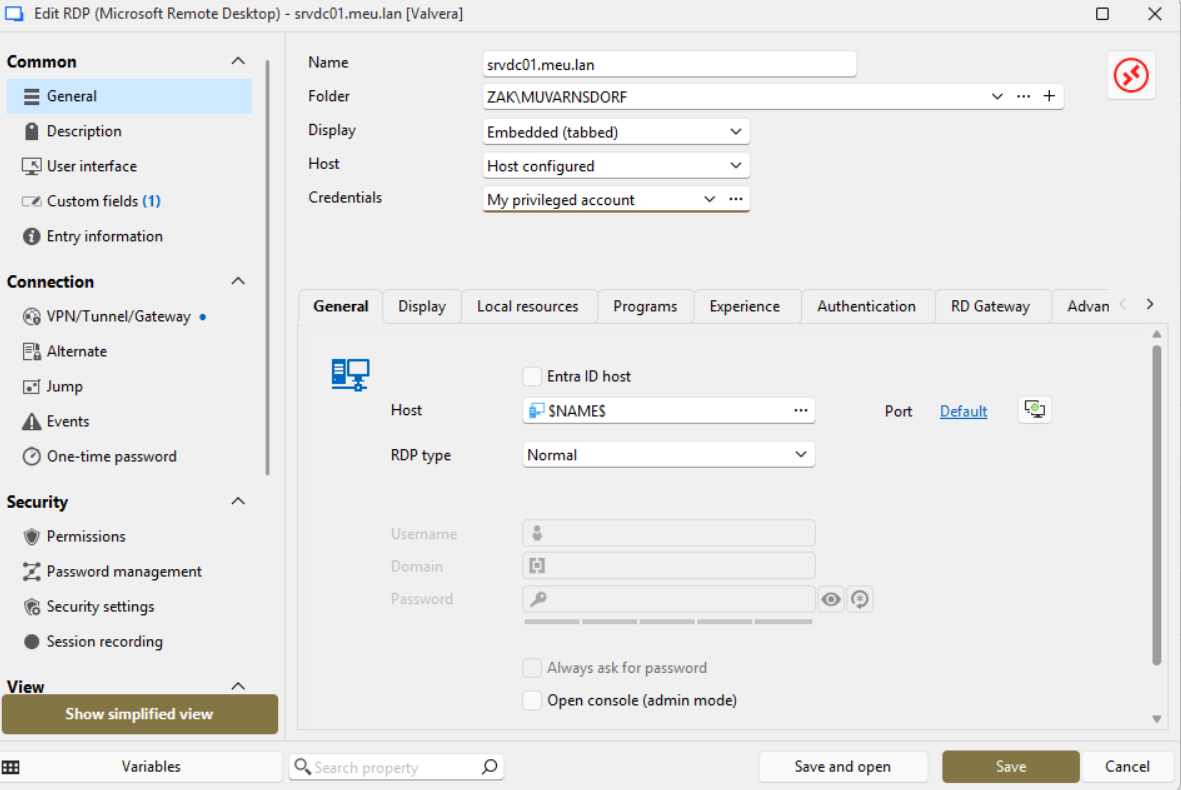
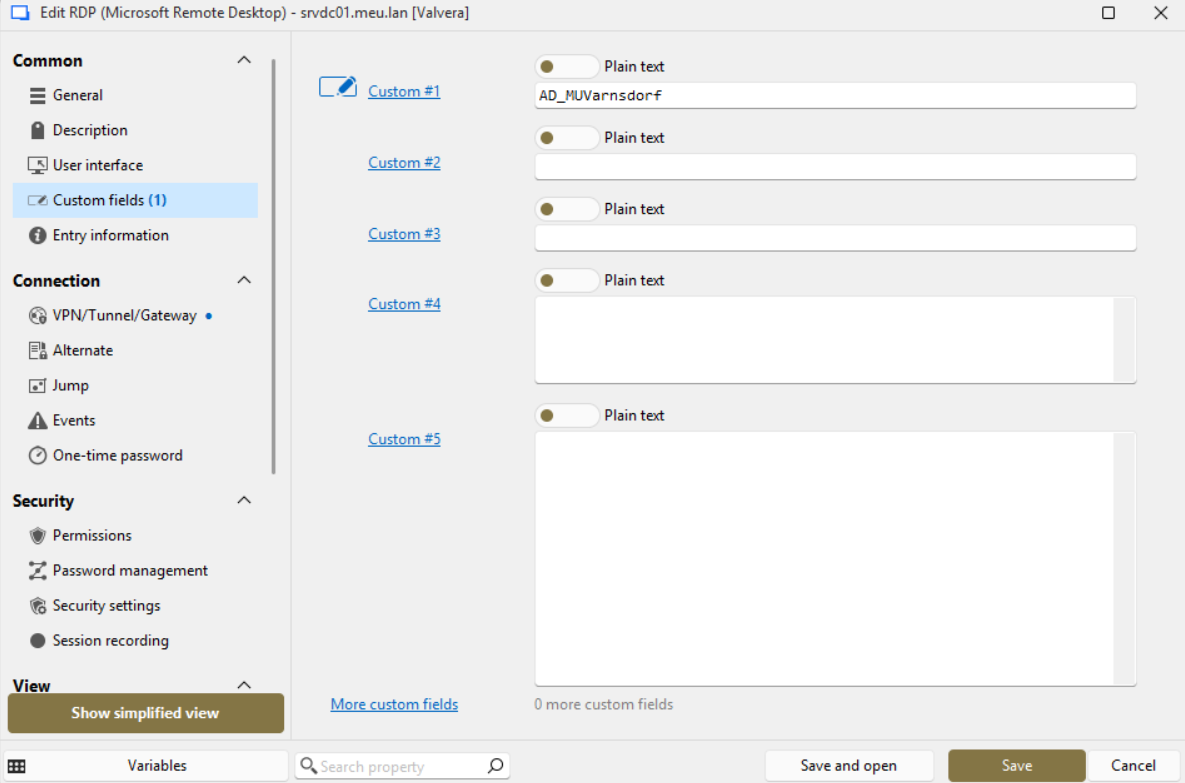
Then I have RDP entry in which I choose to use My privileged credentials and I have set Custom field1 to value AD_MUVarnsdorf.
If I then double click on RDP entry srvdc01.meu.lan - it opens Bitwarden credential list window, but search field is empty - it should be filled with value AD_MUVarnsdorf from RDP Custom_field1.
So if it is working for you and you CUSTOM_FIELD1 pre-sets search field configured in RDP Entry, please let me know. It is possible that there is some misconfiguration in my RDM, but I'm not sure what.
Thanks & best regards,
Ondrej Pejsa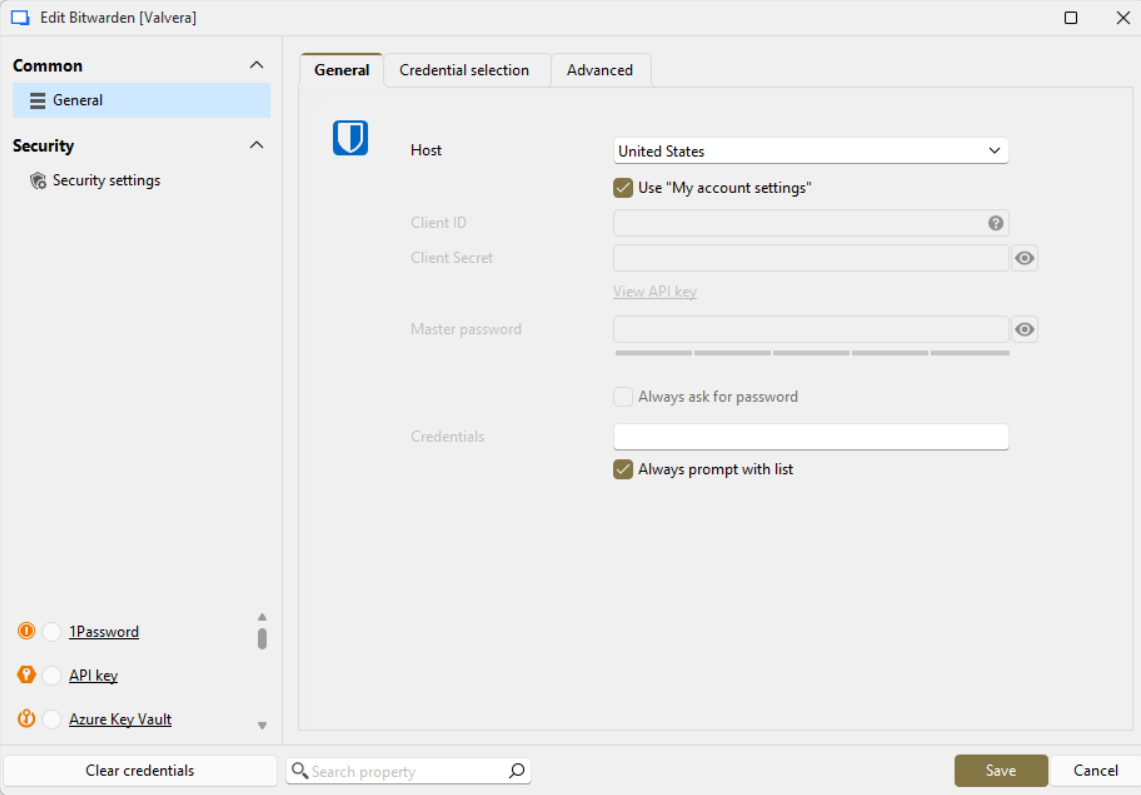
6b1d8f6e-3cbd-4838-8993-3f152355744c.png
0eb3fe55-3b5b-4ff5-a538-757366e254e2.png
e3986273-64c1-40f5-baee-8cbdfb6d2858.png
9612a70f-8002-4b8b-bc19-e0f1a93ab6ca.png
55a7b83d-6012-4a39-aef9-9c6a08e48575.png
Ah, thank you very much for the details! I must have missed the fact that you're using the "My privileged account" feature when I read your original post. I tested and in this case, the "LINKED_OWNER" variables are indeed required. I tested with $NAME$ and $LINKED_OWNER_NAME$ to confirm the concept and they indeed give two different values in this scenario.
I will add new linked owner variables for the custom fields 1 through 5, and ensure they work in this scenario. You can expect this to be available with our next major release, 2026.1.
Regards,
Hubert Mireault
Hi, thank for good news. We're looking forward to next major release :).
Best regards,
Ondrej Pejsa