Error on Application Close - HttpListenerException (87)

Hello,
I am encountering an issue with Remote Desktop Manager. Every time I close the application,
I receive an error message. I have attached a screenshot of the error for reference.
Error Message:
Remote Desktop Manager
Unable to process request: System.Net.HttpListenerException (87): The parameter is incorrect.
at System.Net.HttpListener.BeginGetContext(AsyncCallback callback, Object state)
at Devolutions.RemoteDesktopManager.Business.HttpBrowserLinker.Run(Object obj)
System Information:
- Remote Desktop Manager version: 2024.1.30.0 64-bit
- .NET 8.0.5
- Operating System: Windows 11
Could anyone help me understand why this error is occurring and how to resolve it?
Thank you!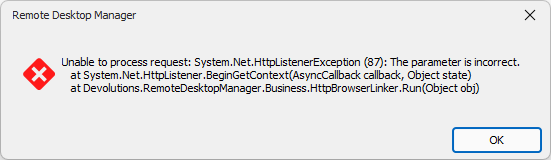
c8ae9d9e-036f-4bc6-8e1d-cfbb9fd5c66d.png
All Comments (8)
Hello,
Could you please attempt to recreate the issue using a portable installation? Here are the steps:
1. Download the .zip file from this link: https://remotedesktopmanager.com/home/thankyou/rdmbin
2. Close the current installation of RDM.
3. Create a new folder on your Desktop.
4. Extract the contents of the .zip file into the folder you created in step #3.
5. Navigate to this folder after extracting the .zip file and run "remotedesktopmanager.exe."
6. Connect to your data source.
This test will help us determine whether the issue is related to your local installation of RDM.
We appreciate your assistance in resolving this matter. Please reach out if you have any questions or concerns.
Best regards,
Carl Marien
Hello,
Could you please update your installation of Windows and check if the issue persists?
Best regards,
Carl Marien
Hello,
Could you please update your installation of Windows and check if the issue persists?
Best regards,
still happening after OS update
Hello,
I have contacted the developers and informed them that the update didn’t fix the issue. I will let you know if they need anything else.
Thank you for your patience.
Best regards,
Carl Marien
I have the same issue, Remote Desktop Manager version 2024.1.31.0 64-bit, windows 11 home fully updated.
It happens only if there is an active desktop connection to another windows session.
Eric
Hello,
Could you update to our latest version, 2024.2.12.0, and see if you reproduce the issue? We have a tentative fix in our 2024.2 version.
Regards,
Hubert Mireault
Version: 2024.2.12.0 64-bit - looks like it solved
Thanks!
Thanks for the feedback, glad to hear this works for you.
Regards,
Hubert Mireault