SSH jump hosts and MFA

Hello. Lonnnnng time user, amazing product.
Im trying to figure out something, I just cant seem to figure out. We use an ssh jumphost, if I setup ..\.ssh\config to use a jumphost like this:PS C:\Users\me\.ssh> cat .\configHost jump.foo.bar IdentityFile C:\Users\me\.ssh\id_rsa User meHost !jump.foo.bar * ProxyJump jump.foo.bar IdentityFile C:\Users\me\.ssh\id_rsa User me ForwardAgent yes
I can use powershell and connect directly to any host and MFA doesnt pop up. How can I emulate this in RDM? Ive set the following,
but every single time I launch a session I get prompted for MFA (albeit it does directly connect to the host). I just can't deal with an MFA request to every single session. 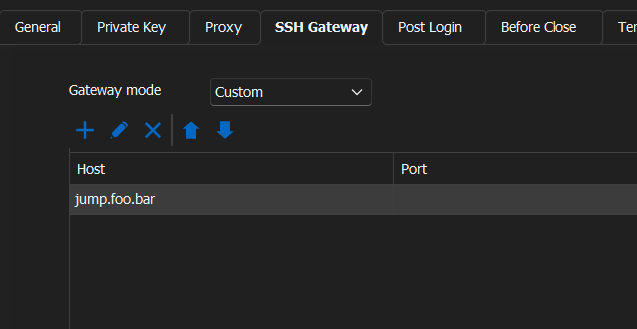
a4ff6a2c-d152-41ac-805b-e0b137fbbd8b.png
All Comments (10)
Hello,
Thank you for using our products Could you please attempt setting up a Powershell entry in RDM to replicate the SSH command you typically use in your PowerShel?
This could give us more insight into whether this method effectively bypasses the repeated MFA requests or if further adjustments are needed within the RDM settings or the SSH configuration itself.
Please let me know how it goes.
Best regards,
Carl Marien
I created a simple Powershell command entry, with a command of ssh me@host.com and it opened up powershell and connected without MFA.
Hello,
I would like to see your issue firsthand. Would it be possible to have a remote session with you?
Best regards,
Carl Marien
Yes of course. I am CDT and around from 9am to 3pm M-F. It could just be that I am not setting up jumphosts correctly, or missing some sort of setting. But Ive spent hours trying to figure it out.
Just let me know when.
Hello,
I have created a ticket and will shortly send you a link to request a session.
Best regards,
Carl Marien
Hello,
Thank you for the session where you explain your issue where Each connection to the jump host requires MFA approval via your phone, which is cumbersome.
as said in the session I will contact the developers about your issue.
Best regards,
Carl Marien
Hello, just checking in to see if there has been any updates on this?
Hello,
Sorry for the long wait. The developer believes that if you add the key to the credential of the jump host, you should not be prompted for your MFA again.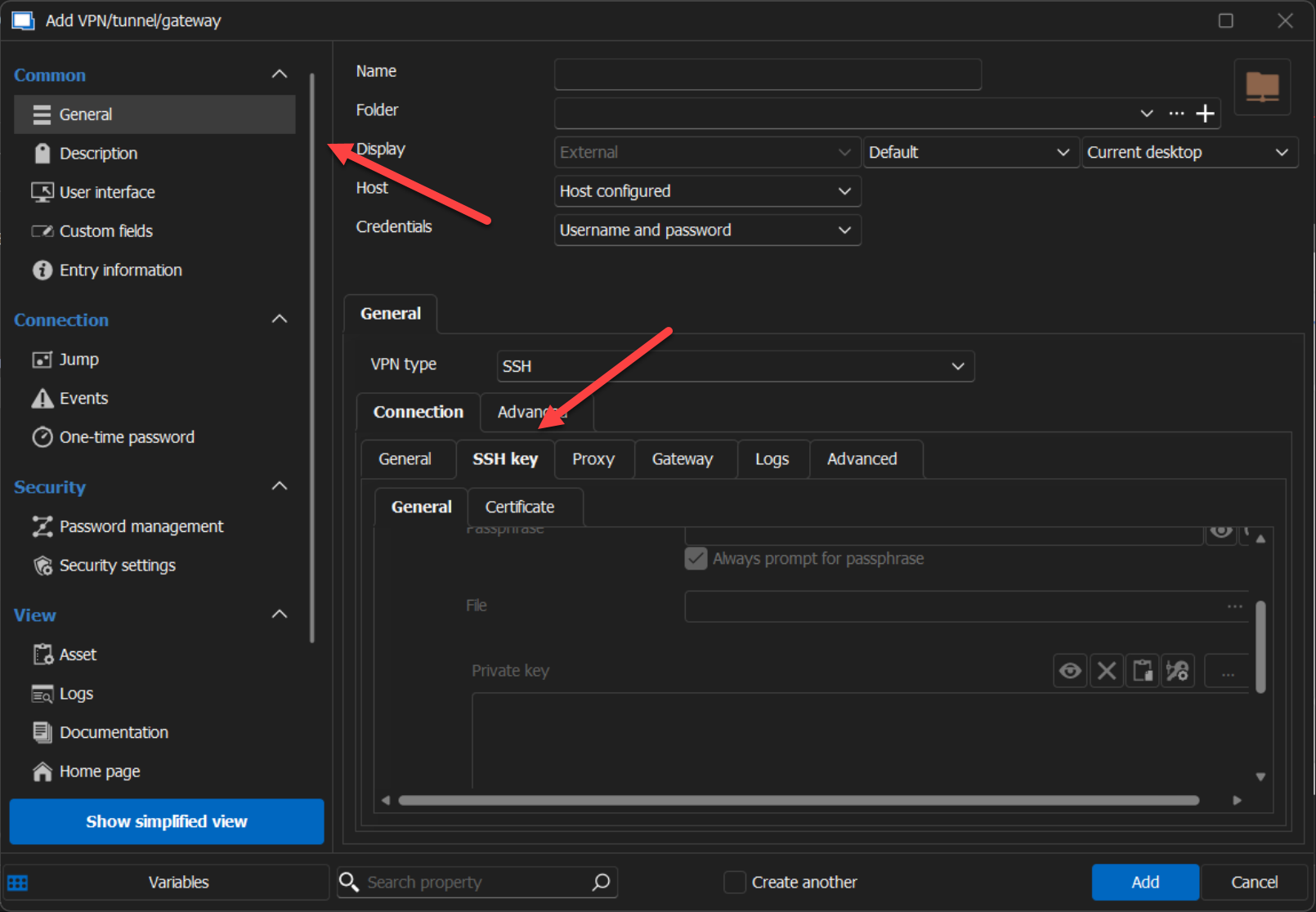
Best regards,
Carl Marien
a0eec182-0b4d-48bd-a77c-b21b756a5146.png
Same thing occurs when I put in the private key, admittedly Im not sure Im using RDMs keys/certs correctly. Usually you would just provide the public key, but I dont see that option anywhere in RDM settings.
Here is the verbose output of the attempt with the private key:
[6/27/2024 6:20:18 AM] Starting SSH, verbose level: 3
[6/27/2024 6:20:18 AM] Setting up connection
[6/27/2024 6:20:18 AM] Using jump host: jump.ssnc-corp.cloud:22, 0
[6/27/2024 6:20:18 AM] Connecting to port: 22 (IP any)
[6/27/2024 6:20:18 AM] Connected to SSH proxy host
[6/27/2024 6:20:19 AM] SSH banner: SSH-2.0-OpenSSH_7.4

[6/27/2024 6:20:19 AM] Sending kex init
[6/27/2024 6:20:19 AM] Received kex init
[6/27/2024 6:20:19 AM] Selected algorithms: curve25519-sha256, ssh-ed25519, chacha20-poly1305@openssh.com, chacha20-poly1305@openssh.com, implicit by cipher, implicit by cipher, none, none
[6/27/2024 6:20:19 AM] Sending Ed25519 kex init
[6/27/2024 6:20:19 AM] Received Ed25519 kex reply
[6/27/2024 6:20:19 AM] Successfully authentified server
[6/27/2024 6:20:19 AM] Sending new keys message
[6/27/2024 6:20:19 AM] Received new keys message
[6/27/2024 6:20:19 AM] Sending userauth service request
[6/27/2024 6:20:19 AM] Received extension info message
[6/27/2024 6:20:19 AM] Server accepts public key types: rsa-sha2-256,rsa-sha2-512
[6/27/2024 6:20:19 AM] Received service accepted message
[6/27/2024 6:20:19 AM] Sending userauth init request
[6/27/2024 6:20:19 AM] Received userauth banner:
                                                 +-----------------------------------------------------------------+
                                                                                                                    | This system is for the use of authorized users only.            |
                                                                                                                                                                                       | Individuals using this computer system without authority, or in |
                                                    | excess of their author
+-----------------------------------------------------------------+
| This system is for the use of authorized users only.            |
| Individuals using this computer system without authority, or in |
| excess of their authority, are subject to having all of their   |
| activities on this system monitored and recorded by system      |
| personnel.                                                      |
|                                                                 |
| In the course of monitoring individuals improperly using this   |
| system, or in the course of system maintenance, the activities  |
| of authorized users may also be monitored.                      |
|                                                                 |
| Anyone using this system expressly consents to such monitoring  |
| and is advised that if such monitoring reveals possible         |
| evidence of criminal activity, system personnel may provide the |
| evidence of such monitoring to law enforcement officials.       |
+-----------------------------------------------------------------+
[6/27/2024 6:20:19 AM] Received userauth failure: publickey,gssapi-keyex,gssapi-with-mic,password,keyboard-interactive
[6/27/2024 6:20:19 AM] Starting interactive authentication
[6/27/2024 6:20:19 AM] Sending userauth interactive request
[6/27/2024 6:20:19 AM] Received userauth info request:
[Prompt->Password: ]
[6/27/2024 6:20:19 AM] Sending userauth interactive response: 1
Here is where it asks for MFA.
I accept it on my phone and it continues:
[6/27/2024 6:20:31 AM] Received userauth info request:
[6/27/2024 6:20:31 AM] Sending userauth interactive response: 0
[6/27/2024 6:20:31 AM] Received userauth success
[6/27/2024 6:20:31 AM] User authenticated successfuly by password interactive
[6/27/2024 6:20:31 AM] Sending forward channel open request: 0/- 10-222-206-152.ssnc-corp.cloud:22
[6/27/2024 6:20:31 AM] Received global request: hostkeys-00@openssh.com , no need to reply
[6/27/2024 6:20:31 AM] Received channel open confirmation: 0/0 WS 200000/2097152 MPS 32000/32768
[6/27/2024 6:20:31 AM] SSH banner: SSH-2.0-OpenSSH_8.7

[6/27/2024 6:20:31 AM] Sending kex init
[6/27/2024 6:20:31 AM] Received kex init
[6/27/2024 6:20:31 AM] Selected algorithms: curve25519-sha256(strict), ssh-ed25519, chacha20-poly1305@openssh.com, chacha20-poly1305@openssh.com, implicit by cipher, implicit by cipher, none, none
[6/27/2024 6:20:31 AM] Sending Ed25519 kex init
[6/27/2024 6:20:31 AM] Received Ed25519 kex reply
[6/27/2024 6:20:31 AM] Successfully authentified server
[6/27/2024 6:20:31 AM] Sending new keys message
[6/27/2024 6:20:31 AM] Received new keys message
[6/27/2024 6:20:31 AM] Sending userauth service request
[6/27/2024 6:20:31 AM] Received extension info message
[6/27/2024 6:20:31 AM] Server accepts public key types: ssh-ed25519,sk-ssh-ed25519@openssh.com,ssh-rsa,rsa-sha2-256,rsa-sha2-512,ssh-dss,ecdsa-sha2-nistp256,ecdsa-sha2-nistp384,ecdsa-sha2-nistp521,sk-ecdsa-sha2-nistp256@openssh.com,webauthn-sk-ecdsa-sha2-nistp256@openssh.com
[6/27/2024 6:20:31 AM] Received service accepted message
[6/27/2024 6:20:31 AM] Using provided key data
[6/27/2024 6:20:31 AM] Sending userauth init request
[6/27/2024 6:20:31 AM] Received userauth banner:
                                                 +-----------------------------------------------------------------+
                                                                                                                    | This system is for the use of authorized users only.            |
                                                                                                                                                                                       | Individuals using this computer system without authority, or in |
                                                    | excess of their author
+-----------------------------------------------------------------+
| This system is for the use of authorized users only.            |
| Individuals using this computer system without authority, or in |
| excess of their authority, are subject to having all of their   |
| activities on this system monitored and recorded by system      |
| personnel.                                                      |
|                                                                 |
| In the course of monitoring individuals improperly using this   |
| system, or in the course of system maintenance, the activities  |
| of authorized users may also be monitored.                      |
|                                                                 |
| Anyone using this system expressly consents to such monitoring  |
| and is advised that if such monitoring reveals possible         |
| evidence of criminal activity, system personnel may provide the |
| evidence of such monitoring to law enforcement officials.       |
+-----------------------------------------------------------------+
[6/27/2024 6:20:31 AM] Received userauth failure: publickey,gssapi-keyex,gssapi-with-mic,password,keyboard-interactive
[6/27/2024 6:20:31 AM] Starting authentication by key
[6/27/2024 6:20:31 AM] Validating public key: rsa-sha2-512
[6/27/2024 6:20:31 AM] Received userauth key ok
[6/27/2024 6:20:31 AM] Sending userauth public key signature: rsa-sha2-512(rsa-sha2-512)
[6/27/2024 6:20:32 AM] Received userauth success
[6/27/2024 6:20:32 AM] User authenticated successfuly by public key
[6/27/2024 6:20:32 AM] Sending session channel open request: 0/-
[6/27/2024 6:20:32 AM] Received global request: hostkeys-00@openssh.com , no need to reply
[6/27/2024 6:20:32 AM] Received debug message:
/home/jsparrow/.ssh/authorized_keys:1: key options: agent-forwarding port-forwarding pty user-rc x11-forwarding
[6/27/2024 6:20:32 AM] Received debug message:
/home/jsparrow/.ssh/authorized_keys:1: key options: agent-forwarding port-forwarding pty user-rc x11-forwarding
[6/27/2024 6:20:32 AM] Received channel open confirmation: 0/0 WS 200000/0 MPS 32000/32768
[6/27/2024 6:20:32 AM] Sending pty request: 0/0 xterm-256color width = 198 height = 48
[6/27/2024 6:20:32 AM] Received channel success: 0/0
[6/27/2024 6:20:32 AM] Sending environment variable request: LANG=en_US.UTF-8 0/0
[6/27/2024 6:20:32 AM] Received channel failure: 0/0
[6/27/2024 6:20:32 AM] The server did not accept the environment variable
[6/27/2024 6:20:32 AM] Sending shell request: 0/0
[6/27/2024 6:20:32 AM] Received window adjust: 0/0 2097152
[6/27/2024 6:20:32 AM] Received channel success: 0/0
[6/27/2024 6:20:32 AM] Sending pty size change: 0/0 width = 198 height = 48

[jsparrow@10-222-206-152 ~]$Aha! I got it!! Its a bit confusing.
First mistake was adding the private key to the General Tab of the connection itself. The correct way is to edit the connection, then go to the SSHGateway Tab, click edit and add the private key there.
The next confusing part is that most private keys dont have an extension, but RDM is looking for one with. So I had to select show all files *.*
The second mistake was assuming that if I edited the private key for the SSHGateway, that it would propagate to all other connections, since they all use it.
I fixed this by doing a batch edit of all entries.
Its now working. TYVM.