Search field in Password List doesn't allow space as AND
Search field in Password List doesn't allow space as AND
0 vote

Hello,
I have some issues with Password List.
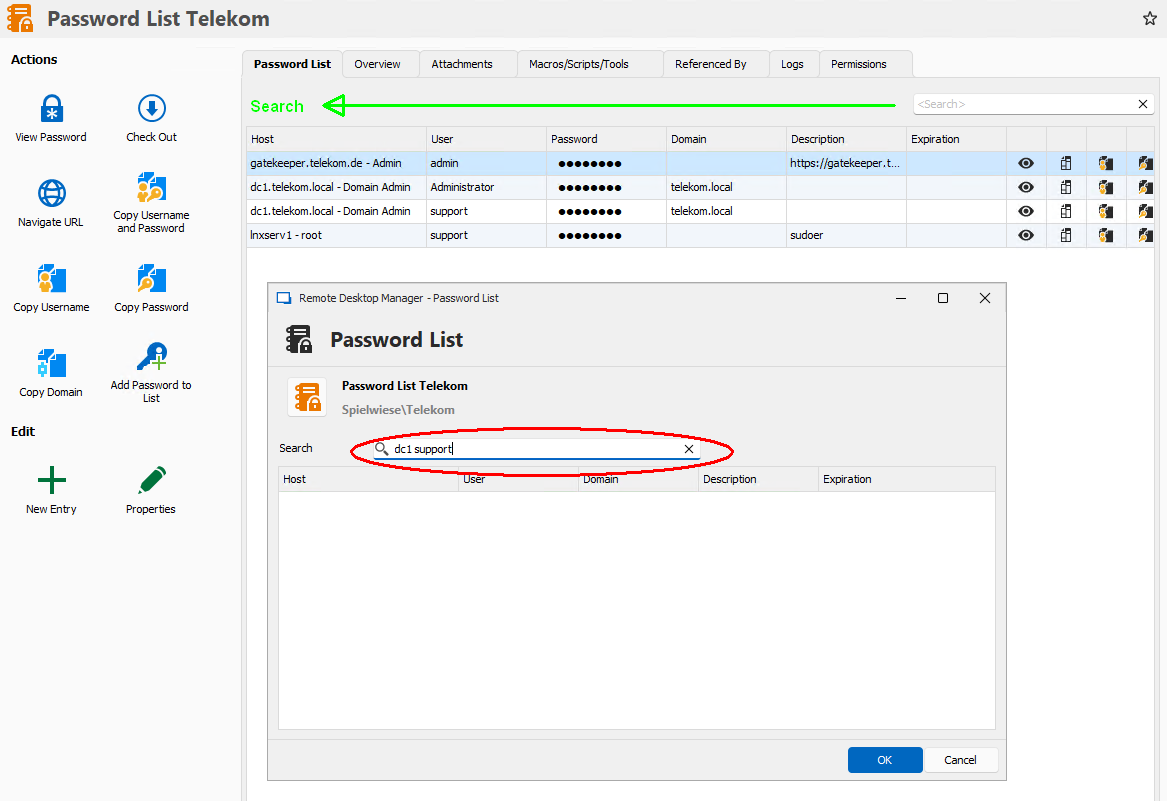
1. Search field doesn't treat space as AND
In Setting there is an option for Filter "Treat space as AND".
But in Search field this doesn't work - the complete entry is treated as search string.
(Refer to red circle in screenshot)
Please make same behavior in Search field like in Filter.
2. Harmonize layout of Search field
More cosmetic but a suggestion from me:
In overview Search Field is right.
When Password List is open (for copying password e.g.) Search field is left with leading "Search ...."
I would like to have layout from opened Password List also in Overview
(Refer to green marks in screenshot).
3. Include Domain in Search
Search in Password List includes Host, User and Description.
Please include Domain also.
regards
Stefan
All Comments (25)
ScreenShot 687 RDM Password List Search.png
Hello,
Thank you for your request. I've opened an internal ticket for this.
Regards,
Hubert Mireault
Hello Hubert,
Thank you for your request. I've opened an internal ticket for this.
Can you give me an update, when I will get the features, please?
regards
Stefan
Hello,
I don't have an estimate on when we will be able to work on this at the moment. I will see if we can raise the priority.
Regards,
Hubert Mireault
Hello,
We've already done some changes to the filtering/Password list layout.
With the upcoming version, you will be able to filter for the domain using the search box. However, for stronger filtering, we suggest using the built-in header search. You can specify the filter desired for each columns (leading to more accurate filtering).
This was already available for the password list prompt, and I've enabled it for the Dashboard section as well.
Here are a few screenshots to showcase using the filters in headers.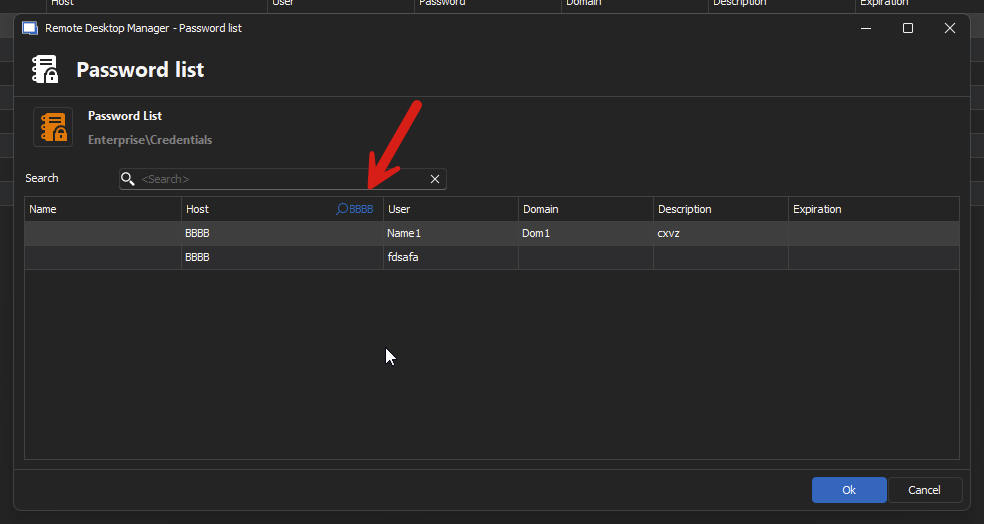
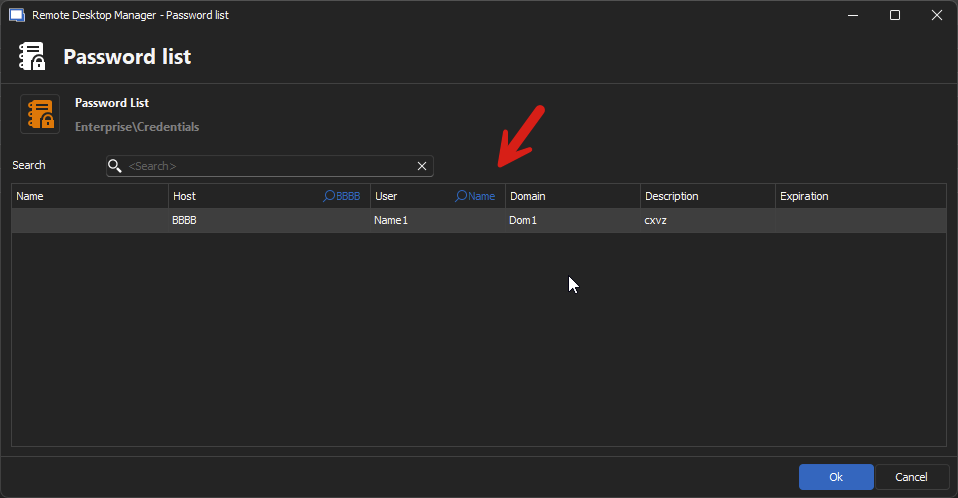
Let me know if this fixes the issue for you.
Regards,
Jafran Majeau
67ec8439-bb89-418a-9f29-71c01cefc924.png
db3baefe-8ad4-4626-8fee-47949bc95c64.png
Hi Jafran,
thank you for your response and your changes.
Unfortunately the changes make it even worse for us.
Header Search is far too complicated. Adding a search term in every column and afterwards deleting the search terms out of every single column takes too much clicks. This is fine as additional possibiltiies but not for all day password usage.
Up to now, we were using a "hidden feature".
Pressing Ctrl + F in PasswordList in Dashboard (with Grap Keyboard input set to off) has opened a new Search Box.
This Search Box has allowed multiple search terms combined with AND (see my screen shot).
But with your changes in version 2024.2.13 this shortcut is replaced by header search.
In PasswordList Edit Mode it's vice versa.
Up to version 2024.2.11 Ctrl + F started Header Search. Now, in 2024.2.13, Ctrl + F opens the Find entry box.
In PasswordList View Mode it's always Header Search.
The existing search field in the upper right could be replaced by the existing, but hidden Find field.
So I still definitely prefer:
- Only one Search entry box, that allows multiple search terms combined with AND
- This search box is visible all the time
- Identical behaviour and identical shortcut Ctrl + F for search box in all three PasswordList modes (in Dashboard, in View Mode, in Edit Mode)
- Focus Search Entry box when opening a PasswordList (because searching a password is the most frequently used)
These would really be very helpful for us
regards
Stefan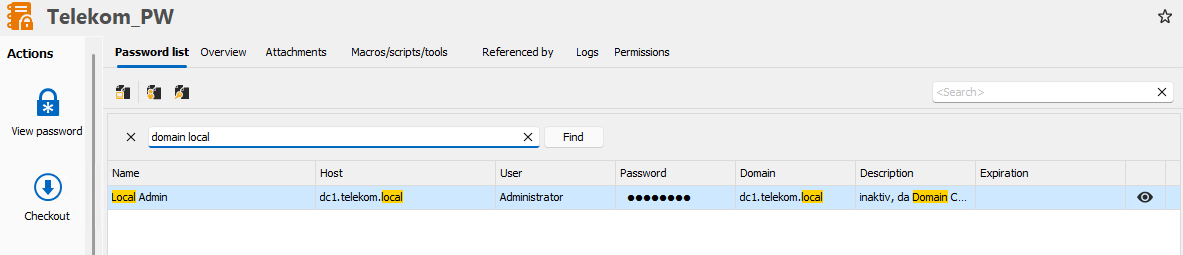
ScreenShot 824 RDM PasswordList in Dashboard.png
Hello,
Thank you for the feedback, we'll investigate this and come back to you shortly.
Regards,
Jafran Majeau
Hello,
I've taken the liberty to remove the header search from the Password List when accessed through the Dashboard. This should take effect with the upcoming version. We will investigate about adding an option to improve the manual filter shortly, and will keep you updated.
Regards,
Jafran Majeau
Hello,
We will implement the following (the changes below will only take effect with interactions related to the Password List (In the Dashboard, when selecting one (view), and when editing the password list entry.)
- We will remove the outdated search box (top right).
- The embedded search box will be open by default (This is the box prompted when using Ctrl + F)
- It will be focused automatically when displayed too.
- By default, it will treat spaces as "AND" (as it currently does), but this can be changed to "OR".
- The above feature as well as others will be located in File - Settings - User Interface - Filter - Password List
As I understand from your last response, this should provide the behaviour you are looking for.
Regards,
Jafran Majeau
Hello Jafran,
yes, thats exactly, what I'm looking for - thanks a lot.
Do you know already the version with these changes?
Regards
Stefan
Hello,
This should take effect for the 2024.2.14.
Regards,
Jafran Majeau
Hi Jafran,
I installed version 2024.2.14 for the new features - thank you.
There would be two issues more:
- in password list view mode (opening PL in tree by double click) the right mouse click menu is not existing and neither are the entries for copying username/password/hostname. (in dashboard mode it is).
- password list view mode should be opened in a non-modal window that it doesn't block change of session windows
Then PL could remain opened separatly from connection window and could be used in my remote session.
Can you change this also, please?
regards
Stefan
PL Dash board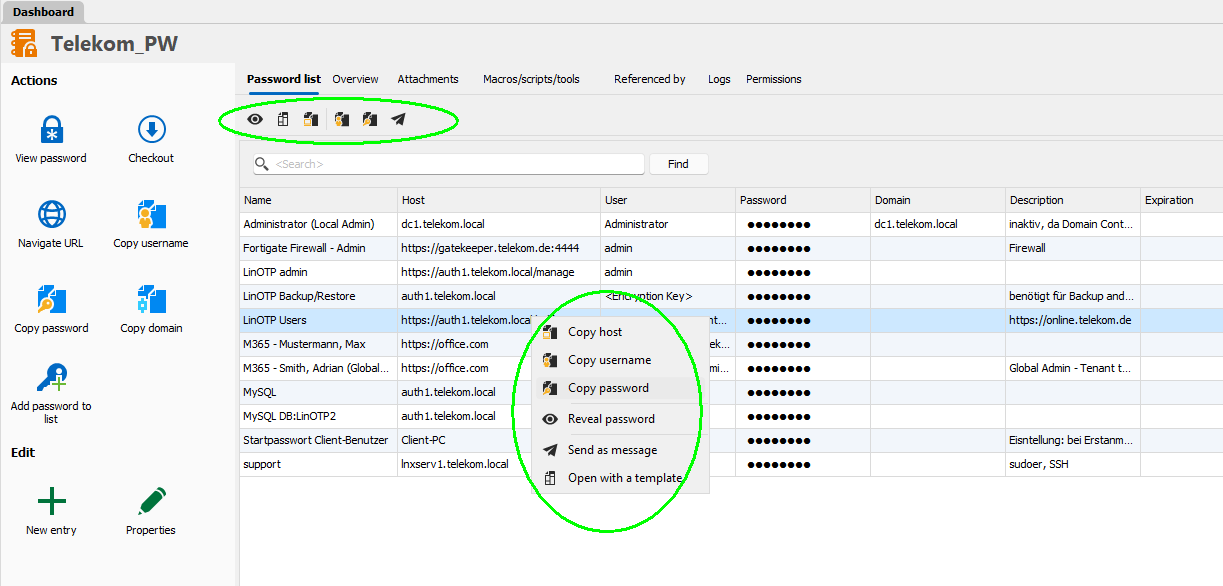
PL view mode - context menu is missing and window is modal and blocks change of connection windows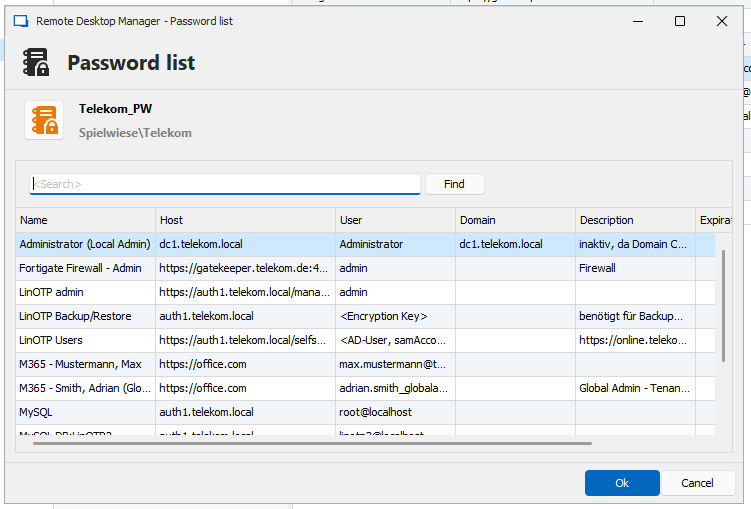
ScreenShot 840 Remote Desktop Manager - Password list.png
ScreenShot 839a RDM [Dashboard].png
Hello Jafran,
just to clearify.
I would prefer, that View mode behaves same as Dashboard mode.
In Dashboard mode double klick in an entry field copies the value.
(In view mode a new window opens to copy the values and PL closes.)
regards
Stefan
PL after double click on specific username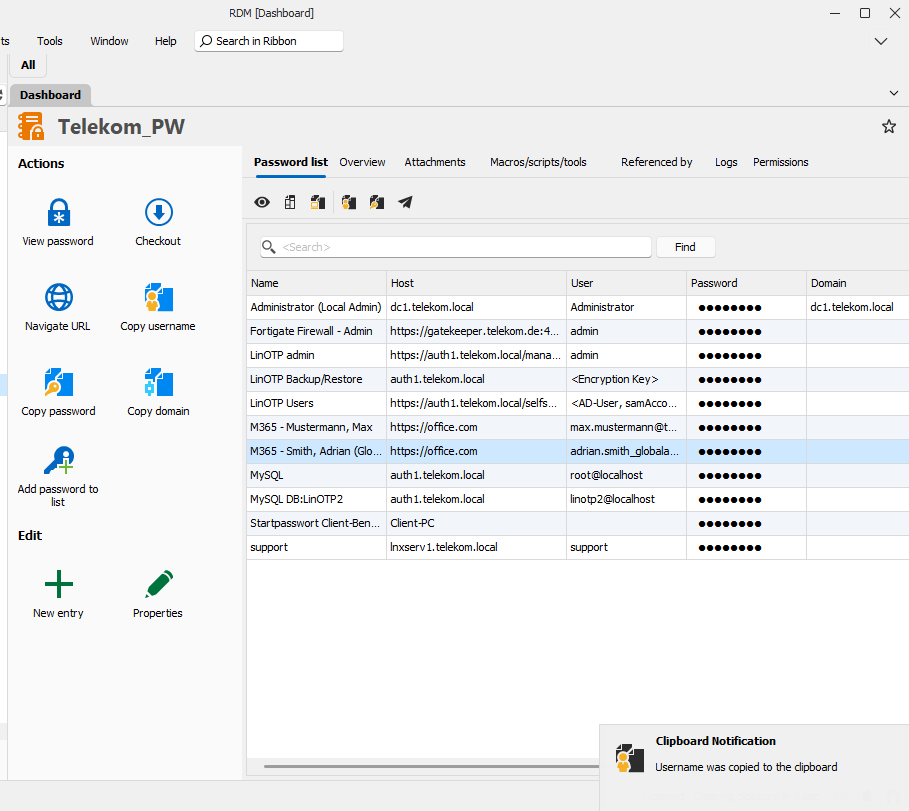
ScreenShot 843a RDM [Dashboard].png
Hello,
We'll see what we can do about those additional changes, however there are certain challenges to changing the mentioned window (mainly that it is used in more than just this context).
Regards,
Jafran Majeau
Hello Jafran,
The changes in PL you have done are great for finding the passwords.
But we are a IT system house not a inhouse IT department. Very often we are working remotely on a management server at customer site, because
we do not have direct access to all ressouces.
So we are looking for a convenient way of working in a single remote session where we need different passwords in this session (e.g. Login in SQL Server, ...).
This could be a way of undocking PL, the non modal window as mentioned or something else.
Thanks a lot for your support
Stefan
Hello Stefan,
I just wanted to let you know, we've opened a different ticket for this specific case. We will have to discuss internally and see what the best solution is, so I don't have an estimate to give you on when we will have this available.
From what I understand, you would need the following:
- Have a way to see the password list with a non-blocking window, unlike when you currently perform the "view password" action or the copy buttons
- From this window, more easily copy the individual parts of a credential (username, domain, password), similar to the way the dashboard is currently handled
- Copying the credentials in this window should not close the window
Let me know if I've understood your needs correctly.
Regards,
Hubert Mireault
Hello Hubert,
I'm not sure, if my last mail reached you because I havn't been logged in in your forum.
Yes, that's what I want, with one addition: "Host" should also be copied.
Thank you for your great support.
Regards
Stefan
Hello Stefan,
Indeed, if you had previously sent a post, it did not reach us. I will note the addition of the host field as well.
Regards,
Hubert Mireault
Hello Hubert,
great job - thanks a lot. With version 2024.3.10 you have implemented these features, that helps us very much.
May I ask you for two minor changes?
- Focus in search field after opening PL
When I open a PL the cursor should be already in search field that I can immediately start entering my search key
- Double Click PL should open Dashboard mode directly
When I open a PL with right mouse button > View Password or the action button View Password, I enter directly the Dasboad mode.
With double clicking the PL opens in view mode. Again double clicking an entry, the PL switches to Dashboard mode.
For my opinion view mode is not necessary at all and you can open directly in Dashboard mode by double clicking the PL entry.
Again thanks a lot for this great enhancement
regards
Stefan
Hello Hubert,
may I add a third point:
- Double click in Domain should copy Domain (similar to Copy host/username/password).
And for consistency this sould be also possible in right mouse button menu and in the Icon bar on top of the list.
Again Thank you
Stefan
Hello,
- We've added the Copy Domain on double click.
- We've set the search field to be focused when the window opens.
- For the double click in the main tree view, this behaviour is linked to an option called Default entry action, which can be located in File - Settings - Entry types - under the Actions sub-section. For Password list, you would be looking at the Credential entry setting. From your previous post, I would surmise that you are likely set on View dashboard, you can change this to View Password.
- That said, I've tested on my side, and there is currently a small bug that prompts the window twice among other things. We have fixed this issue as well.
You can expect all of the above to take effect for the upcoming 2024.3.16
Regards,
Jafran Majeau
Hello Jafran,
thank you for the changes.
I've found another small bug.
In Password list "View mode" in the coloumn OTP, there is a green arrow for entries with OTP.
In Password list "Dashboard mode" this green arrow is missing.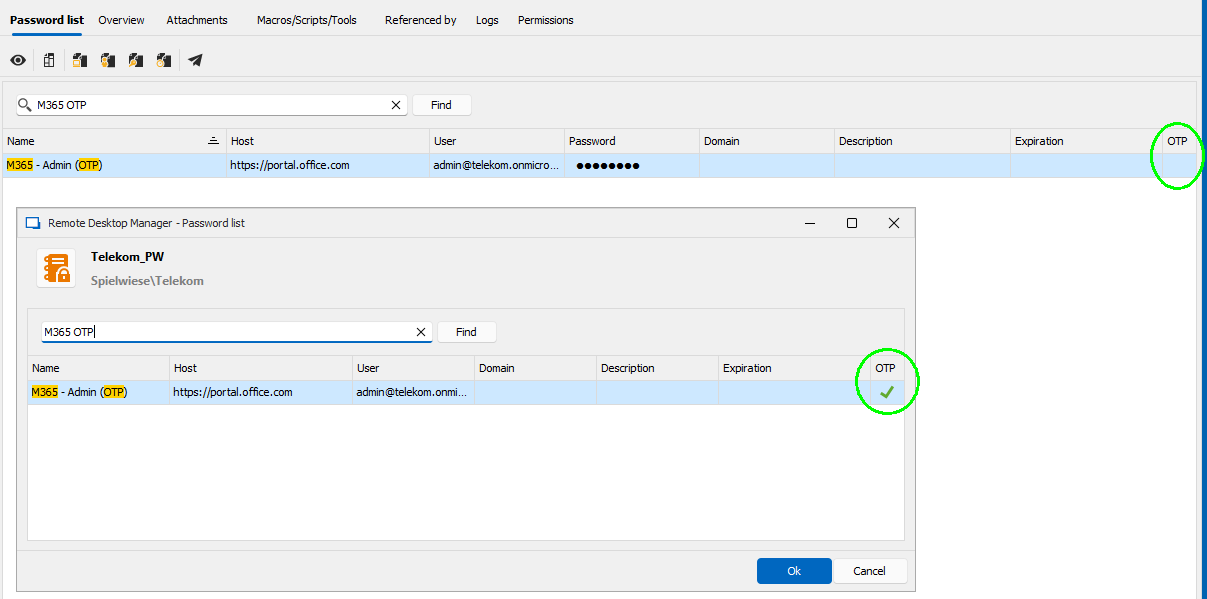
Regards
Stefan
44197a44-119f-4131-944a-437f3dae6cb0.png
Hello,
Thanks for bringing this to our attention as well.
I've fixed the OTP checkmark issue, and you can expect this to take effect for the 2024.3.17
Regards,
Jafran Majeau
Hello Majeau,
thank you again for the great improvment you have done for password list.
You have added double click for "Copy domain" in password list, this helps a lot.
For ease of use (as double click is a "hidden feature") and for consistency reasons I would suggest adding "Copy domain" to right click menu and to icon bar as well.
And for same reasons, if this is possible, add double click for OTP column as well.
Again thank you
Stefan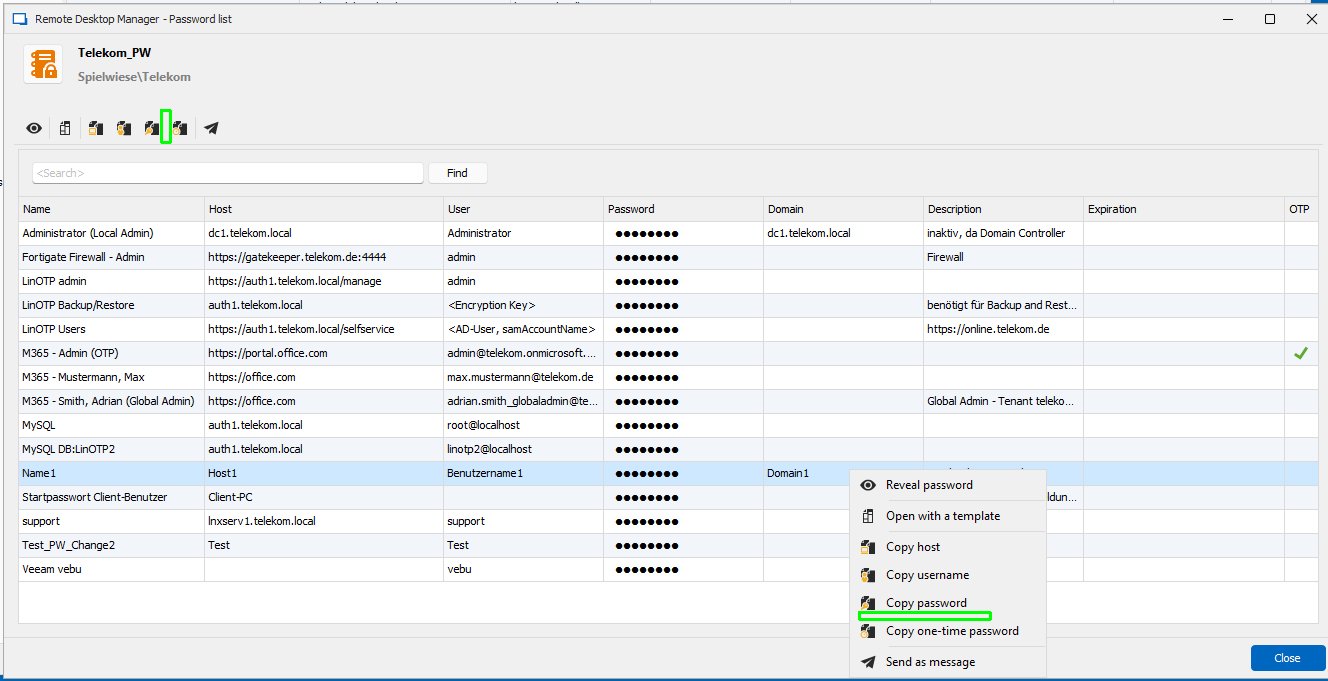
ce4f54f0-1de9-4c0f-a28b-7aceaac94b14.png
Hello,
We've implemented the improvements you mentioned (as well as others) in the password list. This should be available for the upcoming version. I'm uncertain at this stage if we're releasing another 2024 version or not. But if we do, these changes will be included. If we don't, you can expect these to take effect with the next 2025 version.
Regards,
Jafran Majeau