Change Temporary Scripts Folder behavior
0 vote

Current behavior:
Upon closing the RDM application the entire contents of the selected folder are delete with no option of recovery. What happens to the machine if the user selects their Documents folder? C:\windows? C:\? There is potential to destroy a significant amount of data or the functionality of the computer.
At a minimum there should be a message or in indication that the contents of the folder will be destroyed while the developers work on a better solution than a blind delete. One possible solution may be to prepend the temp files with the PID of the current instance of RDM and only delete the files with that prefix?
I can't seem to attach a screenshot mockup.
All Comments (5)
I can add it in a reply.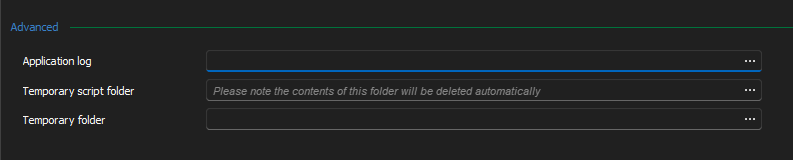
2024-05-22_07-36-42.png
Hello,
Thank you for your feedback. I've opened two different tickets:
- The first to add a warning for the temporary script folder and for the temporary folder (both of them work the same way). This should not be long to add and we should have it in our official release of 2024.2 which we should release in a few weeks.
- The second to see about changing the behavior of the temporary folders used by RDM. This one might be more complicated as it has a bigger impact on the application, but I understand your concern. I can't give you an estimate on when we will be able to work on this one as we have other priorities at the moment.
Regards,
Hubert Mireault
Hello,
After a discussion internally, we have added a new checkbox for "delete content of temporary folders when closing the application". This setting will be enabled by default (as that is the current behavior). That will both give a heads up to the user to only set a path to a folder where it's fine to delete its contents, and allow them to deactivate this behavior and clean their paths manually if they prefer. This setting will be available starting with our major release of 2024.2, coming in a few weeks.
Regards,
Hubert Mireault
Are you keeping the hard delete like current or soft delete i.e. recycle bin?
Hello,
It will be hard delete like currently. I forgot to mention, but we will also improve it to create a subfolder automatically and only delete that subfolder, to make it safer.
Regards,
Hubert Mireault