Out of sync warning

Out of sync warning (PAM tab) is still active upon successful password reset (via check-in). The only way seems to be to go into web PAM GUI and do a Check Synchronization Status or Password Reset.
All Comments (16)
Hello,
Would it be possible to confirm the version of Devolutions Server you are using, and what type op provider/PAM account you are referring to?
Best regards,
Certainly, we are at DVLS version 2023.3.13.0 and we are using Domain User provider.
It's the same issue when using check-in in the web gui, but not as big of a deal since the workaround mentioned is more easily available.
Hello,
I'm sorry for the delay, and I thank you for your patience.
Could you verify the account that is configured on your Application pool and the Scheduler service? Are they domain account or local/network service account?
Best regards,
Hi,
It's the same domain service account on both.
Regards,
Simon
Hello,
I'm sorry for the delay, and I thank you for your patience.
Could you verify the account that is configured on your Application pool and the Scheduler service? Are they domain account or local/network service account?
Best regards,
Hello,
Could you please verify if the account has the necessary rights to use WinRM (Windows Remote Management) to the domain?
Best regards,
Hello,
I'm not following. What would be the necessary right and how would this be configured for this account to be able to reset the flag in DVLS?
Regards,
Simon
Hello,
Could you please verify if the account has the necessary rights to use WinRM (Windows Remote Management) to the domain?
Best regards,
Hello Simon,
The necessary rights for WinRM typically include being a member of the 'Remote Management Users' group on the domain. This setup allows the account to perform operations remotely. To configure these rights:
1. On the target machine, go to 'Computer Management'.
2. Navigate to 'System Tools' > 'Local Users and Groups' > 'Groups'.
3. Add the user to the 'Remote Management Users' group.
After updating these settings, please ensure that your domain account used in DVLS is also in this group. This should help in resolving the flag reset issue upon synchronization.
Please let me know if this resolves the issue or if further assistance is needed.
Best regards,
Hello,
I've added the account (used by scheduler and app pool) to the local Remote Management Users group, and restarted the services. But there is no change.
The "Out-of-sync" error still persists as I do a check-out and check-in of PAM accounts, until I manually either do "Check Sync Status" or a "Password Reset". The log only registers PAM Password reset - Success whenever I do a Password reset, although the password is successfully reset even on Check-in.
Not sure what you mean by ensuring my domain account is a member of Remote Management Users. Surely not all DVLS users would have to be added as members, right?
Please not that these "Out-of-sync" accounts have just been imported to PAM, and without "Reset Password on Import" ticked
Regards,
Simon
Hello Simon,
The necessary rights for WinRM typically include being a member of the 'Remote Management Users' group on the domain. This setup allows the account to perform operations remotely. To configure these rights:
1. On the target machine, go to 'Computer Management'.
2. Navigate to 'System Tools' > 'Local Users and Groups' > 'Groups'.
3. Add the user to the 'Remote Management Users' group.
After updating these settings, please ensure that your domain account used in DVLS is also in this group. This should help in resolving the flag reset issue upon synchronization.
Please let me know if this resolves the issue or if further assistance is needed.
Best regards,
Hello Simon,
Thanks for your patience.
The "Remote Management Users" memberships should indeed be applied to the Scheduler and App Pool Identity accounts.
That said, you brought up an interesting point, and I want to ensure I understand correctly:
"Please not that these "Out-of-sync" accounts have just been imported to PAM, and without "Reset Password on Import" ticked."
Once you have performed the first checkout/check-in or Reset Password, does the scheduled password reset turn to an "In-Sync" state?
If so, I think it's completely normal; Importing an account without resetting the password will inevitably create an empty password on the account and, therefore, be out-of-sync.
Please let me know where I'm mistaken.
Best regards,
Alex Belisle
Hello Alexandre,
I still don't understand what WinRM has to do this changing sync status flag in DVLS, but the account is a member nonetheless
I answer this in my previous post, please check it out :)
Once you have performed the first checkout/check-in or Reset Password, does the scheduled password reset turn to an "In-Sync" state?
If so, I think it's completely normal; Importing an account without resetting the password will inevitably create an empty password on the account and, therefore, be out-of-sync.
Hello Simon,
I believe there's been a misunderstanding. WinRM only applies with Windows Provider (local Windows users), not Active Directory. You can disregard the steps regarding WinRM and remove the permissions.
"Please note that these "Out-of-sync" accounts have just been imported to PAM, and without "Reset Password on Import" ticked"
This is expected behaviour: The sync check verifies that the password stored in the DB matches the one in Active Directory. If you import an account and don't check "Reset Password on Import", the PAM module cannot know the password.
The only workaround is to manually type the password of the PAM account and then doing a sync check.
Example: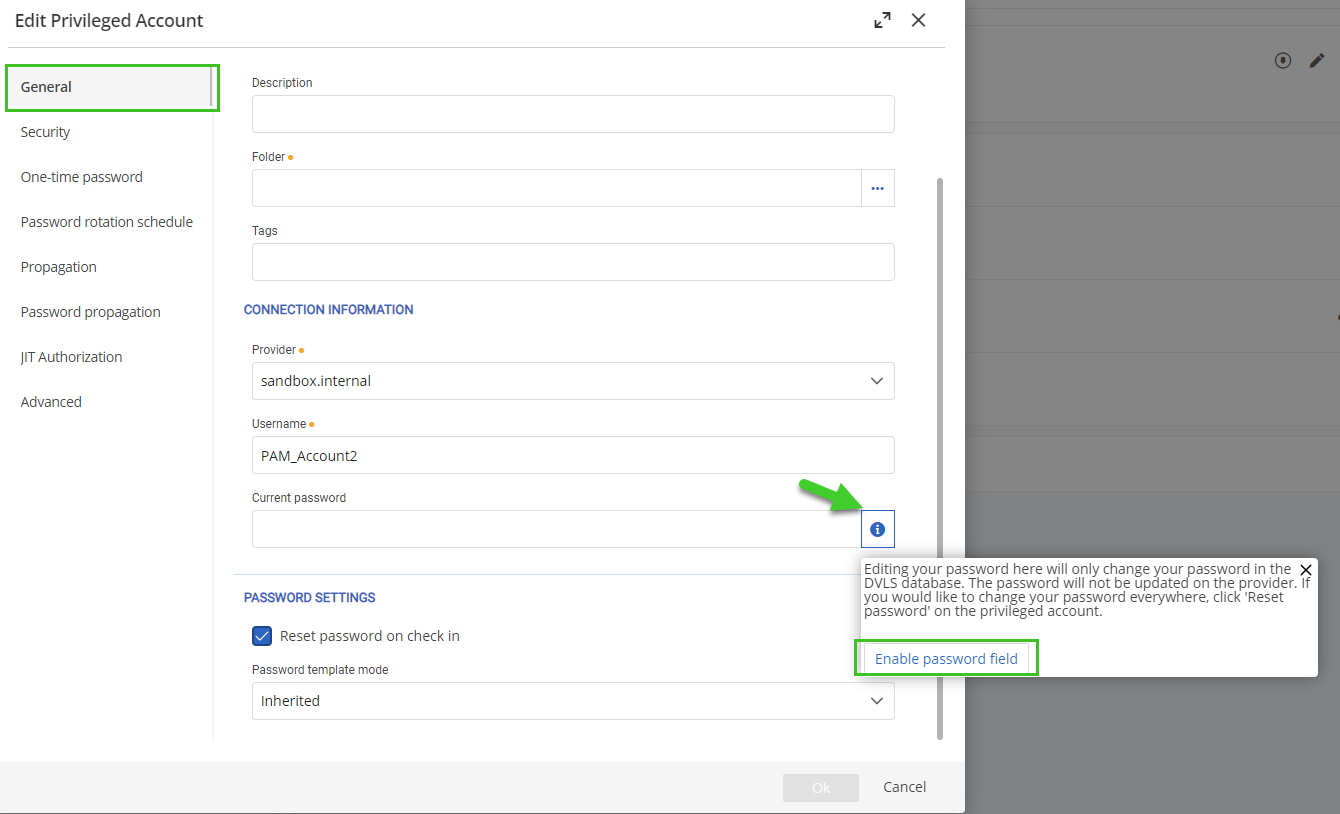
Let me know your thoughts.
Best regards,
Marc-Antoine Dubois
Marc-Antoine Dubois
74858c9b-6d74-4f11-871c-a1ffc014c62a.png
Hello,
This is not the issue. The issue is that "Out-of-sync" i still active after a successful check-in, which resets the password and should clear any out-of-sync issues, just like Reset password button does. It's active until the point you click the Check sync status. This button and the Password reset are only available in the web GUI.
Why is this a problem for us? Well, performing a check-out / check-in of newly imported "out-of-sync" PAM accounts is a workaround for reseting password, without having to leave the RDM GUI. The only annoyance is that we can't clear out the out-of-sync flag this way. I believe this should be regarded as a bug, since the account is, in fact synced after a check-in (just like it is after a Password reset).
The PAM Password reset event isn't logged either after a check-in, although it is performed.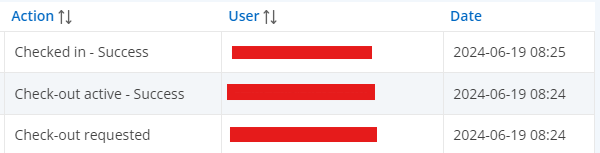
Compared to a password reset action:
I believe adding the Check synchronization step after a Check-in would solve this issue, just like this step is done after a Password reset action. The PAM Password reset event should also be registered in the log when doing a check-in.
EDIT: The PAM Password reset event appears to be logged in both cases according to the RDM GUI, but not in web GUI above.
Also, I just found out, doing a Password reset with Powershell does NOT clear the "Out-of-sync" flag.
Regards,
Simon
"Please note that these "Out-of-sync" accounts have just been imported to PAM, and without "Reset Password on Import" ticked"
This is expected behaviour: The sync check verifies that the password stored in the DB matches the one in Active Directory. If you import an account and don't check "Reset Password on Import", the PAM module cannot know the password.
The only workaround is to manually type the password of the PAM account and then doing a sync check.
7c09573d-b02f-4423-b2dc-0e6e6ef76c46.png
e49c707e-95a5-4e51-a749-32ae60930bc0.png
Hello Simon,
I've opened a support ticket and reached out by email.
I'll post our findings here once we resolve the issue.
Best regards,
Marc-Antoine Dubois
Marc-Antoine Dubois
Hello,
Quick update to whoever stumbles on this thread.
There's a bug or oversight. When you do the check-in of a PAM account, there's no call to do a check-sync, this means the flag for the out-of-sync isn't removed even if the account is technically synced.
In theory, this doesn't affect usability as the scheduler will regularly verify the status of the PAM account and eventually remove the out-of-sync flag.
I'll update the thread once I have more information.
Best regards,
Marc-Antoine Dubois
Marc-Antoine Dubois
Hello,
This issue should be resolved as of version 2024.2.8 of Devolutions Server.
Best regards,
Marc-Antoine Dubois
Marc-Antoine Dubois
Hello,
Yes, I have verified, this is resolved as of 2024.2.8
Thanks
Regards,
Simon
Hello,
This issue should be resolved as of version 2024.2.8 of Devolutions Server.
Best regards,
Marc-Antoine Dubois