HMAC failure

I updated RDM , I have a ssh forwarding configuration, but now I always keep having this issue
5/17/2024 1:19:53 PM] Sending kex init
[5/17/2024 1:19:53 PM] Received kex init
[5/17/2024 1:19:53 PM] Selected algorithms: curve25519-sha256, ecdsa-sha2-nistp384, aes256-ctr, aes256-ctr, hmac-sha2-256, hmac-sha2-256, none, none
[5/17/2024 1:19:53 PM] Sending Ed25519 kex init
[5/17/2024 1:19:53 PM] Received Ed25519 kex reply
[5/17/2024 1:19:53 PM] Successfully authentified server
[5/17/2024 1:19:53 PM] Sending new keys message
[5/17/2024 1:19:53 PM] Received new keys message
[5/17/2024 1:19:53 PM] Sending userauth service request
[5/17/2024 1:19:53 PM] HMAC verification failed
[5/17/2024 1:19:53 PM] Disconnection in progress
[5/17/2024 1:19:53 PM] Bytes sent: 1536, Bytes received: 1492
[5/17/2024 1:19:53 PM] Packets sent: 4, Packets received: 3
[5/17/2024 1:19:53 PM] Kex completed: 1
[5/17/2024 1:19:53 PM] Disconnecting
[5/17/2024 1:22:14 PM] Devolutions Protocols version: 2024.4.16.1 Windows
[5/17/2024 1:22:14 PM] Terminal font: Courier New [Courier New, fixed=True]
[5/17/2024 1:22:14 PM] Starting SSH, verbose level: 2
[5/17/2024 1:22:14 PM] Setting up connection
[5/17/2024 1:22:14 PM] Connecting to port: 22 (IP any)
[5/17/2024 1:22:14 PM] SSH banner: SSH-2.0-9.37 FlowSsh: Bitvise SSH Server (WinSSHD) 9.37: free only for personal non-commercial use
last version is 2024.1.29.0, I had to rollback to 2024.1.12.0
the ok output looks like this
[5/18/2024 12:39:15 PM] Starting SSH, verbose level: 2
[5/18/2024 12:39:15 PM] Setting up connection
[5/18/2024 12:39:15 PM] Connecting to port: 22 (IPv4 - 6)
[5/18/2024 12:39:16 PM] SSH banner: SSH-2.0-9.99 FlowSsh: Bitvise SSH Server (WinSSHD) : free only for personal non-commercial use
[5/18/2024 12:39:16 PM] Sending kex init
[5/18/2024 12:39:16 PM] Received kex init
[5/18/2024 12:39:16 PM] Selected algorithms: curve25519-sha256, ssh-rsa, 3des-cbc, 3des-cbc, hmac-sha2-256, hmac-sha2-256, none, none
[5/18/2024 12:39:16 PM] Sending Ed25519 kex init
[5/18/2024 12:39:16 PM] Received Ed25519 kex reply
[5/18/2024 12:39:16 PM] Successfully authentified server
[5/18/2024 12:39:16 PM] Sending new keys message
[5/18/2024 12:39:16 PM] Received new keys message
[5/18/2024 12:39:16 PM] Sending userauth service request
[5/18/2024 12:39:16 PM] Received extension info message
[5/18/2024 12:39:16 PM] Server accepts public key types: ssh-ed25519,ecdsa-sha2-1.3.132.0.10,ecdsa-sha2-nistp256,ecdsa-sha2-nistp384,ecdsa-sha2-nistp521,rsa-sha2-512,rsa-sha2-256,ssh-rsa
[5/18/2024 12:39:16 PM] Received service accepted message
[5/18/2024 12:39:16 PM] Sending userauth init request
[5/18/2024 12:39:16 PM] Received userauth banner: Welcome , you are trying to enter to Bitvise server
Welcome , you are trying to enter to Bitvise server
[5/18/2024 12:39:16 PM] Received userauth failure: publickey,keyboard-interactive,password
[5/18/2024 12:39:16 PM] Starting interactive authentication
[5/18/2024 12:39:16 PM] Sending userauth interactive request
[5/18/2024 12:39:16 PM] Received userauth info request:
[Name->Password authentication]
[Prompt->Password: ]
[5/18/2024 12:39:16 PM] Sending userauth interactive response: 1
[5/18/2024 12:39:16 PM] Received userauth success
[5/18/2024 12:39:16 PM] User authenticated successfuly by password interactive
Listening on 127.0.0.1:10006 D
the destination server is a bitvise, I could take this information
<event seq="154" time="2024-05-18 12:34:34.288526 -0500" app="BvSshServer 9.37" type="Info" name="I_CONNECT_DISCONNECTED_NORMALLY" desc="Connection disconnected normally.">
<conn id="1032" winSesId="C1032" service="SSH" remoteAddress="192.168.0.5:58678" virtualAccount="javus" windowsAccount="PE-00002\BvSsh_VirtualUsers" winSes="new" cacheUse="late"/>
<parameters reason="EofReceived" elapsedMs="2076516" socketBytesReceived="79896" socketBytesSent="12424" payloadBytesReceived="2525" payloadBytesSent="2116" channelBytesReceived="0" channelBytesSent="0"/>
<conns ssh="0" sshAuth="0" ftp="0" ftpAuth="0" nrWinSes="4" winSesUsesActive="0"/>
<help message="The client has disconnected the connection by sending EOF."/>
</event>
Can you fix the issue in the next version or if there any parameter that I can configure let me know please.
All Comments (15)
Hello,
Could you please verify that the algorithms are enabled in the Advanced menu of your SSH entry?
You can set them by switching the Algorithm support option to Custom and enabling all required missing algorithms.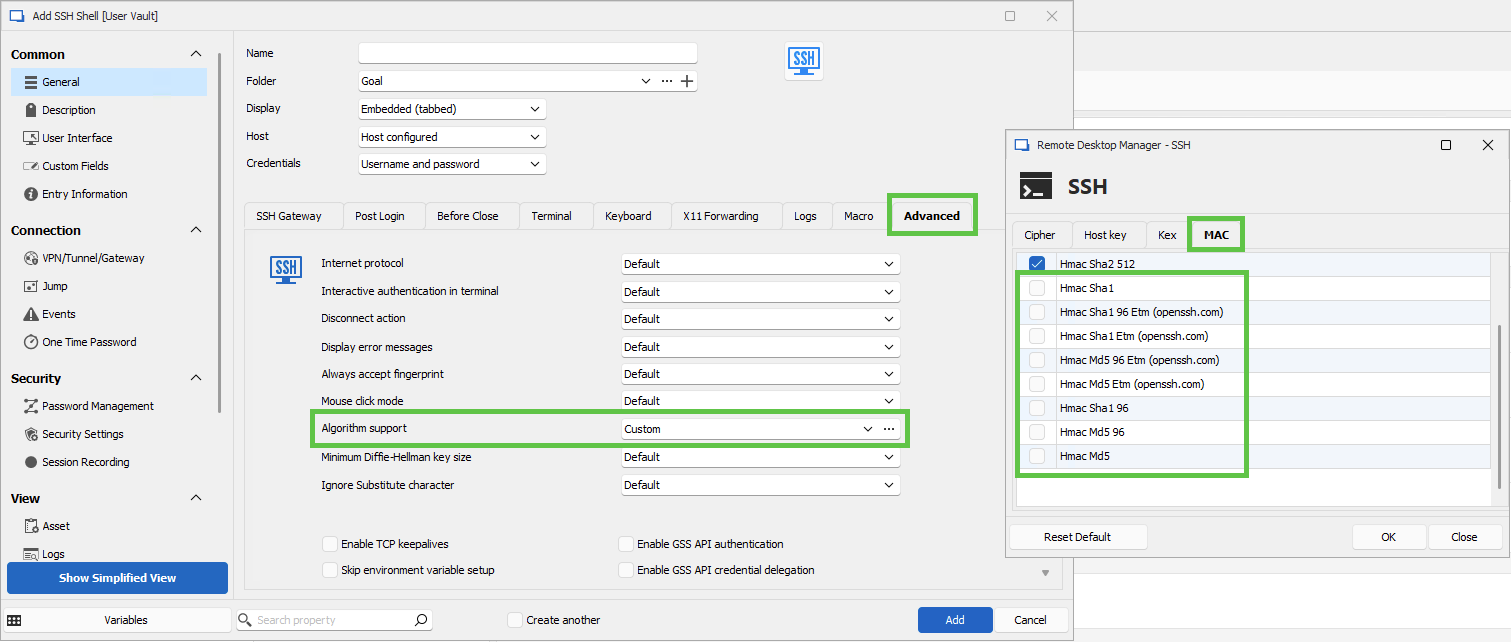
Let us know if that helps.
Best regards,
Érica Poirier
ef91e84b-b298-4ce6-b353-a99adaaad9b2.png
Hello, thanks for the update.
I already did it , I mean I use all the options and also I use specific options, but I always got the same result.
I only could get it to work when I downgrade RDM.
Hello,
Would it be possible to send us a screenshot of your configurationsin the Advanced menu of your SSH entry?
Best regard
Carl Marien
Hello , here are the outputs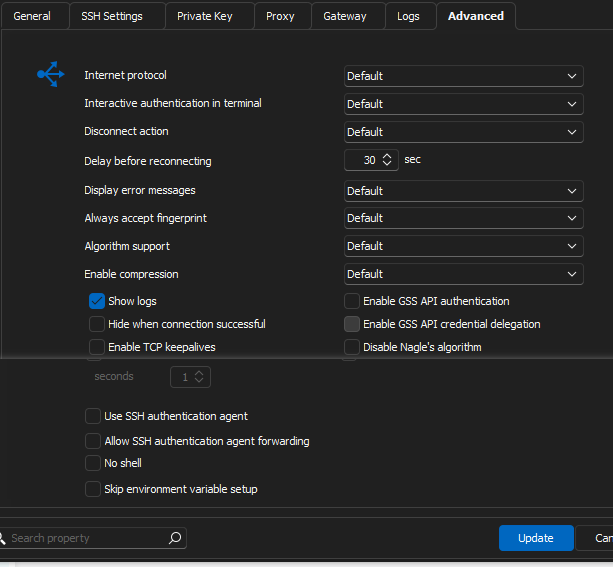
also I think it is important to share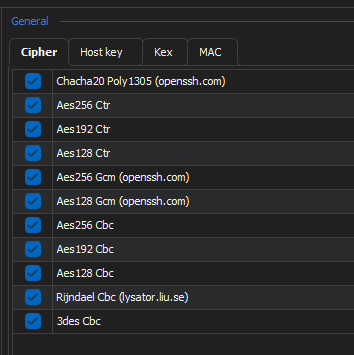
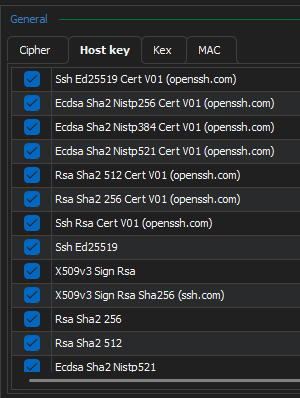
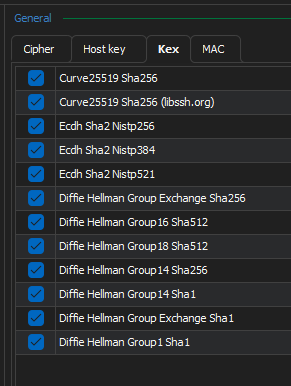
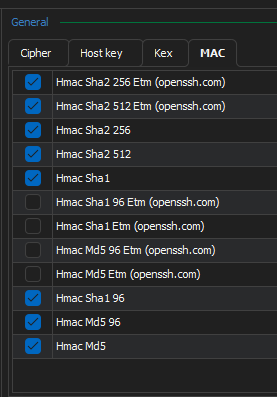
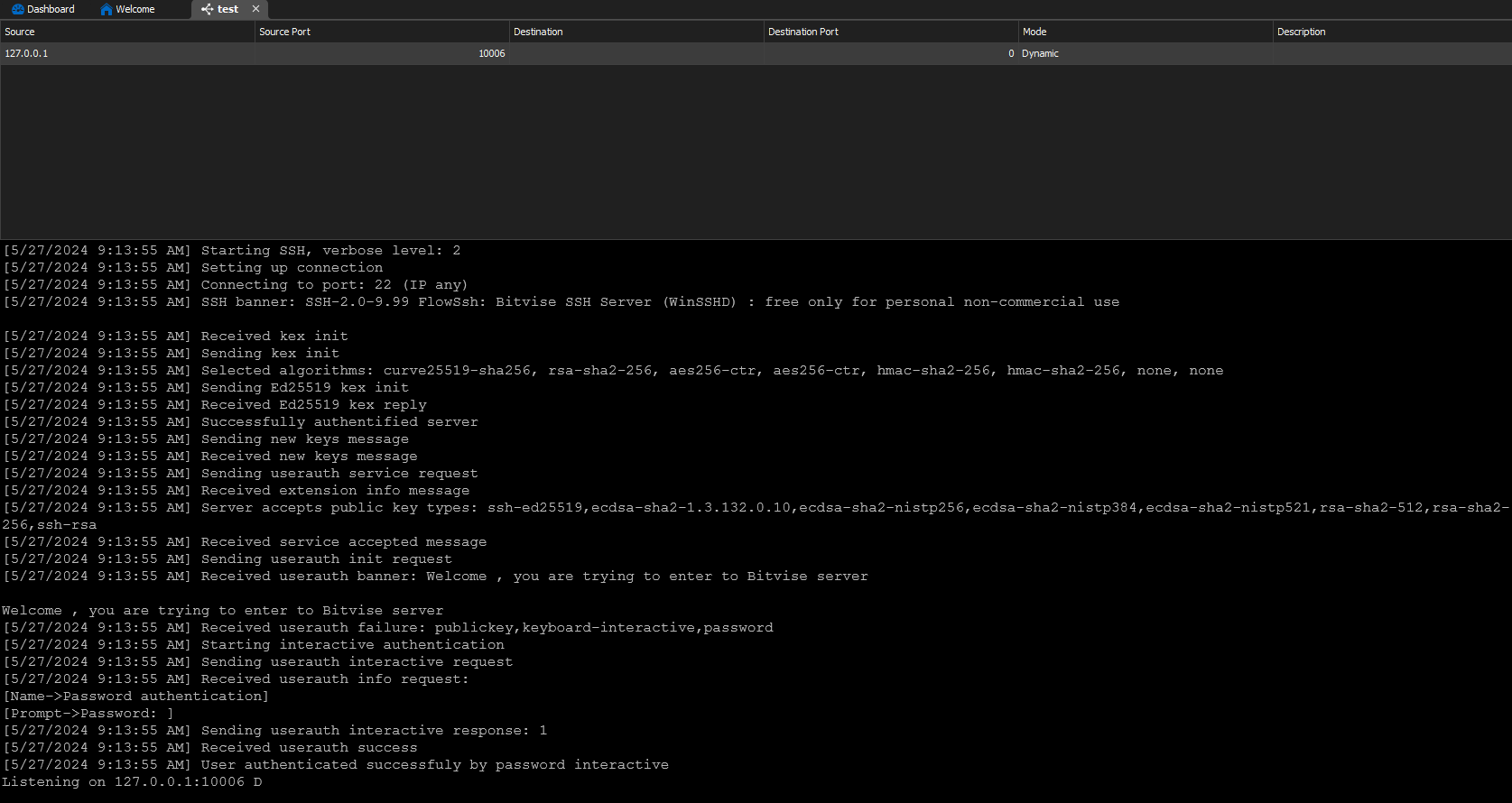
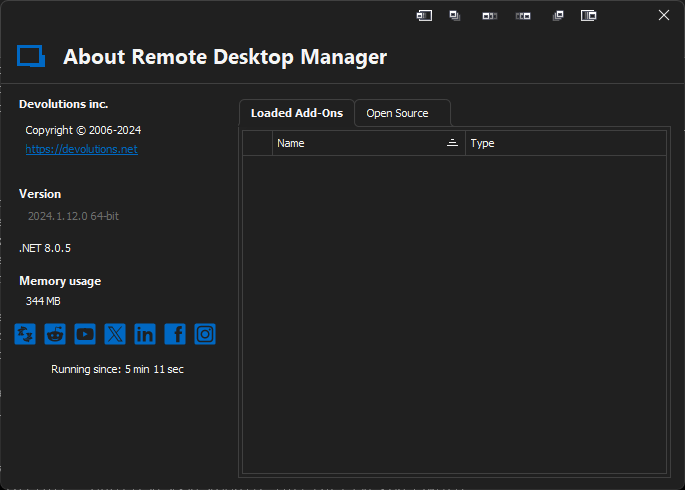
a6b6c1af-7147-46eb-8cdb-e1a2010709f4.png
53a4adb6-fcab-4f63-9bfb-d3eba2c6dc3d.png
805a8257-a7a5-40f9-9596-5e236b6ce3fd.png
7f2b77ed-6b17-4398-9955-6d74a478c4dd.png
612478c2-116e-407d-b5c6-95dba7e98cd1.png
30ff4bf5-7573-4419-bb21-bbd216d5bd5f.png
2fc07951-1113-4ddb-b2a1-998f10a935e1.png
Hello,
After reviewing he error message a second time you provided, this line is quite strange: [5/18/2024 12:39:16 PM] Received userauth failure: publickey,keyboard-interactive,password.
This seems to indicate that the password or private key is incorrect.
Can you tell us if you are using a private key to connect to the SSH session?
If not, I think it would be better to have a remote session so I can see your issue firsthand.
Please let me know if this would work for you.
Best regards,
Carl Marien
Hello,
I have the same issue after upgrade.
Authentication: Password
[6/24/2024 1:18:30 PM] Devolutions Protocols version: 2024.6.11.1 Windows
[6/24/2024 1:18:30 PM] Terminal font: Courier New [Courier New, fixed=True]
[6/24/2024 1:18:30 PM] Starting SSH, verbose level: 2
[6/24/2024 1:18:30 PM] Setting up connection
[6/24/2024 1:18:30 PM] Connecting to port: 443 (IPv4 - 6)
[6/24/2024 1:18:31 PM] SSH banner: SSH-2.0-9.37 FlowSsh: Bitvise SSH Server (WinSSHD) 9.37: free only for personal non-commercial use
[6/24/2024 1:18:31 PM] Received kex init
[6/24/2024 1:18:31 PM] Sending kex init
[6/24/2024 1:18:31 PM] Selected algorithms: diffie-hellman-group-exchange-sha256, rsa-sha2-256, aes256-ctr, aes256-ctr, hmac-sha2-256, hmac-sha2-256, none, none
[6/24/2024 1:18:31 PM] Sending diffie-hellman group exchange request
[6/24/2024 1:18:31 PM] Received diffie-hellman group of size: 3072
[6/24/2024 1:18:31 PM] Sending diffie-hellman group exchange kex init
[6/24/2024 1:18:31 PM] Received diffie-hellman group exchange kex reply
[6/24/2024 1:18:31 PM] Server authenticated by provided public key
[6/24/2024 1:18:31 PM] Sending new keys message
[6/24/2024 1:18:31 PM] Received new keys message
[6/24/2024 1:18:31 PM] Sending userauth service request
[6/24/2024 1:18:31 PM] HMAC verification failed
[6/24/2024 1:18:31 PM] Disconnection in progress
[6/24/2024 1:18:31 PM] Bytes sent: 1632, Bytes received: 2772
[6/24/2024 1:18:31 PM] Packets sent: 5, Packets received: 4
[6/24/2024 1:18:31 PM] Kex completed: 1
[6/24/2024 1:18:31 PM] Disconnecting
I'll downgrade the installation again
Hello,
Thank you for the logs.
Would it be possible to tell us if the issue reappears in other applications?
Best regards,
Carl Marien
Hi I've upgrade from 2023.3.39.0 64-bit to 2024.2.13.0 64-bit and the SSH port forwarding stop working and show the same issue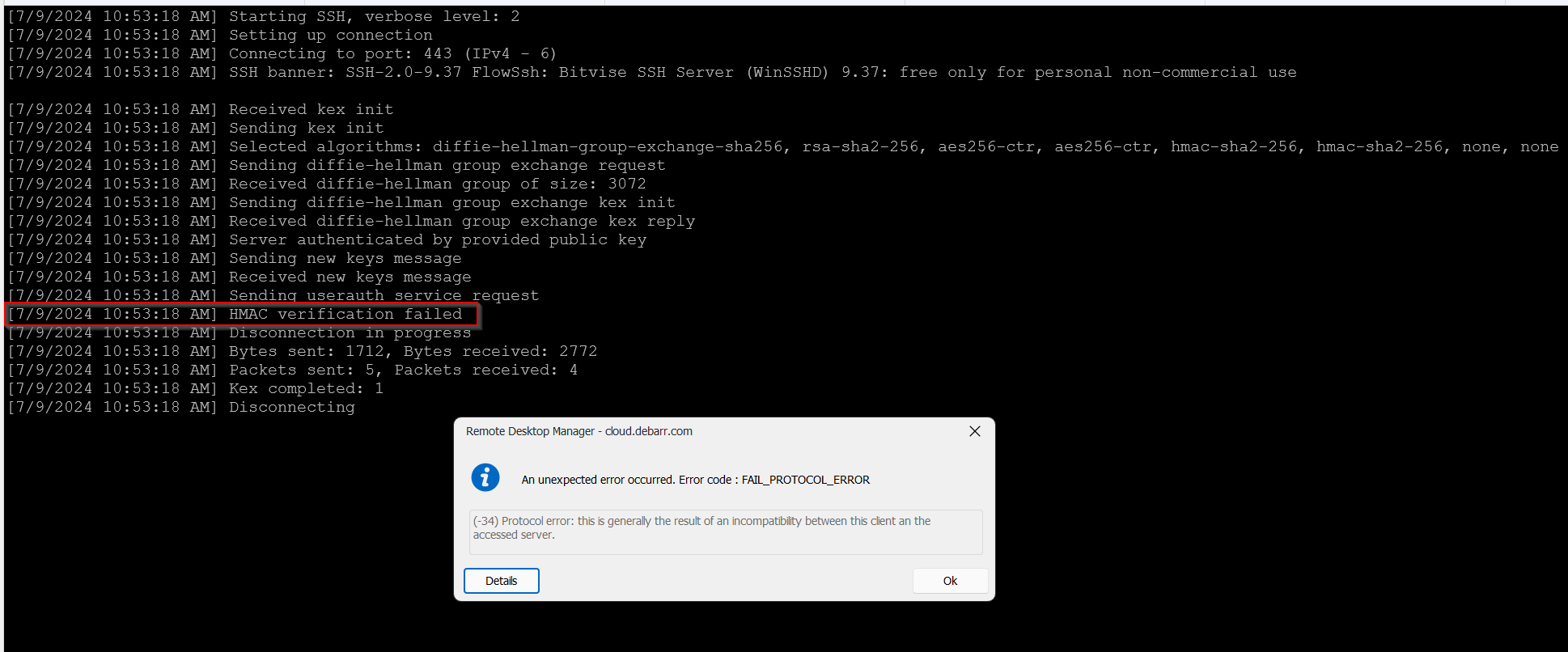
2024-07-09 10_54_12-Clipboard.png
Hello,
Thank you for updating us. As the error message suggests, it seems like there is an incompatibility between the server and the client. In these cases, I usually ask if the issue arises in another application to be sure if the issue is related to RDM.
Could you please verify if the problem persists when using another SSH client? This will help us determine if the issue is specific to RDM or if it might be a broader compatibility issue.
If the problem is specific to RDM, we can investigate further on our end.
Best regards,
Carl Marien
Hi Carl
I've created the ticket 00065329, however to let you know when I used another clients as Putty or Bitvise, it worked.
When I move back to version RDM version 2023.3.39.0 it works fine.
Thanks
Francisco
Hello,
I have spoken with the technician handling your case, and we will send you a link for a session. During this session, we will record the issue and ensure all details are thoroughly documented. This will help us either recreate the issue accurately or provide enough information for the developers.
Best regards,
Carl Marien
Hey Guys,
I have the same Problem. I'm using RDM 2024.2.12.0. I'm trying to connect with an SSH Tunnel to a Bitvise SSH Server Version 9.38.
When doing so, I'm getting the same HMAC Verification failed message.
Best Regards, Johannes
Hello,
The issue was “fixed” on the client side by reverting to Version 9.29 of Bitvise and using RDM 2024.2.16, and we were not able to reproduce the issue from our end.
Can you try reverting to Version 9.29 of Bitvise and see if it works for you as well?
If this workaround works, I will create a bug report as the issue likely stems from how we push the console command in the backend.
Best regards,
Carl Marien
Hi Carl,
I can confirm that it works with Bitvise SSH Server 9.29. (RDM Version i tested with was 2024.2.12.0)
As soon as Upgrading to the next Version of Bitvise SSH Server (9.32) the connection doesnt work anymore.
Please have a look at the Bitvise SSH Server Changelogs from Verison 9.32, which addresses changes with the algorithms due to CVE-2023-48795.
As the Changelog states, the SSH Client has to support Strict Key Exchange. Unfortunately I cant find any options for this, even though it was introduced with RDM Version 2024.1.1.3.
Best Regards, Johannes
Hello,
Thank you. I have created an internal ticket for this issue.
We will attempt to recreate your issue, and I will keep you updated on any progress.
Best regards,
Carl Marien