Line drawing

When connecting ssh to a Linux server with terminal encoding set to UTF8 our menus look pretty: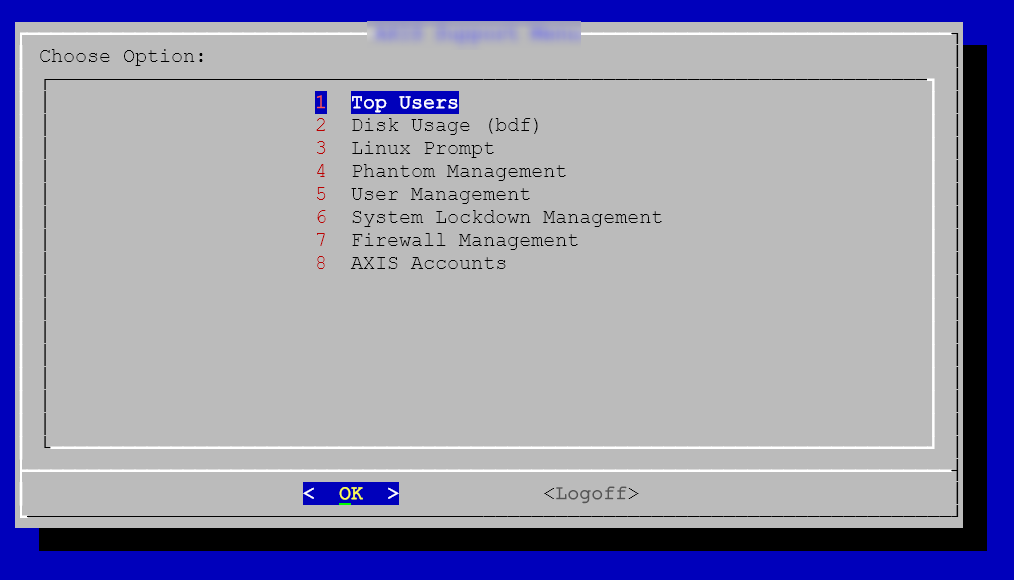
When I set to ISO:
That same menu looks ugly: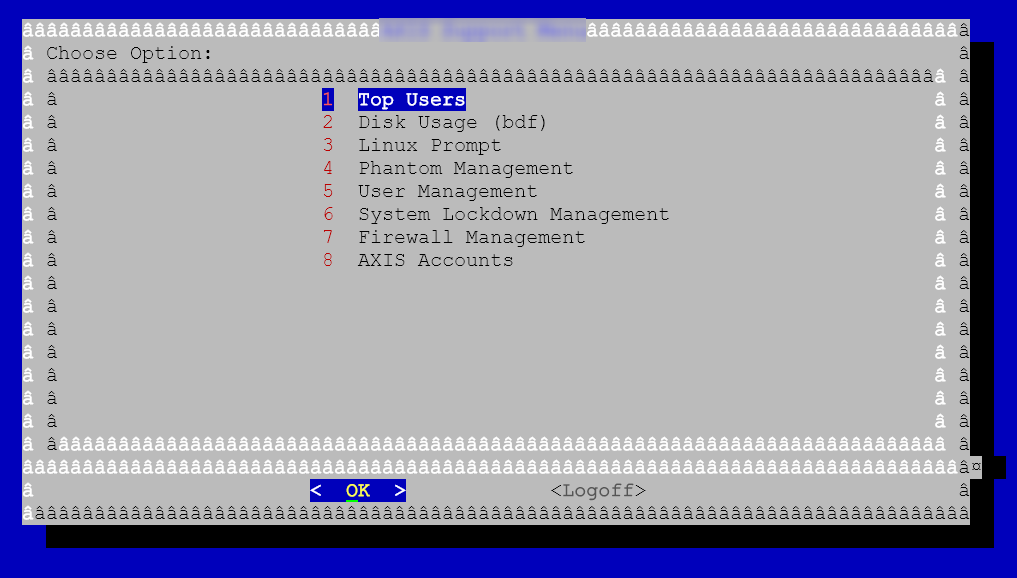
The reason I need ISO is because with UniVerse on this system multi-value delimiters(there are other things) looks wrong with UTF8: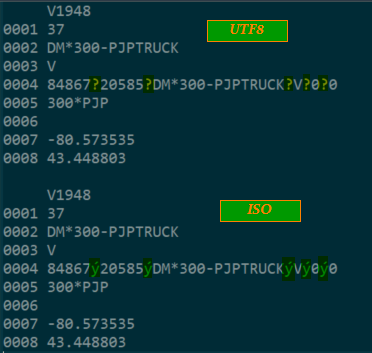
With PuTTY there is an option to override line drawing even in ISO encoding which help me keep my required encoding but also have pretty menus: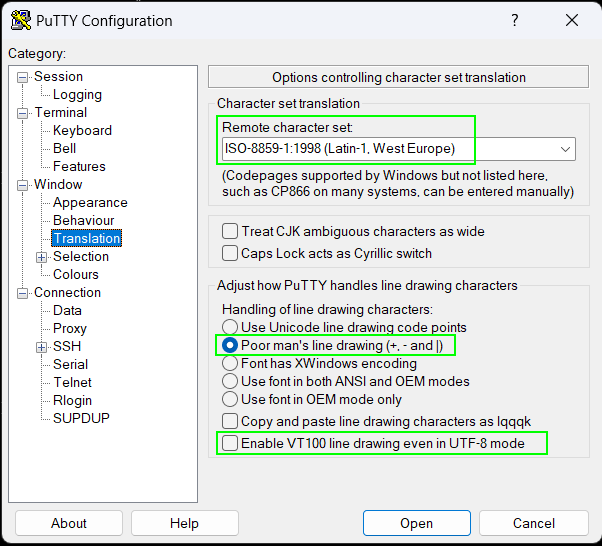
Is there a setting that already exists in RDM that may help or would this be a feature request/bug?
23c6cee7-e411-437a-8e0c-e40d08aadda2.png
ccce5845-5b91-4ec2-bbd8-beba693fc4ff.png
0d7b72fd-b0cc-48da-b4f2-68549ad18897.png
f929bb59-cc66-4a8a-a110-9bd6fd8b6839.png
091bdcc0-d9b8-4f44-be15-c93f847c2abd.png
All Comments (14)
Hello,
Thank you for getting in touch with us. To better assist you, could you kindly provide us with the following information:
- Your current RDM version.
- The data source you are utilizing.
Once we have this information, we will be better equipped to diagnose and resolve the issue.
Best regards,
Maxim Robert
Hello,
Thank you for getting in touch with us. To better assist you, could you kindly provide us with the following information:
- Your current RDM version.
- The data source you are utilizing.
Once we have this information, we will be better equipped to diagnose and resolve the issue.
Best regards,
Latest RDM and what's a data source?
Hello Patrick,
Thank you for your swift reply!
The Data Source you use can be found under File > Data Source. Let me know if it shows "Local Data Source" or "SQLite" or else.
Here's a helpful topic about the Data Source type that can be used under File > Data Source.
https://docs.devolutions.net/rdm/data-sources/data-sources-types/
If you have any other questions, feel free to let us know.
Best regards,
Maxim Robert
2024.1.29.0 64-bit
Local Data Source
Hello Patrick,
Thank you for the information!
I've provided the information to our QA Team to see if they can reproduce the issue. I will let you know with more details as soon as possible.
If you have any other questions, feel free to let us know.
Best regards,
Maxim Robert
Hello Patrick,
Thank you for your collaboration!
After providing the information to our QA Team, they would need a record (.trp) of the character that doesn't come out right, if possible.
I will send you the link to provide this information through Direct Message.
If you have any other questions, feel free to let us know.
Best regards,
Maxim Robert
OK, so while trying to reproduce in RDM and PuTTY I discovered I was a little mixed up in the combinations.
I did some re-testing and and discovered some things.
in PuTTY i was actually showing proper menu when using UTF-8. no amount of combinations of encoding plus line drawing extras in PuTTY could get both UV and menus to display properly in the same settings.
So my UV(UniVerse) uses ISO-8859-1.
But RH Linux8 that UV is installed on uses UTF-8.
The menus in my original post uses dialog in Linux which is supported by UTF-8 and displays using UTF-8.
But because UV doesn't support UTF-8 when i go into UV some characters do not display properly.
I do not think there is away around this, I either set to ISO and get proper view in UV and ugly menus in Linux. Or i set to UTF8 and get nice menus but some off characters in UV.
Unless someone has had this issue before and can recommend a tweak to make both work, i guess i am stuck with an either/or situation.
Hello Patrick,
Thank you for your response!
Could you please try the steps below?
- In RDM, in the Terminal tab of your entry, could you check the "Override terminal type" and write "xterm" (without quotation marks)?
Our development team would still like to see a recording in .trp of the character that doesn't come out right. It will allow us to do some tests on our end.
I will send you the link to provide this information through Direct Message.
Thank you for your collaboration. If you have any other questions, feel free to let us know.
Best regards,
Maxim Robert
what all does the recording capture? and sort of logging?
server info, user/password/key?
files?
Also how to do recording?
My default is set to xterm
I have overwrote it to xterm anyways:
I however can not find where default encoding is set.
with terminal override set to xterm and encoding default. the menu displays properly(line drawing from dialog).
entering into UV (UniVerse) session which in UV the terminal type is vt100:
But multivalue markers are incorrect showing as ? instead of ý: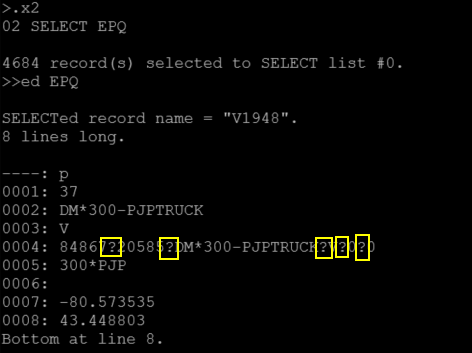
ý = ^253
If I set to ISO-8859-1:
menu is ugly because dialog likes UTF-8: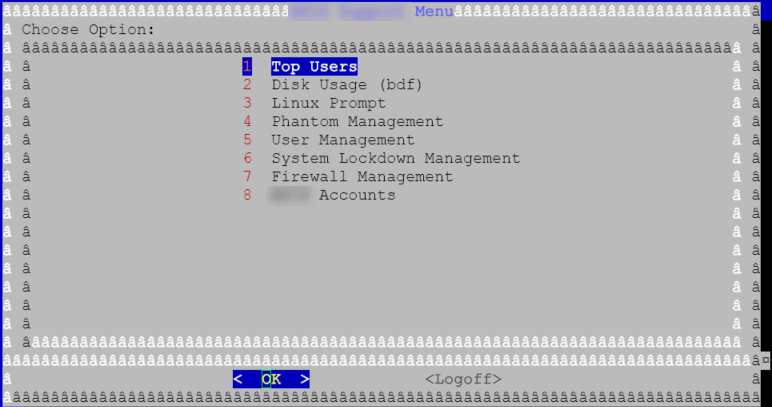
But when I go into UV session multivalue characters show proper ý: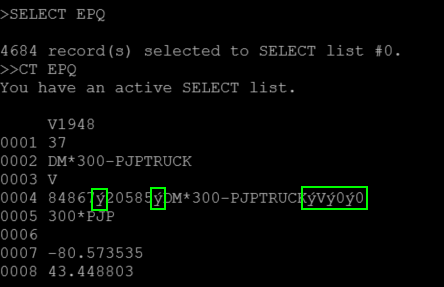
In both instances if I edit the UV file but go into "Up-arrow display mode" they both show the decoded version properly: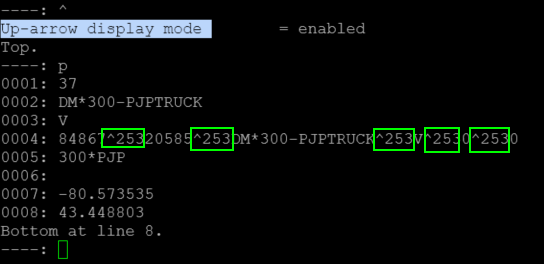
830bc061-0b5e-4118-a1b9-e2a21caae297.png
819ddc25-200c-4f8d-a84f-d5a28be41bfe.png
601c8555-43c8-45d2-9bee-13ad457411df.png
6fc5acf0-be1c-4ac5-b004-14cbc22acab8.png
1875905a-bd76-44fb-a867-7f5967507af2.png
504f5152-1642-4903-8c70-7b925b99369a.png
b3d652f0-9103-4c6e-abfe-c687210dc392.png
4debd4ac-2ec2-4b9d-ab99-ddc331315cbe.png
8f7c819d-1ce8-4af6-9b07-54c8011ef71d.png
Hello Patrick,
Thank you for the information!
We would like to do a remote session with you to examine the issue directly. I created a ticket and emailed you to schedule the session at your convenience.
I also provided the information to our development team and will let you know with more information as soon as possible.
Best regards,
Maxim Robert
Do we have any update on this from dev? was the session (and I think you took a recording as well) helpful?
Hello,
A ticket was opened to our development team regarding this following your remote session.
I added a comment to get feedback regarding this. When they will get back to me, I will then get back to you.
Best regards,
Jeff Dagenais
Hello,
When you connect, the server operates in UTF8. Then, you execute the UV command, and the output of this command is in ISO8859-1, which is the problem. The two encodings are different for non-ASCII characters, and there is really no way for the terminal to know that the encoding has changed.
One possible solution would be to pipe the UV command into the iconv command, which would convert from ISO8859-1 to UTF8.
Another solution could be to force the server to use ISO8859-1 (and set your terminal for this encoding). This could be done by changing one or more environment variables, but we are unsure which ones. Our terminal can do this, but it requires that the server accept the change in environment variables.
Best regards,
Etienne Lord