FreeRDP not working after update to v2024.1.29.0

Good morning.
I just updated to the latest release this morning, and was extremely happy to see the Auto Logoff for FreeRDP is now available.
So upon trying to connect this morning, I get the following error message, no matter if it is Linked KeePass, or set to Username and Password: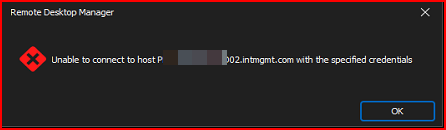
If I use wfreerdp (which is the FreeRDP manufacturers software), I can connect to the entries no problem.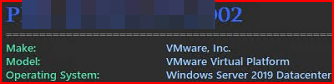
I have tested this with entries that I can connect to perfectly with mstsc, I can connect to those no problem.
If I simply make the change from " so it seems to be something with the way RDM is parsing the credentials.
Thanks for looking in to this, as I do have about 25 entries where I have to use FreeRDP to connect to.
Thanks!
--- Chuck
Overgaard, AZ (-7 MST / Zulu Year-Round)
RDM Version: 2025.3.11.0 64-Bit - MSSQL - Daily Usage
RDM Version: 2025.2.28.0 64-Bit - MSSQL - VM
e24e142b-e1fa-4128-aca7-6fbcb8e06a1c.png
ec5955c1-d96f-4afc-a479-7e8df596eadf.png
f20aea46-3434-4814-a39e-49d1ce7201f4.png
f2e3b1a9-0610-4f00-90b1-7a19e4cf80ba.png
All Comments (19)
Hello Chuck
I apologize for the inconvenience, I'm looking into this.
Could you share the command line you use for wfreerdp?
Thanks and kind regards,
Richard Markievicz
Hello Chuck
I apologize for the inconvenience, I'm looking into this.
Could you share the command line you use for wfreerdp?
C:\Windows\System32\wfreerdp.exe /v:HOSTNAME /f +clipboard /u:DOMAIN\USERNAME /p:PASSWORD
Thanks and kind regards,
--- Chuck
Overgaard, AZ (-7 MST / Zulu Year-Round)
RDM Version: 2025.3.11.0 64-Bit - MSSQL - Daily Usage
RDM Version: 2025.2.28.0 64-Bit - MSSQL - VM
Hello Chuck
Thanks for the information.
Do the servers in question enforce NLA?
I can't reproduce the problem on my side. We've had one change in RDM related to authentication, but it's around RDP Enhanced Security (RDP/TLS authentication) and that's fairly well tested, I don't think it's related (this was a side port of a fix that's existed on RDM Mac for a long time). We've also updated our FreeRDP branch in a recent timeframe.
Previously, were you on version 2024.1.28?
One more thing - it would help me if you can generate a debug log:
- Options > Types > Sessions > RDP > Logging
- Check "Enable Logging" and provide a path to create a log file
- Save the changes, restart RDM
- Reproduce the problem
You can send the log file to me by PM or to service@devolutions.net mentioning this forum thread. I'd also recommend you disable logging again afterwards, it has a non-zero effect on performance.
Please let me know if something isn't clear, and I apologize for the inconvenience
Kind regards,
Richard Markievicz
DM sent, sir!
--- Chuck
Overgaard, AZ (-7 MST / Zulu Year-Round)
RDM Version: 2025.3.11.0 64-Bit - MSSQL - Daily Usage
RDM Version: 2025.2.28.0 64-Bit - MSSQL - VM
Hi Chuck
I didn't get a PM by the forum; did you send on the forum or by email?
Thanks and sorry for the trouble
Richard Markievicz
I clicked on your profile and then "Send Direct Message".
I will send an email to the link you provided now.
--- Chuck
Overgaard, AZ (-7 MST / Zulu Year-Round)
RDM Version: 2025.3.11.0 64-Bit - MSSQL - Daily Usage
RDM Version: 2025.2.28.0 64-Bit - MSSQL - VM
Hi Chuck
Received - thank you.
NLA tells us `STATUS_LOGON_FAILURE` which typically means bad credentials; but I understand that's not the case as you haven't changed anything here.
Was 2024.1.28 working ok for you, or did you update from a different version?
Thanks and kind regards,
Richard Markievicz
Hi Chuck
Received - thank you.
NLA tells us `STATUS_LOGON_FAILURE` which typically means bad credentials; but I understand that's not the case as you haven't changed anything here.
Was 2024.1.28 working ok for you, or did you update from a different version?
Thanks and kind regards,
Deleted my response to correct it with this post...
I was wrong on my versions, and I completely appologize.
My daily VM has v2024.1.29.0 and it hits a jump server that was running 2024.1.27.0 which was providing the error.
I just realized the version difference and updated my jump server to v2024.1.29.0 and still get the above errors.
Sorry for the confusion.
--- Chuck
Overgaard, AZ (-7 MST / Zulu Year-Round)
RDM Version: 2025.3.11.0 64-Bit - MSSQL - Daily Usage
RDM Version: 2025.2.28.0 64-Bit - MSSQL - VM
Hello Chuck
Ok, my apologies for the delay, I've been trying to reproduce the issue but I haven't been successful on my side. I also don't see any changes on our FreeRDP integration that could cause this between .28 and .29. But that obviously doesn't match up with what you're seeing, so I'm sorry about that.
I didn't realize you're going through a Jump Host. So, the original connection log you supplied is from your local RDM to the jump host, and the error is in NLA (pre connection authentication). As far as I can tell the jump host shouldn't be relevant in that case.
Can you try to simplify and we can narrow down the problem. If you create a direct connection to the server you're using as a jump host and enter the credentials directly in the session, does it work or you get the same error? Does that same connection work on 2024.1.28? (Using FreeRDP of course). You could download the 2024.1.28 .zip release to test if you don't want to uninstall / reinstall: https://devolutions.net/remote-desktop-manager/home/previousversions/.
Thanks and kind regards,
Richard Markievicz
On the Jump Host, I removed all Jump Associated settings and have it set as a direct entry.
I still get the same results no matter if it is a KeePass link or direct Username and Password entry.
Figures that I am the only one with this issue, again! :-)
--- Chuck
Overgaard, AZ (-7 MST / Zulu Year-Round)
RDM Version: 2025.3.11.0 64-Bit - MSSQL - Daily Usage
RDM Version: 2025.2.28.0 64-Bit - MSSQL - VM
Hello Chuck
Thanks for your patience. I did reproduce the problem on my side and I'm working on that. I'll update once I have some more information.
Thanks and kind regards,
Richard Markievicz
Hello Chuck
I have an idea, but I'm not sure if this is a regression or something else changed.
I think you have your username in the format DOMAIN\Username, is that correct? If not, RDM can do some manipulation here, but that's how the credentials are reaching FreeRDP.
Can you try changing your configuration to be "user@domain" in the user field, and leaving the domain field empty? In the "Advanced" tab of the connection, please also check the "Username format" setting. We want the credentials to reach FreeRDP as "user@domain". You can verify that happens by enabling logging as above, and checking the first line of the log file which will have the masked username and domain fields.
To extrapolate - and I'm not sure how we got here - there are cases where a down-level login (domain\user) won't work, and if you provide that to mstsc it internally splits the value into separate user and domain fields. FreeRDP doesn't do that. We do have some code in our middleware that emulates the mstsc behaviour, but it's not currently enabled on RDM Windows. If this turns out to be the issue, I can easily enable that and our behaviour should match between mstsc and FreeRDP. But first I'd like confirmation that this is actually what's happening (as I said - I'm not sure how we got here, as I can't explain this regression at the code level).
Please let me know if something isn't clear or you have other questions
Thanks and kind regards,
Richard Markievicz
Hello Chuck
I have an idea, but I'm not sure if this is a regression or something else changed.
I think you have your username in the format DOMAIN\Username, is that correct? If not, RDM can do some manipulation here, but that's how the credentials are reaching FreeRDP.
Can you try changing your configuration to be "user@domain" in the user field, and leaving the domain field empty? In the "Advanced" tab of the connection, please also check the "Username format" setting. We want the credentials to reach FreeRDP as "user@domain". You can verify that happens by enabling logging as above, and checking the first line of the log file which will have the masked username and domain fields.
Good morning. I don't seem to have the "Username Format" setting under the "Advanced" tab in v2024.1.29.0. Please advise.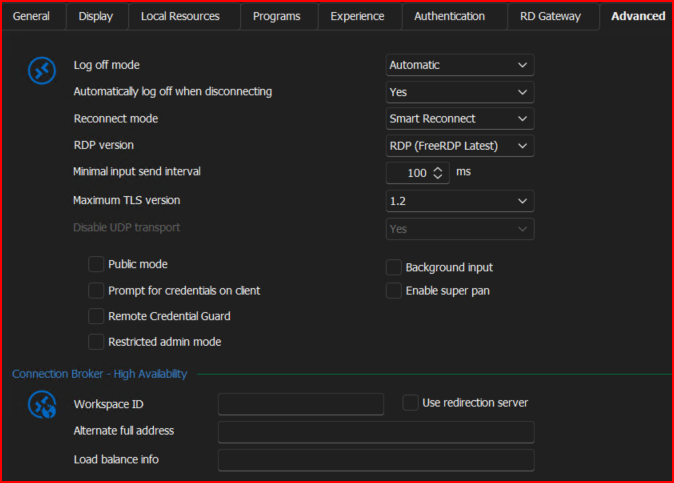
To extrapolate - and I'm not sure how we got here - there are cases where a down-level login (domain\user) won't work, and if you provide that to mstsc it internally splits the value into separate user and domain fields. FreeRDP doesn't do that. We do have some code in our middleware that emulates the mstsc behaviour, but it's not currently enabled on RDM Windows. If this turns out to be the issue, I can easily enable that and our behaviour should match between mstsc and FreeRDP. But first I'd like confirmation that this is actually what's happening (as I said - I'm not sure how we got here, as I can't explain this regression at the code level).
Please let me know if something isn't clear or you have other questions
Thanks and kind regards,
--- Chuck
Overgaard, AZ (-7 MST / Zulu Year-Round)
RDM Version: 2025.3.11.0 64-Bit - MSSQL - Daily Usage
RDM Version: 2025.2.28.0 64-Bit - MSSQL - VM
f55ffbf1-c68d-4b0a-a822-b7348a484c45.png
Hi Chuck
Sorry, I meant the Advanced pane, not the tab.
Kind regards,
Richard Markievicz
WORKED LIKE A CHAMP!!!!!
I made the change as follows for a successful connection:
Credentials: NO CHANGE - Left them as a KeePass link to the User Vault
Username format: Changed from "No Change" to "{User}@{Domain}"
I changes back to the following and it failed with that original message:
Credentials: NO CHANGE - Left them as a KeePass link to the User Vault
Username format: Chaned from "{User}@{Domain}" to "No Change"
I then just made the change back to the 1st setting which was successful and it connected again.
Even the Auto Logoff feature within RDP is now working. :-)
NOTE: The setting change above also worked connecting through the Jump Server from my laptop as well.
Hope this helps. If you need the logfile, I can send that to you as well.
--- Chuck
Overgaard, AZ (-7 MST / Zulu Year-Round)
RDM Version: 2025.3.11.0 64-Bit - MSSQL - Daily Usage
RDM Version: 2025.2.28.0 64-Bit - MSSQL - VM
Hello Chuck
Great news!
I can't explain why this regressed for you when you updated, but since we understand what's going on I won't spend further cycles on that.
I'll switch our FreeRDP integration on Windows to use the mstsc-equivalent credential parsing, so this kind of thing won't be necessary in the future. That will probably be for 2024.2, however (in a few weeks).
In the meantime, I hope this workaround is ok for you.
Thanks and kind regards,
Richard Markievicz
This workaround is perfect in the meantime, sir!
I also tested connectivity through the Jump Server from my laptop with the settings you mentioned, which was successful.
Have a great day and we will test once again when I see it listed in the Fixes section of the update.
Thanks!
--- Chuck
Overgaard, AZ (-7 MST / Zulu Year-Round)
RDM Version: 2025.3.11.0 64-Bit - MSSQL - Daily Usage
RDM Version: 2025.2.28.0 64-Bit - MSSQL - VM
Hello again
I realized I never circled back to this one; but the changes I mentioned up thread should be integrated as of 2024.2.x.
So - moving forward, you shouldn't need to change the "username format" to make this work.
Please don't hesitate to post back with further questions or problems
Kind regards,
Richard Markievicz
Hello again
I realized I never circled back to this one; but the changes I mentioned up thread should be integrated as of 2024.2.x.
So - moving forward, you shouldn't need to change the "username format" to make this work.
Please don't hesitate to post back with further questions or problems
Kind regards,
Thank you for the update, sir.
--- Chuck
Overgaard, AZ (-7 MST / Zulu Year-Round)
RDM Version: 2025.3.11.0 64-Bit - MSSQL - Daily Usage
RDM Version: 2025.2.28.0 64-Bit - MSSQL - VM
