mix Variables and Parameters in custom typing macro

Hi,
is it somehow possible to mix Variables and Parameters in a typing Macro?
e.g. I create a new Typing Macro with the following content:
!NOW ECHOING dollarUSERNAMEdollar
!$USERNAME$
!NOW ECHOING dollarPASSWORDdollar
!$PASSWORD$
!NOW ECHOING bracket1bracket
!{1}
!NOW ECHOING bracket2bracket
!{2}
$USERNAME$ and $PASSWORD$ should be the user/pass from the device im currently running the macro on, {1} & {2} should be the Parameters form the macro itself.
In this case it should be as following:
$USERNAME$=test
$PASSWORD$=test1234
{1}=Parameter1
{2}=Parameter2
The device I'm testing on has Properties -> Security -> Security Settings -> "Allow password in variable" enabled.
Now comes the fun part, as the result differs based on how it's run:
- 1. try:
Open the session normally, then switching back to "Dashboard" (of the selected device), then go to tab "Macros/Scripts/Tools" and select the macro from above. Output:
COSWI0229_LAB_RACK_3560#!NOW ECHOING dollarUSERNAMEdollar
COSWI0229_LAB_RACK_3560#!test
COSWI0229_LAB_RACK_3560#!NOW ECHOING dollarPASSWORDdollar
COSWI0229_LAB_RACK_3560#!$PASSWORD$
COSWI0229_LAB_RACK_3560#!NOW ECHOING bracket1bracket
COSWI0229_LAB_RACK_3560#!Parameter1
COSWI0229_LAB_RACK_3560#!NOW ECHOING bracket2bracket
COSWI0229_LAB_RACK_3560#!Parameter2
so everything except $PASSWORD$ works.
- 2. try:
Open the session normally, then right click the host in the navigation pane, press "Execute Macro/Script in Terminal", select the Macro from above. Output:
COSWI0229_LAB_RACK_3560#!NOW ECHOING dollarUSERNAMEdollar
COSWI0229_LAB_RACK_3560#!test
COSWI0229_LAB_RACK_3560#!NOW ECHOING dollarPASSWORDdollar
COSWI0229_LAB_RACK_3560#!test1234
COSWI0229_LAB_RACK_3560#!NOW ECHOING bracket1bracket
COSWI0229_LAB_RACK_3560#!{1}
COSWI0229_LAB_RACK_3560#!NOW ECHOING bracket2bracket
COSWI0229_LAB_RACK_3560#!{2}
so now both variables work but the Parameters don't.
- 3. try:
Open the session normally, then right click the host in the navigation pane, press "Macros/Scripts/Tools", select the Macro from above. Output is the same as in the first try:
COSWI0229_LAB_RACK_3560#!NOW ECHOING dollarUSERNAMEdollar
COSWI0229_LAB_RACK_3560#!test
COSWI0229_LAB_RACK_3560#!NOW ECHOING dollarPASSWORDdollar
COSWI0229_LAB_RACK_3560#!$PASSWORD$
COSWI0229_LAB_RACK_3560#!NOW ECHOING bracket1bracket
COSWI0229_LAB_RACK_3560#!Parameter1
COSWI0229_LAB_RACK_3560#!NOW ECHOING bracket2bracket
COSWI0229_LAB_RACK_3560#!Parameter2
COSWI0229_LAB_RACK_3560#!NOW ECHOING bracket3bracket
COSWI0229_LAB_RACK_3560#!
Any idea if it's possible to mix those somehow?
Currenlty running "2024.1.23.0 64-bit".
Thanks!
All Comments (4)
Hello,
Thank you for reaching out to Devolutions Support.
I am working to reproduce the issue.
I will get back to you as soon as possible.
Best regards,
Hello,
For some reason, only $USERNAME$ works for me.
I will report the issue to our Dev team and reply soon.
Best regards
518dc801-fd76-4e99-bc02-09c99eeacaea.png
Hello,
For some reason, only $USERNAME$ works for me.
I will report the issue to our Dev team and reply soon.
Best regards
Hi,
as seen in my examples above $USERNAME$ is the only variable that works every time for me also. The bigger problem is that either $PASSWORD$ works, or the paramters - not both.
BR Jannis
Hi,
I hope you are doing well!
Sorry for the delay.
Do you use Devolutions Server as a Data Source?
If yes, you can allow passwords in a variable by enabling the option from your Devolutions Server.
Administration > System settings > Password Management 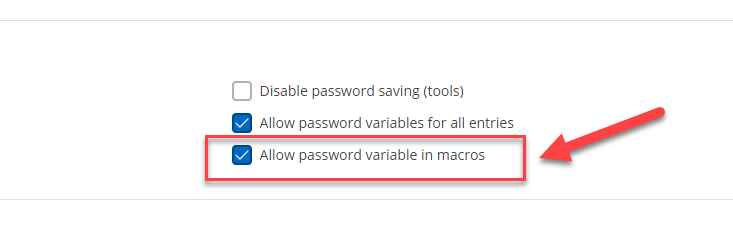
I hope this will help.
Thanks
576ee201-9b6a-49ec-9f0e-b132dee9a12d.png