MFA Problem

Good afternoon,
We are experiencing issues with MFA TOTP Google Authenticator accessing the Data Source
We have multiple workstations that connect to the Data Source with the same username, password and MFA.
The problem is that when entering the Data Source there are times when it asks to reconfigure the MFA.
Do you know what it could be?
We are in version 2024.1.25.0
It also happens in 2024.1.28.0 and earlier (it's been happening to us for two years!)
Also, I leave you more information.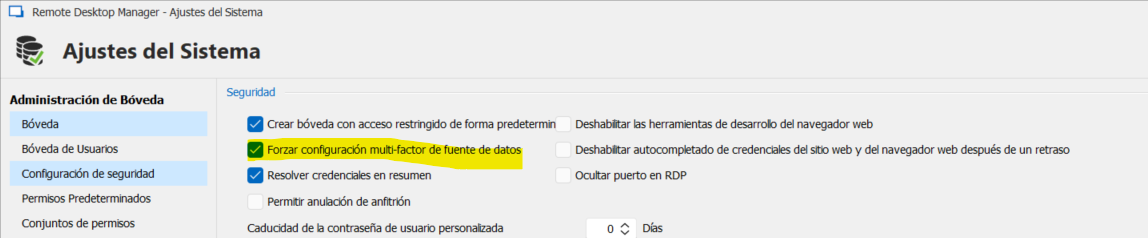
DB: SQL Server
License: Entrerpise
Product: Remote Desktop Manager
Greetings
1b0b2305-b2e8-4050-9919-04b087e8e393.png
All Comments (23)
Hello,
Thank you for reaching out to us regarding this,
That is indeed odd; I'm wondering if you have version management configured on your data source.
https://docs.devolutions.net/rdm/commands/administration/settings/system-settings/application-specific/version-management/
I suspect some users may be using a version of RDM not compatible with the current database version which may be causing this type of weird issue,
Let me know,
Best regards,
Samuel Dery
Hello,
Yes, we have it configured as follows
c431d7a3-270d-4541-a7eb-692ee42c7f50.png
Hello,
Thanks for sharing the configuration details. From what you've described and the added configuration image, it sounds like a compatibility issue between versions might be leading to these MFA reconfiguration prompts.
I recommend updating all workstations to the same latest version of Remote Desktop Manager to mitigate possible incompatibilities. Also, check if the MFA module is correctly set up across the different versions and ensure all users are synchronized in their settings.
If the problem persists after these checks, please let us know. We'll further investigate this issue to provide you with a solution.
Best regards,
Carl Marien
Hello,
It has happened to us again, this time in the maximum version with several users...
thank you
Hello,
Unfortunately, since the issue first appeared two years ago and you are the only user experiencing it, pinpointing the exact problem is quite challenging.
I will create an internal ticket to investigate this issue further and will contact you via email to set up a remote session.
Best regards,
Carl Marien
Hello,
We have seen the report but nothing appears...
I checked System Diagnostics and it shows "User Specific Settings Size" at 0 Bytes...
Could that be why?
And if that's why... how do we use the space?
Thanx
88fe7cea-6d10-4ca1-911f-330c336923ea.png
Hello,
Thank you for the detailed report and the additional information you provided regarding the 'User Specific Settings Size'. im not sure This could influence the behavior of MFA authentication. Could you please check your system settings to see if any MFA-related options are enabled? This check could help us better understand the issue.
Please keep us informed about what you find.
Best regards,
Carl Marien
Hello, as you can see, we have forced the MFA to enter the data source.
I have been reviewing your knowledge base and there are no more options to activate MFA to access the data source
Greetings
A question
Is the MFA information stored on the end user's own computer or in the DB?
Greetings
Hello,
The MFA information is stored on the user's local machine
Best regards,
Carl Marien
Hello
I have already detected where the error may come from:
It appears that the MFA information is stored in: C://users/%LOCALUSER%//appdata/local/Devolution/RemoteDektopManager.
Here, the data source information will be in folders (according to configured data sources)
By doing tests, we have seen that by deleting the .mcdf2 file with the ID by name we have been able to replicate the bug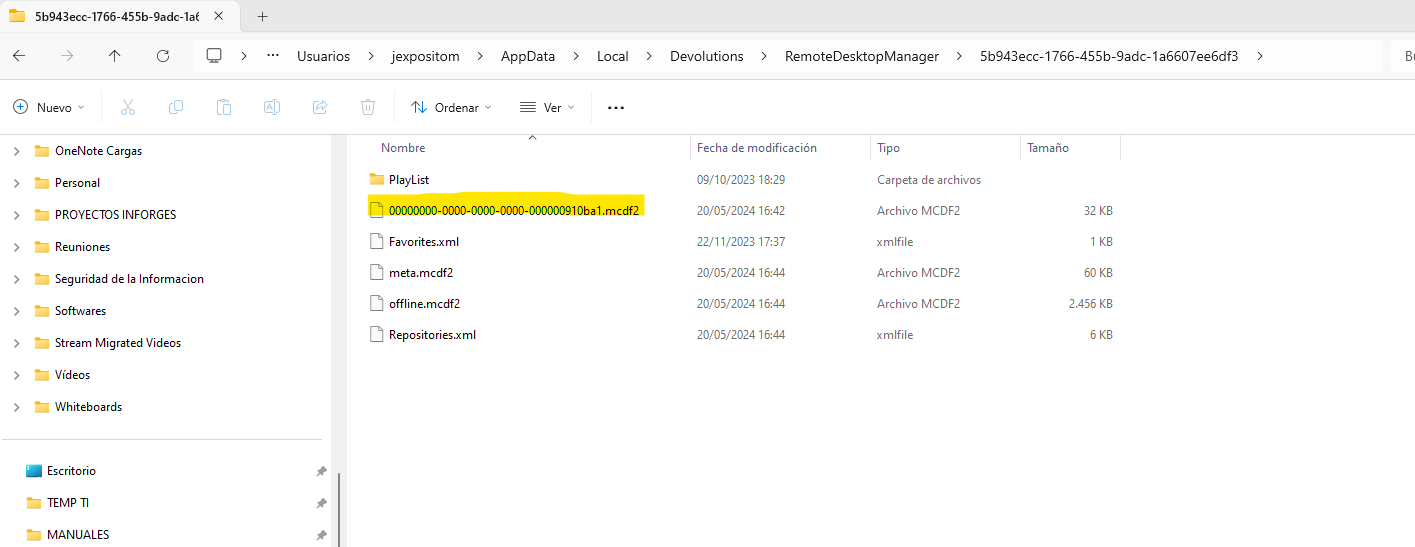
So, I think that:
- By having the same user for different computers, if the MFA is generated on one computer and that file is different from the one on another computer, when connecting the DB to Online mode the MFA is corrupted and asks to generate another file, thus increasing the problem
Is there a possible solution to this bug by the development team?
Thanks for everything
2313003c-6d40-420f-95ff-5ad2513689d7.png
Hello,
Thank you for all the information. I have reached out to the developer and will keep you informed about any advancements.
Best regards,
Carl Marien
Hello,
Thanks i wait answer
Greetings
Hello,
Thank you for your patience.
Could you please tell us how MFA is set up in your installation?
Are we talking about data source MFA, MFA configured via My Account Settings, or app MFA?
Best regards,
Carl Marien
Hello,
We configure Data Source MFA from the data source settings.
MFA is Google Authenticator
The MFA will be requested from users every time they connect to the Database online.
In offline mode it is not requested
Greetings
Hello,
Thank you for your patience.
Could you please install the latest version of RDM and check if the issue persists?
Best regards,
Carl Marien
Hello,
We have been trying to update to the latest version for a few months now and the same thing happens to us...
When we have to update many users
Can you assure me that the latest version solves the problem?
Greetings
Hello,
The developer mentioned that the current version could help with the issue you are experiencing. Unfortunately, we cannot assure you 100% that the issue is fixed in the latest version, but it would be a step forward in the troubleshooting process.
Best regards,
Carl Marien
Hello
We have updated to the most recent version and it still happens...
Greetings
Hello,
Thank you for the follow-up. I have informed the developer that the issue is still present for you.
I will keep you updated on any advancements.
Best regards,
Carl Marien
Hello,
Thanks i wait answer
Greetings
Hello,
Thank you for your patience. Would it be possible for you to try to recreate the issue on the latest version?
The latest version should have a fix for a similar issue to yours.
Best regards,
Carl Marien
Good morning
It seems that, after moving to version 2024.2.15, the MFA problem does not occur again
Many thanks for everything!
Greetings