RDM 2024.1.28.0 Crashes when exiting ssh sessions

Hi,
I have an issue where if I close any SSH session, RDM will freeze. I never had this issue weeks back, but it started with 2024.1.27.0 and continued when I upgraded to 2024.1.28.0. I have tried to use the portable version but its experiencing the same issue. I tried downgrading to 2024.1.21.0 but i have the same issue.
here are my event logs:
-
Faulting application name: RemoteDesktopManager.exe, version: 2024.1.28.0, time stamp: 0x65f90000
Faulting module name: KERNELBASE.dll, version: 10.0.22621.3447, time stamp: 0x3d876852
Exception code: 0xe0434352
Fault offset: 0x00000000000653ac
Faulting process id: 0x0x42C0
Faulting application start time: 0x0x1DA9CA8830BB1A0
---------------------------------------------------------------------------------
Application: RemoteDesktopManager.exe
CoreCLR Version: 8.0.424.16909
.NET Version: 8.0.4
Description: The process was terminated due to an unhandled exception.
Exception Info: System.InvalidOperationException: Value Dispose() cannot be called while doing CreateHandle().
at System.Windows.Forms.Control.Dispose(Boolean disposing)
at System.Windows.Forms.Form.Dispose(Boolean disposing)
at DevExpress.Utils.Win.StickLookAndFeelForm.Dispose(Boolean disposing)
at DevExpress.XtraSplashForm.SplashFormBase.Dispose(Boolean disposing)
at DevExpress.XtraWaitForm.WaitForm.Dispose(Boolean disposing)
at Devolutions.RemoteDesktopManager.Forms.FrmWaitProgress.Dispose(Boolean disposing)
at System.ComponentModel.Component.Dispose()
at DevExpress.XtraSplashScreen.ThreadManagerBase.ThreadEntryPointCore(ThreadParameters params)
at DevExpress.XtraSplashScreen.ThreadManagerBase.ThreadEntryPoint(Object params)
at System.Threading.ExecutionContext.RunInternal(ExecutionContext executionContext, ContextCallback callback, Object state)
--- End of stack trace from previous location ---
at System.Threading.ExecutionContext.RunInternal(ExecutionContext executionContext, ContextCallback callback, Object state)
---------------------------------------------------------------------------------------------------------------------------
Exception code: 0xe0434352
Fault offset: 0x00000000000653ac
Faulting process id: 0x0x6D68
Faulting application start time: 0x0x1DA9D6B90B6A819
Faulting application path: C:\Program Files\Devolutions\Remote Desktop Manager\RemoteDesktopManager.exe
Faulting module path: C:\Windows\System32\KERNELBASE.dll
Report Id: def3ce11-50f4-4e7e-9474-a2cce7abc122
Faulting package full name:
Faulting package-relative application ID:
----------------------------------------------------------------------------------------------------------------------------
All Comments (9)
Hello,
Thank you for reporting the details of the technical issues you're experiencing. To help us better diagnose the problem, could you please provide more information about exactly when the application begins to freeze? Does the connection crash when you click on the 'X' to close it, or does it occur when you execute a shutdown command?
Providing this additional detail will help us understand the context better and assist you more efficiently.
Best regards,
Carl Marien
Hello,
The freezing begins when I click "X" to close. Initially, I thought it was happening when I had multiple sessions but even a single session has the same issue.
Hello,
Could you specify which version of Remote Desktop Manager you are currently using? Additionally, it would be helpful to know the type of data source you are using.
Could you please try creating another local data source to see if the issue persists? This data will help us further investigate and attempt to recreate the issue on our end.
Best regards,
Carl Marien
Hi,
I am currently on 2024.1.21.0 but i saw the issue on 2024.1.27.0 and 2024.1.21.0. I am using SQLite as my data source but I ran into another error message (see attached)
datasource.png
Hello,
Would it be possible to have a remote session with you? I have sent a remote session appointment to your email, as I would like to understand your issue firsthand.
Best regards,
Carl Marien
Thank you. I have followed up
Hi Carl,
I found the issue and the solution. RDM is not given administrator privileges, which makes it crash with the KernelBase.dll error. Under properties ---> Compatibility, I enabled Always run as an administrator. I tested on a few sessions and I did not see the issue coming up.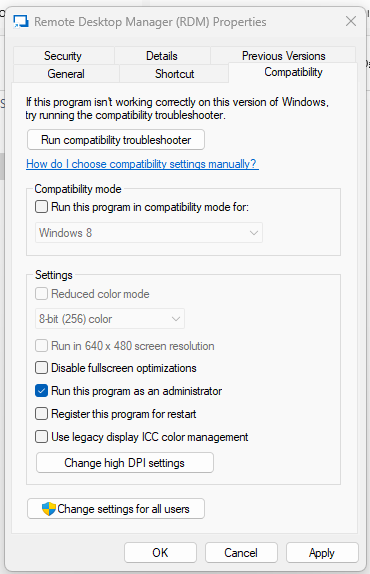
Source: Microsoft
e30cea4f-3bb7-46a8-9d93-70cc358638d5.png
Hello,
Thanks for sharing your solution regarding the administrator privileges and the impact on the KernelBase.dll error. That’s a great observation and may be helpful to others experiencing similar issues.
If you encounter any further challenges or if the problem reappears, please don’t hesitate to reach out. We are here to assist you.
Best regards,
Carl Marien
Thank you, Carl.