User Variables allowed for RVTools exports?

Good afternoon, folks.
I was curious to know if RDM will allow %VARIABLES% for folders and files when utilizing the RVTools Export function?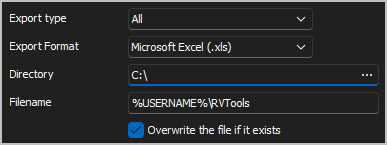
Thanks!
--- Chuck
Overgaard, AZ (-7 MST / Zulu Year-Round)
RDM Version: 2025.3.11.0 64-Bit - MSSQL - Daily Usage
RDM Version: 2025.2.28.0 64-Bit - MSSQL - VM
06ff66d5-e40e-4c59-99d1-c916a86aff5b.png
All Comments (12)
Hello Chuck,
Thank you for reaching out to us regarding this,
I see, I believe that should work, but I have not tested this myself at this time, is the variable not being resolved as expected when you generate this export?
Let me know,
Best regards,
Samuel Dery
Sam,
I have not tried because I did not know if this is possible.
Do you happen to have a link or any FAQ's as to what variables are available within RDM?
Thanks!
--- Chuck
Overgaard, AZ (-7 MST / Zulu Year-Round)
RDM Version: 2025.3.11.0 64-Bit - MSSQL - Daily Usage
RDM Version: 2025.2.28.0 64-Bit - MSSQL - VM
Hello Chuck,
Regarding the use of variables with the RVTools Export function in RDM, they should theoretically be supported throughout various functionalities as variables are generally well integrated. However, there might be specific cases where the integration might not be perfect due to overlooked scenarios, particularly within complex modules like export functions.
Since it appears you haven't tested it yet, I would recommend giving it a try. If you encounter any issues with variables not being resolved correctly, please let us know. This feedback will be essential for us to address any potential gaps in functionality.
Best regards,
David Hervieux
Hello Chuck,
Regarding the use of variables with the RVTools Export function in RDM, they should theoretically be supported throughout various functionalities as variables are generally well integrated. However, there might be specific cases where the integration might not be perfect due to overlooked scenarios, particularly within complex modules like export functions.
Since it appears you haven't tested it yet, I would recommend giving it a try. If you encounter any issues with variables not being resolved correctly, please let us know. This feedback will be essential for us to address any potential gaps in functionality.
Do you have any documentation online that specifies what %VARIABLES% are available throughout the RDM program? I cannot find anything with any searches I have performed, so I apologize if I did not look in the right location.
Best regards,
--- Chuck
Overgaard, AZ (-7 MST / Zulu Year-Round)
RDM Version: 2025.3.11.0 64-Bit - MSSQL - Daily Usage
RDM Version: 2025.2.28.0 64-Bit - MSSQL - VM
Hello again, the %variables% are related to the environment variables of Windows:
We call this method to resolve the variables:
https://learn.microsoft.com/en-Us/dotnet/api/system.environment.expandenvironmentvariables?view=net-7.0 and here are the defaults:
https://learn.microsoft.com/en-us/windows/deployment/usmt/usmt-recognized-environment-variables
Regards
David Hervieux
Thank you, sir.
One thing I noticed is RDM blocks where you can use Variables in some cases.
For instance...
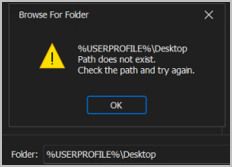
Which within RDM, translates to:
I have to specify the actual directory, so this is useless when the software is being utilizes in a SQL Team Environment where directory structures are not the same for everyone.
Is this something that can be added to the list of fixed issues for the next release?
--- Chuck
Overgaard, AZ (-7 MST / Zulu Year-Round)
RDM Version: 2025.3.11.0 64-Bit - MSSQL - Daily Usage
RDM Version: 2025.2.28.0 64-Bit - MSSQL - VM
a1582bb6-77cc-4a89-a014-96820d086025.png
6e5c24a0-4aff-4546-b13c-ab218a696247.png
35ec7bb0-d072-4440-97e8-f2dc050f34eb.png
Hello,
I'm not sure what the source or entry type shown in your screenshot is. Is it an embedded command line (Cmd)? I'm asking because the error (Browse for Folder) you mentioned does not seem to originate from us; it's not a typical warning message.
David Hervieux
Hello,
I'm not sure what the source or entry type shown in your screenshot is. Is it an embedded command line (Cmd)? I'm asking because the error (Browse for Folder) you mentioned does not seem to originate from us; it's not a typical warning message.
Good morning, David.
This is from RDM in the RVTools setup. Here is the screen: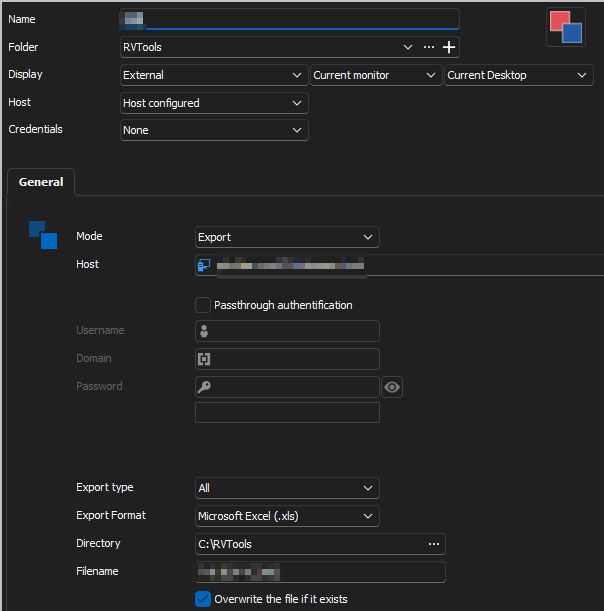
When clicking the three ..., that brings up this window: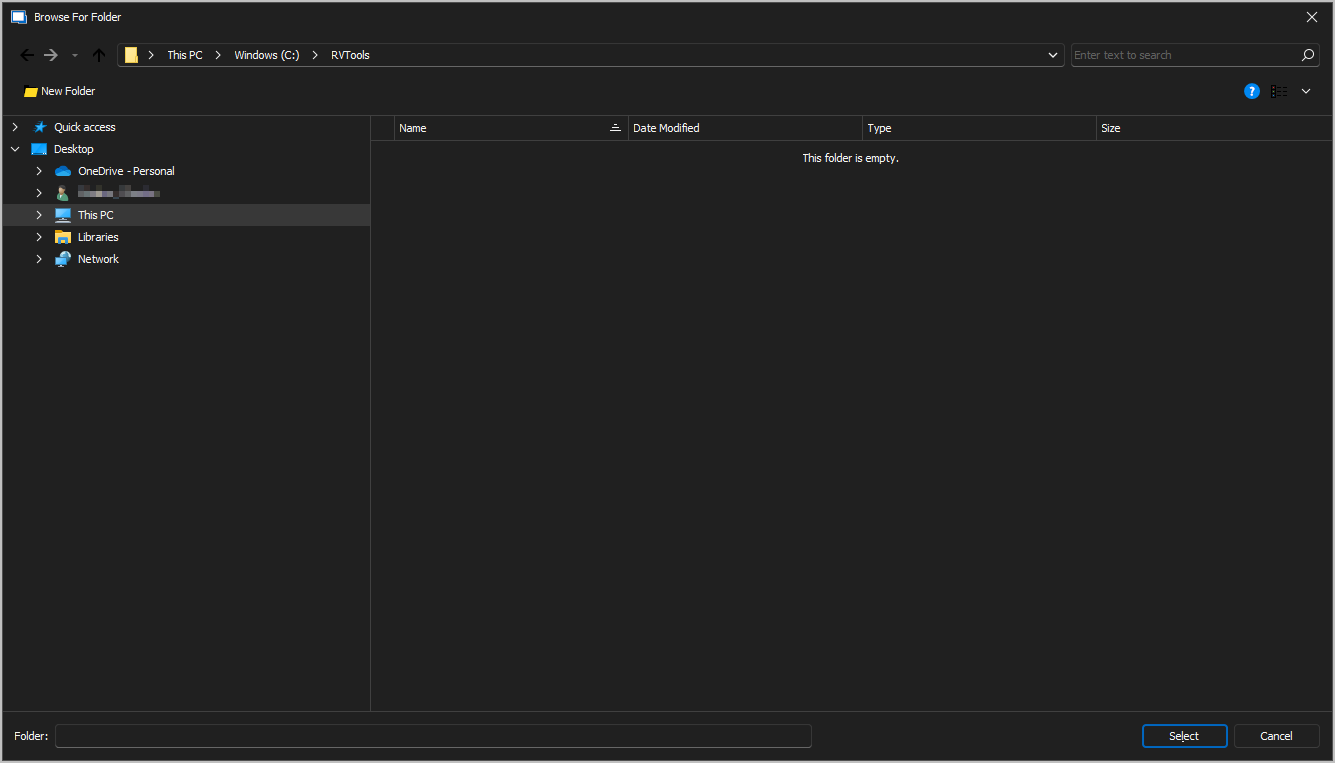
When clicking in the Folder line to manually input a folder name, you can see when I start typing variables, RDM starts to populate: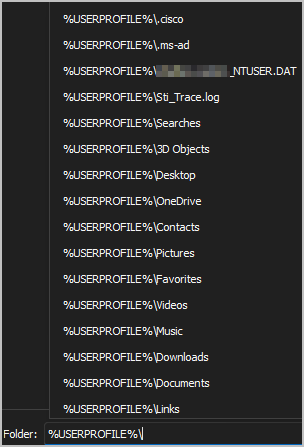
When I select the %USERPROFILE%\Desktop population that was automatically available, I get the following error: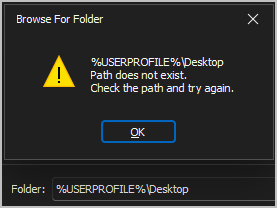
So that is where the error is coming from.
This feature does not allow free form typing of the Directory entry.
Last year, I brought up the same issue with the Filename option, and that was implemented in I want to say it was 2023.3.39.0 to allow typing & freeform in the filename.
When I found that issue, you couldn't even type anything in the Filename option itself, so that was a bug that was implemented.
I believe Freeform Directory typing also needs to be allowed in this field as well to suffice when utilizing in a numerous personnel environment.
Hope this helps and is what you were referring to.
--- Chuck
Overgaard, AZ (-7 MST / Zulu Year-Round)
RDM Version: 2025.3.11.0 64-Bit - MSSQL - Daily Usage
RDM Version: 2025.2.28.0 64-Bit - MSSQL - VM
20ccb698-8a3d-4e42-921f-0d338cd3663a.png
c95bdbef-5f33-4cce-bab2-3b6b6bbe3ddd.png
ac160ab1-903e-4e63-ab87-92d1c0d00749.png
470e414c-3d95-4887-acea-72101e697c50.png
Hello,
This is a dialog from a third party. I will report it. You can use the environment variables in the breadcrumb.
Regards
David Hervieux
4aeceab9-6f81-442c-a3d2-d0257e9d19b4.png
Hello,
This is a dialog from a third party. I will report it. You can use the environment variables in the breadcrumb.
Regards
Thank you for the response, sir. but there is still some confusion. Maybe it's me just not understanding...
So there is no option to either type, manually populate, or select anything in that box that is variable in any way, shape, or form. The same error message comes back:
And when utilizing the entry box you are showing above and clicking the Select box, it does not update anything on the entry, since there is nothing actually selected in the Folder box shown above, where as in your screenshot, it is in the top BreadCrumb box, which does not save as any kind of selection.
Please advise...
--- Chuck
Overgaard, AZ (-7 MST / Zulu Year-Round)
RDM Version: 2025.3.11.0 64-Bit - MSSQL - Daily Usage
RDM Version: 2025.2.28.0 64-Bit - MSSQL - VM
2f5242fd-c37f-4dc3-b93e-79d3115e43e4.png
Hello,
I think we are talking about the same thing. I have posted the bug report to the third party, and they don't seem to want to fix it:
https://supportcenter.devexpress.com/ticket/details/t1231624/re-feature-request-support-environment-variables-in-address-bar-of-xtraopenfiledialog
I'm not sure I can do anything since I don't have access to this code.
Regards
David Hervieux
Hello,
I think we are talking about the same thing. I have posted the bug report to the third party, and they don't seem to want to fix it:
https://supportcenter.devexpress.com/ticket/details/t1231624/re-feature-request-support-environment-variables-in-address-bar-of-xtraopenfiledialog
I'm not sure I can do anything since I don't have access to this code.
Regards
Thank you for at least checking on this.
I saw in your post that you mention it worked in the Breadcrumbs. Maybe if you are utilizing the Web version for RDM Teams, but within the actual RDM Application itself, it does not.
Thanks for the update.
--- Chuck
Overgaard, AZ (-7 MST / Zulu Year-Round)
RDM Version: 2025.3.11.0 64-Bit - MSSQL - Daily Usage
RDM Version: 2025.2.28.0 64-Bit - MSSQL - VM