question about looking into RDP sessions on a machine

Good day!
We are currently looking into the option for using the Remote Desktop Manager as our standard for Managing RDP sessions for our terminal servers.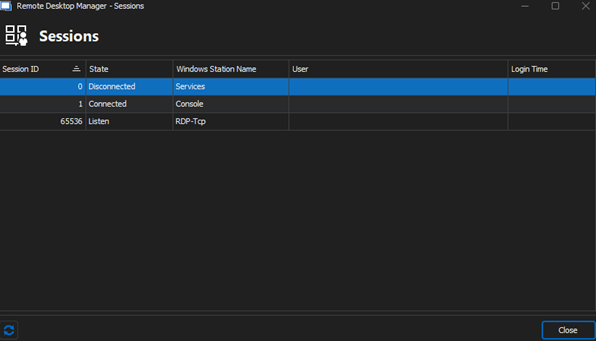
We wish to look into connected RDP sessions and read out more data (like the ip address of the client, last input time, and the disconnect timestamp)
Is there a possibility to get this info using this tool? Or is there another possibility (like an addon or feature) to read out this data?
Please let me know if you have additional questions.
4afd4962-e1f8-4b66-a881-b5893ff8f64b.png
Sessions.png
All Comments (7)
Hello,
It is possible to see who used an entry and when by going into the 'Report' section and then accessing the 'Activity Logs'.
Best regards,
Carl Marien
Hello,
It is possible to see who used an entry and when by going into the 'Report' section and then accessing the 'Activity Logs'.
Best regards,
I'm afraid i haven't made my question clear enough, apologies!
I actually meant the tool "Sessions" to see which users are currently signed in to a RDS server.
As you can see in the screenshot it displays the username, state and login time, but i would like to see some more data like my first comment describes.
It also would suffice to use a different plugin or tool to achieve this.
Could you help me clarify if this is possible?
Thank you in advance!
Hello,
Thank you for clarifying your question. Based on your requirements, you might want to consider creating a Microsoft RDS Dashboard entry which should allow you to view more extensive data about the active sessions, including details like IP addresses, last input time, and disconnect timestamps.
This solution will enable you to manage and view real-time and historical data of sessions in a more comprehensive manner.
If you need further assistance or have more queries as you implement this, please feel free to reach out.
Best regards,
Carl Marien
Hello Carl,
This is exacly what i needed! Many thanks!
Do you know if it is possible to make the Microsoft RDS Dashboard visible as a tab within an RDP entry?
The best situation would be that the RDS dashboard shows up instead of the default overview tab
Please let me know if you need additional information!
b2b32247-7230-4594-aad3-a62d7b072939.png
Hello,
I'm glad you found the Microsoft RDS Dashboard helpful!
Regarding your query about making the dashboard visible as a tab within an RDP entry, it is currently not possible. A workaround you can use is to open your RDP connection undocked and place it near the desired location.
Best regards,
Carl Marien
Hello Carl,
Many thanks for your replies!
I have one last question regarding the functionality of the Microsoft RDS Dashboard.
When we are checking the RDP sessions using this dashboard we cannot see the adresses of the connected computers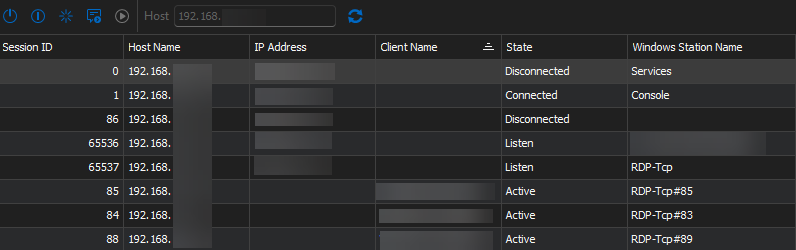
Do you have advice or tips which actions we can perform to make this data visible?
In the server as shown in the screenshot i can directly connect to the server using ipv4 (no gateways of VPN clients)
dc617949-7390-4b42-a9a1-1b0e962c2ec5.png
Hello,
The visibility of the IP addresses depends on how the client data is retrieved and managed. Typically, we use the WTSApi to connect and fetch most of the information displayed in the fields. For the IP addresses specifically, if the 'clientname' is present, we can resolve it to an IP using Dns.GetHostEntry.
If the 'clientname' field is empty, the IPAddress will also display as empty, which may be why you're not seeing these addresses.
Let me know if this helps or if there's anything else we can assist you with!
Best regards,
Carl Marien