Changing Default settings for all the session already created.
Changing Default settings for all the session already created.

Is there a way to enable keyboard shortcuts for all existing RDP sessions?
I noticed that the default setting is "On the local computer", but I would like to use combo within RDP sessions as well.
I have over 300 sessions, and changing it manually on all of them would be a huge waste of time. 
immagine.png
All Comments (5)
Hello Andreirotaru,
Thank you for contacting us on that matter!
If you select all your entries, then Right-Click > Edit > Batch Edit > Edit Session Type Settings > Local Ressources > Check Override and change the settings as you wish.
Here's a helpful topic regarding the Batch Edit (Session Type Settings)
https://docs.devolutions.net/rdm/commands/edit/batch/batch-edit/#edit-entries-session-type-settings
If you have any other questions, feel free to let us know.
Best regards,
Maxim Robert
My batch edit seems to be grayed out. Can you help with that? 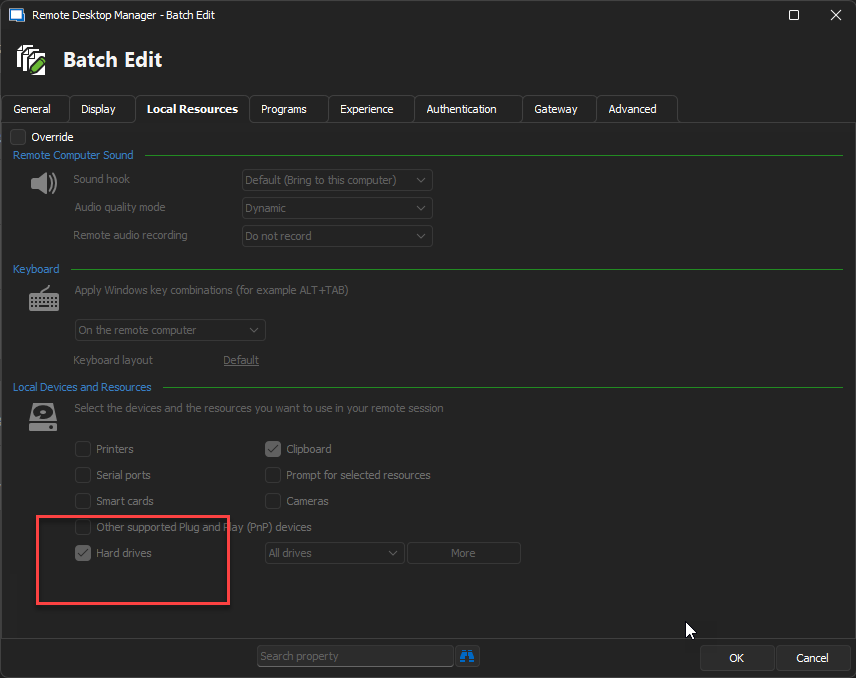
batch-edit.png
Click on the override button on the top. Will then allow you to edit.
Thanks
Iain
Version 2026.2.13.0 64-bit
Data Source SQL
Click on the override button on the top. Will then allow you to edit.
Wow, thanks for the quick reply. Feeling dumb I missed that!
No worries!
Thanks
Iain
Version 2026.2.13.0 64-bit
Data Source SQL