Unable to connect to Azure database

Hi,
When I try to connect to our RDM database hosted in Azure from the RDM client we often get this error message - some suggestions as to what's wrong and a solution ?
a connection was successfully established with the server, but then an error occurred during the pre-login handshake (provider: ssl provider, error: 0 - the wait operation timed out)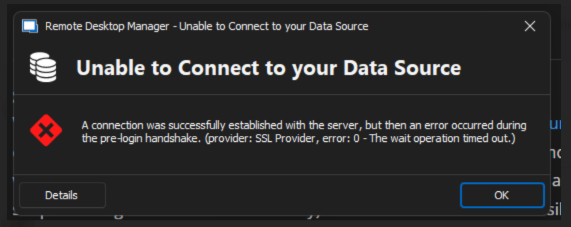
RDM.png
All Comments (5)
Hello toa,
Thank you for contacting the Devolutions support team.
Could you send us the details of this error message?
Does this issue occur for all your users?
Do you still have the same behaviour if you set the timeout connection to 30 sec?
This option is under File -> Data Sources -> Edit -> Advanced -> Connection timeout.
Could you launch RDM with the cmd.exe with the command line RemoteDesktopManager.exe /Profiler -1 and send us the result of the profiler?
Best regards,
Patrick Ouimet
Hello Patrick,
Thanks for your respons.
I get this error message from time to time. Sometimes RDM works fine, other times I get the message. Changing settings to 30 seconds doesn't help. My colleague has the same problem.
Details error message:
Microsoft.Data.SqlClient.SqlException (0x80131904): A connection was successfully established with the server, but then an error occurred during the pre-login handshake. (provider: SSL Provider, error: 0 - Ventehandlingen blev midlertidigt afbrudt.)
---> System.ComponentModel.Win32Exception (258): Ventehandlingen blev midlertidigt afbrudt.
at Microsoft.Data.SqlClient.SqlInternalConnection.OnError(SqlException exception, Boolean breakConnection, Action`1 wrapCloseInAction)
at Microsoft.Data.SqlClient.TdsParser.ThrowExceptionAndWarning(TdsParserStateObject stateObj, SqlCommand command, Boolean callerHasConnectionLock, Boolean asyncClose)
at Microsoft.Data.SqlClient.TdsParser.WaitForSSLHandShakeToComplete(UInt32& error, Int32& protocolVersion)
at Microsoft.Data.SqlClient.TdsParser.EnableSsl(UInt32 info, SqlConnectionEncryptOption encrypt, Boolean integratedSecurity, String serverCertificateFilename)
at Microsoft.Data.SqlClient.TdsParser.ConsumePreLoginHandshake(SqlConnectionEncryptOption encrypt, Boolean trustServerCert, Boolean integratedSecurity, Boolean& marsCapable, Boolean& fedAuthRequired, Boolean tlsFirst, String serverCert)
at Microsoft.Data.SqlClient.TdsParser.Connect(ServerInfo serverInfo, SqlInternalConnectionTds connHandler, TimeoutTimer timeout, SqlConnectionString connectionOptions, Boolean withFailover)
at Microsoft.Data.SqlClient.SqlInternalConnectionTds.AttemptOneLogin(ServerInfo serverInfo, String newPassword, SecureString newSecurePassword, TimeoutTimer timeout, Boolean withFailover)
at Microsoft.Data.SqlClient.SqlInternalConnectionTds.LoginNoFailover(ServerInfo serverInfo, String newPassword, SecureString newSecurePassword, Boolean redirectedUserInstance, SqlConnectionString connectionOptions, SqlCredential credential, TimeoutTimer timeout)
at Microsoft.Data.SqlClient.SqlInternalConnectionTds.OpenLoginEnlist(TimeoutTimer timeout, SqlConnectionString connectionOptions, SqlCredential credential, String newPassword, SecureString newSecurePassword, Boolean redirectedUserInstance)
at Microsoft.Data.SqlClient.SqlInternalConnectionTds..ctor(DbConnectionPoolIdentity identity, SqlConnectionString connectionOptions, SqlCredential credential, Object providerInfo, String newPassword, SecureString newSecurePassword, Boolean redirectedUserInstance, SqlConnectionString userConnectionOptions, SessionData reconnectSessionData, Boolean applyTransientFaultHandling, String accessToken, DbConnectionPool pool, Func`3 accessTokenCallback)
at Microsoft.Data.SqlClient.SqlConnectionFactory.CreateConnection(DbConnectionOptions options, DbConnectionPoolKey poolKey, Object poolGroupProviderInfo, DbConnectionPool pool, DbConnection owningConnection, DbConnectionOptions userOptions)
at Microsoft.Data.ProviderBase.DbConnectionFactory.CreatePooledConnection(DbConnectionPool pool, DbConnection owningObject, DbConnectionOptions options, DbConnectionPoolKey poolKey, DbConnectionOptions userOptions)
at Microsoft.Data.ProviderBase.DbConnectionPool.CreateObject(DbConnection owningObject, DbConnectionOptions userOptions, DbConnectionInternal oldConnection)
at Microsoft.Data.ProviderBase.DbConnectionPool.UserCreateRequest(DbConnection owningObject, DbConnectionOptions userOptions, DbConnectionInternal oldConnection)
at Microsoft.Data.ProviderBase.DbConnectionPool.TryGetConnection(DbConnection owningObject, UInt32 waitForMultipleObjectsTimeout, Boolean allowCreate, Boolean onlyOneCheckConnection, DbConnectionOptions userOptions, DbConnectionInternal& connection)
at Microsoft.Data.ProviderBase.DbConnectionPool.TryGetConnection(DbConnection owningObject, TaskCompletionSource`1 retry, DbConnectionOptions userOptions, DbConnectionInternal& connection)
at Microsoft.Data.ProviderBase.DbConnectionFactory.TryGetConnection(DbConnection owningConnection, TaskCompletionSource`1 retry, DbConnectionOptions userOptions, DbConnectionInternal oldConnection, DbConnectionInternal& connection)
at Microsoft.Data.ProviderBase.DbConnectionInternal.TryOpenConnectionInternal(DbConnection outerConnection, DbConnectionFactory connectionFactory, TaskCompletionSource`1 retry, DbConnectionOptions userOptions)
at Microsoft.Data.ProviderBase.DbConnectionClosed.TryOpenConnection(DbConnection outerConnection, DbConnectionFactory connectionFactory, TaskCompletionSource`1 retry, DbConnectionOptions userOptions)
at Microsoft.Data.SqlClient.SqlConnection.TryOpen(TaskCompletionSource`1 retry, SqlConnectionOverrides overrides)
at Microsoft.Data.SqlClient.SqlConnection.Open(SqlConnectionOverrides overrides)
at Microsoft.Data.SqlClient.SqlConnection.Open()
at Devolutions.RemoteDesktopManager.Business.DataSources.SQLServerConnectionDataSource.CreateDbConnection(String connectionString, Boolean openConnection)
at Devolutions.RemoteDesktopManager.Business.DataSources.SQLServerConnectionDataSource.CreateDbConnection(String connectionString)
at Devolutions.RemoteDesktopManager.Business.DataSources.DatabaseConnectionDataSource.CreateDbConnection(Boolean master, Nullable`1 connectTimeout)
at Devolutions.RemoteDesktopManager.Business.DataSources.SQLServerConnectionDataSource.CreateDbConnection(Boolean master, Nullable`1 connectTimeout)
at Devolutions.RemoteDesktopManager.Business.DataSources.DatabaseConnectionDataSource.CreateDbConnection(Nullable`1 connectTimeout)
at Devolutions.RemoteDesktopManager.Business.DataSources.DatabaseConnectionDataSource.ExecuteScalar[T](String sql, IDbDataParameter[] parameters)
at Devolutions.RemoteDesktopManager.Business.DataSources.SQLServerConnectionDataSource.ExecuteScalar[T](String sql, IDbDataParameter[] parameters)
ClientConnectionId:bf261c05-af08-4438-b8b4-5d35eca76c86
Error Number:258,State:0,Class:20
Result when I start RDM using /Profiler -1
Main thread (UI)
----------------------------------------
OfflineManager.GetDataSourceSettings...
Initialize : 36 ms
OfflineManager.GetDataSourceSettings : 221 ms
LoadConnectionsFromOfflineFile...
DeserializeData : 19 ms - Count : 163
ReadFromOffline : 5 ms
LoadConnectionsFromOfflineFile : 29 ms
LoadConnectionsFromOfflineFile...
DeserializeData : 1 ms - Count : 1
ReadFromOffline : 1 ms
LoadConnectionsFromOfflineFile : 3 ms
LoadConnectionsFromOfflineFile...
DeserializeData : 0 ms - Count : 1
ReadFromOffline : 1 ms
LoadConnectionsFromOfflineFile : 2 ms
RefreshConnections...
LoadConnections UI - [Microsoft Azure SQL : AZURE] - ReadOnly - 64-bit...
OfflineManager.GetDataSourceSettings : 3 ms
Engine.Clear - DisposeInternalList : 0 ms
HasSecurityChanged : 5506 ms
OfflineManager.LoadConnections : 54 ms
HasChanged : 268 ms
Reload: True - HasSecurityChanged: False - HasChanged: False
LoadConnectionsFromDataSource...
LoadConnectionsFromDataSource : 411 ms
Load connection overrides...
Has changes : 18 ms
Load connection overrides : 18 ms
OfflineManager.LoadConnections : 2 ms
LoadConnections [Microsoft Azure SQL : AZURE - Global Vault] - ReadOnly - 64-bit : 101 ms
RefreshRepositories : 22 ms
FavoriteManager.LoadFolders : 25 ms
LoadConnections UI - [Microsoft Azure SQL : AZURE] - ReadOnly - 64-bit : 6847 ms
RefreshConnections : 7032 ms
Connection States: Refresh...
GlobalConnectionManager.Refresh...
LoadConnections [Microsoft Azure SQL : AZURE - Global Vault] - ReadOnly - 64-bit : 59 ms
GlobalConnectionManager.Refresh : 77 ms
Connection States: Refresh : 135 ms
TreeView.LoadConnectionList...
BeginUpdate...
LoadConnectionInTreeNode : 6 ms
PreCreateGroups : 3 ms - Run count : 1
BeginUpdate : 29 ms
TreeView.LoadConnectionList : 31 ms
Load Expand States...
Expanded: 0 - Nodes : 163
Nodes...
Expand : 0 ms - Run count : 0
Collapse : 1 ms - Run count : 18
Nodes : 1 ms
Load Expand States : 2 ms
SelectionChanged - Default : 5 ms
RootDashboardOverviewManager.LoadRootDashboardOverView - Quick Load...
Set DocumentText : 27 ms
RootDashboardOverviewManager.LoadRootDashboardOverView - Quick Load : 348 ms
RefreshConnections...
LoadConnections UI - [Microsoft Azure SQL : AZURE] - ReadOnly - 64-bit...
HasSecurityChanged : 18 ms
HasChanged : 18 ms
Reload: False - HasSecurityChanged: False - HasChanged: False
Load connection overrides...
Has changes : 18 ms
Load connection overrides : 18 ms
LoadConnections [Microsoft Azure SQL : AZURE - Global Vault] - ReadOnly - 64-bit : 59 ms
RefreshRepositories : 20 ms
FavoriteManager.LoadFolders : 19 ms
LoadConnections UI - [Microsoft Azure SQL : AZURE] - ReadOnly - 64-bit : 158 ms
RefreshConnections : 159 ms
Thread : 12
----------------------------------------
12 - OfflineManager.SaveMeta...
12 - SaveSecurityInfo...
12 - 3d892570-eeea-471f-9879-3e1adf8723ac
12 - SaveSecurityInfo : 19 ms
12 - Repository : 5 ms
12 - Expiration : 28 ms
12 - DataSourceSettings : 6 ms
12 - OfflineManager.SaveMeta : 61 ms
Thread : 17
----------------------------------------
17 - OfflineManager.SaveMeta...
17 - Expiration : 16 ms
17 - OfflineManager.SaveMeta : 17 ms
Thread : 20
----------------------------------------
20 - RootDashboardOverviewManager.LoadRootDashboardOverViewAsync - Full Load : 285 ms
Hello toa,
Thank you for this feedback.
Since this issue occurs occasionally, could you check your DTU report in Azure and see if this is related?
Best regards,
Patrick Ouimet
Hello Toa,
Could you have a look at the MultiSubnetFailover option?
This can be configured in RDM under File -> Data Sources -> Edit -> Advanced -> More options.
This is an article about this:
https://docs.devolutions.net/kb/remote-desktop-manager/troubleshooting-articles/sql-server-connection-timeout/
Best regards,
Patrick Ouimet
Issue solved, we had some problems with our firewall