Custom Install Generator - Additional options
0 vote

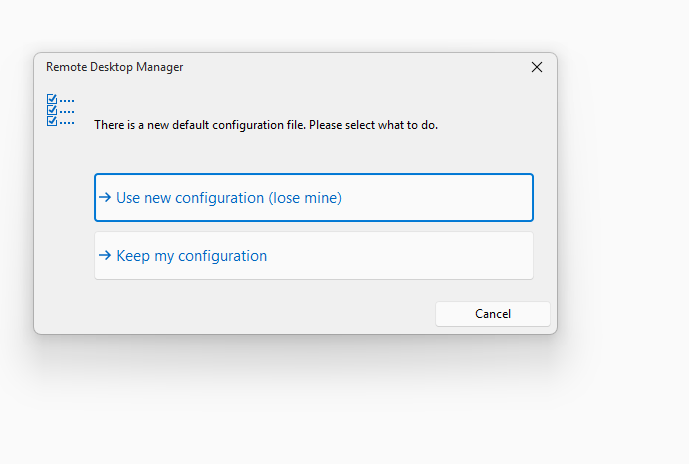
When users upgrade, they are prompted to "use new configuration" or "ignore" - can these options be added as options in the customer installer generator so that we can select which one we want so it doesn't prompt the user?
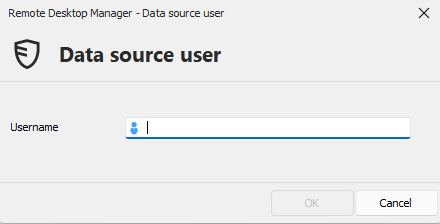
Also, if selecting "use new configuration" it would be good if it RETAINED the username from the data source. We normally set up RDMS with all the options/configurations that we want so tell our users to always select use new config, but the amount of people that enter the wrong username is so frustrating. Perhaps this can be an option when generating as well?
We'd prefer to have it so users don't have to do anything when upgrading and it just works with no prompts.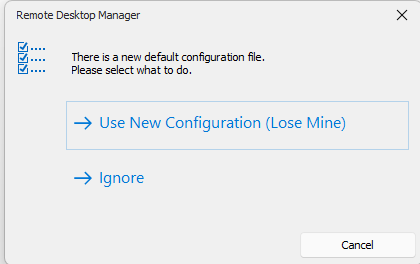
52677be1-7901-4664-be88-cfaa429b1e3f.png
780730bf-4688-460e-8895-bd31adb3493d.png
e6dd3064-3903-486d-9264-b319806c0774.png
All Comments (25)
Hello,
For this:
> When users upgrade, they are prompted to "use new configuration" or "ignore" - can these options be added as options in the customer installer generator so that we can select which one we want so it doesn't prompt the user?
You can use the GPO ForceDefaultConfigurationLoading to avoid the prompt and to always use the data contained within the "default.cfg" file (which is what is used by the custom installer).
For your other point:
> Also, if selecting "use new configuration" it would be good if it RETAINED the username from the data source. We normally set up RDMS with all the options/configurations that we want so tell our users to always select use new config, but the amount of people that enter the wrong username is so frustrating. Perhaps this can be an option when generating as well?
We support variables in the username field if I'm not mistaken. If all of your users' account names are for example their UPN, you could use the $USER_PRINCIPAL_NAME$ variable in the username field, and build the custom installer this way.
If this does not work for your use case, we can open a ticket to improve this behavior.
Regards,
Hubert Mireault
We are unable to deploy GPO's, hence requesting the enhancement to make this an option in the custom installer.
Variable is a good option. I'll give that a go,.
Tried the variable and that appears to work. However, whilst the majority of our users have domain joined computers, there are some that don't - so a workaround for now at least, but if it can be updated as an enhancement to not wipe out the username in the data source that would be great.
Upon further testing, the variable works putting it in to the custom installer, but it doesn't work after installing and running RDMS. Still prompts for username.
Hello,
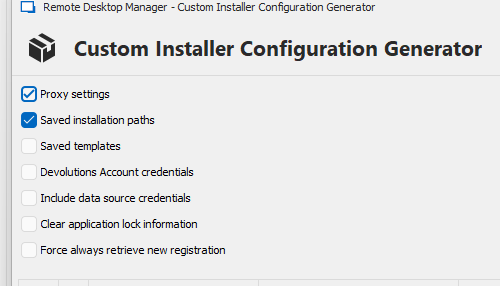
Thanks for doing the test. When creating the custom installer, did you make sure to check the "include datasource credentials" option? If you don't have it checked, that would explain why the variable isn't carried to the final installation, as that is part of the credentials of the DVLS datasource configuration. It's good that this workaround can work for a good amount of your users at least (if we can figure out this last part).
So for the request itself, let me summarize what we could do to help:
- We add a new configuration when creating the custom installer, for "Force 'use new configuration' choice"
- This will do the same as the GPO and act as if the user clicked on "use new configuration (lose mine)", to skip that prompt
- We add a new configuration when we create the custom installer, something like "Keep original datasource credentials when installing if already exists"
- If you have this option checked, when installing RDM and choosing the "use new configuration" option, the application will check to see if it finds a datasource that "matches". If it finds a "match", we will inject the credentials from the user's datasource into the new datasource, effectively taking the new settings from the custom installer, minus the credentials
For the matching, we will have to see what is possible. An ID match may not always work (since the user can simply create a new datasource with the same information) so we may have to check with the URL of the DVLS configuration the user already has configured. If that URL matches, we will perform the operation.
If you're good with this idea, we will open a ticket. Let me know if I misunderstood part of what you're looking for.
Regards,
Hubert Mireault
I swear I did this last week and it worked, but testing today it's not recognising the variable at all.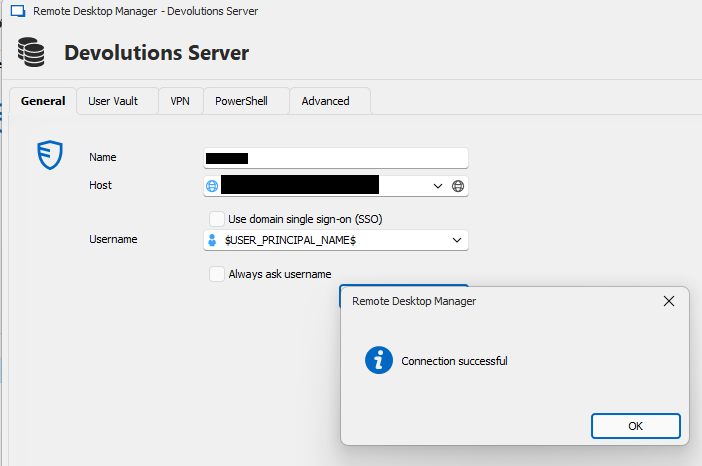
- We add a new configuration when creating the custom installer, for "Force 'use new configuration' choice"
- This will do the same as the GPO and act as if the user clicked on "use new configuration (lose mine)", to skip that prompt
- We add a new configuration when we create the custom installer, something like "Keep original datasource credentials when installing if already exists"
- If you have this option checked, when installing RDM and choosing the "use new configuration" option, the application will check to see if it finds a datasource that "matches". If it finds a "match", we will inject the credentials from the user's datasource into the new datasource, effectively taking the new settings from the custom installer, minus the credentials
Yep, I think this is a good summary. We could technically NOT include the data source at all but then if there was a new user we'd have to get them to manually set it up, so having an option to keep DS credentials if they already exist would be ideal.
87a1d329-8f05-4220-82f7-ee33e012c454.png
e84e57c1-30b2-4f43-9ddc-8d0d565b3742.png
Thank you for the confirmation, I will open a ticket with the planned changes I've described.
As for the issue with the variables, I also feel like I've seen this work recently (otherwise, I would not have recommended it!). I will check with our QA department. Maybe it's a question of certain variables not working, or maybe it takes specific settings to reproduce the issue. It might also not be working on the latest version but performing some actions beforehand made it seem like the variable worked.
If you manage to make it work again and find a pattern of what might be causing it to fail, let us know, but we will be investigating this on our end.
Regards,
Hubert Mireault
Circling back to this, confirming that $USER_PRINCIPAL_NAME$ works fine - I forgot to then tick "include datasource credentials"
Is there documentation somewhere that lists all the system variables? I've searched around and couldn't find it anywhere.
The only thing we need now in the custom generator is the ability to force one of the two options below so that the user does not see this prompt when opening RDMS after an upgrade has been pushed out.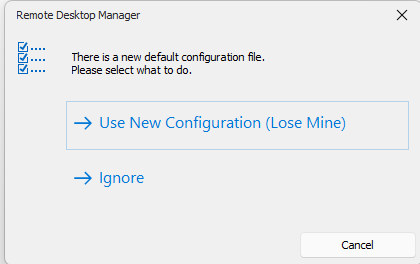
e6dd3064-3903-486d-9264-b319806c0774.png
Hello,
> Is there documentation somewhere that lists all the system variables? I've searched around and couldn't find it anywhere.
The easiest way to access it is through the "variables" button in the entry settings. You can find out more information about it on our knowledgebase article here: https://docs.devolutions.net/rdm/kb/rdm-windows/knowledge-base/access-manage-rdm-variables/
In your case I think you're interested in the "global" tab of the variables as those don't rely on the current entry to be resolved. $USER_PRINCIPAL_NAME$ is one such variable listed.
> The only thing we need now in the custom generator is the ability to force one of the two options below so that the user does not see this prompt when opening RDMS after an upgrade has been pushed out.
This is part of the ticket I've opened already. There is a GPO for this, but it's not currently configurable while making the custom installer itself. I will see if we can raise the priority but at the moment I can't give you an estimate on when this will be available.
Regards,
Hubert Mireault
Excellent, thanks for variables. Cannot believe I have never seen that in all these years :)
Will give the GPO option a whirl and see if that will provide a fix.
Hello sjames,
Thank you for your suggestion! The requested feature has been implemented and will be available starting with version 2025.1.3.0.
Best regards,
David Godin
Excellent. Thanks David.
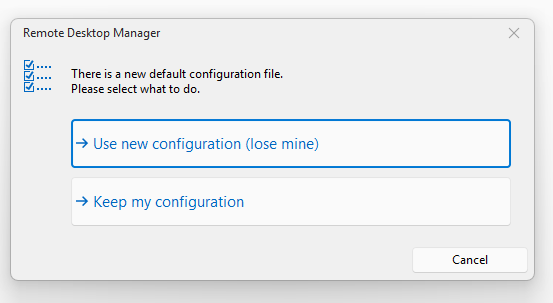
@David Godin @Hubert Mireault it looks like this feature has been included, however it is not working as intended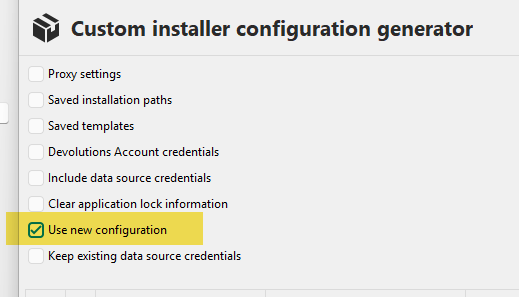
83e4f37a-a323-42bb-90cf-a36d64233ea9.png
b4dd6730-9f19-41f5-9aa1-acdd437048ba.png
Hello,
Thanks for the feedback, it was working in our original testing so there might have been a change further down the line that broke it. We'll open a ticket to investigate.
Can you let us know what version of RDM you are using, both for the machine generating the custom installer file, as well as the version of the custom intaller package you're trying to install?
Regards,
Hubert Mireault
2025.1.25.0 building version 2025.1.31.0
Would it be possible for you to use our latest release, 2025.1.33.0, to generate this installer, and seeing how it goes? We've made a lot of fixes between 2025.1.25.0 and 2025.1.33.0, so it's possible that a bug was introduced and then fixed.
We've done some tests internally and weren't able to reproduce when using 2025.1.33.0 as the version.
Regards,
Hubert Mireault
Thanks.
31.0 building 33.0 appears to have worked fine.
Thanks for the feedback, I'm glad to hear it works. If you encounter any additional issue, let us know!
Regards,
Hubert Mireault
RDM 2025.1.34.0 building 2025.2.21.0 failed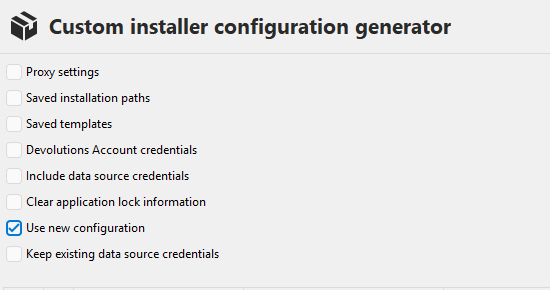
cf8d7c9c-af9a-4276-a03d-ba14bd360e90.png
9c814b7a-5469-4ab3-9095-cd78fdc1cd63.png
Hello,
I will open a case so we can try to reproduce this issue. I'm not sure why it would have broken in-between releases as we didn't make any changes to this as far as I know. Looking at the code I might have an idea of what is going on but if that's the case I'm not sure why it worked previously. Thanks for bringing this up and sorry for the inconvenience.
Regards,
Hubert Mireault
Hello,
We've made a change to how the feature was implemented and I believe it should fix the issue. This fix will be in our next minor update, 2025.2.22.0. We are aiming to release it this week, depending on our QA cycle.
Files exported when you have the "use new configuration" setting checked (which is the same as when you generate a custom installer file) should now contain the value "<CustomInstallerUseNewConfiguration>true</CustomInstallerUseNewConfiguration>" in their data. This will let RDM know that it should automatically pick this configuration without prompting.
As a note, you will need to be on 2025.2.22.0 or later to generate the file with this value. I hope with this final change it should work properly. In my testing it worked with both an empty RDM environment (no prior configs), as well as one with existing configurations.
Regards,
Hubert Mireault
Thanks Hubert, much appreciated.
Unfortunately this still isn't working.
2025.2.25 building 2025.2.27
Hello,
Hubert is on vacation this week. He will follow up with you on his return.
Best Regards,
Michaël Beaudin
Hello,
I will need to ask our QA and support teams to help reproduce the remaining issue since I'm starting to run out of ideas on what might be causing this. We might need to contact you to ask a few additional questions. We'll let you know.
Regards,
Hubert Mireault