HttpListenerExecption (87)

Hello, when I close RDM I get (not everytime) this error, first time when I upgraded to Version .24, I got back to old version, everthing o.k, got the newest: error again, but not every time. Is a pop up, when I close nothing special happens.
Thanks in advance
cu
F. :-)
All Comments (13)
Hello Rainer,
Thank you for contacting us on that matter!
Could you provide us with the information below?
- The operating system you are using and its version.
- The data source you are utilizing.
- A screenshot of the error message.
Once we have this information, we will be better equipped to diagnose and resolve the issue.
Best regards,
Maxim Robert
Hello, screenshot when I get the error next time. Source:local, W11 22H2 x64 German. Looks like something in trouble wit .net.
cu
F. :-)
Hello Rainer,
Thank you for the response!
When installing the new version, did you install the .NET 8.0 Runtime (v8.0.3)?
Thank you for letting us know. If you have any other questions, feel free to let us know.
Best regards,
Maxim Robert
how can keep conntecting if it fails again?
I'm Smithloo, working for a web development and digital marketing company. Our homepage
Hello Smithloo,
Thank you for your response!
Could you provide us with more details on the behaviour you got?
If you have any other questions, feel free to let us know.
Best regards,
Maxim Robert
Hello, here a screenshot, it pop ups very very seldom when closing RDM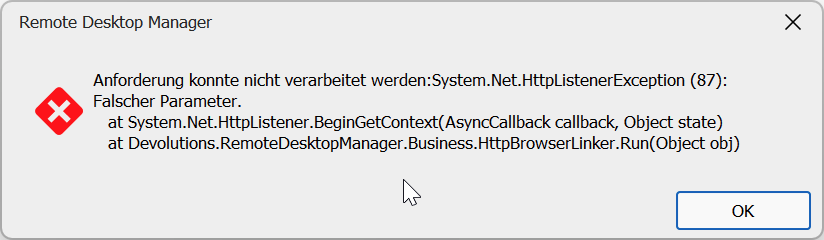
grafik.png
Hello Rainer,
Thank you for the information!
I've provided the information to our development team and will give you more information as soon as possible.
Thank you for your collaboration. If you have any other questions, feel free to let us know.
Best regards,
Maxim Robert
I am getting the same error when I close RDM with any session opened to a computer with a VPN connected. I have one in particular that is kept on a VPN at all times for access to an external site and that seems to be the culprit. Let me know if you want the logs but my theory is it is getting an error when trying to confirm the session is closed. The server that is connected via VPN is Server 2019 Datacenter in case that is important.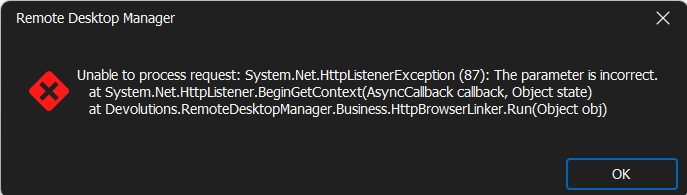
c203a739-2211-4384-84b6-031c27c354bc.png
Hello Jake
Thank you for contacting us on that matter!
Could you verify under the Administration logs if there's any information related? If not, could you try to reproduce the issue with the Profiler opened in the background?
To activate the Profiler, you can go to the Help tab > Profiler > remove the "Auto Clear" > Minimize the window > Reproduce the issue and then reopen the Profiler from the window in the taskbar, not from the help tab.
Here's a helpful topic regarding the Profiler.
https://docs.devolutions.net/rdm/commands/help/support/profiler/
Would it be possible to provide us with a recording that lead to the problem? I will send you a Direct Message with the link to send the recording.
We also have a ticket open with the development team. We appreciate your help with this issue. If you have any other questions, feel free to let us know.
Best regards,
Maxim Robert
So as a follow up, my server just updated with KB5037765 which seems to have resolved some of the issues I was seeing. If it starts up again I will get a profile log for you so you can further diagnose however I would assume that there was something that was fowled when disconnecting from a RDP source that was fixed in that update pushed by Microsoft.
Hello Jake,
Thank you for the information!
Are you still getting the prompt of the Error HttpListenerExecption (87)?
Thank you for letting us know. If you have any other questions, feel free to let us know.
Best regards,
Maxim Robert
The HttpListenerException (87) error might be due to conflicts or incomplete shutdowns. Ensure your .NET framework is updated and try reinstalling RDM.
Hello,
Thank you for following up on this issue!
I'm letting you know that our team is still investigating the issue. Regrettably, the Support Department cannot provide an exact release date as the full process (Build—Quality Assurance—Release) is out of our control.
The development team needs to implement a fix. After that a series of events must take place:
- A pull request must be approved, by a peer primarily, but sometimes also by a security specialist;
- A build must be generated;
- The whole build contains typically many fixes, which each must be validated by our QA department
- if need be, the build is rejected for a specific issue, or a combination thereof, which would trigger another build cycle
If you have any other questions, feel free to let us know.
Best regards,
Maxim Robert