RDM PowerShell via Batch Edit unable to modify existing Folders
RDM PowerShell via Batch Edit unable to modify existing Folders

UPDATE: Never Mind - found out I need to use "Advance search" and then batch edit the results to include folders. It would be good if this information was included in the powershell manual and github pages:
https://forum.devolutions.net/topics/27878/batch-edit-folder-security-permissions-from-gui
Hi,
As an initial test I just want to change the icon ('ImageName') of my folder using batch edit powershell, but it does not seem to work.
Going forward I would like to updates the permissions on the folders based on the folder names; but I cant seem to edit the simplest thing like the icon or Name of the folder.
I have followed the examples in the below two links and I have been able to successfully edit entries inside my folder structure. However I don't seem to be able to edit the actual folders/groups:
https://docs.devolutions.net/rdm/powershell-scripting/custom-powershell-commands/batch-actions-samples/
https://github.com/Devolutions/RDMSamples-ps/blob/main/custom_batch_actions/README.md
I have been copying the folder to a text editor and I can see:<?xml version="1.0" encoding="utf-8"?><RDMExport> <Connections> <Connection> <ConnectionType>Group</ConnectionType> <CreatedBy>Chris Wyllie</CreatedBy> <CreationDateTime>2024-04-16T01:16:45</CreationDateTime> <Group>Restricted Site 1</Group> <ImageName>SampleOffice2Green</ImageName>
So for example I would like to change the folder icon for SampleOffice2Green from to SampleOffice2Red:if ($Connection.ConnectionType -like 'Group'){ if ($Connection.ImageName -like 'SampleOffice2Green'){ $Connection.ImageName = 'SampleOffice2Red'; $RDM.Save(); } }
However running the above script at the top level of the folder results in no changes: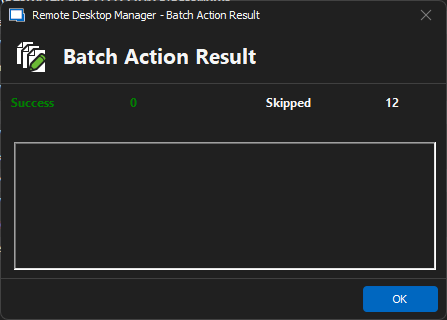
I have 12 non-folder entries under the folder I am right clicking on.
Its like the Batch action ignores all folder.
55ccdd7d-1e62-4c2d-9660-f942efe9147a.png
All Comments (1)
Hello,
Thank you for sharing your solution with the community.
We do have online documentation about the Batch Edit feature. There is no specific mention of how to use this feature on folders.
I have submitted a ticket to our documentation team to add this information to all 3 places.
Best regards,
Érica Poirier