plug-in for NICE DCV
0 vote

Hello Remote Desktop Manager team
I would like to request a development of plug-in for NICE DCV.
Many CAE engineers, when they are using linux cluster for their high performance computing resource. some of them are using VNC. however, recently, many engineers and companies begin to use a NICE DCV. if you add this feature it will be very helpful.
https://www.ni-sp.com/products/nice-dcv/?gad_source=1&gclid=CjwKCAjw_e2wBhAEEiwAyFFFo9dG56E1ZzOWXRCvDzHDBzBtay8-8eIZxfPNdkLPTakFD8qaM__bXxoCrYgQAvD_BwE
Thank you.
All Comments (9)
Hi,
I happen to know someone that works on NICE DCV, but we haven't tried it ourselves yet. I'll reach out to see if there's an SDK available for a potential RDM integration. What would be your platform requirements, and would simply launching their client as an external program with credential injection be sufficient, or are you looking for deeper integration within RDM?
Best regards,
Marc-André Moreau
Hello Marc
for my system, when I request RDM, system is sending me a file to launch in NICE DCV viewer on my desktop. every time when I request RDM, it is generating a file separately.
If user can use NICE DCV in Remote Desktop Manager environment, it would be perfect. however, if it is difficult to add, adding like win SCP would be ok to use.
Hi,
I reached out to NICE DCV and they're really interested in a Remote Desktop Manager integration. At this point, I'm still collecting information about how the product works and how we could do a first integration. In your deployment, are you doing direct connections, or are you combining it with the Connection Gateway and Session Broker components?
I was told that besides the regular user credentials for the connection, some customers can deploy a kind of custom authentication using a token returned to authorize the connection through a gateway, which would be the only part of the connection settings that would be dynamic. This could make the integration more difficult as we'd need to fetch that token dynamically, is this your case?
Best regards,
Marc-André Moreau
Hello Marc
currently, I am using a web-browser to use RDM.
In my case, when I log in cluster and check settings, I need to choice a Desktop Client in NICE DCV Session Manager menu.
I am installing a NICE DCV 2023.1 Client on my notebook and when I request a RDM session on company cluster, cluster is sending me a file (x.dcv) to connect a Session Manager.
Can I share this discussion link in my company? globally, a lot of colleagues are using NICE DCV to use Company clusters.
Hello Marc
currently, I am using a web-browser to use RDM.
Do you mean you're not using the RDM desktop application, but rather the Devolutions Server or Devolutions Hub web interface? I've been looking at integrating the NICE DCV desktop application, so if you want this to work with the NCV browser-based client, it's a very different project.
In my case, when I log in cluster and check settings, I need to choice a Desktop Client in NICE DCV Session Manager menu.
I am installing a NICE DCV 2023.1 Client on my notebook and when I request a RDM session on company cluster, cluster is sending me a file (x.dcv) to connect a Session Manager.
That .dcv file is what I'd like to import in a reusable connection entry in RDM, such that you'd download and import it once. However, if the contents of that .dcv file changes frequently, that's where we'd need a different kind of integration to obtain the dynamic connection parameters.
Can I share this discussion link in my company? globally, a lot of colleagues are using NICE DCV to use Company clusters.
Yes, this is a public forum, and we welcome as much input as we can take from users. Please share it within the company so we can get a good understanding of how you're using NICE DCV, which would help us plan a NICE DCV integration in RDM that makes sense.
Best regards,
Marc-André Moreau
Hello Marc
Do you mean you're not using the RDM desktop application, but rather the Devolutions Server or Devolutions Hub web interface? I've been looking at integrating the NICE DCV desktop application, so if you want this to work with the NCV browser-based client, it's a very different project.
- Now I am using the RDM. website session I am using now. I installed a NICE DCV viewer. however, I don`t use it.
That .dcv file is what I'd like to import in a reusable connection entry in RDM, such that you'd download and import it once. However, if the contents of that .dcv file changes frequently, that's where we'd need a different kind of integration to obtain the dynamic connection parameters.
- whenever I am connecting, each session cluster is creating a *.dcv file. My imagination was that when I connect a desktop, server is sending a *.dcv file, RDM is catching that *dcv file for session and after session close, RDM is deleting a *.dcv file.
if you have any comments, please let me know.
Hello Marc
is there any update?
Thank you.
Hi,
Since our last exchange, I've been in touch with NICE DCV, got a licensing server and license configured, got the NICE DCV client in place, etc. It's a nice product (no pun intended). I sent my requests for what we'd need for an integration, namely the possibility to inject credentials without leaking them to the command-line. I've been told they've already done the change internally but that it would be part of the next major release, some time this summer.
In the meantime, I managed to create a custom solution that should work well enough using the "Command-Line (External Application)" entry type with some PowerShell and a typing macro.
First, create the entry, then use "C:\Program Files (x86)\NICE\DCV\Client\bin\dcvviewer.exe" as the program to run, and "%TEMP%\$NAME$.dcv" for the arguments. Click on "Assign File Icon to Session" to import the icon from the NICE DCV client executable into the entry. Change the Display to "External", and you may want to change "Default" to "Current Monitor" based on your preferences for which screen to use.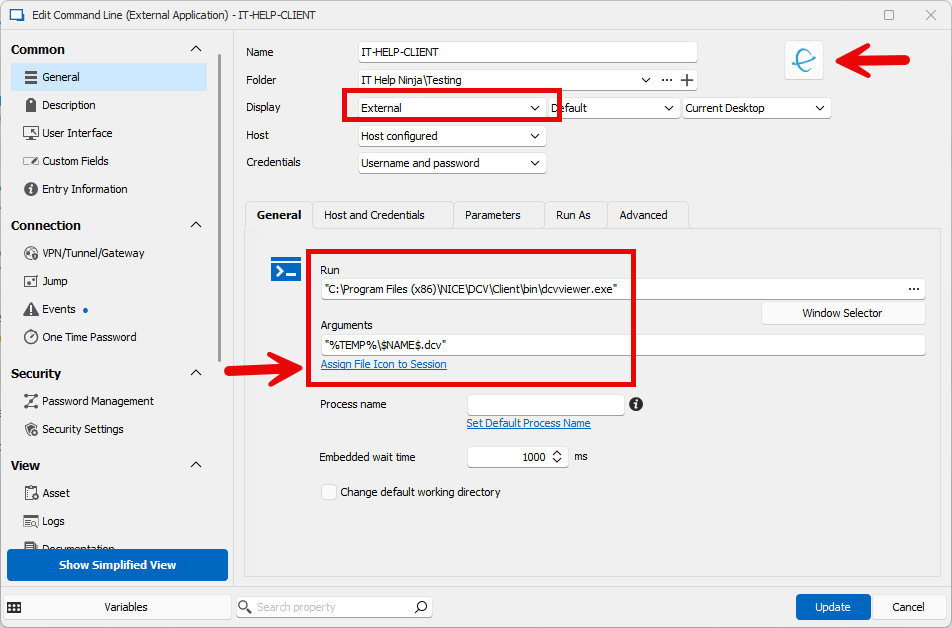
In the "Host and Credentials" tab, enter the desire host, username and password: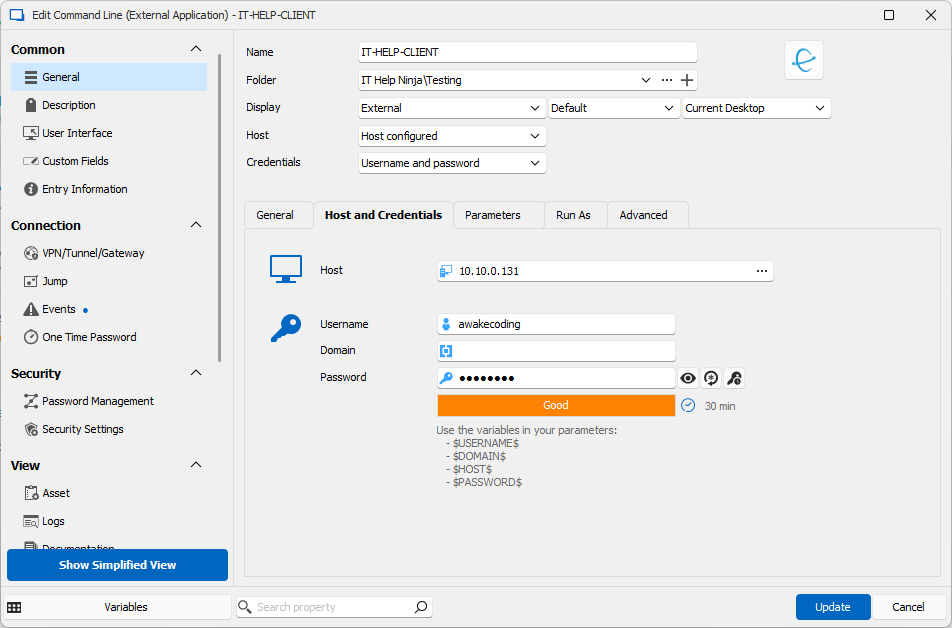
In the Advanced tab, just make sure the execution mode options look like this, it worked with and without "Use Shell Execute" for me: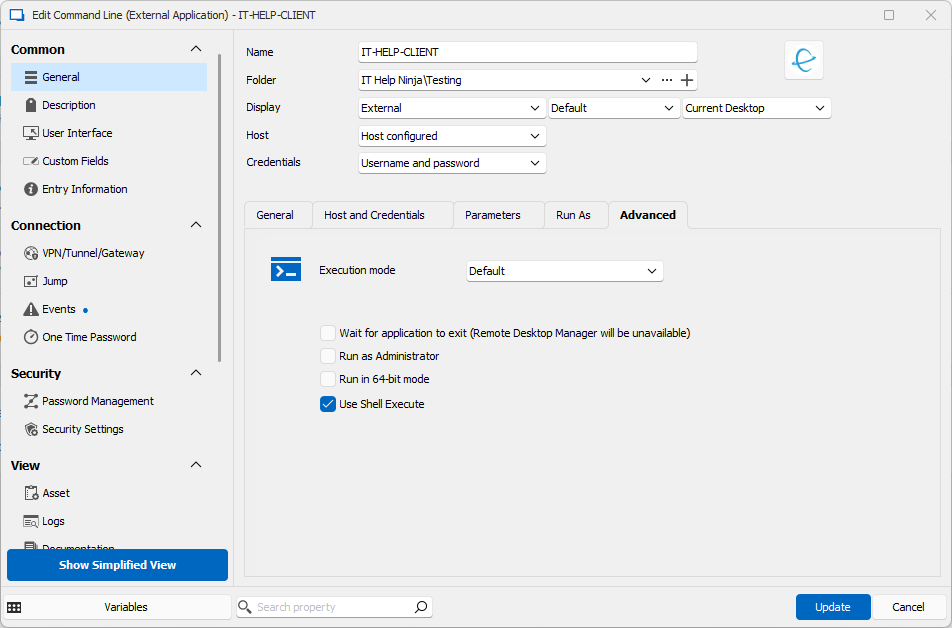
Now for the fun part, using some of the most powerful features in RDM. Click "Show All Properties", then under Connection/Events, go in the "Before Open" tab. Select "PowerShell" and "Wait for exit":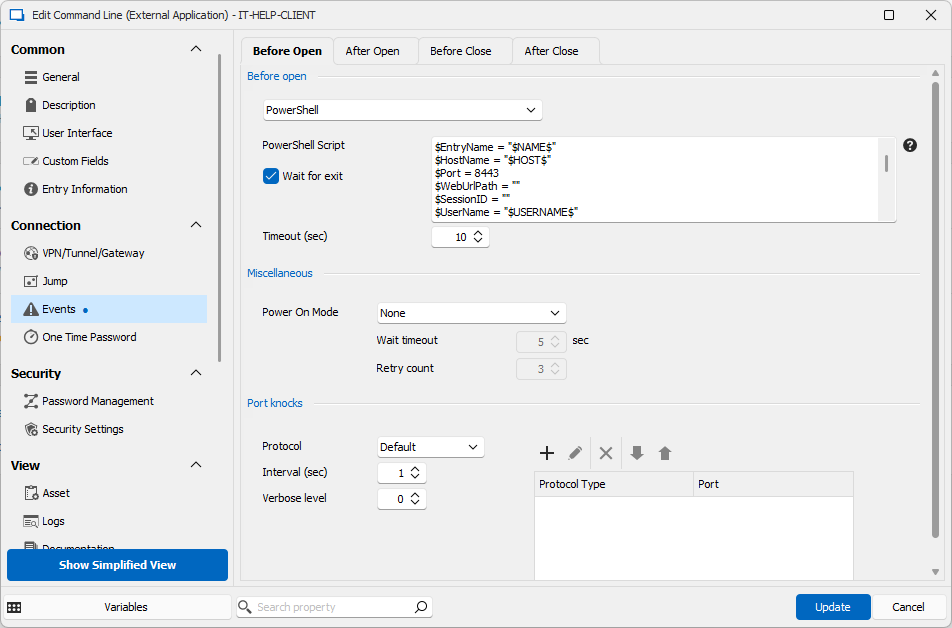
In the text box for the script contents, paste the following:
$EntryName = "$NAME$"
$HostName = "$HOST$"
$Port = 8443
$WebUrlPath = ""
$SessionID = ""
$UserName = "$USERNAME$"
$ProxyPort = 0
$ProxyType = "none"

$content = @"
[version]
format=1.0
[connect]
host=$HostName
port=$Port
weburlpath=$WebUrlPath
sessionid=$SessionID
user=$UserName
proxyport=$ProxyPort
proxytype=$ProxyType
[options]
extensionsloadpolicy=onlysigned
"@

$DcvFile = Join-Path $Env:TEMP "${EntryName}.dcv"
$content | Out-File -FilePath $DcvFile
This PowerShell script will use the RDM variables as input ($HOST$, $USERNAME$, etc) and dynamically create the .dcv file in a temporary location, the same one we've used for the command-line arguments. At this point, it should be possible to launch the DCV client, but a simple credential injection method would be nice.
In the Security / Security Settings section, enable "Allow password in variable", this will make $PASSWORD$ usable in typing macros: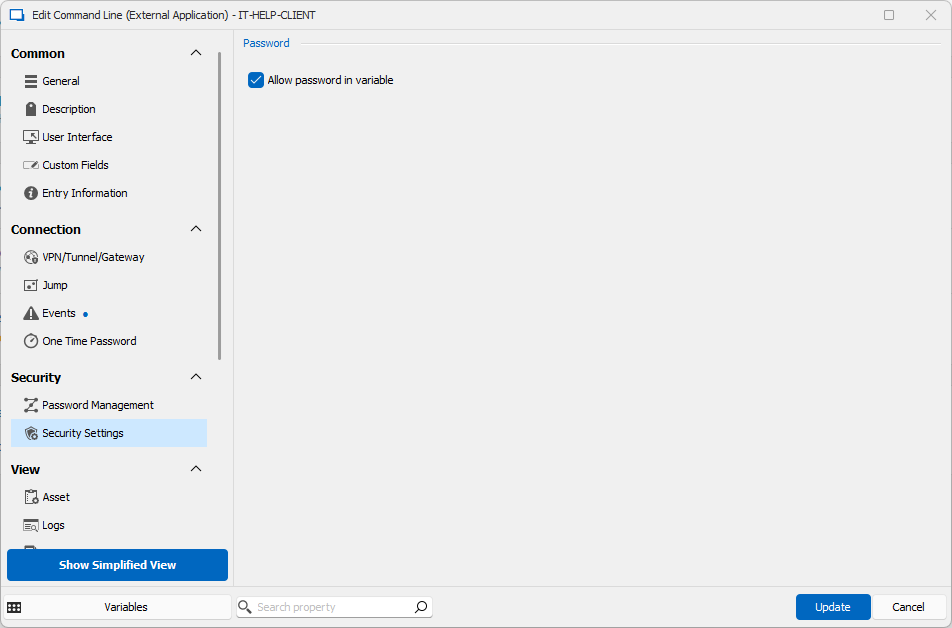
Now under Connection / Events, go in the "After Open" tab, select "Macro/Script/Tool" and use this as a typing macro:
$PASSWORD$
Don't forget the newline such that the typing macro will simulate pressing "Enter" after typing in the password. Use an initial wait of 1 second, this was enough in my case to have the DCV client ready and in focus. That's it, it should now be able to launch the NICE DCV client with settings from the RDM connection entry! If you need more, you can adapt the PowerShell script and use other variables. To learn more about the available variables, just click on "Variables" at the bottom left of the entry.
For simplicity, I also exported my customized connection entry and attached it to this reply. You can import it and modify it as you need instead of going through all the manual steps.
Best regards,
Marc-André Moreau
IT-HELP-CLIENT.rdm
5a4bebd5-a1ac-4ba4-862c-8550cd6da110.png
db0f3b5a-00a2-4f64-89f4-1b8a90bd24f3.png
702c73e7-87d8-48c9-af2e-4cb84a4e4e76.png
b11f645b-600a-47f8-99a3-727450e2f25e.png
3c1255eb-2f5a-412a-b96e-76ab2044cf01.png
Hello Marc
Thank you for supporting.
it is good news that sometime in summer version, they are going to release something for RDM.
I am going to try.
Thank you again.
and I will share the results.