2024.1.24.0 - Search in the Navigation Panel

Since updating from 2023.3.37.0 to 2024.1.24.0 the workflow to search within the navigation panel has changed and become impossible.
Workflow in 2023.3.37.0
Click on any connection or folder within the Navigation panel > Start typing to search for a connection. Character by character the search highlights connections in yellow > enter to start connecting to the entry.
Workflow in 2024.1.24.0
As soon as clicking any connection or folder within the Navigation Panel the Dashboard panel becomes active and focused making search impossible.
The only work around I have found is to tab through the entire interface until the Navigation panel is active and then start typing to search
Hopefully this can be fixed quickly in a patch update or I'll jump back to my last known good version
Cheers
Keith
All Comments (2)
Hello,
We've managed to reproduce the issue and have opened a ticket.
We will keep you updated on the progress.
Best Regards,
Michaël Beaudin
Hello,
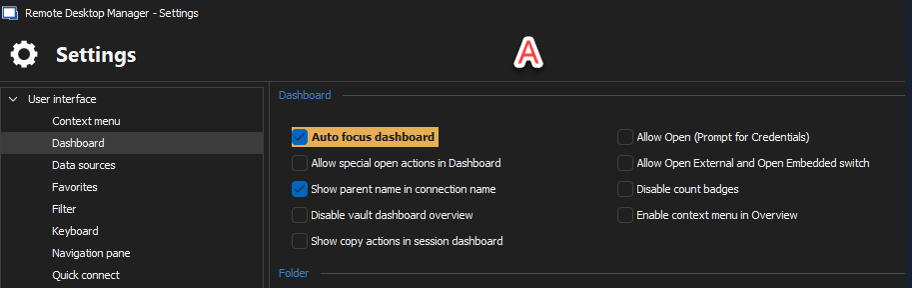
We've investigated further and have some new information. We are assuming that you currently have the option Auto focus dashboard enabled. (Screenshot A - This can be found in File - Settings - User interface - Dashboard). This option forcefully focuses the Dashboard section when selecting something in the Tree View and the dashboard tab isn't already displayed.
The reason you are experiencing this with a new version (and not prior) is likely because of the What's new tab or a Welcome page (depending on your settings). Settings these tabs to Don't show again will prevent them from displaying, and will let you do a search immediately on the first tree view click after RDM launches.
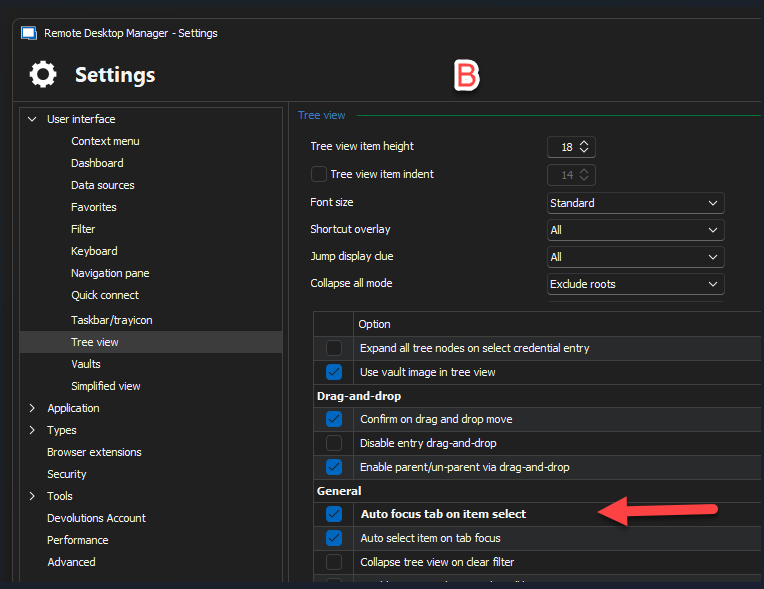
Alternatively, disabling this option will likely remove the behaviour you are currently experiencing. It's also possible to notice a change of focus from the Tree view if you are using the option Auto focus tab on item select, (Screenshot B - File - Settings - User interface - Tree view - In the checkbox section options). This 2nd option will automatically focus an opened session's tab if you select its counterpart in the Tree view. This is working as intended, after all the goal of these options is to change the focus.
Essentially, whenever the active tab in the dashboard section is changed by these option, you lose the focus in the tree view. However, note that if the dashboard already is the displayed tab, then selecting the tree view will not lose focus even with the Auto focus dashboard option. (In the case of your original post, where you mention using the Tab key to cycle back to the tree view, it is unnecessary. Once you've clicked in the tree view once and the focus is already set on the Dashboard, clicking another item in the tree view should no longer result in a loss of focus, and you can then type whatever search you'd like).
Note that if you do not wish to remove these options, there are alternatives to your problem.
- Using Ctrl + F will automatically focus the filter bar, and then you can type to filter the tree view as you see fit (there are also a lot of customization options)
- Using Ctrl + Space will prompt a Quick Search window that has its own advantages and features as well.
Let us know if you have any further questions or inquiries.
Regards,
Jafran Majeau
9387dc2f-a2af-4bd7-93e8-7cdab7951bf9.png
dc67a79a-f5b3-43cb-8257-501f64b98091.png