Topicus Keyhub login broken

Good morning,
In the latest version 2024.1.23.0 and Topicus Keyhub 3.1 we cannot use credentials from Keyhub anymore.
We did the following steps again https://portal.topicus-keyhub.com/en/knowledge/connecting-devolutions-remote-desktop-manager-to-keyhub but still same problem.
We open a device in RDM and then normally Topicus should popup a list with credentials we can use.
In the current state we go to the login page from Keyhub and we can login but there isnt a popup with credentials we can use.
How can we fix this?
All Comments (7)
Hello,
Thank you for reaching out to us regarding this,
Could you confirm which version of RDM you used previously where it worked for you without issues?
I'm also wondering if you have any logs of this error under "Help" -> "Application Logs"? If so could you provide them to us?
Let me know,
Best regards,
Samuel Dery
Hello Samuel,
Thanks for your reply.
I tried the following versions and all not working:
2024.1.24.0
2024.1.23.0
2024.1.20.0
2024.1.19.0
2024.1.18.0
2023.3.39.0
Dont know for sure which we had before, but one of those should be it ;)
Could be a thing that the problem is with Topicus Keyhub.
Topicus had a new update 3.2 yesterday but the problem is still there.
Only thing we see is this: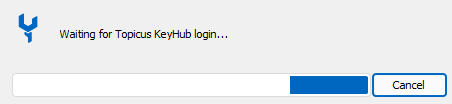
We go to the Keyhub login page.
After this there should normally be a popup with credentials but we see nothing.
Check the log like you ask, but there is no error message or anything related to this problem.
keyhubrdm.png
Just tried 2024.1.25.0 but same problem
Hello,
Thank you for your reply,
I see, I will reach out to our QA department to see if they are able to reproduce this issue,
I will keep you updated with any news I receive regarding this,
Best regards,
Samuel Dery
Hi Wesley,
In KeyHub releas 31 the OIDC applications were updated. They now have several profiles. If you change to 'Public native application with secure storage' The connection to KeyHub should work again. If you want to know more you can find the release notes here: https://www.topicus-keyhub.com/nl/blog/release-31
You can also find more info in this topic in the KeyHub manula chapter 17.1.1
Hope this helps.
Kind regards,
Jan Martijn Tallen
Good morning / Goede morgen Jan Martijn,
I can confirm that this is working and fixed the problem for us.
Thanks!
Hello,
Thank you for your replies,
Perfect, I'm glad to hear that!
Best regards,
Samuel Dery