OTP for Microsoft Authenticator
1 vote

In the past, I was able to add a OTP key for Microsoft 365.
We could see the secret key during setup and copy that to the RDM Key field.
Now it's not possible to see the secret key anymore, Microsoft changed this to improve security.
When I now select that I cant scan the QR code, then I see a code.
When I enter the code in the RDM Key field, I receive an error that the format is not supported.
I also tried to make a screenshot of the QR code and add that to the key field, but that is also not working.
Is there a solution for this problem?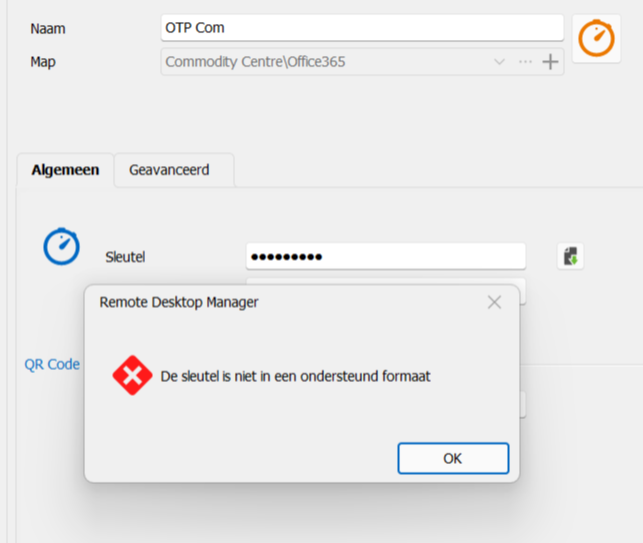
4a9aed7d-0f5f-480e-8314-4581848e0084.png
All Comments (10)
Hello,
For your information, we deleted the first attachment since it contains sensitive information.
We'll be in touch for the troubleshooting.
Best regards,
Alex Belisle
Hello again,
I might be mistaken, but it seems like the data that is being imported is not a TOTP Key; RDM simply doesn't support this.
The QR Code contained a formatted URL (phonefactor://..........) and contains no information that RDM can parse; which is not used to generate an OTP.
It is very likely that MS Auth changes deprecated TOTP support. I'm sorry I cannot be of more help.
Best regards,
Alex Belisle
Hello Alexandre,
This means that we not be able to use the OTP function anymore for our Microsoft 365 logins?
The engineers at our company use RDM to safely store passwords and also the OTP for Microsoft 365 Two-Factor Authentication.
Hello,
Thank you for the feedback.
It may be too early to say that this can no longer be possible, but we cannot promise anything about this new method of theirs.
For now, we understand that MS Auth no longer supports OTP.
Obviously, we don't yet know if any integration is possible. What I can do, however, is move this thread to the Feature Request Forum.
This will allow other members of the community to chime in.
It will very likely be a completely new integration, different from what's already available in RDM.
This thread is now moved to the feature request section.
Best regards,
Alex Belisle
Hi Alex,
It would be great if RDM / DVLS could replace the MS Authenticator phone app.
With respect to OTP, its so much simpler to copy/paste OTP from RDM, instead of unlocking cell phone and manually typing digits from MFA app into a web form.
Additionally, RDM / DVLS support for MFA push notifications from Azure would be great, so being able to copy/paste the 2-digit code from the o365 login page to RDM and have it send back to Azure/Entra. Maybe it might even be possible to make RDM/browser plugin recognize this type of page and process automatically
Another idea would be for RDM/DVLS to act as a software based FIDO2 key.
Thanks
Joe
Also interested in this feature. It would be really nice to have Microsoft MFA 2FA integrated in RDM
Also interested in this feature.
Any news from Devolutions on this ?
Hello,
At the moment we don't have a way to integrate this in RDM (API, SDK, etc). We are keeping an eye out for this and noting your interest in this feature.
Regards,
Hubert Mireault
Hello and sorry for digging deep into the past. Is there any news regarding this issue? Seems like microsoft is now deprecating old otp:s and new ones don't work with rdm (atleast 2025.1.41.0)
-Ville
Hello,
Unfortunately, as far as I'm aware, there's still no way for us to support non-TOTPs from Microsoft Authenticator as an entry similar to our One-time Password entry in our products.
Regards,
Hubert Mireault