Desktop Manager on a large monitor at a high res and screen lag
Desktop Manager on a large monitor at a high res and screen lag

This might not be a Devolutions thing but I thought I would ask. I know there are a few layers here at play and I am not sure which is to blame.
So running a large monitor at a high res and my own desktop space works quick and snappy. But in an RDP session via RDM that RDP desktop has more than noticeable latency to it in the graphics. I can see it moving things around on the desktop and then Teams meetings with video can be very very choppy and laggy on the inbound video.
I have a feeling this is due to the virtual RDP video adaptor but I was not sure it could be positively affected to help.
Thanks.
All Comments (6)
Hello
Do you get the same results using Microsoft Remote Desktop (mstsc) under the same conditions? RDM embeds the Microsoft RDP ActiveX control, so I'd be surprised if things are fundamentally different.
RDP is bandwidth hungry, what kind of connection do you have to the remote machine? The larger your desktop size, the greater the bandwidth and memory consumption.
One thing to check in your RDP session is to make sure you set "Detect network automatically" in the "Experience" tab.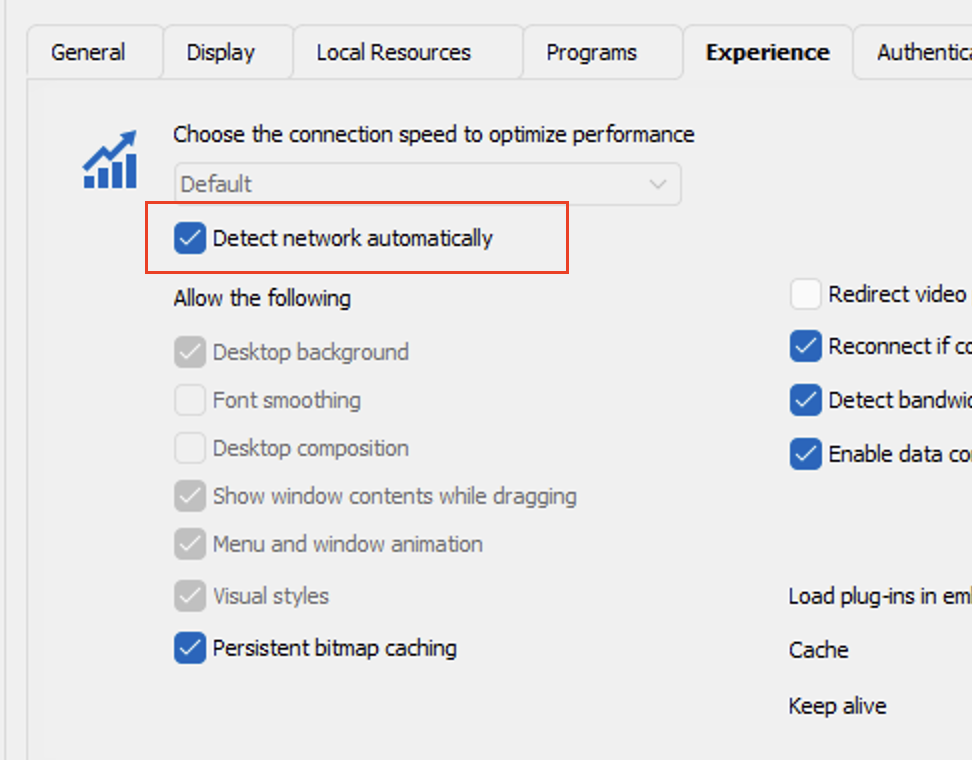
Please, let me know if something isn't clear or you have other questions
Kind regards,
Richard Markievicz
Screenshot 2024-04-08 at 22.46.53.png
Hello
Do you get the same results using Microsoft Remote Desktop (mstsc) under the same conditions? RDM embeds the Microsoft RDP ActiveX control, so I'd be surprised if things are fundamentally different.
RDP is bandwidth hungry, what kind of connection do you have to the remote machine? The larger your desktop size, the greater the bandwidth and memory consumption.
One thing to check in your RDP session is to make sure you set "Detect network automatically" in the "Experience" tab.
Please, let me know if something isn't clear or you have other questions
Kind regards,
Thanks for the reply.
I have not tried RDP because I am not really blaming this on RDM. I was just curious how I might make it better. I did think that trying RDP was a good idea anyway and I went to do it but then RDP will only go fullscreen on me (not the same as RDM I don't think) or it will only drop to far smaller. So I cannot test apples to apples. As far as network and bandwidth I am going to a laptop sitting 3 feet from me on a wired 1GB network. Again, I am not really saying this is an RDM issues and you must solve it, I realize I am doing something here out of the norm a bit. I was just wondering if it's possible to make it better in anyway. Thank you
Hello again
Ok, I understand. In this case it sounds like bandwidth is not an issue. There are a few settings you can experiment with to try and get the best performance:
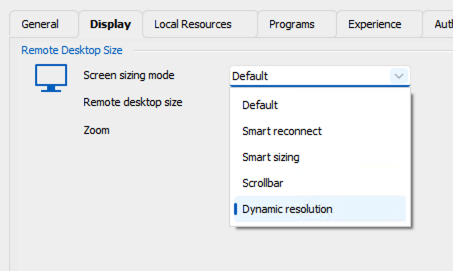
- What do you have configured for your display settings? Assuming it's acceptable that the RDP session fits the current window, I'd recommend setting the screen resizing mode to "Dynamic Resolution". This should ensure that the server's resolution matches your local window (and will prevent, for example, the server sending larger updates just for them to be scaled down or up on the client)
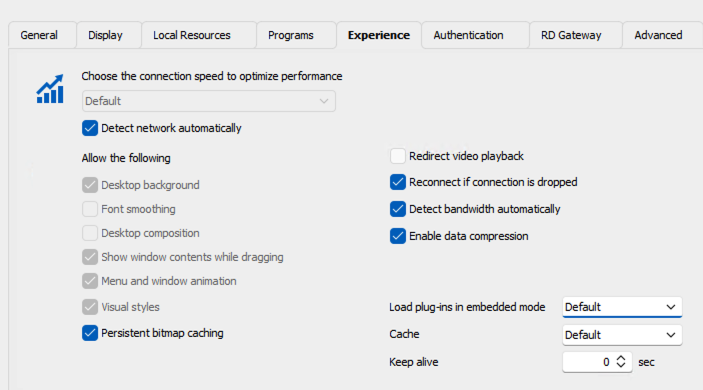
- In the "Experience" tab, as I wrote before you should use "Detect network automatically". Additionally, you could experiment with disabling data compression (uncheck "Enable data compression"). Since you have a very fast network it's possible this just adds overhead.
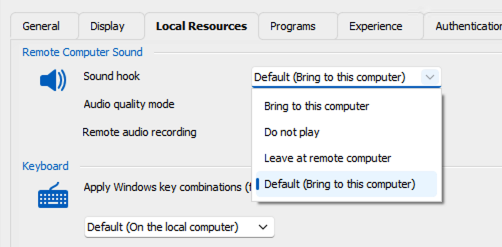
- Again, in the "Experience" tab you could experiment with enabling "Redirect video playback" (since you specifically mentioned video performance in your OP). This will tell the server that video streams should be decoded on the client. Note that a prerequisite of this feature is to also enabled audio redirection ("Sound hook" > "Bring to this computer" in the "Local Resources" tab).
Finally, you could check the information in this blog post which provides some information on the latest RDP codec and how to check if it's being used or not.
Please, let me know if something isn't clear or you have additional questions.
Thanks and kind regards,
Richard Markievicz
Screenshot 2024-04-09 at 12.10.59.png
Screenshot 2024-04-09 at 12.07.50.png
Screenshot 2024-04-09 at 12.07.08.png
Hello again
Ok, I understand. In this case it sounds like bandwidth is not an issue. There are a few settings you can experiment with to try and get the best performance:
- What do you have configured for your display settings? Assuming it's acceptable that the RDP session fits the current window, I'd recommend setting the screen resizing mode to "Dynamic Resolution". This should ensure that the server's resolution matches your local window (and will prevent, for example, the server sending larger updates just for them to be scaled down or up on the client)
- In the "Experience" tab, as I wrote before you should use "Detect network automatically". Additionally, you could experiment with disabling data compression (uncheck "Enable data compression"). Since you have a very fast network it's possible this just adds overhead.
- Again, in the "Experience" tab you could experiment with enabling "Redirect video playback" (since you specifically mentioned video performance in your OP). This will tell the server that video streams should be decoded on the client. Note that a prerequisite of this feature is to also enabled audio redirection ("Sound hook" > "Bring to this computer" in the "Local Resources" tab).
Finally, you could check the information in this blog post which provides some information on the latest RDP codec and how to check if it's being used or not.
Please, let me know if something isn't clear or you have additional questions.
Thanks and kind regards,
Awesome, thanks so much. This is what I was hoping to get. I will test and let you know. Before you replied I had started to dink with some of this and I might have gotten some improvement but it could also just be perception. I do also run usually 3 sessions at once. Of course only one is displayed at a time. I have had large monitors before and not noticed this but this one larger and in higher res so I think it'sm just pushing it. Nothing wrong with RDM I mean, I am probably just pushing RDP very hard. Thanks.
Hello again
Thank you for the feedback. I do encourage you to play around with this and let us know how you get on.
I am probably just pushing RDP very hard
This is possible. RDP is an old but well optimized protocol, but it does have its limits. Remember that very high resolutions the shear number of pixels that have to be pushed can get very high. I do believe the maximum resolution of an RDS session host is capped at something like 4096 x 2048. You might also find this article interesting, although it more specifically refers to Remote Desktop Services running on a Windows Server installation.
Thanks and kind regards,
Richard Markievicz
Hello again
Thank you for the feedback. I do encourage you to play around with this and let us know how you get on.
I am probably just pushing RDP very hard
This is possible. RDP is an old but well optimized protocol, but it does have its limits. Remember that very high resolutions the shear number of pixels that have to be pushed can get very high. I do believe the maximum resolution of an RDS session host is capped at something like 4096 x 2048. You might also find this article interesting, although it more specifically refers to Remote Desktop Services running on a Windows Server installation.
Thanks and kind regards,
Well then I am certainly pushing it or I am going over the line. I have RDM in windowed mode and almost my entire screen which is 7680x2160.
I did go through and make the suggested changes and tinkered with a few other things and it has indeed helped. It's gone from causing me a problems sometimes to just sometimes mildly irritating. I am OK with that, I will continue to experiment. Thank you for your help and solid info.
PS - given the zillions of tiny packets RDP sends I am also going to try to turn off interrupt moderation on both NICs.
Thanks