Active Directory Dashboard - Could not connect to domain controller
Active Directory Dashboard - Could not connect to domain controller

Hi there,
First of all, awesome app. I'm using it on MacOS.
I have an issue, I cannot connect to our Active Directory running on a local Windows DC Server.
I have it configured as below. With the same configuration I can connect to AD with "LDAP Admin Tool"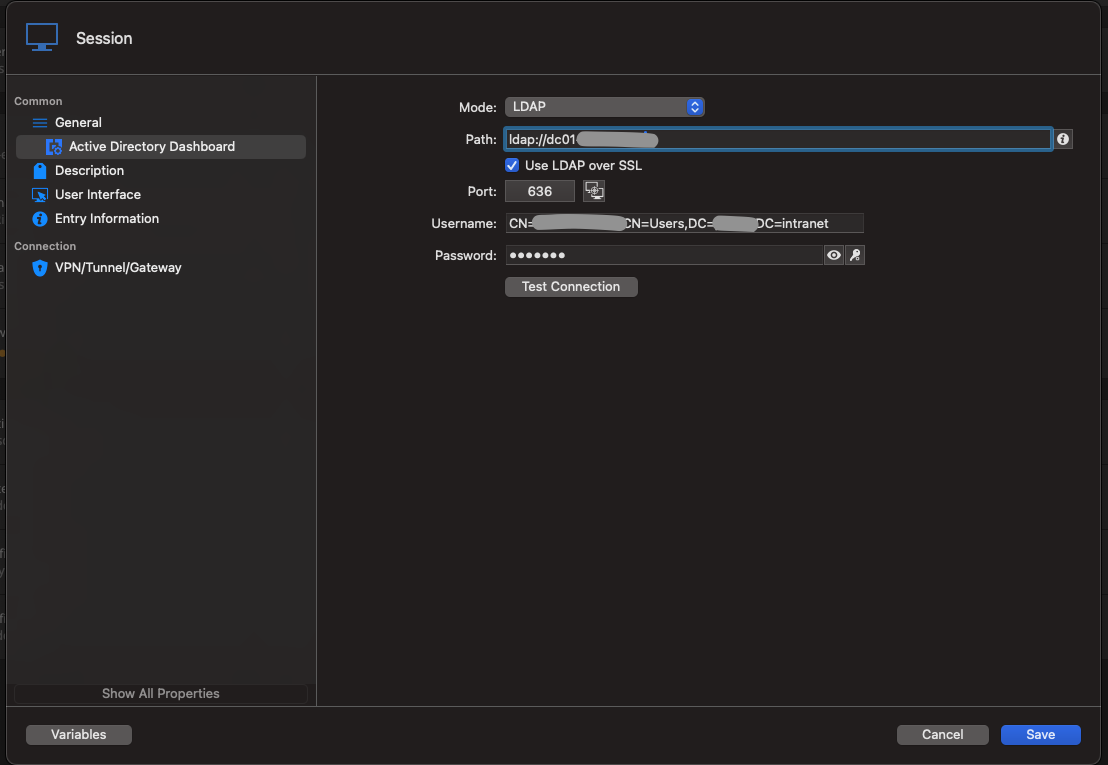
When I try to open session I get "Could not connect to domain controller" error.
Can you tell me what I'm doing wrong or if this is not supposed to be used as this.
Thank you!
Screenshot 2024-04-05 at 17.42.29.png
All Comments (13)
Hello,
Sorry you are seeing issues connecting to Active Directory with RDM for MacOS. A few things I noticed here:
1) In the Path field LDAP URL did you enter the hostname or the domain name of the domain controller?
2) Can you try connecting with Mode=Custom and the host or IP of your domain controller in the Hostname instead?
3) In the MacOS version you must currently enter the NetBios (samAccountName) of your account in the Username field and not your DN (we will fix this very shortly).
Let me know if this works for you or if you have any other questions?
Thanks,
Paul
Hi Paul,
Thank you for the reply.
1) In the LDAP URL, I entered the hostname. But I also tested with IP and same result.
2) Tried Mode=Custom with hostname or IP in the Hostname and same result also.
3) Tried with samAccountName in Mode Custom and LDAP and same result also.
Hello,
Can you try connecting without SSL and port 389, just to see if you can reach the domain controller on that port?
Thanks,
Paul
Hi,
No, got the same error.
Tried with port 389 without SSL, port 636 without SSL and port 389 with SSL.
Hi,
No, got the same error.
Tried with port 389 without SSL, port 636 without SSL and port 389 with SSL.
Sorry, If I try without SSL on port 389 or port 636 I get a different error: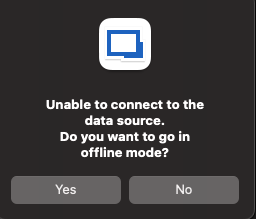
If I try with SSL on port 636 or port 389 I get "Could not connecto to domain controller"
Screenshot 2024-04-09 at 09.38.43.png
Hello,
Can you open the Terminal app and verify that connections can be made to the IP/hostname and port? Open Terminal then enter the following commands:
nc -vz HOSTNAME 389
nc -vz IP 389
nc -vz IP 636
Thank you,
Paul Dumais
Hi,
All connections succeeded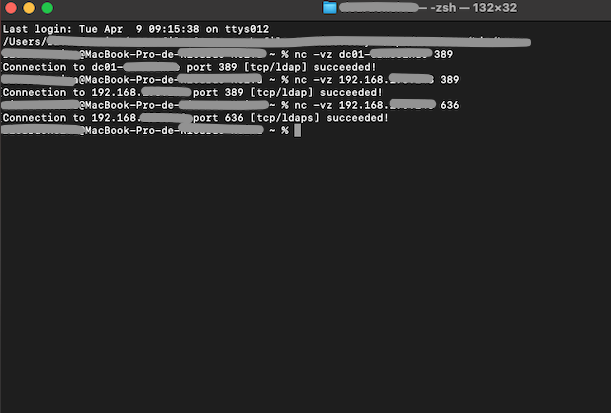
Screenshot 2024-04-09 at 13.57.58.png
Hello,
Can you try using the IP address and the mode Custom with Default port and the Netbios username, for example see this screenshot: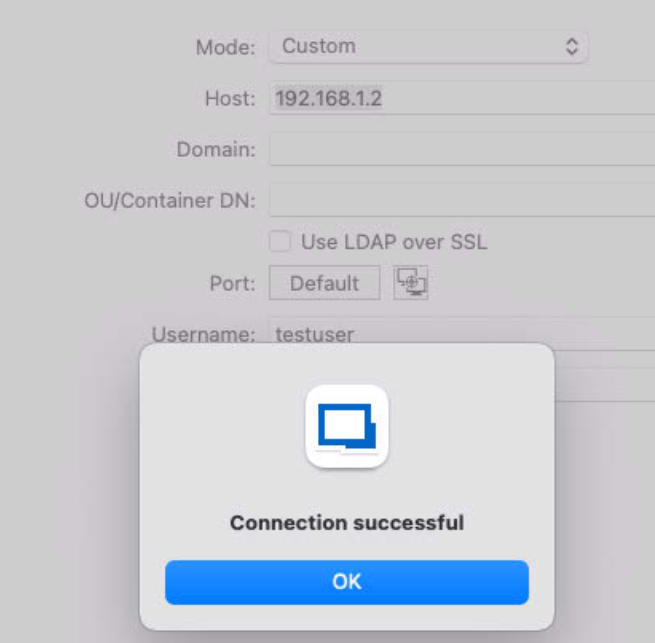
Also can you provide more information about your domain itself, maybe something odd is failing with authentication and it's providing an incorrect error message, do you know what version of Windows your Domain Controller is running? Or are you using something like SambaAD as a domain controller?
Thanks for your patience while we diagnose this issue,
Paul
c3fca0b6-cd15-43a8-b595-c96e1a054a60.png
Hello,
Another thing to note. RDM for MacOS is currently only supporting NTLM for authentication against Active Directory, we will be updating it shortly to support SimpleBind (when using LDAPS/SSL) and Kerberos. Is it possible that NTLM is disabled on your domain?
Thanks,
Paul
Hello,
Can you try using the IP address and the mode Custom with Default port and the Netbios username, for example see this screenshot:
Also can you provide more information about your domain itself, maybe something odd is failing with authentication and it's providing an incorrect error message, do you know what version of Windows your Domain Controller is running? Or are you using something like SambaAD as a domain controller?
Thanks for your patience while we diagnose this issue,
Paul
Hi again,
I just asked our IT Manager and he told me the AD is SambaAD, sorry, but I didn't know about that.
Is Active Directory Dashboarb able to connet to a SambaAD?
Thank you
Hello,
RDM for Windows has been tested and works properly with SambaAD, but it appears as though RDM for MacOS is having issues connecting to it. I will create a ticket and investigate what the issues are.
Thanks for helping us find this issue,
Paul
Hello,
We have submitted a fix to RDM MacOS that should resolve your problems connecting to Samba Active Directory. Please watch for the next release with this fix and let us know if it resolves the issue for you.
Thank you,
Paul Dumais
Hello,
Thank you for being so patient!
I'm pleased to inform you that a new version of RDM Mac(2026.1.11.3) has been released, featuring the fix for your issue.
Latest Version: Download RDM
Please let us know if this works or if you encounter any issues.
Best regards,
Maxim Robert