Can't choose Devolutions Gateway as VPN type for HeidiSQL entry template
Can't choose Devolutions Gateway as VPN type for HeidiSQL entry template

Why can't I choose "Devolutions Gateway" as VPN type for a HeidiSQL entry in a template? It is possible for entries like RDP and SSH.
RDM version: 2023.3.35.0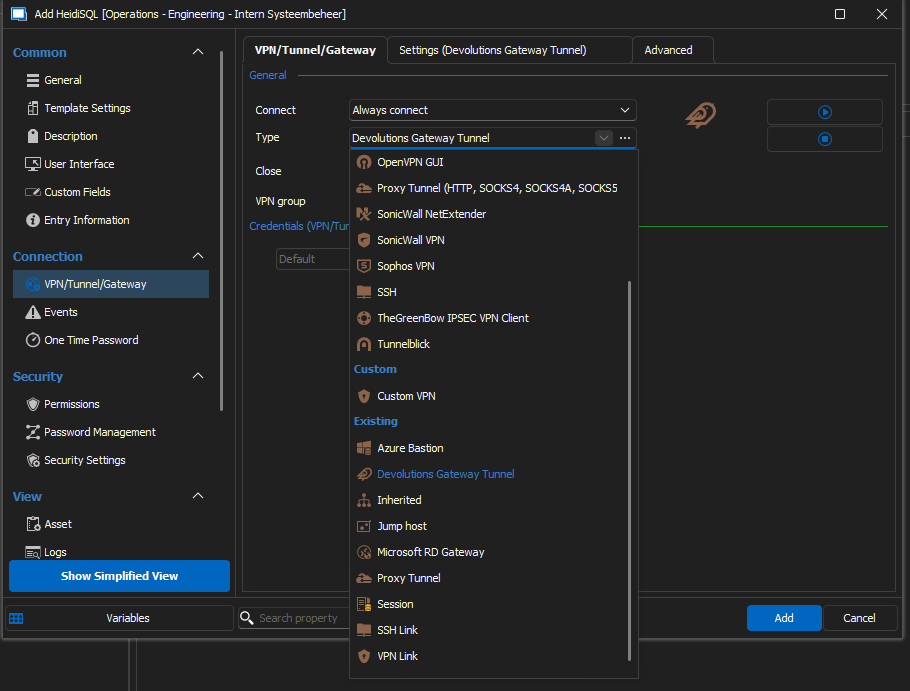
709ecf06-a4b1-4e8f-8a4c-f6248630c5fe.png
All Comments (3)
Hello,
Devolutions Gateway primarily supports RDP and SSH sessions and does not facilitate direct database connections, such as those utilized by HeidiSQL. This is why the gateway does not appear in the dropdown menu.
Best regards,
Carl Marien
Hi,
Connection types like RDP and SSH are directly integrated with Devolutions Gateway, meaning we've been able to make the client aware of the modified connection sequence required to go through it. This is similar to an application supporting SOCKS proxying natively versus an application that doesn't.
For all other connection types, you need to use the Devolutions Gateway tunnel instead, which is more generic and supports local port forwarding, SOCKS and HTTP proxying modes. The simplest approach is to use port forwarding and modify you connection entry to connect to localhost + the chosen port.
Best regards,
Marc-André Moreau
Thank you for the fast response. We have fixed our issue with adding a Devolutions Gateway tunnel entry which is using a Devolutions Gateway as VPN type and afterwards adding a HeidiSQL entry where the VPN type is the added Devolutions Gateway tunnel entry.