Gateway mode "Linked" dont accept Selection

RDM 2024.1.20.0
DVLS 2024.1.8.0
When i want to link a System SSH Gateway in a regular SSH Tunnel under "Connection" > "Gateway" it let me chose the specific System Gateway, but the Dropdown is empty after selection.
REST API tells me that only the Option "Terminal" > "SSHGatewayMode" with value "Linked" was created on SSH Object, but nothing else.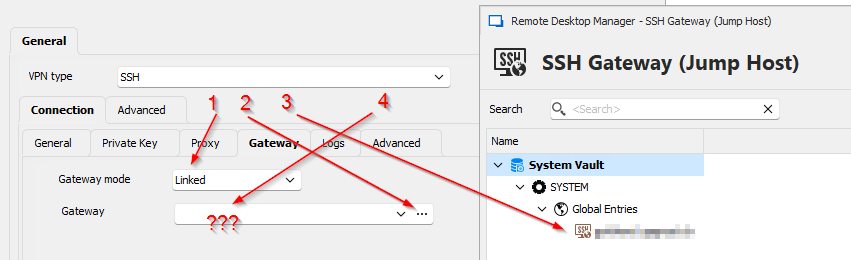
This also didnt worked with RDM 2023.3.39 and DVLS 2023.3.14.0.
Best Regards,
Andreas
d5e03283-e5bf-4117-85d3-5e1d98fde91a.png
All Comments (11)
Hello Andreas,
Thank you for reporting this issue. It seems to happen because the system vault SSH gateways aren't properly loaded in this dropdown. I will open a ticket and will let you know once we have a fix.
Regards,
Hubert Mireault
Hello,
We've made the fix and it should be available starting with our next minor version, 2024.1.21.0. It should release early next week.
Regards,
Hubert Mireault
Hello Hubert
We updated to 2024.1.28.0 and now the Gateways are selectable, thanks for this fix.
But ive a strange Problem.
The Gateway works when i try to connect as Administrator. But as normal User we always get permission denied: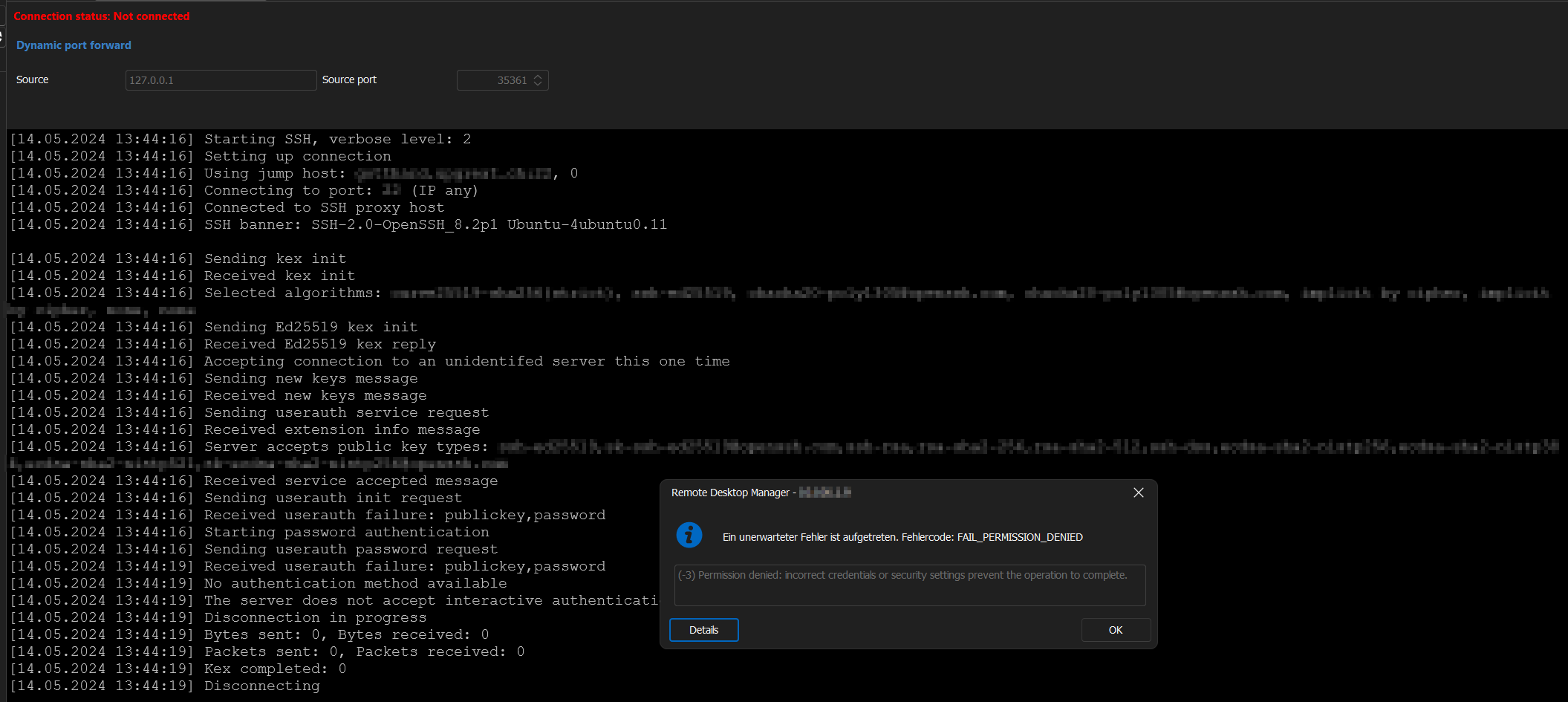
Is there something i miss?
There is no Permission Tab when editing a System Vault Entry and im not sure if it is a setting problem, because it works as Administrator.
Best Regards,
Andreas
92b4bc07-5c93-4ea6-a1f6-bbb8941f83be.png
Hello,
Could you check a few things:
- Make sure the credentials for your user are accurate. It might seem obvious, but a typo can be easy to miss
- Does the password of your user contain special characters? If so, would it be possible to change the password to contain no special characters and see if it works? Our only theory at the moment is that maybe some special characters aren't properly handled by the terminal.
Regards,
Hubert Mireault
Hi Hubert
Thanks for your inputs.
But as i wrote, the same Object works as Administrator.
Also the same Credentials works, when i dont use linked Mode on the Gateway, but Custom and add all Informations directly (Same Credentials).
The only special Char which the Password contains is a single point (.).
Best Regards,
Andreas
Hello,
When you're talking about administrator and regular user, I thought you meant the credentials in the gateway, but you mean the user type in RDM? If that is the case, there should be no difference, that is odd. Thank you for the additional information, I will check with our team to see if we're able to reproduce this.
Regards,
Hubert Mireault
Hello Hubert
Im sorry for the missing Information. Yes, Administrator and User as Usertype.
Same Config as DVLS Administrator via RDM works. But as regular User it doesnt.
Also both Users was in the same Network and using the same RDM Version.
Best Regards,
Andreas
Thank you. Let me do a quick recap (and ask a few additional questions) to make sure I understand your environment:
- You have created an SSH Gateway entry in the System Vault
- Could you let me know what is the credentials method used for this gateway? Is it "Username and password" or "Linked (vault)" for example?
- You have created a VPN/Tunnel/Gateway entry and chose the "SSH" mode. You have linked it to the prior SSH Gateway entry.
- Is this VPN/Tunnel/Gateway entry located in the System Vault as well?
- From there, you simply open that VPN (SSH) entry. If an administrator runs it, it works, and if a regular user runs it, it fails.
- If instead of linking to the SSH Gateway, you enter the information directly, it works well.
- In this case, are the credentials directly entered, or are they linked to an existing entry, for example with "Linked (vault)"?
Is this correct? Did I miss anything in how you've configured this?
Regards,
Hubert Mireault
You have created an SSH Gateway entry in the System Vault
Could you let me know what is the credentials method used for this gateway? Is it "Username and password" or "Linked (vault)" for example?
Yes
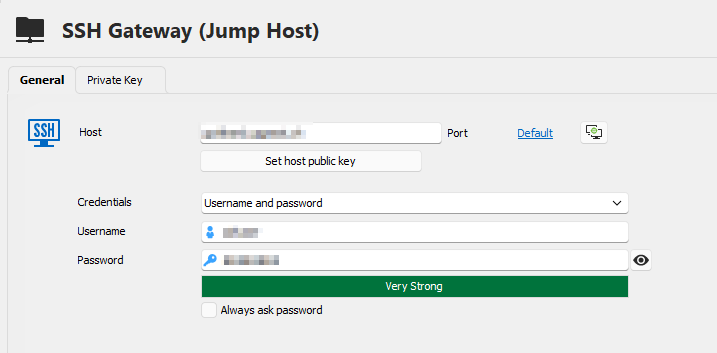
Credentials there are Username and Password
You have created a VPN/Tunnel/Gateway entry and chose the "SSH" mode. You have linked it to the prior SSH Gateway entry.
Is this VPN/Tunnel/Gateway entry located in the System Vault as well?
Yes
No, the SSH Tunnel itself is directly located in the normal Vault. Only the Gateway is located in the System Vault. This, because we have over 280 Vaults, and every Vault contains between 1 and 10 SSH Tunnels. And all those SSH Tunnels have currently the same SSH Gateway Settings via Script directly set. I want to link there a central SSH Gateway for future Changes.
From there, you simply open that VPN (SSH) entry. If an administrator runs it, it works, and if a regular user runs it, it fails.
Exactly
If instead of linking to the SSH Gateway, you enter the information directly, it works well.
In this case, are the credentials directly entered, or are they linked to an existing entry, for example with "Linked (vault)"?
Yes, this is how it is implemented currently on all Vaults
Yes, theyre directly entered. Here is a Screenshot of the current working solution for all Tunnels: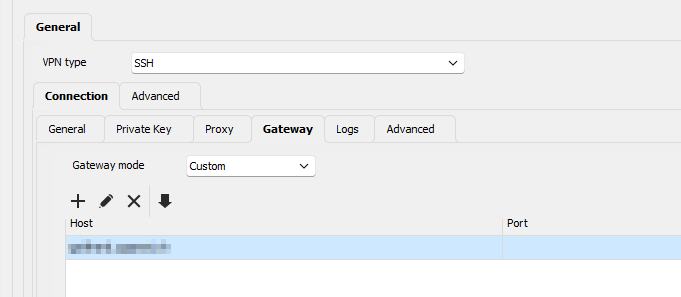
Best Regards,
Andreas
b323d510-ba7a-4e76-bc2f-df782ff82ea0.png
9c1d966c-a52b-4767-ab4c-d2a0f5fcc949.png
Thank you for the additional information! We'll be testing this to try and reproduce the issue.
Regards,
Hubert Mireault
Hello,
We believe we were able to reproduce this issue. We have opened a ticket.
Regards,
Hubert Mireault