Pass Credentials through when using Jump Session??

Good afternoon.
I was wondering if there is a way to utilize RDMAgent to run commands when connecting to a Jump Host. For example...
I have an A/D Dashboard and A/D Sync set up on my Jump Host. The Dashboard works perfectly fine, as I have it set on my local RDM install to utilize the connection.
However, since A/D Sync isn't supported via a Jump Session, I was wondering if there is any Credentials setting to choose from when utilizing the Jump Host, without having to set up KeePass Linking on the jump server itself?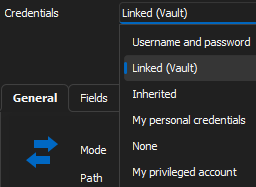
Thanks!
--- Chuck
Overgaard, AZ (-7 MST / Zulu Year-Round)
RDM Version: 2026.3.2.0 64-Bit - Free
ac6535d5-08e4-4b6e-bd8b-779d00200be6.png
All Comments (7)
Hello Chuck,
Thank you for reaching out to us regarding this,
I see, I'm not sure I understand what you're looking to achieve in this case perhaps you can provide me with some additional details? Would using the "Username and Password" option and entering the credentials directly in the entry Properties not work in this case?
Is this a specific reason why you'd prefer not to have the credentials on the Jump Host?
Let me know,
Best regards,
Samuel Dery
Hello Chuck,
Thank you for reaching out to us regarding this,
I see, I'm not sure I understand what you're looking to achieve in this case perhaps you can provide me with some additional details?
So let's say I connect to "JUMP1" via a local RDM session.
When I connect to JUMP1, I have "TEST1", "TEST2", and "TEST3" for instance.
What I am trying to find out, is since the Jump Host utilizes RDMAgent, is there any way after the connection is made to JUMP1, that when I connect to TESTx, it has a way to utilize the same credentials used when connecting to JUMP1 without having to specify?
Would using the "Username and Password" option and entering the credentials directly in the entry Properties not work in this case?
Is this a specific reason why you'd prefer not to have the credentials on the Jump Host?
Reason for this would be efficiency and ease. I have worked with a handful of support folks via Teams with screen share to fix issues, and they have seen all the different domains and credentials I have stored in RDM via KeePass. Instead of manually having to set credentials everywhere on every Jump Host, it would make it so much easier to be able to just have the credentials stored in one place, and have RDM pull the credentials that were used on the initial connection.
Let me know,
Best regards,
Hopefully that makes a bit more sense now. If that is not something that is available or a thought to implement, I understand and will resort back to the U/N & P/W scenario.
Thanks!
--- Chuck
Overgaard, AZ (-7 MST / Zulu Year-Round)
RDM Version: 2026.3.2.0 64-Bit - Free
Hello Chuck,
Thank you for the clarification, and my apologies for the delay,
I see, from my understanding, this would not be currently possible,
Would using an Advanced type of data source work in this case? It would allow you to connect to this data source on the Jump Host and have access to the entries with the Credentials configured:
https://docs.devolutions.net/rdm/mac/data-sources/data-sources-types/advanced-data-sources/
Let me know,
Best regards,
Samuel Dery
Hello Chuck,
Thank you for the clarification, and my apologies for the delay,
I see, from my understanding, this would not be currently possible,
Would using an Advanced type of data source work in this case? It would allow you to connect to this data source on the Jump Host and have access to the entries with the Credentials configured:
https://docs.devolutions.net/rdm/mac/data-sources/data-sources-types/advanced-data-sources/
I have been thinking about venturing to the SQL option. I just haven't honestly had a chance to get it configured and tested at this time.
Let me know,
Best regards,
--- Chuck
Overgaard, AZ (-7 MST / Zulu Year-Round)
RDM Version: 2026.3.2.0 64-Bit - Free
Hello Chuck,
Thank you for your quick reply,
I see, no problem, from my current understanding, I believe it would be the best option in your case,
If you have additional questions regarding this or need some guidance regarding Advanced type of data sources, feel free to let me know,
Best regards,
Samuel Dery
Hello Chuck,
Thank you for your quick reply,
I see, no problem, from my current understanding, I believe it would be the best option in your case,
If you have additional questions regarding this or need some guidance regarding Advanced type of data sources, feel free to let me know,
Best regards,
I do have one quick question...
Devolutions Server... I know that runs on top of SQL Express. Is that basically RDM's version of SQL SSMS?
Or can it actually run independently? It's hard to tell from the online docs.
--- Chuck
Overgaard, AZ (-7 MST / Zulu Year-Round)
RDM Version: 2026.3.2.0 64-Bit - Free
Hello Chuck,
Thank you for your reply,
Devolutions Server can be used without RDM it is installed on top of the database and provides an additional layer of security.
I'm not sure if it could be considered RDM version of SSMS, but you can access the DVLS from a web interface to manage it and access your entries.
Perhaps the following article may be of interest If you've not already seen it: https://docs.devolutions.net/server/overview/what-is-server/
Let me know if this helps,
Best regards,
Samuel Dery