Hyper-V Syncronizer Destination Folder additions
0 vote

Hello,
It seems that when configuring the destination folder for items discovered by the Hyper-V synchronizer, only generic type folders can be selected. For example, it doesnt appear to be currently possible to choose a 'Smart Folder' or have the items created as 'sub entries' under an existing object (i.e. a 'host' type entry for a Hyper-V server).
Would it be possible to enable additional destination types to be configured for the Syncronizer pls?
Thanks
Joe
All Comments (17)
Could I also add to this feature request a capability to only create the syncronized entries if a matching entry does not allready exist anywhere in the current data source. Ideally the matching criteria would have some flexibility to match on various entry attributes, but at the least matching on name would be required.
The use case is that there may allready be existing RDM type entries for the VM's that the syncronizer detects, but those entries are outside the destination folder that the syncronizer uses for the detected VM's. For example, there maybe an existing RDP, SSH, HOST or ASSET type entries. Also in some cases the VM name might be slightly different than the existing entries, such as having a prefix, so flexibility on the matching criteria (i.e using wildcards *, ? etc or regex) would be useful.
Pls let me know if you would like any additional info.
Thanks
Joe
Hello Joe,
For your first point, could you give more information as to how you'd like the structure to end up as? It would help if you also gave an example of how it's structured in your Hyper-V. A quick mock up with screenshots could be very helpful to see what's possible for us.
For your second point, we will have to investigate to see what the behavior should be and how we can improve it. We are already planning to make improvements to some synchronizers in 2024.2, so we may revisit the Hyper-V synchronizer to bring it more in line with our other synchronizers for that kind of behavior. I've opened a ticket for this.
Regards,
Hubert Mireault
Hi Hubert,
Currently I have a Hyper-V server configured as a 'Host' type entry in RDM. The Hyper-V Syncronizer is configured as a sub connection. I'd like the VM's that the Syncronizer detects to appear as sub entries under the Hyper-V Server host entry. As a workaround, I created a seperate folder to store the Syncronizer results in, which works, however in some cases I'd like to be able to use smart folders, as these have additional capabilities compared to a regular folder (i.e. the 'show sub entries' toggle). Further Folders cannot currently be created as sub entries under a Host Entry.
Thus the request for a less restrictive choice of destinations for the Syncronizer results. Make sense?
Thanks
Joe
Hello,
Thank you for the details. The issue with synchronizing as sub-entries is that we are only able to have one level of depth on non-folder entries (Parent->child), so if we went about it this way, it would synchronize strictly as a sub-entry to your Host entry, and not have any other folder for sorting these entries, which is probably not what you're looking for. We will keep this in mind but it would require reworking how sub-entries work in our application which would have a big impact. I recommend using traditional folders when it comes to this.
As an additional note, smart folders currently have the same limitations as non-folder entries (the entries contained within are sub-entries, so only one level of depth), but instead are a way to list entries in its dashboard according to the criterias stored within (for example, based on tags).
In short, we are keeping your request in mind but at the moment it would require a lot of changes to how things are structured to allow for this.
Regards,
Hubert Mireault
HI Hubert,
Thanks for the response. The limitation of syncronizing to a single depth level under a host entry would not be an issue, at least in the use case I outlined. While I can appreciate there is a lot of work required to enable multi-level depth under host or smart folder type entries, I'm not asking for that, just the ability to syncronize to a single level depth under an existing host (or smart folder) entry, which I dont believe would require significant engineering.
As Hyper-V doesnt organize VM's into folders like vSphere does, there is no folder structure the synchronizer needs to replicate from the source. Additionally, if the second part of my request was implemented (i.e. skip creating allready present entries found elsewhere in data source), there would be even less necessity to create folders under a host type entry. Without the ability for the syncronizer to skip creating allready present items, I think its a mute point about multi-level folders under a host type entry anyway, because as far as I know the syncronizer only traverses the first level, so if someone created a sub folder under a host entry and manually moved a syncronized item there, the item would probably be recreated/duplicated in the original location on next sync.
Pls let me know if you would like any additional info.
Joe
Thanks for the additional information. I think I indeed misunderstood what you were saying in your previous message. If you're not looking for more than one depth level as sub-entries, then it should be more in the realm of possibilities.
I can't give you an estimate on when we will be able to work on this part of your request, but we will post back here when we do.
Regards,
Hubert Mireault
sounds good, thanks Herbert.
Regarding the second part of the request to skip pre-existing entries; I noticed there is a 'creation source' property on entries, which seems to be able to link to a syncronizer object. Do you know if this can be used to tell the syncronizer not to create the respective entry in the destination folder, if an identically named entry which has the creation source set to the syncronizer allready exists?
e3029a80-b833-4b1b-92fb-746ce97c73f0.png
Hello,
The "creation source" field is set to the ID of the synchronizer entry when the entry is created by that synchronizer. The synchronizer entry can only modify/delete entries created by itself to minimize risk of changing entries that aren't part of the synchronization process. If you set this ID on entries, this means the synchronizer might modify or delete this entry if it doesn't match what is found in your Hyper-V environment. This won't affect whether it creates duplicate entries or not.
As a note, usually what dictates what is considered a "duplicate entry" for synchronizers is the combination of Host+Folder (not the name of the entry), but we will have to investigate what it does for Hyper-V. Additionally, we're making improvements to the synchronizers for 2024.2 and what is considered a unique entry will change from a combination of fields to the unique identifier, and this should be a change that will be done for the Hyper-V synchronizer as well.
Regards,
Hubert Mireault
Hi Hubert,
Thanks for the additional info. I did some testing and found that the syncronizer does delete entries linked via the 'creation source' property even when the name matches. Further I found that the host property of the syncronized items is a GUID, as opposed to the network hostname/fqdn of the respective VM, and its not allways viable to use the GUID as as hostname to connect to the VM directly via RDP.
As part of the improvements to the Syncronizer in 2024.2, could you make the matching criteria an option of either 'name' or 'name+host' or 'unique identifier' pls. In scenarios where the VM's move between hosts, the current and planned matching criteria are not ideal due the following:
1) The host property of a syncronized entry may need to be changed from a GUID to a FQDN, so 'name+host' wouldnt work
2) Using a unique identifier would likely limit the capability of manually linking a pre-existing entry to a syncronizer via the 'creation source' property, as I suspect its not easy to change the unique identifier of a pre-existing object to match a duplicate entry created by the syncronizer
3) When VM's move between hyper-v hosts (i.e. between cluster nodes, or if a hyper-v host is rebuilt with a newer OS/name), newly syncronized objects would be created.
4) Syncronized / creation source linked entries may be customized or have sub entries created, which need to be retained when a VM moves and maybe detect by a different syncronizer that targets an alternate Hyper-V host
So in summary, the feature requests are:
1) Be able to set the destination for syncronized items to other entry types like 'host' or 'smart folder' (items would be created a sub entries)
2) Be able to customize the matching criteria to match only on 'name', ideally with support for regex or wildcards (i.e. *, ?)
Hopefully all that makes sense, if you would like further clarification, please let me know.
Joe
Hello Joe,
Thank you for the details. I understand the difficulties you're encountering with the current implementation, and how the planned changes wouldn't necessarily improve these scenarios.
For now, we will go forward with the planned changes for ID matching, as it should be equivalent if not better than the current matching for the majority of our users. For the two features you're asking for, we will see about adding these to a future roadmap. We will have to consider how we want to implement these, as they could be features available in most of our synchronizers, not just the Hyper-V synchronizer.
As an additional note regarding this:
> 2) Using a unique identifier would likely limit the capability of manually linking a pre-existing entry to a syncronizer via the 'creation source' property, as I suspect its not easy to change the unique identifier of a pre-existing object to match a duplicate entry created by the syncronizer
There's always the possibility for you to make a powershell script to associate these. You could compare the required fields and then set both the CreationSource and the SynchronizedItemID, then delete the entry that you don't want to use anymore. Just note that for now the SynchronizedItemID is not available for the Hyper-V synchronizer, but it will be part of the changes we are bringing to 2024.2.
Regards,
Hubert Mireault
ok, thanks Hubert. Will revisit this once 2024.2 has been released and I can test out SynchronizedItemID usage.
Hi Hubert,
Circling back on this one now that 2024.2 has been released. Have tested out replacing the attributes SynchronizedItemID and CreationSource of an existing entry to match those from a newly syncronized entry. If I remove the newly syncronized entry, and then rerun the syncronizer, the original entry gets moved to the destination folder set in the syncronizer.
Is there a way to prevent the syncronizer from moving an existing entry to the destination folder? Currently this behaviour prevents regularly using the syncronizer while also preserving entries that have been organized into various folders elsewhere in the vault.
To add context to this question, I'm trying to use the syncronizer to create entries in a 'Discovered VM's' folder, which are then moved elsewhere, while also ensuring any new/future VM's get added to the destination folder set in the syncronizer.
Please let me know if you would like any additional information.
Thanks
Joe
Hello,
There's unfortunately no way to ignore the destination folder at this time, but we can see how that could be useful in your case. We'll update our internal ticket to reflect your scenario and see what we can do.
We'll keep you updated on any progress.
Regards
Jonathan Del Signore
Hello,
A new setting called "Update folder only for newly discovered items" will be available in our 2024.3 release, which will prevent the synchronizer from moving already created entries : 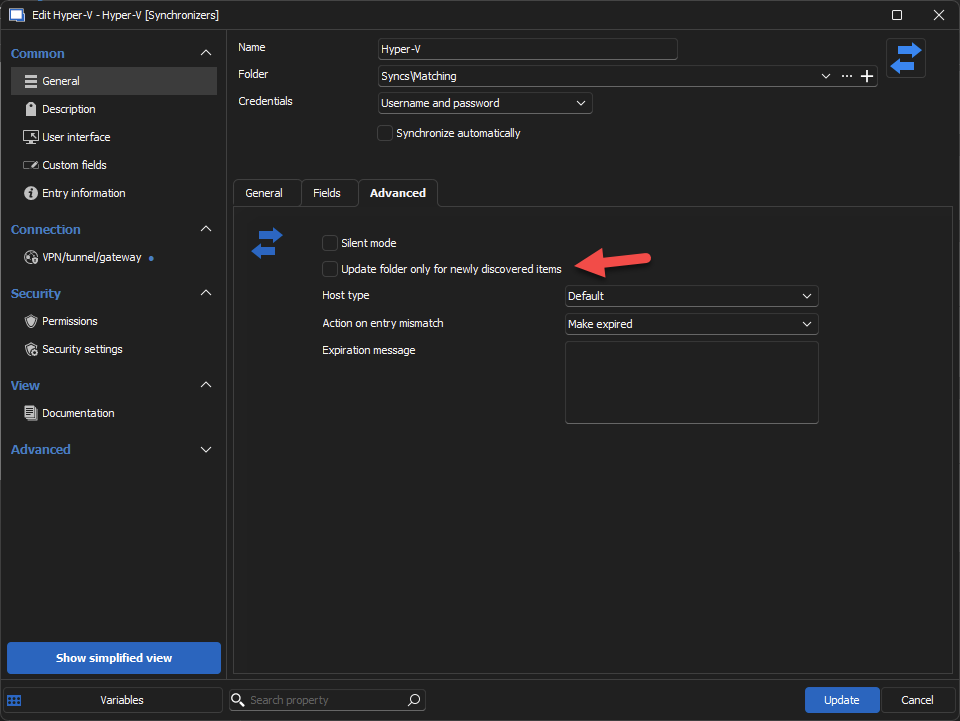
Regards
Jonathan Del Signore
b8882ac4-d6a4-4a08-8af6-756058ade12b.png
Hi,
I've write a long message with screenshots and everything but apparently I forgot to post it.
So I will keep it short: the feature doesn't work.
The synchronizer ignore the already created sessions, so it recreate everything.
If you have already configured sessions, you don't want to re-do all the job...
The duplicate check doesn't work how it should either, for example: the destination folder is Servers\Folder 1 and you set duplicate check to root, it doesn't check from Servers\* . It check from Servers\Folder1\* .
That's not convenient since it would be nice to set a specific subfolder for creating sessions and sort them manually as needed.
Example: Servers\New as destination folder and after I move them to Servers\Citrix. Next time I synchronize, if it check from Servers then it should see the servers was already created.
Best regards
Hi Arnaud,
Could you please tell us:
- Which synchronizer you're using
- Your current RDM version
I just tested with Active Directory and HyperV and both seem to work as intended.
Regards
Jonathan Del Signore
Hi,
I showed this bug in the ticket 00087280 with your colleague Marc-Antoine Dubois.
Could you ask him the video of our session please? It will be easier for you to see the behavior I'm describing.
We're using RDM 2025.1.24.0 and it's the Active Directory synchronizer.
Best regards