HashiCorp Vault secret engine permission

Good afternoon all,
I am trying to implement some sort of permissions so that a single HCP vault credential entry in RDM can only access certain Secret Engines in HashiCorp Vault.
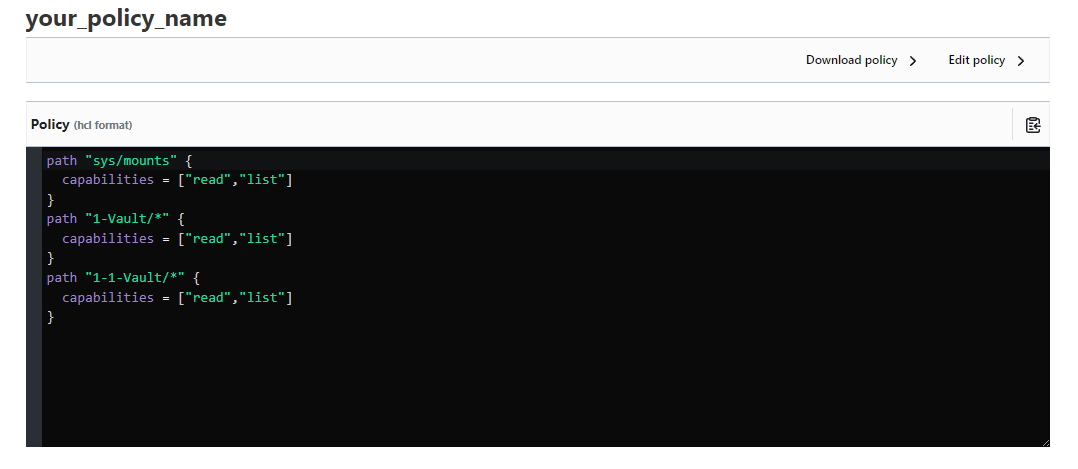
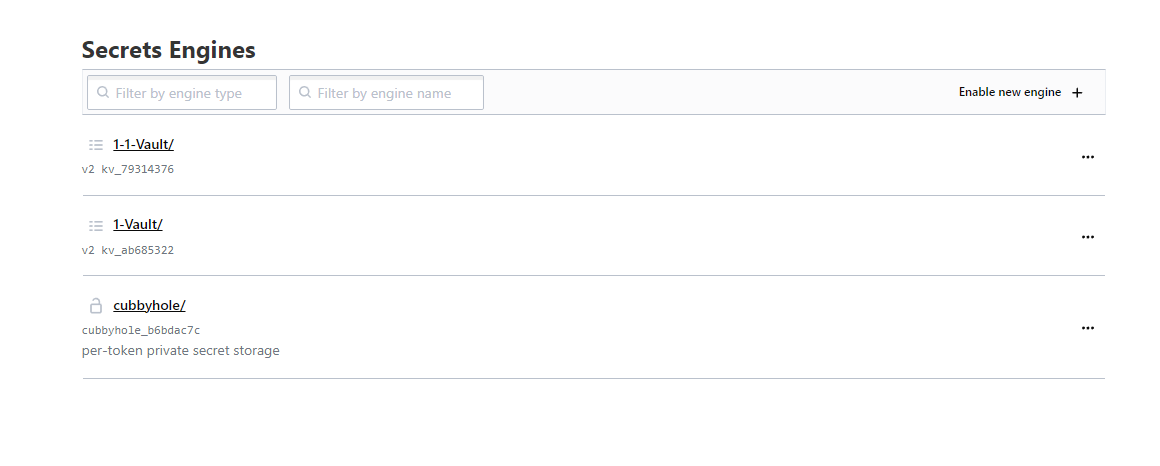
I have the policies set as I think they should and in the UI, the account used can only see the required vaults as per the policy set in HCP UI. However, In RDM, It lists all the engines and not just the ones I want.
Could anyone provide some insight into what I am doing wrong or if this is a limitation of either RDM/HashiCorp.
Cheers,
Louis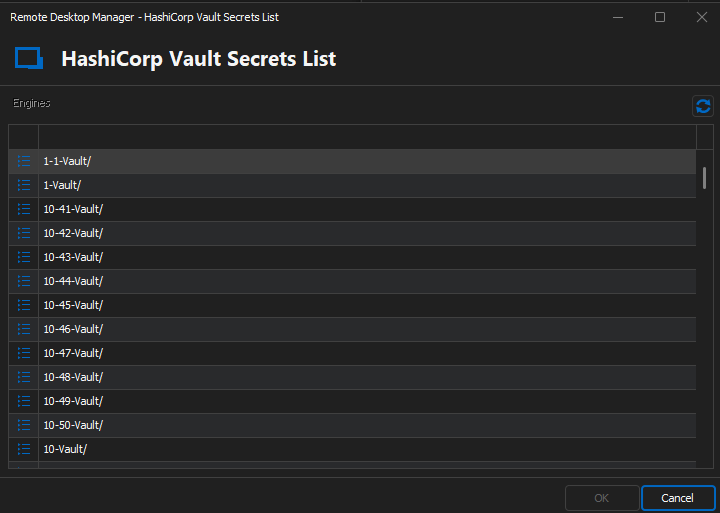
RDM-HCP-All-Engines.png
HCP-UI-Polcies.png
HCP-UI-Engines.png
All Comments (16)
Hello Louis,
Thank you for reaching out to us regarding this,
- Could you please specify the version of RDM you are currently using?
- What type of data source are you using?
To clarify, this is a new configuration and was not working previously is this correct?
Let me know,
Best regards,
Samuel Dery
Hi Samuel,
RDM is currently running version 2024.1.17.0 64-bit
Data Source is MS SQL
This is a completely new thing that we have not used before in the past.
Louis
update, I just noticed that there is an update available for RDM.
Version is now: 2024.1.19.0 64-bit
No change in the vault permissions working unfortunately.
Hello Louis,
Thank you for your reply,
I see, I will need to discuss your case with our development team,
I will keep you updated with any news I receive regarding this,
Best regards,
Samuel Dery
Hello,
At first glance, I would say you're doing it correctly and it should work, although clearly it doesn't. We'll look into adjusting our setup to replicate yours and come back to you with our findings.
Also, could you please tell us which type of auth method you're using?
Regards
Jonathan Del Signore
Thanks Samuel,
Hi Jonathan,
We have tried user/pass and token. Both with the same outcome.
Cheers,
Louis
Perfect thank you, and are your adding these users directly through the vault UI, or via command line? If via command line, I'd like to see the exact command you're using if possible.
I added users through the vault UI, and even with these policies, the API is refusing them. I'm thinking something else is affecting permissions that we're not seeing.
Regards
Jonathan Del Signore
user (userpass) had been created via UI but as you mentioned CLI I decided to give that a try just now. ("vault write auth/userpass/users/<user> policies=las-testing password=<password>")
I got the same result as users created via UI.
Louis
Hello,
Sorry it's been a while, but our setup is being finicky and I simply can't get a userpass auth to work through the API.
A case has been opened with our IT department to look into it. We'll let you know as soon as we can get it working.
Regards
Jonathan Del Signore
Hi Jonathan,
Just wondering if you have made any in-roads or if it is still causing problems.
Cheers,
Louis
Hi Louis,
The issue lies with the "sys/mounts" permission. It gives full engine listing access through the API. You can test this yourself in the "Tools -> API Explorer" section of the Vault UI. Not adding specific engines to your policy will simply make it so that you can't access secrets inside the engine, but you'll still be able to list it.
I'm still not sure if there's a way to hide specific engines when going through the API. I'll let you know if I find anything.
Regards
Jonathan Del Signore
Good news, there is an API that would return only the visible engines, it's simply not supported by the library we're using.
We'll see if we can either have them support it, or implement it ourselves.
Regards
Jonathan Del Signore
Hi Jonathan,
It's been a while :)
Don't suppose you know any more since the last update?
Cheers,
Louis
Hello,
The developer for the library we're using wasn't active for the past few months, but they seems to be back now. I'll see if I can get in touch with them.
Regards
Jonathan Del Signore
Hi Jonathan,
Just following up on the above. Any news?
BR
Louis
Hi Louis,
Sorry no news yet. I'll let you know as soon as I do.
Regards
Jonathan Del Signore