cannot login with local accoun

Hello,
I can login with RDP to all my servers using saved domain credentials in Devolutions Online Drive, however it does not log me in automatically when using a local account on a domain-joined server. The domain(hostname), ID, and pw are all correct but it does not login. There is no error, it just takes hangs for a few seconds and then takes me to the windows login screen where i can manually enter the pw and it logs in fine. I have tried creating a new credential entry, and a new server entry with no change.
This has been happening through multiple versions of RDM, I just haven't looked for a solution til now. Currently on 2023.3.39.0 64-bit.
Any help would be appreciated.
Thank you!
All Comments (10)
Hello,
Thank you for reaching out to us regarding this,
I see, when attempting the connection outside RDM using MSTSC for example, does it work without issues, or are you encountering the same behavior?
Let me know,
Best regards,
Samuel Dery
No problems at all outside of RDM. Only happens using RDM, and only when logging in with a local account. If I switch to domain credentials on the same server, it works fine also.
Thanks!
Hello,
Could you try to disable the API hooking for a test in File->Settings: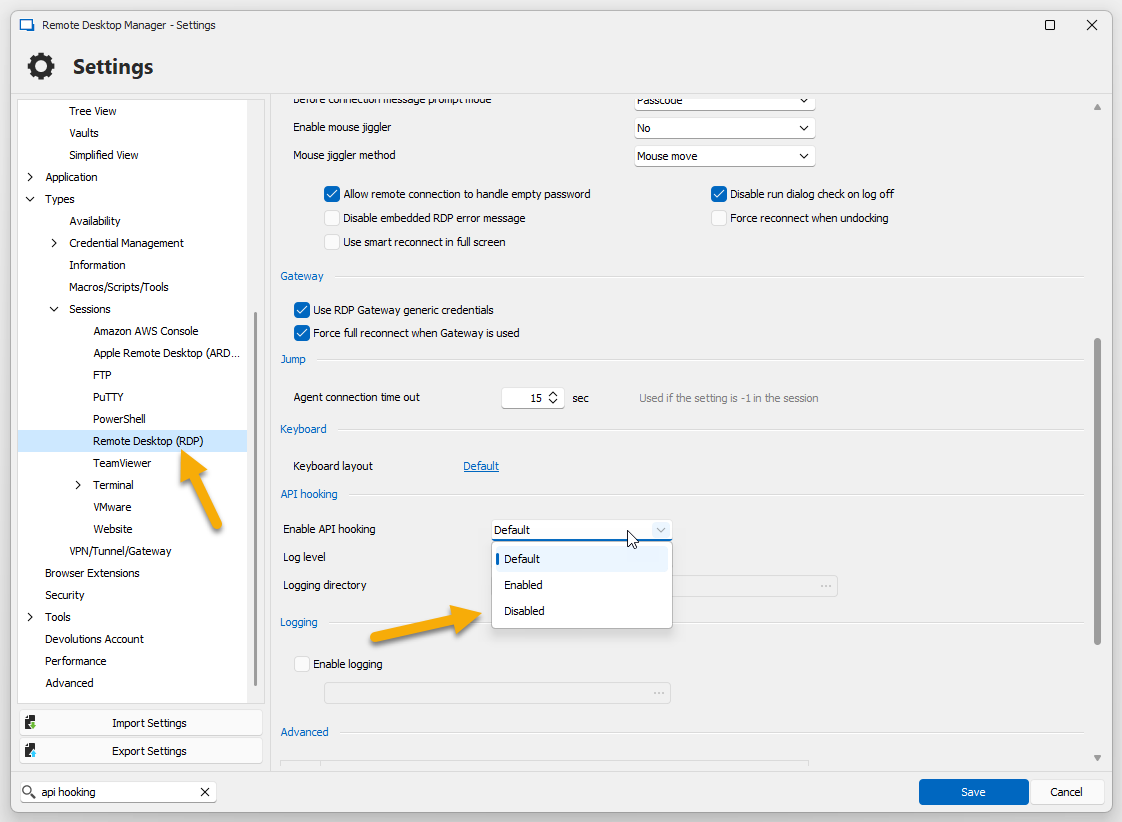
Or try to disable the NLA in the RDP properties of your entry: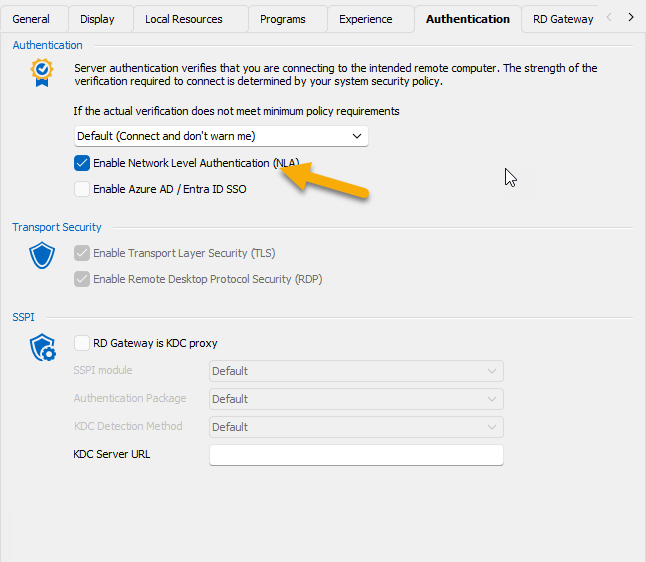
Regards
David Hervieux
43796bbf-9804-45cc-9d22-f40e8518a360.png
f237729c-eba6-46ae-b147-05641e5378f8.png
Hello, I know it's been 2 years but can we look at this again? I'm still having the same issue. I got busy and forgot about this since it's not a critical issue, just an annoyance. Other than this minor issue, RDM is fantastic!
I've tried the suggestions in the last post related to API hooking and NLM settings, which did not solve the issue.
Thank you!
And I have updated to the latest version, 2026.1.15.0
Thanks
Hello
Have you tried pre-pending the username with either a "." or the machine name?
For example:
Username: .\administrator
or
Username: RemoteMachineName\Administrator
Let me know if it helps
Kind regards,
Richard Markievicz
Hello again
As I think about it, the .\ prefix might tell RDP to use your local (client) computer as the domain. So if it doesn't work, instead try the machine name or just a backslash (e.g. Username: \administrator)
Kind regards,
Richard Markievicz
Hello,
I have tried for the username:
accountname (and domain in the domain field)
accountname (leaving domain field blank)
domain\accountname
.\accountname
It's like it's not passing through the password, becasue when it fails the login screen comes up with the correct domain\account, then I just have to enter the password and it works.
Hello
Broadly I can't reproduce the issue, what works consistently for me is using e.g. remotemachinename\administrator as the username. This is from a workstation that is joined to the same domain as the RDP host. Is that the same for you, or is your workstation in a different domain or workgroup?
I know you said mstsc works - what form of credentials do you use there? Make sure it's not picking up cached credentials from Credential Manager (in the "Windows Credentials" section - stored RDP credentials will have the prefix TERMSRV).
Assuming you use the same in RDM (or stick with remotemachinenmame\administrator) what's the result when you select your connection and choose "Open with parameters > Open (External)"?
Thanks and kind regards
Richard Markievicz