One-Time password not automatically fill my site like username & password
One-Time password not automatically fill my site like username & password

Hi Devolutions,
I am using devolutions workspace extension in Microsoft Edge browser. I have saved my username & password in the vault.
Also configured the OTP for the login.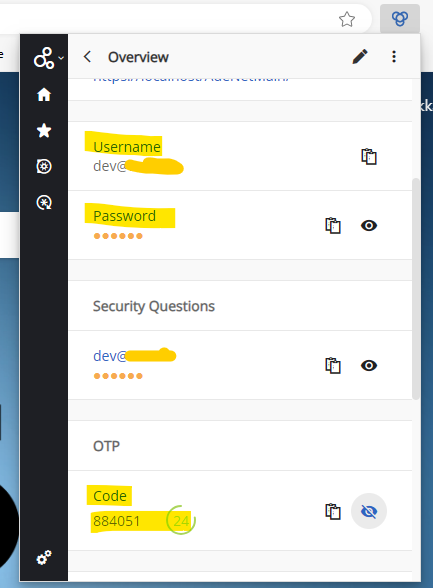
I have login using saved username & password like shown below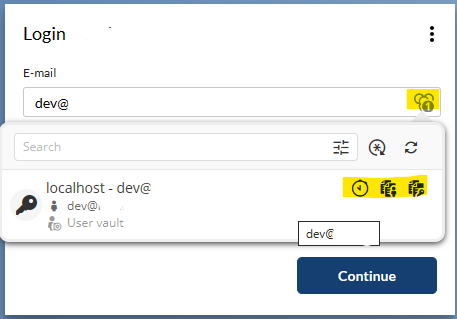
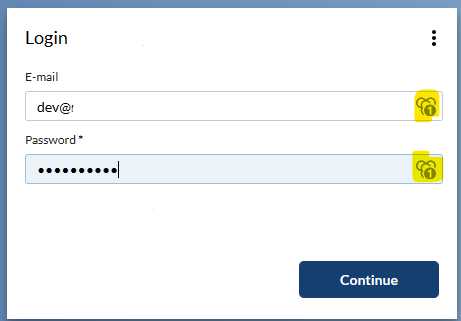
After login there is no icon shown in the One-Time Password field.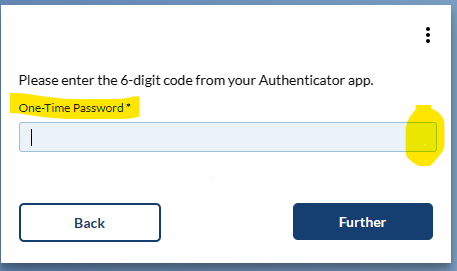
So we have added the control Id --> in the HTML control Id 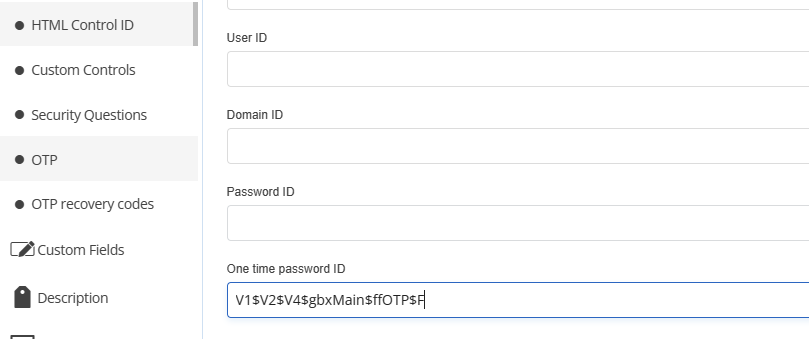
But still this is not automatically fill the otp code.
Please help me.
Thanks
fbdde20d-9148-4449-b089-1c8ef8c97bda.png
bdee077c-a2e3-4db0-b601-683e2fbb67a4.png
3771e306-6c9f-4283-b146-1c7889c54249.png
368b44a7-238e-4bff-88d4-cc714840982f.png
70f05e0d-c26d-46cd-91da-e8c466e63eeb.png
All Comments (21)
Hi,
Do you use the "Automatically fill in credentials on load auto-fill on load" settings? When you select an entry from the popup, does it populate the OTP field for you?
Is it a public website that we could look at? (You can send us the URL in a private message)
Could you also verify whether the ID/Name attribute you're referring to changes dynamically? In other words, when you revisit the HTML code, do the values in the ID or name attribute remain the same?
Best regards,
Olivier Désalliers
Hi @Oliver Desalliers,
Thanks for your reply.
I did the "Automatically fill in credentials on load auto-fill on load" settings but still not detect the OTP.
I have added the sample page with our use case & video steps. Please have a look.
Could you please resolve the problem.
FYI: We use only name for the OTP field. We didn't use ID field for the OTP field.
Thank you!.
LoginPage.zip
Devolutions OTP not capture.zip
Hi,
Thank you for the sample page and video steps. For the “Nothing to copy to the clipboard” message when copying the OTP, does it still happen after you restart Edge? We have been able to reproduce the issue after editing an entry, the workaround was to restart Devolutions Workspace or the browser. A fix will be available in the next Devolutions Workspace version.
Best regards,
Olivier Désalliers
Hi Olivier Désalliers,
Thanks for your info.
For the “Nothing to copy to the clipboard” message when copying the OTP- will works after restart the browser.
But the OTP code fields doesn't recognize First Time. If I click the devolution extension and the click the user then the OTP is filled.
Could you please help me first time the OTP field is to fill the code. I have created the Issue steps as Video. Please have a look.
Thanks
OTP Not capture FirstTime.mp4
Hi,
The auto-fill on load (Fill the OTP on “the first time”) will work if you have only one matching website for the page (you have four matching in your case) otherwise Devolutions Workspace doesn’t know which one to take.
Best regards,
Olivier Désalliers
Hi Olivier Désalliers,
Thanks for your info.
Its worked for the sample (Fill the OTP on “the first time”) as per your suggestion.
Unfortunately for real my website is not working.
I don't know the reason.
Could You please suggest something.
FYI: I have attached the video & log.
After login it go below page
After click enter the otp is not filled automatically.
After refresh the OTP filled
what can I do? to fill first time
Thanks.
Hi,
Are the sample and the “real” website the same thing, including the JavaScript that could interfere with the filling?
It seems there could be JavaScript elements or aspects of the website's design that interfere with the autofill script's execution upon loading, preventing it from functioning correctly.
Also, it looks like the video that was meant to be included did not attach properly.
Best regards,
Olivier Désalliers
Hi @Olivier Désalliers,
Thanks for the Info.
Now I have attached the video steps(both sample & My local site) & the settings details.
Please have look and suggest to resolve this.
Thanks
Sample.mp4
My Local Site.mp4
Hi @Olivier Désalliers,
Thanks for the Info.
It seems there could be JavaScript elements or aspects of the website's design that interfere with the autofill script's execution upon loading, preventing it from functioning correctly.
After changing our javascript it will fill the OTP first time.
But we have another problem the OTP fields value doesn't change every 30 seconds.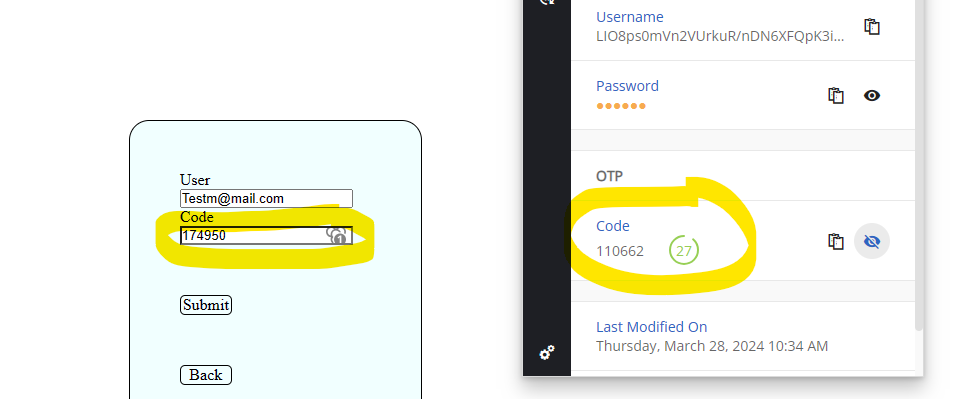
Could you please have a look.
Thanks
e7957d23-1e76-4435-9e09-179e1888a924.png
Hi,
The field where the One-Time Password (OTP) has been filled on the website does not automatically update when a new code is generated. To update the field with the latest code, simply click on the item within the popup. This action will insert the new OTP into the field.
Best regards,
Olivier Désalliers
Hi Olivier Desalliers,
Thanks for the info,
The field where the One-Time Password (OTP) has been filled on the website does not automatically update when a new code is generated.
But the newly generated OTP field ID / Name is same what I have configured in the Settings. 
Why it will not update?
Is that Devolutions WorkSpace is not support this problem?
FYI:
I have checked some other extensions (LastPass & 1Password) its working. They have change the OTP value every 30seconds & automatically update the OTP field.
Thanks
f3d53e5e-e6c7-4f93-be06-5ee3f53da555.png
Hi,
Devolutions Workspace browser extension won’t automatically update the OTP value in the field once it has been filled on the page; this currently requires user interaction.
Could you send us a video demonstrating how LastPass and 1Password automatically change the OTP value in the field when the OTP code changes?
Best regards,
Olivier Désalliers
Hi Olivier Désalliers,
Thanks for your Info,
I have attached the LastPass demo video.
Please have a look.
Best Regards,
LastPass.mp4
Hi Olivier,
Is there any update?
Thanks
Hi,
Thank you for sharing the video outlining your feature request. We have opened a ticket about it.
Best regards,
Olivier Désalliers
Hi Olivier ,
Thanks for your info.
Could you please share the opened a ticket?
I will follow the status.
Thanks
Hi,
It's impossible to share this ticket's link as it's our internal ticketing system.
Once any update will be available, we will post it here.
Thank you for being so patient.
Best regards,
Érica Poirier
Hi Erica Poirier,
Thanks for the info.
We are waiting for the update.
Thanks & Regards,
Venkat
Hi Oliver,
Is it possible to automatically detect the OTP without specifying the 'One Time Password ID'?
Because some user don't know this how to do, is not really good.
Thanks
Hi Oliver,
Still the OTP is not automatically detect without giving the 'HTML Control ID'. (Devolutions Workspace Extension)
Pls help me how to detect the OTP without adding 'Control ID'.
Thanks
Hello,
As I can see, the case opened with our development team is still opened. I will ask for more information on the development and get back to you.
Best regards,
Jeff Dagenais