Support for multiple IP Addresses on the Asset\Network tab
Support for multiple IP Addresses on the Asset\Network tab
0 vote

Hello,
Using RMD to inventory server asset info via the 'load from system information' feature, and currently there appears to be no discovery of secondary/tertiary IP addresses (for example a Hyper-V cluster node may have seperate Nics/IP's for iSCSI traffic).
Would it be possible to accomodate the discovery and recording multiple IP addresses within the asset section of an entries properties?
Ideally the hardware inventory would also capture the Network adapters/drivers, which may also tie into how/where multiple IP addresses are recorded/displayed in the GUI.
One benefit of this capability would be to support generating reports of which servers have IP addresses in which subnets/vlans etc.
Pls let me know if you would like any additional info.
Thanks
Joe
All Comments (10)
Hello Jo,
Could you post a small mock up (paint is ok) to show me where in the Asset you think it could be interesting to add it?
Regards
David Hervieux
Hi David,
Thanks for asking. Ideally there would be a multi-column grid the articulates network addressing information for each adapter present in the system. For example, most of the information from an 'ipconfig /all' command would be useful to have in the entries asset\networking tab, with the exception of DHCP lease info.
Ideally the MetaInfo could also be queried by PowerShell and builtin reports.
Pls let me know if you would like any additional info.
Thanks
Joe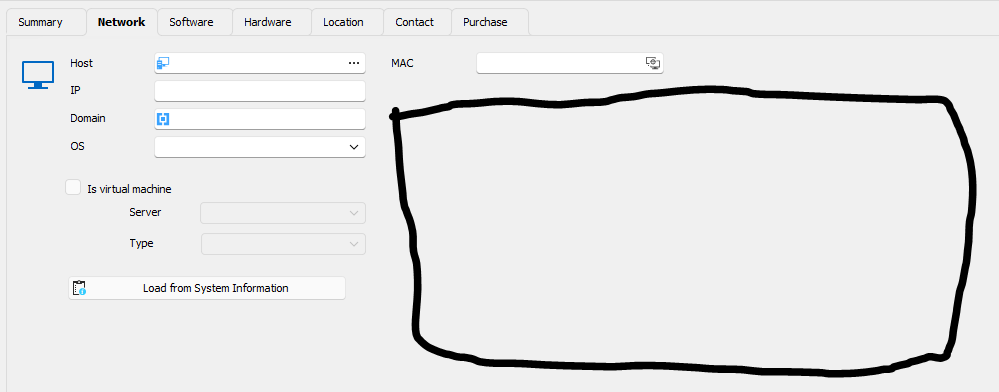


ffd39704-daef-4be0-b512-83df4ad20c25.png
Hello,
Thank you for the details. I will create ticket for that. I can't give you an ETA.
Regards
David Hervieux
ok, thanks David.
Hi David,
I see an option in the RDM settings for IT Assett Management that references network adapter in the 'System Information Options'. I have enabled it, but dont see any extra info shown on an entries Asset tab.
What does this setting do? If network adapter info is being retrieved, is the data accessible via powershell?
Thanks
Joe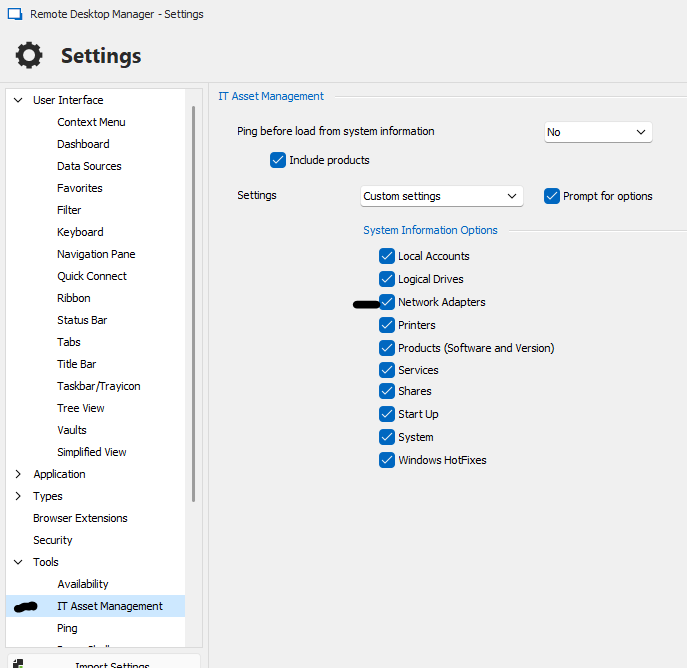
a6b298b0-ca45-4259-9874-f8ba445d3d21.png
Hi David,
It appears the entry type of 'System Information Report' does capture some information about the network adapters installed in the system. While it captures the MAC address of each adapter, its not capturing IPv4 or v6 info, and I'm not sure why the 'Name' value is empty, and the value of 'IsAdapter' is False.
Thought I would mention it, as it may be easier / quicker to enhance this entry type to capture addressing info, while awaiting enhancements to the other Asset\Networking page. That being said, I'm not really sure of the reason to have both an RDM entry type of 'System Information Report' as well as an 'Asset' tab on entries, as the information is somewhat identical.
Pls let me know if you would like more info.
Joe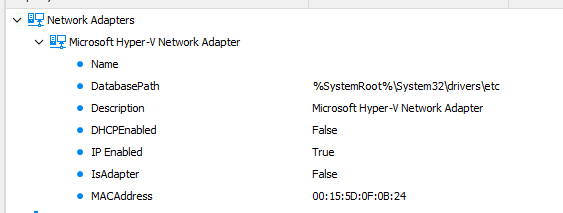
d5514ce3-cbfe-440b-81fa-389636751885.png
Hello,
I have verified and we use WMI to retrieve the network adaptors:
Select * from Win32_NetworkAdapterConfiguration
And it seems that we get the IP information but not exposing it in the UI. I will try to improve this.
Regards
David Hervieux
Thanks David.
As a side note, I'm currently working on a script to be run on offline machines which will create an 'inv' xml file which can be loaded into the 'System Information Report' type entry in RDM, and have noticed that only select properties from the XML file are displayed in the GUI. It would be great if this entry type could display all the properties retrieved from a manually uploaded XML file, as that would provide some flexibility for adding additional data fields without requring a corresponding GUI change.
Hello,
Unfortunately I don't think it's possible to include every properties that you add but if it's a real property mnaged by WMI, I could add it in the Xml model that we have and in the UI add the same time. Do you have any example of missing fields?
David Hervieux
Hi David,
Thanks for your help. Currently I dont have a specific property I need to see in the GUI, beyond the IP addresses for all adapters. That being said, there are quite a lot of properties returned for Win32_NetworkAdapterConfiguration (see below), and it would be great if the GUI could dynamically adapt to displaying these when they are populated with values in a source XML file.
Additionaly, someone may want to add additional attributes to an XML file that are retrieved outside of the Win32_NetworkAdapterConfiguration query, such as switch port discovery information pertaining to network adapter via https://github.com/lahell/PSDiscoveryProtocol . If the XML model used by the gui could dynamical accomodate properties from an XML file, it would increase the extent of information that could be stored in the System Information Report entry without requiring GUI coding changes each time.
Pls let me know if you would like any additional info.
Joe
ArpAlwaysSourceRoute
ArpUseEtherSNAP
Caption
DatabasePath
DeadGWDetectEnabled
DefaultIPGateway
DefaultTOS
DefaultTTL
Description
DHCPEnabled
DHCPLeaseExpires
DHCPLeaseObtained
DHCPServer
DNSDomain
DNSDomainSuffixSearchOrder
DNSEnabledForWINSResolution
DNSHostName
DNSServerSearchOrder
DomainDNSRegistrationEnabled
ForwardBufferMemory
FullDNSRegistrationEnabled
GatewayCostMetric
IGMPLevel
Index
InterfaceIndex
IPAddress
IPConnectionMetric
IPEnabled
IPFilterSecurityEnabled
IPPortSecurityEnabled
IPSecPermitIPProtocols
IPSecPermitTCPPorts
IPSecPermitUDPPorts
IPSubnet
IPUseZeroBroadcast
IPXAddress
IPXEnabled
IPXFrameType
IPXMediaType
IPXNetworkNumber
IPXVirtualNetNumber
KeepAliveInterval
KeepAliveTime
MACAddress
MTU
NumForwardPackets
PMTUBHDetectEnabled
PMTUDiscoveryEnabled
ServiceName
SettingID
TcpipNetbiosOptions
TcpMaxConnectRetransmissions
TcpMaxDataRetransmissions
TcpNumConnections
TcpUseRFC1122UrgentPointer
TcpWindowSize
WINSEnableLMHostsLookup
WINSHostLookupFile
WINSPrimaryServer
WINSScopeID
WINSSecondaryServer