Devolutions RDM crashes with Faulting module path: C:\Windows\System32\uiautomationcore.dll
Devolutions RDM crashes with Faulting module path: C:\Windows\System32\uiautomationcore.dll

Hi,
I've just moved away from MremoteNG to Devolutions RDM and it's great. If only it wouldn't randomly crash it would be perfect :).
It seems related to navigating around the UI, specifically opening properties of servers in quick succession. I've pasted the two events from the event logs. I'm currently on .Net Framework 8.0.2. I was on 8.0.3 but downgraded to see if it made a difference but it does not. In both versions, this happens.
.Net Runtime:
Application: RemoteDesktopManager.exe
CoreCLR Version: 8.0.224.6711
.NET Version: 8.0.2
Description: The process was terminated due to an unhandled exception.
Exception Info: exception code c0000005, exception address 00007FFB2AA6D4AC
Stack:
Application Error:
Faulting application name: RemoteDesktopManager.exe, version: 2024.1.19.0, time stamp: 0x65cd0000
Faulting module name: uiautomationcore.dll, version: 7.2.19041.4046, time stamp: 0x92d93086
Exception code: 0xc0000005
Fault offset: 0x000000000003d4ac
Faulting process ID: 0x3144
Faulting application start time: 0x01da7c447aefd357
Faulting application path: C:\Program Files\Devolutions\Remote Desktop Manager\RemoteDesktopManager.exe
Faulting module path: C:\Windows\System32\uiautomationcore.dll
Report ID: 8f162c34-ccc7-486c-b664-a2e3dfa7fbd3
Faulting package full name:
Faulting package-relative application ID:
Any idea what this could be?
Cheers,
All Comments (7)
Hello,
uiautomationcore.dll is a Windows lib. Could you verify the event viewer or the application logs? Perhaps we could get more clue to reproduce this issue or at least handle it gracefully.
Regards
David Hervieux
Hi,
The above two logs are from the Application Event logs. There are no other logs in the event view.
I did manage to grab the attached when it first crashed today.
Cheers.
Report.wer
Ah, I think you meant this?
RemoteDesktopManager.log.db
Hello,
I have verified your log and I've found a strange error. I don't think it's related but I have made a fix. I've also seen the same error with Outlook which seems related to UIAutomationCore.dll
https://answers.microsoft.com/en-us/outlook_com/forum/all/uiautmation/42577502-b0fb-4729-b4cc-d8bcceca4677
Could you also try the different mode here instead off Default: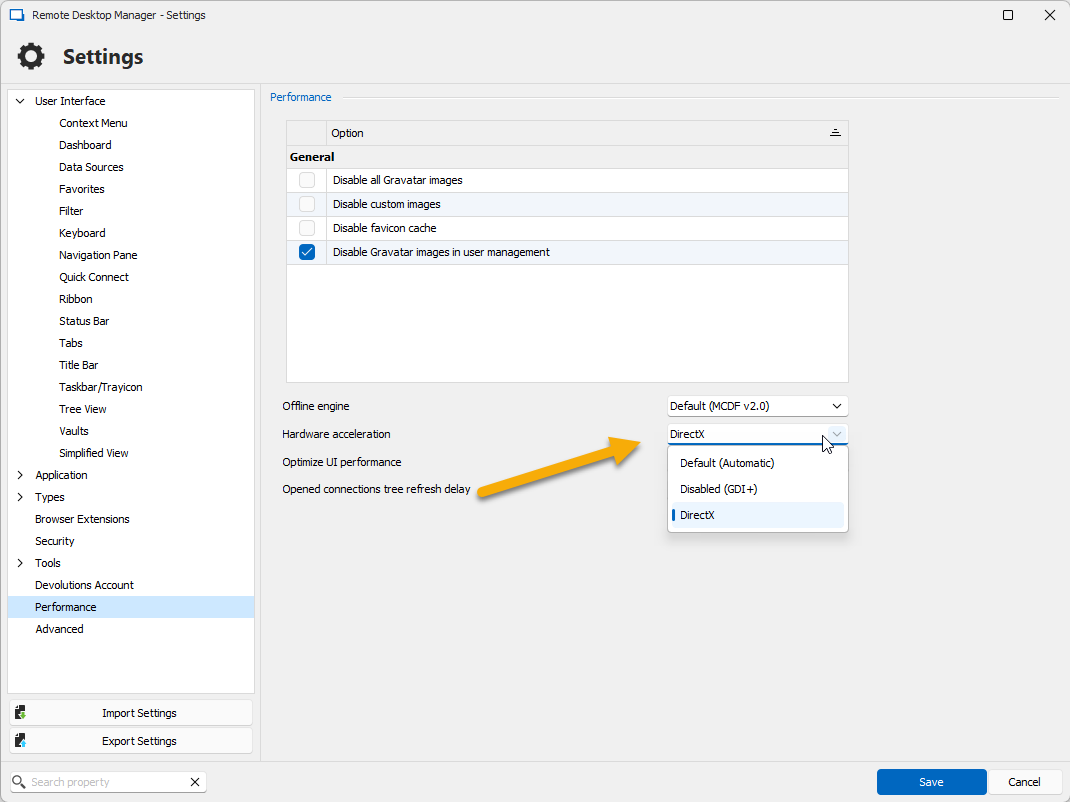
Regards
David Hervieux
4a0e52fd-097a-4e75-a709-83c4eb637860.png
Hi,
Great, I've made the change and will monitor it throughout today and get back to you.
Cheers,
Hi,
I just had another crash, the log is attached. It feels like it's the UI not keeping up with clicks. There is a slight delay after changing a setting or deleting a folder or server, kind of like lag, and then continues with the clicks.
Cheers,
RemoteDesktopManager.log.db
Hello,
I don't see anything new but I've made some potential fixes. The next minor update should be released tomorrow.
Regards
David Hervieux